
1. Reasons for Abandoning webpack
1. webpack Module Readability is Too Low
// 引用模块
var _myModule1 = __webpack_require__(0);
var _myModule2 = __webpack_require__(10);
var _myModule3 = __webpack_require__(24);

// 模块定义
/* 10 */
/***/function (module, exports, __webpack_require__) {...}

// 源码
_myModule2.default.xxx()
This kind of code is quite tedious to read, first find the __webpack_require__ id corresponding to _myModule2, then find the corresponding module definition, and finally see what is hung on the module's exports. This module definition part is very annoying, extending the reading of the reference chain
Of course, generally there is no need to read the bundle, this point is not critical
2. File Size is Very Large
As mentioned above, these extra bundle codes (sub-module definitions, sub-module references, etc.) cause file size bloat, because:
-
Each independent file of the source code is wrapped in a module definition layer
-
References to other modules within a module insert a
__webpack_require__declaration -
The volume of the
__webpack_require__utility function itself
File size not only brings transmission burden, but also affects Compile time, bundle size of packaging solutions is an important indicator
3. Execution is Very Slow
Sub-module definition and runtime dependency handling (__webpack_require__), not only causes file size increase, but also significantly reduces performance, as shown below:

(Image from webpack_require is too slow)
Packaging solutions have a significant impact on performance, this is the most fatal point, unbearable
2. Advantages of rollup
1. File is Very Small
Almost no extra code, except for necessary cjs, umd headers, bundle code is basically no different from source code, no strange __webpack_require__, Object.defineProperty
Bundle size comparison as follows:
webpack 132KB
rollup  82KB
2. Execution is Very Fast
Because there is no extra code, as mentioned above, webpack bundle not only has large volume, non-business code (__webpack_require__, Object.defineProperty) execution time consumption is also not negligible
rollup doesn't generate these extra things, execution time consumption is mainly in Compile Script and Evaluate Script, the rest can be ignored, as shown below:
[caption id="attachment_1531" align="alignnone" width="844"]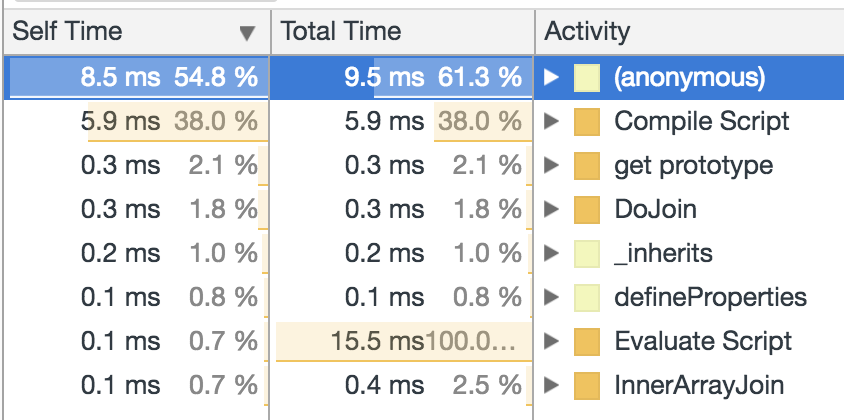 rollup-performance[/caption]
3. ES Module and iife Format Support
// rollup
amd – Asynchronous Module Definition, used with module loaders like RequireJS
cjs – CommonJS, suitable for Node and Browserify/Webpack
es – Keep the bundle as an ES module file
iife – A self-executing function, suitable for inclusion as a <script> tag. (If you want to create a bundle for your application, you probably want to use this, because it leads to smaller file sizes.)
umd – Universal Module Definition, works as amd, cjs and iife all in one

// webpack
"var" - Export by setting a variable: var Library = xxx (default)
"this" - Export by setting a property of this: this["Library"] = xxx
"commonjs" - Export by setting a property of exports: exports["Library"] = xxx
"commonjs2" - Export by setting module.exports: module.exports = xxx
"amd" - Export to AMD (optionally named - set the name via the library option)
"umd" - Export to AMD, CommonJS2 or as property in root
Supports packaging ES6 modules, very suitable for basic libraries and such things, because ES6 projects generally use babel to transform once, this ensures one unified babel translation
Supports packaging into iife, very small. Additionally, looking at the final bundle size alone:
        default uglify
cjs     81KB    34K
amd     81KB    30KB
iife    81KB    30KB
umd     82KB    30KB
umd has advantages over cjs, looks very strange, but actual results are indeed like this. Looking at bundle differences mainly lie in function name simplification, many long function names in cjs bundle are preserved, not obfuscated
3. Defects of rollup
The latest version (0.50.0) is still in 0.x unstable state, there are many version-related problems (even some problems need to be solved through version downgrade)
- Plugin ecosystem is relatively weak, some common requirements cannot be met
For example, packaging multiple dependency libraries, extracting common dependencies (webpack's CommonsChunkPlugin)
-
Earlier versions (0.43) handle circular dependencies poorly, packaging/execution errors may occur
-
Documentation is relatively scarce, unable to quickly solve problems when encountering them
For example, common error 'foo' is not exported by bar.js (imported by baz.js), Troubleshooting can be considered FAQ, but does not provide detailed and reliable solutions (i.e., even if followed, may not necessarily solve)
4. babel Configuration
babel translation is generally indispensable, as an intermediate processing link in rollup/webpack packaging process, both provide corresponding wrapper plugins, can embed babel configuration, actually need to master is babel configuration
babel preset
In Babel, a preset is a set of plugins used to support particular language features.
Common ones include:
-
es2015: Only supports ES6 features, if preset contains this item, will convert ES6 syntax to ES5
-
stage-0: Also supports latest ES7 even ES8 features, actually refers to ES Stage 0 Proposals, if preset contains this item, will convert ESn to ES6
-
react: Supports React JSX
stage-0 is the most radical approach, indicating wanting to use all JS new features that babel can transform, regardless of stability. es2015 is most conservative, specification has been released, no risk of unstable features. Like stage-0 there are 4 more that can fight (TC39 specification formulation process):
- stage-0 - Strawman: just an idea, possible Babel plugin.
- stage-1 - Proposal: this is worth working on.
- stage-2 - Draft: initial spec.
- stage-3 - Candidate: complete spec and initial browser implementations.
- stage-4 - Finished: will be added to the next yearly release.
P.S. Recently babel provided babel-preset-env, automatically adds presets according to target platform environment, no need to install a bunch of esxxx, but only provides ES support, react and polyfill are not built-in, nor should they be. For more information about env, please check babel-preset-env: a preset that configures Babel for you
Note, each preset is only responsible for one-step conversion, for example stage-0 can convert ESn to ES6, not ES5, that is to say, for a project with very radical syntax, wanting to convert to ES5, needs such babel configuration:
{
  "presets": [
    ["stage-0"],
    ["es2015",  {"modules": false}]
  ],
  "plugins": [
    "external-helpers"
  ]
}
P.S. Among them, {"modules": false} is needed by rollup, used to replace babel-preset-es2015-rollup, the function of external-helpers will be introduced later
If wanting to preserve ES6 style, needs such babel configuration:
{
  "presets": [
    ["stage-0"]
  ],
  "plugins": [
    "external-helpers"
  ]
}
After conversion, get ES6 module that stitches together each module file of the project, class, const, let in the code will be preserved, because ES6 supports these features, but more advanced features like async&await will be converted to ES6
babel plugin
In babel's 3 processing links:
parsing -> transforming -> generation
Plugin acts on the 2nd link (transforming), that is, after parsing source syntax, convert it to equivalent target syntax, in this stage can do further processing through plugins, for example simple:
// 把标识符成员访问转换为字面量形式,例如 a.catch -> a['catch']
es3-member-expression-literals
// 把标识符成员声明转换为字面量形式,例如{catch: xxx} -> {'catch': xxx}
es3-property-literals
Also commonly used:
// 支持 class 静态属性和实例属性,例如 class A{instanceProp = 1; static staticProp = 2;}
transform-class-properties
// 把 babel 自己用的公共方法提出来,例如_createClass, _inherits 等等
external-helpers
// 常量修改检查,const 声明的常量被修改时报错
check-es2015-constants
So babel plugins are roughly divided into 3 categories:
-
ES5/ES6 patches, fixing lower environment related issues (es3-xxx, es2015-xxx)
-
Static checking, such as const modification error reported in advance to "compile" stage
-
Risk features, such as class-properties and other controversial features not suitable to put in stage
Patches target production environment, static checking is part of quality assurance, risk features are more radical JS syntax
babel polyfill
When babel converts ESn advanced syntax to ES5/ES3, encounters 4 situations:
-
Simple syntax sugar. Mindless conversion, such as
for...of, arrow function -
Complex syntax sugar. Needs utility function handling, such as
createClass, inherits -
Basic features missing in low environment. Needs polyfill, such as
Symbol, Promise, String.repeat -
Features that cannot be polyfilled. Such as
Proxy
For basic features missing in low environment, babel does not provide polyfill by default (babel translation result does not contain polyfill), can introduce babel-polyfill, or introduce special polyfills wanted (lighter and smaller, or more reliable heavy-duty)
babelHelpers
babel has some transformation-related utility functions, such as:
_typeof
_instanceof
_createClass
_interopRequireDefault
_classCallCheck
_inherits
asyncGenerator
These utility functions all belong to babelHelpers, complete helpers can be generated through command:
npm install babel-cli --save-dev
// type 可选 global/umd/var
./node_modules/.bin/babel-external-helpers -t umd > helpers.js
P.S. For more information about generating babelHelpers, please check External helpers
Under default configuration, these utility functions will be generated multiple times, that is to say multiple _createClass declarations will exist in bundle, it is redundant code. Can be optimized or removed through plugin configuration
Default configuration, multiple helper declarations exist in bundle:
{
  "presets": [
    ["es2015"]
  ]
}
Add external-helpers plugin, move helper declarations to top of bundle, no multiple declarations exist:
{
  "presets": [
    ["es2015"]
  ],
  "plugins": [
    "external-helpers"
  ]
}
Reference external babelHelpers, bundle does not contain helper declarations:
{
  "presets": [
    ["es2015"]
  ],
  "plugins": [
    "external-helpers"
  ],
  externalHelpers: true
}
Generally adding external-helpers to move helpers to top of bundle can meet optimization requirements, so babel configuration is recommended to at least add external-helpers plugin to remove redundant helper code
externalHelpers: true is for multi-bundle (multi entry) situation, if not added each bundle top has a helper declaration, after adding all bundles reference external helper, for example:
babelHelpers.createClass(xxx)
babelHelpers is undefined in bundle, needs to be introduced in advance, for example web environment:
<script src="babelHelpers.js"></script>
<script src="bundle.js"></script>
5. Summary
Compared to webpack, rollup has incomparable performance advantages, this is determined by dependency handling method, compile-time dependency handling (rollup) naturally has better performance than runtime dependency handling (webpack), but handling of circular dependencies is not 100% reliable. Try to avoid through internal implementation (or design), common techniques for solving circular dependencies include:
-
Dependency hoisting, lift parts that need to depend on each other up one level
-
Dependency injection, inject dependencies from outside module at runtime
-
Dependency lookup, lookup dependencies from inside module at runtime
Dependency hoisting targets unreasonable design, such circular dependencies can be avoided, for example A->B, B->A may be able to convert to A->C, B->C by proposing C
For circular dependencies that cannot be avoided, can be solved through runtime dependency injection and dependency lookup, for example factory->A, A->factory, a simple dependency injection solution is:
// factory.js
import A from './A';
export create() {
    // 构造函数注入
    return new A(create);
    // 属性注入
    // let a = new A();
    // a._createFromFactory = create;
    // return a;
}

// A.js
class A {
    constructor(create) {
        this._createFromFactory = create;
    }
    // Will be injected from factory
    _createFromFactory() {
        return null;
    }
}
So circular dependencies can be solved from design/implementation, not a big problem
In terms of application scenarios, rollup is most suitable for packaging into single file, because currently rollup is not very friendly to multi entry (cannot even extract common dependencies). Additionally, stability and plugin ecosystem, documentation etc. are not as good as webpack, but in scenarios demanding performance, rollup is the only choice
No comments yet. Be the first to share your thoughts.