
Foreword
Found something interesting that can display QR codes in the command line. My daily routine has always been:
命令行起个sync服务
编辑器码码码,浏览器看看看
...码到差不多了
浏览器插件生成个二维码
掏出100个手机扫啊测啊
...咦,有问题
改改没好,场景比较复杂,得抽出来定位
复制个test文件
再生成个二维码,再扫再测,o了
...额,又发现个问题
...
Browser QR code plugins almost meet my needs, but frequently switching between IDE, browser, terminal, and Finder is a bit troublesome. I hadn't found a better way... until I saw command line QR codes. How can it be so ingenious?
1. Principle
Seeing "Command Line QR Code", it's easy to guess the principle: when outputting to the screen, you can control the foreground color, background color, and text style.
To output a QR code, being able to change the background color is enough; you can piece it together with white and black spaces.
For example:
# 输出focus here
# focus黑底白字,空格默认,here蓝底白字加粗
echo "\e[40;0;37mfocus\e[0m \e[44;1;37mhere\e[0m"
\e[0m resets to the default style. Generally, the control sequence format is:
# \e[开头,m结尾
# 分号隔开的3个值分别是背景色、文本样式和前景色
\e[40;0;37m
Supported values are as follows:
# 文本样式
0: 常规文本
1: 加粗文本
4: 下划线文本

# 前景色30-37
30: 黑色
31: 红色
32: 绿色
33: 黄色
34: 蓝色
35: 紫色
36: 青色
37: 白色

# 背景色40-47
40: 黑色
41: 红色
42: 绿色
43: 黄色
44: 蓝色
45: 紫色
46: 青色
47: 白色
In addition, there are some more powerful ones, such as moving the cursor, deleting a line, clearing the screen, etc. For example, a character progress indicator:
echo -n '-'
arr=('\\' '|' '/' '-' '|' '100%')
for c in ${arr[@]};
do
    # 等1秒
    sleep 1
    # 左移一格,输出字符
    echo -en "\033[1D$c"
done
2. Implementation
1. Generate QR Code Metadata
Calculate a binary matrix based on the input string according to QR code rules.
Implementing this process manually is quite difficult because QR code is a technology with hundreds of patents; see http://www.qrcode.com/en/patent.html. You would need to buy (or get) an ISO Specification and implement it once:
Obtaining QR Code Specification
QR Code is established as an ISO (ISO/IEC18004) standard. QR Code specification can, therefore, be purchased from this organization.
Purchasing ISO Standards
Please search by inputting ISO No.18004 or X0510 to "Search and ISO Catalogue". http://www.iso.ch/iso/en/prods-services/ISOstore/store.html
However, it doesn't need to be that hard because there are open-source versions with various language implementations: https://github.com/kazuhikoarase/qrcode-generator
But it is still necessary to understand some concepts:
-
Size (called
Versionin the spec andTypeNumberin the open-source implementation mentioned above)Values range from
1to40, where1corresponds to the smallest21x21matrix and40to the largest177x177matrix. -
Positioning Patterns
The most obvious are the three concentric squares at the corners, with three points defining a rectangle. There are also other patterns used for positioning in other locations.
-
Error Correction Level
There are four levels:
'L', 'M', 'Q', 'H'. The higher the level, the higher the tolerance and the more error correction data is carried, which is why personalized QR codes are possible. -
Data Types
Reserved data (format information, version information, positioning pattern information), actual data information, and error correction data.
2. Output
The primary JS APIs of the qrcode-generator mentioned above are as follows:
// 创建实例
qrcode(typeNumber, errorCorrectionLevel) => QRCode
// 传入待编码串
addData(data, mode) => void

// 计算矩阵
make() => void

// 获取结果矩阵行列数(列数等于行数)
getModuleCount() => number
// 获取矩阵单元值
isDark(row, col) => boolean
Once we have the metadata, iterate through the matrix to concatenate black and white space strings, and output:
// 黑白空格
var black = "\033[40m  \033[0m",
    white = "\033[47m  \033[0m",
    toCell = function (isBlack) {
        return isBlack ? black : white;
    },
    repeat = function (color) {
        return {
            times: function (count) {
                return new Array(count).join(color);
            }
        };
    },
    fill = function(length, value) {
        var arr = new Array(length);
        for (var i = 0; i < length; i++) {
            arr[i] = value;
        }
        return arr;
    };

//...略去创建实例和计算矩阵部分

// 遍历
var border = repeat(white).times(qrcode.getModuleCount() + 3);
output += border + '\n';
qrcode.modules.forEach(function (row) {
    output += white;
    output += row.map(toCell).join('');
    output += white + '\n';
});
output += border;

// 输出
console.log(output);
Then you can display a large QR code in the command line, as shown in the figure:
[caption id="attachment_1323" align="alignnone" width="625"]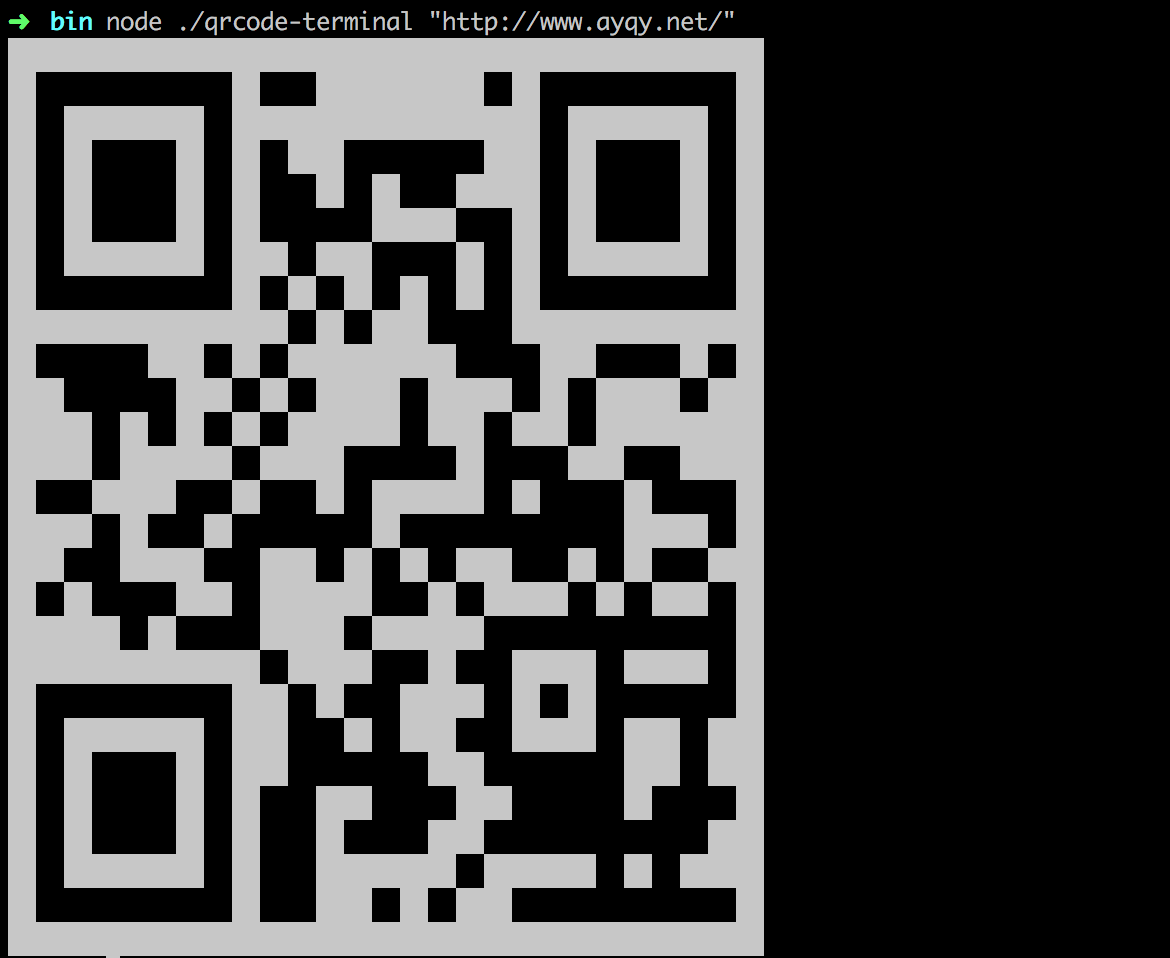 terminal-qrcode[/caption]
3. Command Line Optimization
However, when displayed in the command line, the size is too large.
The minimum size of a QR code is 21x21. Within the black frame, 21 lines almost fill a default screen. If the code is slightly longer, it won't be fully displayed, and typical URL codes exceed 21 lines. For example:
// 在纠错级别为M(默认)时
// 21行的二维码只能显示14个字符
https://www.ay
// 22行的只能显示26个字符
https://www.ayqy.net/blog/
//...
Therefore, we need to find a way to make the row and column dimensions of the output QR code smaller. The most obvious way is to use strange Unicode characters:
[caption id="attachment_1325" align="alignnone" width="484"]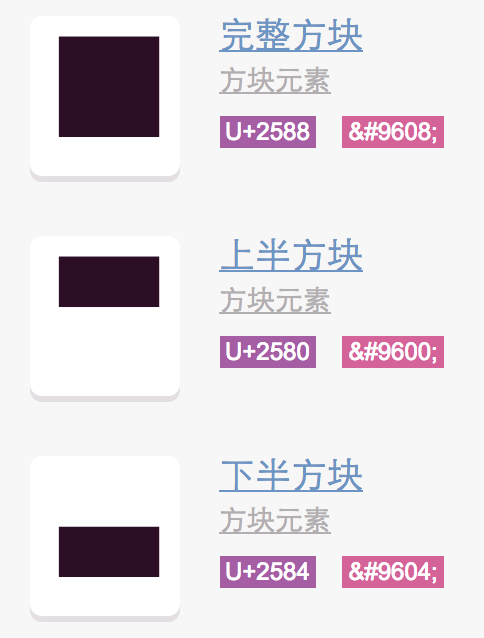 unicode-block[/caption]
Then halve the number of column spaces, so that both the width and height can be reduced by half, as shown in the figure:
[caption id="attachment_1326" align="alignnone" width="768"]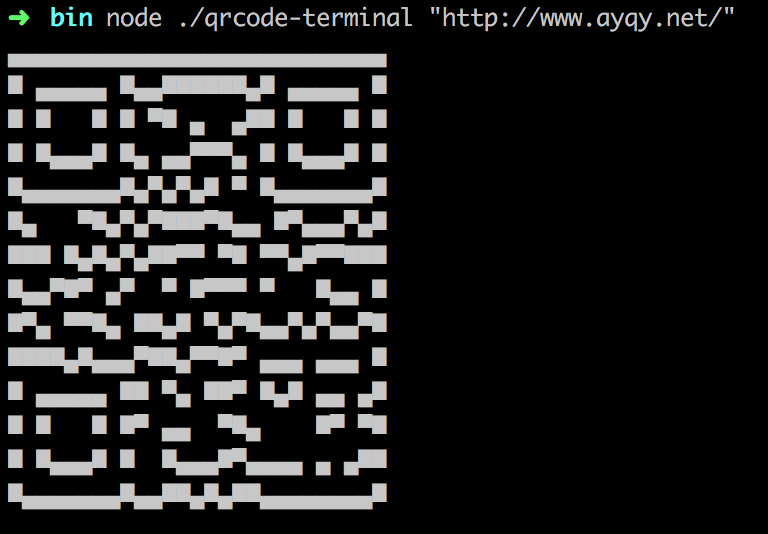 terminal-qrcode-small[/caption]
Although a bit uglier, it is still usable. So can it be even smaller? What if we want to reduce it by half again?
The same method won't work because Unicode characters only have "Lower one quarter block", "Lower three quarters block", "Left three quarters block", and "Left one quarter block", which aren't enough.
3. Open Source npm Packages
Coincidentally, someone has already done everything mentioned above: qrcode-terminal-alpha
Adding command line QR codes to your workflow tools to display the QR code immediately after building will make scanning much more convenient.
References
-
QR Code Generator: Online QR Code Generator
-
kazuhikoarase/qrcode-generator: JS API
No comments yet. Be the first to share your thoughts.