
0. Why Customize?
Opening a corner of such a massive black box as IDE, attempting deep customization, looks that's really stupid, isn't it better to write plugins? There are mainly 2 reasons for doing this:
-
Higher flexibility: Not limited by extension mechanisms, whether customizing existing features or extending new features, all are achievable
-
Finer control granularity: Deep secondary development can achieve complete control over details, meeting fine-grained customization needs
Actually, the amount of flexibility benefit depends on the limitation degree of extension mechanisms. If plugin mechanism is completely open, the flexibility improvement brought by secondary development seems less necessary, such as Atom's extension mechanism, almost no restrictions, relying on plugin mechanism can completely create a brand new IDE, such as Nuclide
Control granularity focuses on customization capabilities, such as theme style, UI layout, syntax extension, etc. Secondary development can support customizing parts that plugin mechanisms don't allow, from small things like application name/icon to large things like UI layout/interaction operations
On the other hand, from demand scenario perspective, dedicated IDEs have several advantages:
-
One-stop tool: Integration. Feeling like Hulu Little King Kong, possessing all capabilities of other 7 babies
-
Immersive experience: Connection. Organically combining tool chains, scaffolding-syntax hint-Lint check-build-preview-debug-package one-stop service
-
Platform construction: Integration. Addressing fragmented tools, non-systematic problems, promoting tool system construction
-
Standardized development: Constraint. Flexibility of writing style contradicts workshop assembly line collaboration, unified development environment can provide stronger constraints
This is also why special scenarios like ReactNative, Weex, WeChat Mini Programs, Alipay Mini Programs need to provide dedicated IDEs. First, hoping development is more convenient, better experience; second, hoping to standardize writing to some extent, unify style
1. Expected Features
What capabilities should a usable customized IDE have:
-
Basic functions: At least should possess most capabilities of mainstream frontend IDEs, should satisfy coding perverse desires
-
Integration capabilities: Should be able to integrate existing common tools, including specification checks, build, preview, debug, API documentation, etc.
-
Extensibility: On one hand should have open plugin ecosystem support, on other hand should be able to calmly integrate future new tools
Among them, the status of each capability is:
Space/Development  Extensibility
-------
Seed/Growth  Integration capabilities
-------
Water/Survival  Basic functions
Integration capabilities and basic functions are both indispensable, extensibility is imagination space. Because without seed everything is empty talk, without water will quickly lose vitality, after having seed and water, whether grass or tree depends on space. After sprouting, water needs to be continuously satisfied, so basic functions are the foundation for survival (if coding is not satisfying, no matter how convenient I won't use it)
Additionally, basic functions have their particularity, frontend IDE selection has always been a taste issue, heavy like IntelliJ IDEA/WebStorm, light like Sublime Text/VS Code, fast like NotePad/Vim, wanting to solve this difficult matter of pleasing everyone with one candy is almost impossible, so secondary development based on open source IDE seems like the only choice, unless there's a highly available IDE Core containing most IDE basic functions, unfortunately, there's no such thing yet (Monaco is relatively close, but still lacks some key things, such as extensibility)
2. Mature Cases
Customized IDEs suddenly seemed to appear many, for example:
Corresponding selection solutions as follows:
| Name | Cross-platform | Basic Functions | Implementation Solution |
|---|---|---|---|
| WeChat Developer Tools | NWjs | monaco-editor | NWjs hand-crafted, IDE Core uses Monaco |
| Alipay Mini Program Development Tools | Electron | vscode editor | Electron hand-crafted, IDE Core uses scraped VS Code editor part |
| React Native IDE | Electron | Atom | Atom plugin collection, IDE Core just uses Atom |
Initially used WeChat Developer Tools to do things (see Mini Program That Can't Go Online), that feeling of being constrained while coding was very uncomfortable (how come there's no xx feature), this is the water mentioned above (of course, because no choice, they don't need to consider water problem), after so long iteration, seems improved a lot in code editing, file management, etc., no deep experience again
Alipay Mini Program probably also considered water problem, so chose solution of scraping an editor from VS Code, should have spent considerable effort
RN IDE is much more rough, took a bunch of Atom packages (plugins), piled out an IDE heavily dependent on Flow, also claims:
A unified developer experience for software development
Actual situation is, if project doesn't use Flow, doesn't even support jump to definition
3. Optional Solutions
Feasible solutions are just two types:
-
Hand-craft: Find an IDE Core, integrate it
-
Secondary development: Find an IDE, extend and enhance
Technically need to decide on 3 key points:
-
Cross-platform solution: NWjs or Electron
-
IDE Core: Monaco or other
-
Open source IDE: VS Code or Atom or other
If secondary development based on open source IDE, only need to care about which IDE to use, if hand-craft solution, then need to choose cross-platform solution and IDE Core
NWjs vs. Electron
Background
-
NWjs
Project incubated by Intel Shanghai Open Source Technology Center (originally called node-webkit), allows creating Webkit browser window in Node environment. Later switched from Webkit to Chromium, and clarified development direction of Nodejs + Chromium for desktop application development
-
Electron
Technology adopted and open sourced when Github developed Atom, has some connection with NWjs, but implementation differs greatly (process model, Chromium integration method, etc.)
Differences
Similarities:
-
Develop desktop applications with frontend technology stack, both have mature cases, such as DingTalk (NWjs), VS Code (Electron)
-
Technical implementation is both Nodejs + Chromium
Differences and restrictions:
-
Platform support: Electron doesn't support XP and Vista, NWjs supports
-
Process model: NWjs is single process model, shares heap memory; Electron is multi-process model, communicates via pipe IPC
-
Source code protection: NWjs supports source code protection (compile source code to V8 snapshot), Electron doesn't support
-
Auto update: Electron has built-in support, NWjs has community module support
-
Development experience: Electron documentation is better than NWjs, in popularity Electron 55.6k star; NWjs 33.1k star
Among them, more important are differences in platform support and source code protection
Application Scenarios
Reasons to choose NWjs:
-
Platform requires support for XP or Vista
-
Value convenience of single process model sharing data, multi-window sharing state is easier
-
Benefits in isomorphism, NWjs custom parts are relatively fewer than Electron, can reuse more isomorphic code (maintain one codebase, run on desktop and Web environments)
-
Scenarios that care a lot about source code protection, such as game in-app purchases
Reasons to choose Electron:
-
"Pure" client application, no support plan for web environment
-
Value security of multi-process model, process isolation
-
Higher community activity, lower development cost
Monaco
Open source, and highly available IDE Core seems to only have Monaco, but exists some difficult to overcome problems:
-
TSX support level is average, doesn't support JSX syntax highlighting
-
No mature plugin ecosystem, VS Code plugins can't be migrated over at low cost
How difficult is JSX syntax highlighting to support?
Can check Does monaco support JSX ?, problem from end of 16, now (March 18) still open. Because it's from underlying regex engine limitation, can't migrate from .tmLanguage at low cost, details see Colorization Clarification
P.S. So how is TSX supported, isn't it about the same? Because TypeScript is also maintained by MS itself, not supporting it is unjustifiable, without sufficient reason, no one will do massive regex conversion work
Extension mechanism more importantly is ecosystem, after all resources are limited, we need to "embrace" open source, and Monaco exactly lacks this, see Integrate VS Code extensions in the Monaco editor
P.S. Fortunately WeChat Mini Programs didn't create something completely new (just XML, CSS, JS), otherwise IDE team might face huge workload
VS Code vs. Atom
| Open Source IDE | Technical Implementation | Maintainer | Popularity | Plugin Ecosystem |
|---|---|---|---|---|
| Atom | Electron | Github | 43K star | Many plugins, but not active |
| VS Code | Electron | Microsoft | 42.6K star | Many plugins, and active |
| Brackets | Chrome Embedded Framework (customized solution above Chromium) | Adobe | 28.6K star | Many plugins, and active |
From above comparison alone, VS Code has most advantages. But why did RN extend based on Atom instead of VS Code?
Because, VS Code has large restrictions on extension capabilities, such as:
-
Very low freedom to customize UI, can only add an icon or option in some inconspicuous positions
-
Plugin process isolation, plugins run in independent process environment, except for injected extension APIs, can't touch IDE main body at all, means without API can't do anything
And Atom is exactly opposite, no process isolation, allows deep UI customization, plugin APIs are relatively low-level, unlike VS Code only providing highly encapsulated ones, from extension cost perspective, Atom has considerable advantages
P.S. When Atom first launched, performance was criticized, left not so good impression on everyone, but daily use seems sufficient, not that slow
4. Decision
Decision tree as follows:
[caption id="attachment_1678" align="alignnone" width="625"]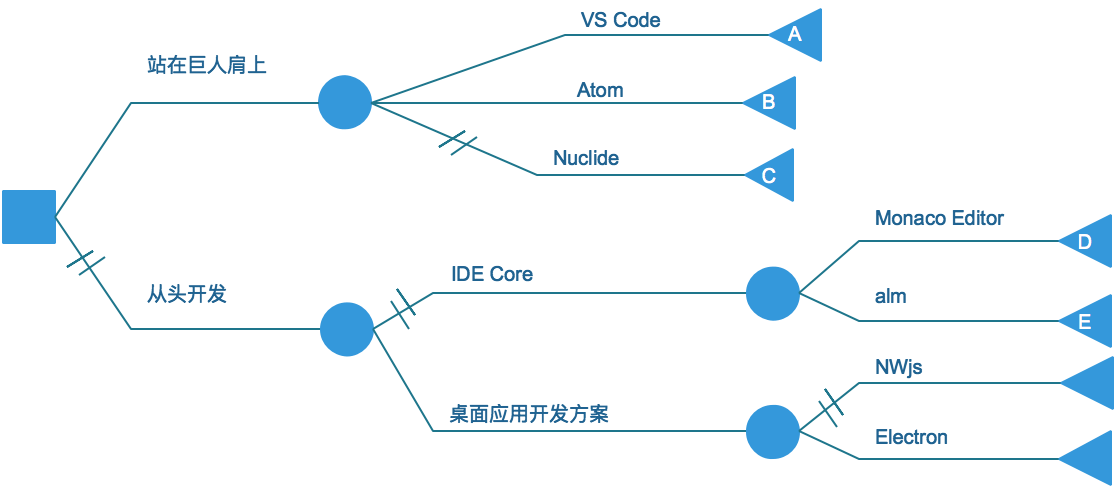 Customized IDE Solution Decision Tree[/caption]
5 feasible solutions pros and cons comparison as follows:
| Solution | Brief Description | Defects | Advantages |
|---|---|---|---|
| A) Secondary development based on VS Code | VS Code plugin development + minimize source code modification | High UI customization cost Plugin capabilities strictly restricted Very few UI customization type plugins | High plugin market activity Good code editing experience High startup performance, plugins load on demand Easy to extend, such as Vue or newer frontend ecosystem product support |
| B) Secondary development based on Atom | Atom plugin development + minimize source code modification | Weak core APIs Plugin capabilities unrestricted, quality not guaranteed Low plugin market activity, high later maintenance cost Code editing experience slightly worse | Easy UI customization Plugin capabilities unrestricted Many UI customization type plugins, fast early development Easy to extend, such as Vue or newer frontend ecosystem product support |
| C) Modify RN IDE | Pure Atom plugin development | Heavily dependent on TypeScript, Flow JSX support not high, low enhancement cost Startup performance slightly worse | Similar application scenarios, implementation details can be referenced, no technical risk Ready-made UI/interaction, no need for special investment |
| D) Monaco + N | VS Code IDE core + Electron development | Manual implementation, stability not guaranteed Doesn't support JSX, very high enhancement cost TSX support not high, very high enhancement cost | Decentralized, high flexibility Development cost higher than ABC |
| E) alm + N | VS Code IDE core enhancement + Electron development | Manual implementation, stability not guaranteed JSX support not high, very high enhancement cost | Decentralized, high flexibility Development cost higher than ABC, lower than D |
Comprehensively, truly feasible are only A and B, further selection needs to consider workload and available resources:
-
Schedule/key time nodes: Project time span, and Alpha, Beta time points
-
Manpower/combat power: How many people participating, can parallelize, and whether combat power meets standards
-
Technology stack familiarity: Can guarantee normal progress after getting started
-
Actual workload: Whether workload overflows
Assuming only 1 person-month, then choose B, no risk, because B is great early stage, can quickly produce things, but will face later stage playing soy sauce problem
If have 2 person-months, can try choosing A, low risk, because UI customization cost is an uncertain factor, affects early progress, may cause Alpha and other earlier time nodes to have greater pressure, but great later stage has absolute development advantages
5. Experience
From 0 to 1
Putting elephant into refrigerator needs 3 steps:
-
First clarify what seed and water are
-
Next choose a good seed with imagination space
-
Finally continuously supply water
Seed and water are both indispensable, under extreme conditions, seed > water > space
Based on Practice
Made 2 mistakes during process:
-
Because of one sentence, temporarily adjusted solution. Consequence is 3 days wasted + 2 days rework
-
Task allocation unreasonable, suitable people didn't do suitable things. Consequence is wasted 2 days research + 2 days progress lag
Facing authority pressure, shouldn't shake rational judgment, tell me why, we state facts and reason. Judgment of combat power should be based on current facts, not past experiences, only when truly facing problems will real combat power show
Where is this stuff NB?
Switch Perspective
Reverse driving capability
Their computers have nothing on them
Things besides results, sometimes are as important as results themselves
No comments yet. Be the first to share your thoughts.