
1. CSS and Form Elements
There is such a paragraph in CSS 2.1 specification (3.2 UA Conformance):
CSS 2.1 does not define which properties apply to form controls and frames, or how CSS can be used to style them. User agents may apply CSS properties to these elements. Authors are recommended to treat such support as experimental. A future level of CSS may specify this further.
Simply translated: CSS 2.1 does not define which properties apply to form controls and frames, and how to use CSS to style them, user agents may apply CSS properties to these elements, it is recommended that authors treat such support as experimental, CSS future versions may further specify these
That is to say, the specification does not guarantee that CSS styles on form elements will work normally, why?
Because form elements have some specialities, these controls are rendered by the operating system, not the browser. Especially checkbox and radio group, you will encounter various problems when trying to style them
Indeed, there will be problems where certain CSS properties become invalid on form elements, for example display: table-cell on input is invalid, see details in display:table-cell not working on an input element
2. Real Case
First, show the image:
[caption id="attachment_1536" align="alignnone" width="577"]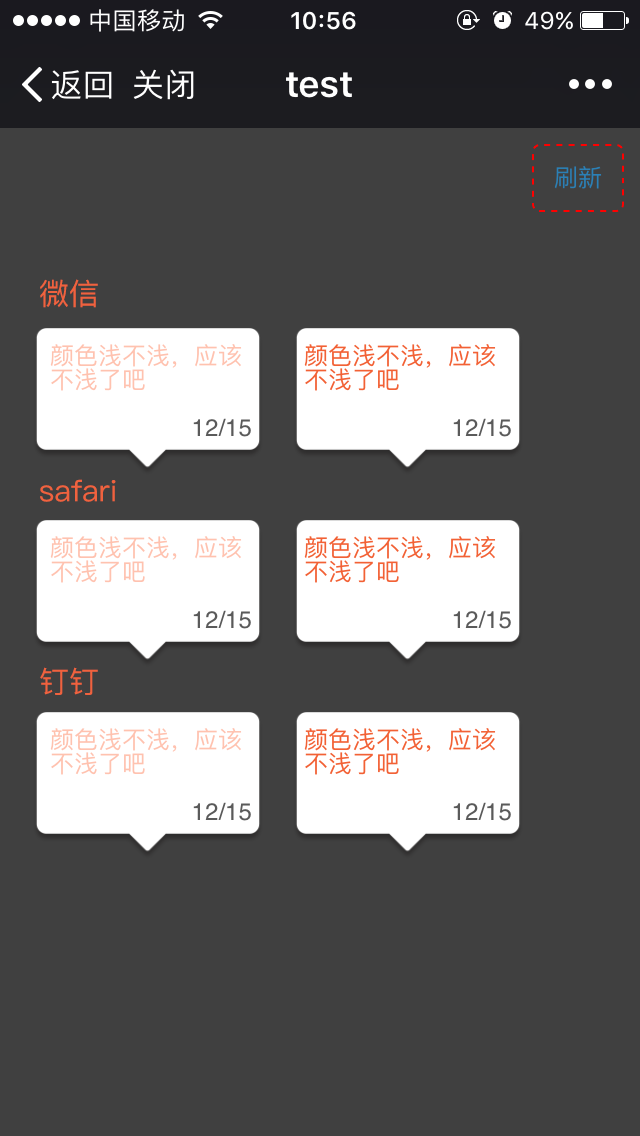 form-css-not-working[/caption]
You can see the obvious difference in text color, the corresponding HTML structure and CSS styles are as follows:
<!-- 左边 -->
<textarea class="txtLetter" disabled="true">颜色浅不浅,应该不浅了吧</textarea>
<!-- 右边 -->
<div class="txtLetter">颜色浅不浅,应该不浅了吧</div>

textarea {
    -webkit-appearance: none;
}
.txtLetter {
    resize: none;
    border: none;
    display: block;
    width: 100%;
    height: 4.5rem;
    -webkit-box-sizing: border-box;
    -moz-box-sizing: border-box;
    box-sizing: border-box;
    padding: 0.8rem 0.6rem;
    color: #f26135;
    font-size: 12px;
    background-color: transparent;
    outline: none;
}
div and textarea share the same styles, but the text color rendering effect varies greatly, later positioned the reason to be disabled, normally inputable input, textarea color is accurate, if in disabled state, then color becomes unreliable, feels like "disabled" state is covering the entire input control with a transparency filter (guess). If so, it's also reasonable, because form elements cannot interact should give users strong perception, should have obvious differences from interactive state performance
This also reminds us, for custom form controls (non-native), color matching needs to pay attention to these details, disabled state not only needs to gray out the background color, text color, border color, icon decoration etc. should all be considered
A relatively hidden point is, this kind of difference in form elements cannot be discovered in development environment, as shown below:
[caption id="attachment_1538" align="alignnone" width="526"] mac-chrome&safari[/caption]
Under Chrome disabled text color has no difference (Firefox also has no difference), under Safari there seems to be invisible difference to the naked eye (can find color picking difference after enlarging n times). Of course, during development process, early real device self-testing can easily discover problems, but should avoid this situation from implementation scheme
P.S. This case scenario is mainly due to laziness, interactive form page and non-interactive share page shared the same HTML structure, so directly set textarea to disabled, expecting it to look the same as div, as a result discovered this hidden problem
3. Removing Form Element Default Styles
In mobile environment or environments where compatibility is allowed, can use the following CSS to remove textbox default styles:
input, textarea {
    -webkit-appearance: none;
    -moz-appearance: none;
    outline: none;
    /* remove highlight outline on samsung */
    -webkit-tap-highlight-color: rgba(255, 255, 255, 0);
    -webkit-tap-highlight-color: transparent;
    /* android 4.0.4 */
    -webkit-user-modify: read-write-plaintext-only;
}
P.S. Under Samsung GT-S7562i (android4.0.4), when input box gets focus, the highlight yellow frame cannot be removed, not outline, needs to be removed through user-modify, see details in Disable orange outline highlight on focus
Additionally, -webkit-appearance: none; has 2 problems:
-
May not completely remove everything you want to remove, such as input highlight yellow frame
-
May not retain what you want to retain, such as select arrow icon, checkbox cannot be checked
4. Conclusion
Someone has specifically researched this problem in depth, and did many experiments:
using CSS to style form controls to look exactly the same across browsers and platforms is impossible. It also shows that most browsers ignore many CSS properties when they are applied to form controls.
In summary:
-
Applying CSS styles to form controls needs extra caution, because the specification does not guarantee effectiveness, so effects may be inconsistent across platforms
-
Not recommended to heavily customize styles on form elements, environment compatibility is very fragile, either retain native styles, or fully customize (such as manually implementing select), do not use form elements
No comments yet. Be the first to share your thoughts.