
I. Starting from iframe
Using iframe can embed third-party pages, for example:
<iframe style="width: 800px; height: 600px;" src="https://www.baidu.com"/>
However, not all third-party pages can be embedded through iframe:
<iframe style="width: 800px; height: 600px;" src="https://github.com/join"/>
Github login page doesn't display nicely in the iframe like Baidu homepage, and outputs an error line in the Console panel:
Refused to display 'https://github.com/join' in a frame because an ancestor violates the following Content Security Policy directive: "frame-ancestors 'none'".
Why is this?
II. Clickjacking and Security Policies
Yes, prohibiting pages from being loaded in iframe is mainly to prevent clickjacking (Clickjacking):

Specifically, for clickjacking, there are mainly 3 countermeasures:
-
CSP (Content Security Policy)
-
X-Frame-Options
Server declares CSP and X-Frame-Options by setting HTTP response headers, for example:
# Not allowed to be embedded, including <frame>, <iframe>, <object>, <embed> and <applet>
Content-Security-Policy: frame-ancestors 'none'
# Only allowed to be embedded by same-origin pages
Content-Security-Policy: frame-ancestors 'self'
# Only allowed to be embedded by pages within whitelist
Content-Security-Policy: frame-ancestors www.example.com

# Not allowed to be embedded, including <frame>, <iframe>, <embed> and <object>
X-Frame-Options: deny
# Only allowed to be embedded by same-origin pages
X-Frame-Options: sameorigin
# (Deprecated) Only allowed to be embedded by pages within whitelist
X-Frame-Options: allow-from www.example.com
P.S. Same-origin means protocol, domain name, and port number are all exactly the same, see Same-origin policy
P.S. Additionally, there's a frame-src that looks very similar to frame-ancestors, but they have opposite functions, the latter is used to restrict the content sources that <iframe> and <frame> in the current page can load
As for framekiller, it's executing a piece of JavaScript on the client side, thereby turning the tables:
// Original version
<script>
if(top != self) top.location.replace(location);
</script>

// Enhanced version
<style> html{display:none;} </style>
<script>
if(self == top) {
  document.documentElement.style.display = 'block';
} else {
  top.location = self.location;
}
</script>
And Github login page simultaneously sets CSP and X-Frame-Options response headers:
Content-Security-Policy: frame-ancestors 'none';
X-Frame-Options: deny
Therefore cannot be embedded through iframe, so, is there a way to break these restrictions?
III. Ideas
Since main restrictions come from HTTP response headers, then there are at least two approaches:
-
Tamper with response headers to satisfy
iframesecurity restrictions -
Don't directly load source content, bypass
iframesecurity restrictions
At any link before resource response reaches the endpoint, intercept and change CSP and X-Frame-Options, such as intercepting and tampering when client receives response, or forwarding and tampering through proxy service
And another approach is very interesting, using Chrome Headless to load source content, convert to screenshot and display in iframe. For example Browser Preview for VS Code:
Browser Preview is powered by Chrome Headless, and works by starting a headless Chrome instance in a new process. This enables a secure way to render web content inside VS Code, and enables interesting features such as in-editor debugging and more!
That is to say, load page normally through Chrome, then screenshot content and put into iframe, thus not subject to above security policy restrictions (including framekiller). But this solution is also not perfect, exists other problems:
-
Full set of interaction events need adaptation support, such as double click, drag
-
Some functions are limited, such as cannot copy text, doesn't support playing audio, etc.
IV. Solutions
Client-side Interception
Service Worker
To intercept and tamper HTTP responses, the first thing that comes to mind is naturally Service Worker (a kind of [Web Worker](/articles/理解 web-workers/)):
A service worker is an event-driven worker registered against an origin and a path. It takes the form of a JavaScript file that can control the web-page/site that it is associated with, intercepting and modifying navigation and resource requests.
(Excerpted from Service Worker API)
After registering Service Worker can intercept and modify resource requests, for example:
// 1.Register Service Worker
navigator.serviceWorker.register('./sw-proxy.js');

// 2.Intercept requests (sw-proxy.js)
self.addEventListener('fetch', async (event) => {
  const {request} = event;
  let response = await fetch(request);
  // 3.Reconstruct Response
  response = new Response(response.body, response)
  // 4.Tamper response headers
  response.headers.delete('Content-Security-Policy');
  response.headers.delete('X-Frame-Options');

  event.respondWith(Promise.resolve(originalResponse));
});
Note, Fetch Response doesn't allow directly modifying request headers, need to reconstruct a new one, see Alter Headers
P.S. For complete implementation case, can refer to DannyMoerkerke/sw-proxy
WebRequest
If in Electron environment, can also use WebRequest API to intercept and tamper responses:
const { session } = require('electron')

session.defaultSession.webRequest.onHeadersReceived((details, callback) => {
  callback({
    responseHeaders: {
      ...details.responseHeaders,
      'Content-Security-Policy': ['default-src \'none\'']
    }
  })
})
(Excerpted from CSP HTTP Header)
But similar to Service Worker, WebRequest also depends on client environment, and for security considerations, these capabilities will be disabled in some environments, at this time need to find a way out from server side, such as forwarding through proxy service
Proxy Service Forwarding
Basic idea is to forward source requests and responses through proxy service, modify response headers or even response body during forwarding process
Specific implementation, divided into 2 steps:
-
Create proxy service, tamper response header fields
-
Client requests proxy service
Taking HTTPS as example, proxy service simple implementation as follows:
const https = require("https");
const querystring = require("querystring");
const url = require("url");

const port = 10101;
// 1.Create proxy service
https.createServer(onRequest).listen(port);

function onRequest(req, res) {
  const originUrl = url.parse(req.url);
  const qs = querystring.parse(originUrl.query);
  const targetUrl = qs["target"];
  const target = url.parse(targetUrl);

  const options = {
    hostname: target.hostname,
    port: 80,
    path: url.format(target),
    method: "GET"
  };

  // 2.Forward request
  const proxy = https.request(options, _res => {
    // 3.Modify response headers
    const fieldsToRemove = ["x-frame-options", "content-security-policy"];
    Object.keys(_res.headers).forEach(field => {
      if (!fieldsToRemove.includes(field.toLocaleLowerCase())) {
        res.setHeader(field, _res.headers[field]);
      }
    });
    _res.pipe(res, {
      end: true
    });
  });
  req.pipe(proxy, {
    end: true
  });
}
Client iframe no longer directly requests source resources, but goes through proxy service to fetch:
<iframe style="width: 400px; height: 300px;" src="http://localhost:10101/?target=https%3A%2F%2Fgithub.com%2Fjoin"/>
In this way, Github login page can display nicely in the iframe:
[caption id="attachment_2078" align="alignnone" width="924"]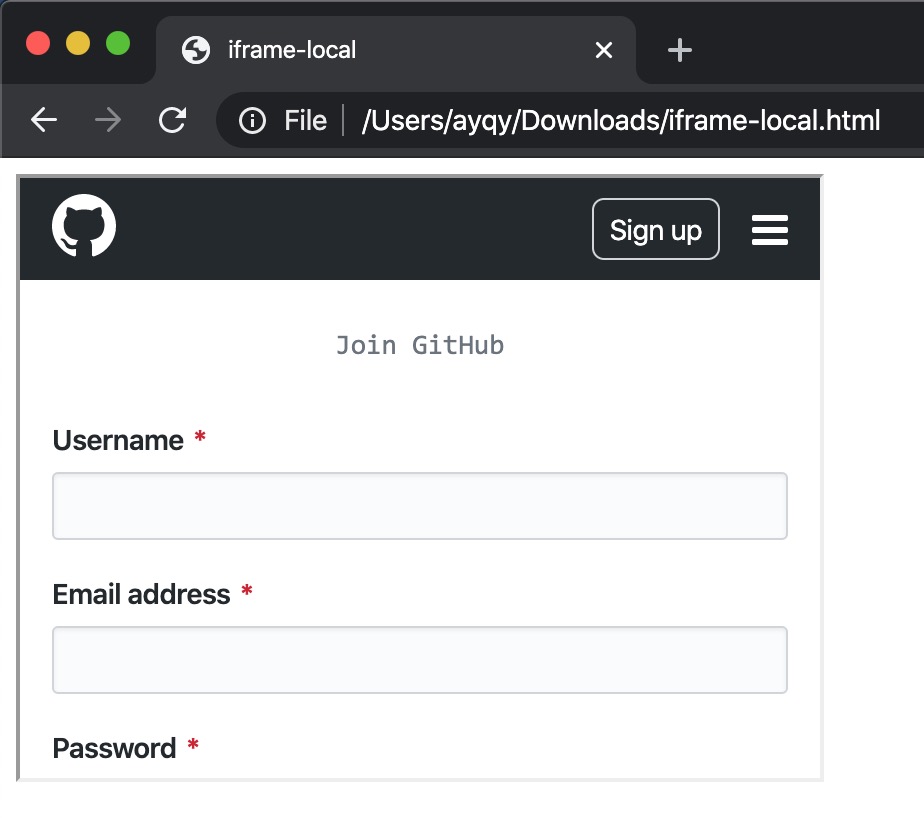 iframe github login[/caption]
No comments yet. Be the first to share your thoughts.