
Best Solutions
There is no single "best" solution; the truly optimal approach depends on the requirements. The decision tree for selecting the best script downloading technique is as follows:
[caption id="attachment_860" align="alignnone" width="300"]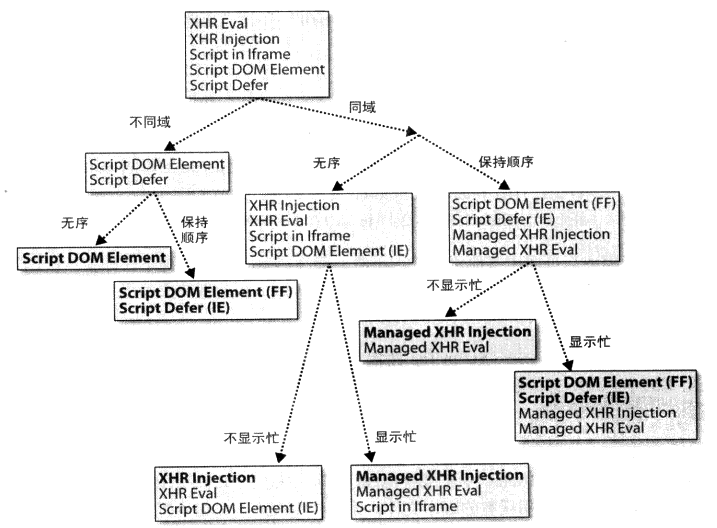 Decision tree for selecting the best script loading technique[/caption]
There are six possible outcomes in the decision tree:
- Different Domain, Unordered
XHR Eval, XHR Injection, and Script in Iframe techniques cannot be used in these cases because the domain of the main page differs from the domain of the script. We should not use the Script Defer technique, as it forces scripts to load in order; instead, allowing scripts to execute as soon as they arrive makes the page load faster. For this scenario, the Script DOM Element technique is the best solution, though it results in ordered loading in Firefox, which we do not necessarily want. Note that both techniques trigger busy indicators (status bar, progress bar, icons, cursor), but there is no way to avoid this.
Web pages containing JavaScript advertisements and widgets are examples that fit this scenario. The domains of these scripts are often different from the main page, and there are no dependencies between them, so the loading order does not matter.
- Different Domain, Preserve Order
As before, XHR Eval, XHR Injection, and Script in Iframe techniques do not work because the domain of the script differs from the main page. To ensure the loading order, we should use the Script Defer technique in Internet Explorer and the Script DOM Element technique in Firefox. Note that both techniques trigger busy indicators.
An example that fits this scenario is a page that downloads multiple dependent JavaScript files from different servers.
- Same Domain, Unordered, No Busy Indicator
XHR Eval and XHR Injection are the only two techniques that do not trigger busy indicators. Between these two XHR techniques, I recommend XHR Injection because it does not require refactoring the script.
This can be applied to web pages where you want to download JavaScript files in the background.
- Same Domain, Unordered, With Busy Indicator
XHR Eval, XHR Injection, and Script in Iframe are the only techniques that do not maintain loading order across Internet Explorer and Firefox. The Script in Iframe technique seems like the best choice as it triggers busy indicators and only slightly increases page size. However, I prefer XHR Injection because it allows scripts to be used without refactoring and is also the choice for other decision tree branches. We need extra JavaScript to activate the busy indicator: activate the status bar and cursor when the XHR is sent, and restore them when the XHR returns; we call this Managed XHR Injection.
- Same Domain, Preserve Order, No Busy Indicator
XHR Eval and XHR Injection are the two techniques that do not trigger busy indicators. Of these two, I prefer XHR Injection because it does not require script refactoring. To preserve loading order, another type of Managed XHR Injection is needed. In this case, XHR responses can be queued and executed in order if necessary, where a delayed script only begins execution after all scripts before it have been downloaded and executed.
Pages with multiple internally dependent scripts downloading in the background fit this scenario.
- Same Domain, Preserve Order, With Busy Indicator
The Script Defer technique in Internet Explorer and the Script DOM Element technique in Firefox are the preferred solutions. Managed XHR Injection and Managed XHR Eval are also viable. However, they add extra code to the main page and are more complex to implement.
P.S. The content above is excerpted from the references.
XHR Eval
xhr fetches the script str, then eval(str) executes it.
Advantages: Non-blocking (does not block the download of other resources).
Disadvantages: Restricted by the Same Origin Policy (SOP); external scripts must be on the same domain (protocol, port, hostname) as the executing script. Additionally, external scripts may need to be refactored.
XHR Injection
xhr fetches the script str, then inserts str into a script element, which is then inserted into the DOM tree for execution.
Advantages: Non-blocking.
Disadvantages: SOP restrictions.
Script in Iframe
The iframe and other resources in a page are loaded in parallel. This characteristic can be leveraged to achieve non-blocking script loading:
<!-- Include an iframe in the main page; jsWrapper.html should be on the same domain as the main page -->
<iframe src="jsWrapper.html" frameborder="0" width="0" height="0" id="myIframe"></iframe>

//---js communication
// Main page -> iframe
var winIframe = window.frames['myIframe'].contentWindow;
winIframe.fun();    // winFrame is the window object inside the iframe
// iframe -> Main page
var winMain = window.parent;
winMain.fun();      // winMain is the window object of the main page
Note: src is x.html instead of x.js because the iframe expects an html document, so the script should be wrapped as an inline script within html.
Advantages: Non-blocking.
Disadvantages: SOP restrictions, and the external script requires refactoring.
Script DOM Element
Dynamically create a script element, set its src, and insert it into the DOM tree.
Advantages: Non-blocking, allows cross-domain, no refactoring needed for external scripts, and can guarantee script execution order.
Disadvantages: Script execution order cannot be guaranteed in IE.
Script Defer
IE supports the defer attribute for the script tag, allowing other resources to be downloaded in parallel.
Advantages: Easy (just add an attribute to the script tag), and it guarantees script execution order.
Disadvantages: Some browsers (such as older versions of FF) may not support this attribute. However, the HTML5 standard has established the status of defer and async, and added the onload callback. Compatibility issues are currently not severe. For more information, please refer to HTML5 <script> element async, defer asynchronous loading.
document.write Script Tag
Use document.write to write script tags into the page.
Advantages: Multiple scripts written with document.write in IE can load in parallel.
Disadvantages: Only IE is non-blocking, and while these scripts are loading, other resources (images, DOM) are blocked.
References
- Even Faster Web Sites
No comments yet. Be the first to share your thoughts.