
Foreword
Initially, I wanted to represent traditional bar-style frequency spectrum charts using smooth curves; the "breathing" effect should feel more natural.
I previously tried least squares curve fitting, but the conclusion was that least squares curve fitting cannot solve this problem:
-
Least squares curve fitting: Can find a line or an n-degree curve that evenly splits all scattered points into two parts.
-
Bezier curve: Can find a curve that smoothly passes through each scattered point.
I. Problem Restatement
Cubic Bezier curves require two control points, as shown below:
[caption id="attachment_751" align="alignnone" width="360"]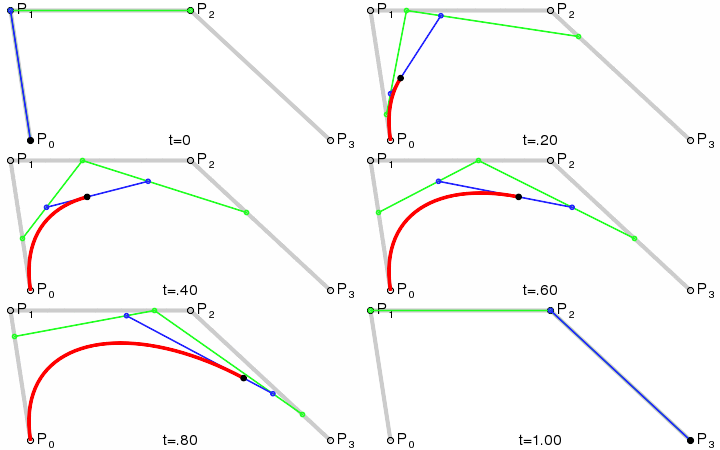 Cubic Bezier Curve[/caption]
(P1 and P2 in the figure are the control points)
Scattered points (the tops of each bar in a spectrum chart) can be obtained via the Audio API. The difficulty lies in calculating the two control points; setting them arbitrarily will definitely not work and will produce very poor results.
II. Solution
I found an empirical solution based on practice. Although it has no strict mathematical basis, the actual effect is perfect. The specific steps are as follows:
-
Assume the control points are between (x1, y1) and (x2, y2). The first and last points are the previous and next points on the curve path, respectively.
-
Calculate midpoints.
-
Calculate the lengths of the lines connecting the midpoints.
-
Calculate the ratios of the lengths of the lines connecting the midpoints (used to determine the positions of p2 and p3 before translation).
-
Translate p2.
-
Translate p3.
-
[Optional] Fine-tune the distance between the control points and the vertices; the larger the distance, the straighter the curve.
For more details, please see Interpolation with Bezier Curves: A very simple method of smoothing polygons.
For the smoothing effect, you can refer to Jianshu: Android Handwriting Optimization - Implementing Smoother Signature Effects.
III. JavaScript Implementation for Finding Cubic Bezier Control Points
The original version is implemented in Java. I have made simple modifications and encapsulated it as follows:
window.Bezier = {
    /**
     * Get control point coordinates
     * @param  {Array} arr Array of 4 point coordinates
     * @param  {Float} smooth_value [0, 1] Smoothness
     *   p1 Previous point
     *   p2 Left endpoint
     *   P3 Right endpoint
     *   p4 Next point
     * @return {Array}     Array of 2 point coordinates
     */
    getControlPoints: function(arr, smooth_value) {
        var x0 = arr[0].x, y0 = arr[0].y;
        var x1 = arr[1].x, y1 = arr[1].y;
        var x2 = arr[2].x, y2 = arr[2].y;
        var x3 = arr[3].x, y3 = arr[3].y;

        // Assume we need to calculate the control
        // points between (x1,y1) and (x2,y2).
        // Then x0,y0 - the previous vertex,
        //      x3,y3 - the next one.
        // 1. Assume the control points are between (x1, y1) and (x2, y2). The first and last points are the previous and next points on the curve path, respectively.

        // 2. Calculate midpoints
        var xc1 = (x0 + x1) / 2.0;
        var yc1 = (y0 + y1) / 2.0;
        var xc2 = (x1 + x2) / 2.0;
        var yc2 = (y1 + y2) / 2.0;
        var xc3 = (x2 + x3) / 2.0;
        var yc3 = (y2 + y3) / 2.0;

        // 3. Calculate the lengths of the lines connecting the midpoints
        var len1 = Math.sqrt((x1-x0) * (x1-x0) + (y1-y0) * (y1-y0));
        var len2 = Math.sqrt((x2-x1) * (x2-x1) + (y2-y1) * (y2-y1));
        var len3 = Math.sqrt((x3-x2) * (x3-x2) + (y3-y2) * (y3-y2));

        // 4. Calculate the ratios of the lengths of the lines connecting the midpoints (used to determine the positions of p2 and p3 before translation)
        var k1 = len1 / (len1 + len2);
        var k2 = len2 / (len2 + len3);

        // 5. Translate p2
        var xm1 = xc1 + (xc2 - xc1) * k1;
        var ym1 = yc1 + (yc2 - yc1) * k1;

        // 6. Translate p3
        var xm2 = xc2 + (xc3 - xc2) * k2;
        var ym2 = yc2 + (yc3 - yc2) * k2;

        // Resulting control points. Here smooth_value is mentioned
        // above coefficient K whose value should be in range [0...1].
        // 7. Fine-tune the distance between the control points and the vertices; the larger the distance, the straighter the curve
        var ctrl1_x = xm1 + (xc2 - xm1) * smooth_value + x1 - xm1;
        var ctrl1_y = ym1 + (yc2 - ym1) * smooth_value + y1 - ym1;

        var ctrl2_x = xm2 + (xc2 - xm2) * smooth_value + x2 - xm2;
        var ctrl2_y = ym2 + (yc2 - ym2) * smooth_value + y2 - ym2;

        return [{x: ctrl1_x, y: ctrl1_y}, {x: ctrl2_x, y: ctrl2_y}];
    }
};
The comments should be quite detailed now and can be understood in conjunction with the Interpolation with Bezier Curves: A very simple method of smoothing polygons mentioned above.
IV. Result Screenshot
[caption id="attachment_752" align="alignnone" width="794"]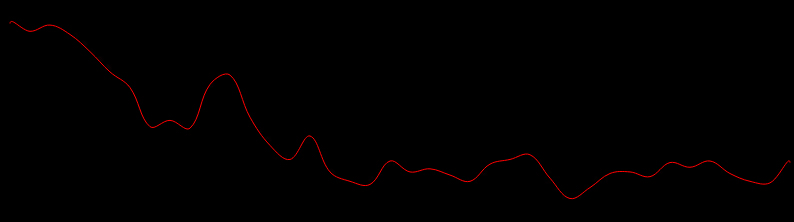 Bezier Curve Effect[/caption]
The smoothing effect is excellent, and the computational overhead is low, satisfying the requirements for real-time drawing (the original project was for Android handwriting signatures).
References
- gcacace/android-signaturepad: Original project
No comments yet. Be the first to share your thoughts.