
Preface
In [previous notes](/articles/uniform 变量与片元着色器-webgl 笔记 4/), we drew multiple points in a rather clumsy way, low efficiency, and cannot draw basic primitives like triangles, let alone complex graphics
1. Understanding Buffer
Buffer is an area partitioned inside WebGL system, can store a set of vertex data, such as vertex coordinates. After writing vertex data into buffer, shader program can read data from buffer when executing, especially convenient when data volume is large
Although cannot directly read buffer in shader program, can first specify shader variable value as buffer's address through API, then specify data reading method, such as where to start reading? Read how many numbers? Where is next vertex's data? Indirectly read data from buffer
2. Typed Arrays
Preparing vertex data originally doesn't need to be discussed separately, but this step is very easy to get wrong, correct code as follows:
// 一次性传递一组顶点数据
//!!! 注意:不是一般数组,需要 new 类型化数组,否则报错
// GL ERROR :GL_INVALID_OPERATION :glDrawArrays: attempt to access out of range vertices in attribute 0
// var arrVtx = [-1.0, 1.0, 1.0, 1.0, -1.0, -1.0, 1.0, -1.0, 0.0, 0.0];
var arrVtx = new Float32Array([-1.0, 1.0, 1.0, 1.0, -1.0, -1.0, 1.0, -1.0, 0.0, 0.0]);
Special note: Data prepared to write into buffer is not normal array, need to new typed array, otherwise error, error message as follows:
GL ERROR :GL_INVALID_OPERATION :glDrawArrays: attempt to access out of range vertices in attribute 0
From error message alone it's hard to trace back to vertex data, so need to pay special attention
Because GLSL ES is strongly typed language, js is weakly typed, js array elements have no restrictions, while GLSL ES needs very strict data, that's why there are typed arrays. In WebGL, typed arrays have following 8 types:
-
Int8Array
-
UInt8Array
-
Int16Array
-
UInt16Array
-
Int32Array
-
UInt32Array
-
Float32Array
-
Float64Array
Difference is each element occupies different number of bytes (typed array has BYTES_PER_ELEMENT property, can get number of bytes each element occupies in array, for example Float32Array each element occupies 4 bytes), compared to normal arrays, typed arrays don't support push and pop methods, but optimized for "large number of elements are all same type"
3. Using Buffer
From creating buffer to writing a set of vertex data, we need to do 5 things
1.Create Buffer
Directly call API to create buffer, as follows:
// 1.创建 buffer
var vBuffer = gl.createBuffer();
if (!vBuffer) {
    console.log('Failed to create buffer');
    return;
}
If creation fails, returns null, but since this kind of function has relatively low error rate, here don't do strict error checking (while high error rate parts must do strict checking, such as compiling shader source program)
2.Bind Buffer Object to Target
After creating buffer need to bind buffer object to existing target in WebGL system
// 2.把缓冲区对象绑定到目标
gl.bindBuffer(gl.ARRAY_BUFFER, vBuffer);
Buffer is already created, shouldn't next step be writing data? What's binding target for?
Because we cannot directly write data to buffer, can only write to target, so to write data to buffer, must first bind target and buffer. Target indicates buffer object's usage, value is gl.ARRAY_BUFFER or gl.ELEMENT_ARRAY_BUFFER, former indicates buffer object contains vertex data, latter indicates contains vertex index values
3.Write Data to Buffer Object
Write data through gl.bufferData(target, data, usage)
// 3.向缓冲区对象写入数据
gl.bufferData(gl.ARRAY_BUFFER, arrVtx, gl.STATIC_DRAW);
Among them data is typed array, already introduced before
usage indicates buffer data usage, WebGL will optimize according to usage, value is gl.STATIC_DRAW (write data to buffer object only once, but need to draw many times), gl.STREAM_DRAW (write data to buffer object only once, then draw several times) or gl.DYNAMIC_DRAW (write data to buffer object multiple times, and draw many times), difference is not very obvious, and only may affect performance, won't affect final result
4.Assign Buffer Object to a_Position Variable
Buffer is ready, now need to assign value to shader variable, and tell shader how to use this data later
// 4.将缓冲区对象分配给 a_Position 变量
gl.vertexAttribPointer(a_Position, 2, gl.FLOAT, false, 0, 0);
// 等价于
// gl.vertexAttribPointer(a_Position, 2, gl.FLOAT, false, arrVtx.BYTES_PER_ELEMENT * 2, 0);
Assign buffer pointer to attribute object through gl.vertexAttribPointer(location, size, type, normalized, stride, offset), parameter meanings as follows:
gl.vertexAttribPointer(location, size, type, normalized, stride, offset)
---
size        Number of components per vertex in buffer (1~4), indicates number of components in each vertex data to assign to shader variable
type        Data format, value is gl.UNSIGNED_BYTE, gl.SHORT, gl.UNSIGNED_SHORT, gl.INT, gl.UNSIGNED_INT, gl.FLOAT five types
normalized  true|false, indicates whether to normalize non-float type data to [0, 1] or [-1, 1] range
stride      Specifies number of bytes between adjacent two vertices, defaults to 0
offset      Offset in buffer object, start writing from buffer's offset position, from beginning is 0
Special note: stride parameter is quite special, if each vertex has n data, setting stride to arr.BYTES_PER_ELEMENT * n has same effect as 0. Because after current vertex data reading ends, if stride is 0, then read next vertex's data from current vertex data end position, if stride is non-0, then skip stride specified bytes from current vertex data start position then start reading
P.S. May be hard to understand, but fact is like this, we'll explain in concrete examples later
5.Connect a_Position Variable and Assigned Buffer Object
Buffer is ready, also told shader how to use data, finally need to connect variable and buffer
//!!! 注意:分配完还要 enable 连接
// 5.连接 a_Position 变量和分配给它的缓冲区对象
gl.enableVertexAttribArray(a_Position);
This step is very easy to forget, because from logic perspective already complete, this step seems purely redundant, but API is like this, this step is like switch in diagram below:
[caption id="attachment_901" align="alignnone" width="893"]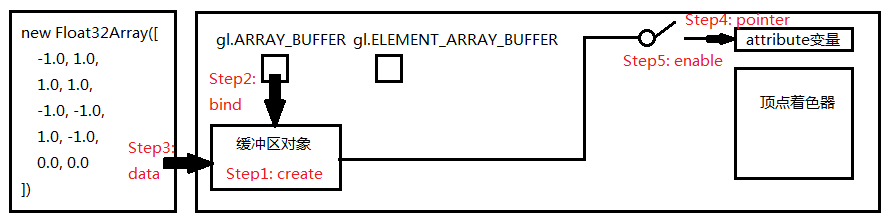 webgl-buffer[/caption]
6.Draw Multiple Points
// 绘制点
gl.drawArrays(gl.POINTS, 0, arrVtx.length / 2);
Finally used third parameter, no longer draw a point, third parameter indicates number of vertices to draw, in this example array length arrVtx.length divided by each vertex's data count 2 indicates drawing all vertices in arrVtx (total 5)
4. DEMO
Complete example containing above code, please check: http://www.ayqy.net/temp/webgl/buffer/index.html
5. Summary
In this example, we used buffer to pass in coordinates of 5 points (4 corners and center), drew at once, solved most basic input data problem
After unlocking buffer can go touch primitives and slightly complex graphics, in next notes we want to draw most magical primitive—triangle. This boasting about triangle is really not wrong, in fact, triangle strips can piece together whole world, character models, BOSS models, flowers grass trees etc. everything is pieced together by triangle strips
Reference Materials
- "WebGL Programming Guide"
No comments yet. Be the first to share your thoughts.