
Preface
For new sites with low traffic, waiting for search engines to index new content is slow. You can actively push links through the interface provided by the Baidu Webmaster Platform to speed up indexing. Entry for relevant functions: After logging in, click on Link Submission in the list on the left.
- Active Push: The fastest submission method. We recommend pushing new links produced on the same day immediately through this method to ensure they are indexed by Baidu in a timely manner.
- Automatic Push: The most convenient submission method. Deploy the automatic push JS code into the source code of every page on your site. Whenever a page with the code is browsed, the link will be automatically pushed to Baidu. It can be used in conjunction with Active Push.
- Sitemap: You can periodically place website links into a sitemap and then submit it to Baidu. Baidu will periodically crawl and check the submitted sitemap and process the links within, but the indexing speed is slower than Active Push.
- Manual Submission: Use this method to submit links to Baidu all at once.
P.S. The author's environment is PHP 5.3 + WordPress 4.2
1. Active Push
It is said to be the fastest method and is easy to implement in WP. Directly edit functions.php (can be edited online via the WP dashboard under Appearance -> Editor -> Theme Functions (functions.php), or downloaded via FTP, modified, and re-uploaded; the path is wordpress/wp-content/themes/[currentTheme]/functions.php). Add a filter at the end of the opening comments, as follows:
/*submit url*/
function submitUrl($postID, $post) {
    $url = 'www.ayqy.net/blog/'.$post->post_name.'/';
    $api = 'http://data.zz.baidu.com/urls?site=www.ayqy.net&token=[yourtoken]';
    $ch = curl_init();
    $options =  array(
        CURLOPT_URL => $api,
        CURLOPT_POST => true,
        CURLOPT_RETURNTRANSFER => true,
        CURLOPT_POSTFIELDS => $url."\n",
        CURLOPT_HTTPHEADER => array('Content-Type: text/plain'),
    );
    curl_setopt_array($ch, $options);
    $result = curl_exec($ch);

    //echo $result;
    if (function_exists( 'swpsmtp_test_mail' )) {
        $email = 'nwujiajie@163.com';
        swpsmtp_test_mail( $email, 'Submit Result', $result.'<p><a href="http://'.$url.'">点我</a>查看原文<p>' );
    }
}

add_action('publish_post', 'submitUrl', 0, 2); // submit url
/*end submit url*/
Note: Replace [yourtoken] in the code above with the token obtained from the Baidu Webmaster Platform.
The filter is executed when a post is published, constructing the article URL, then sending a POST request via curl_exec to submit the URL, and finally sending the submission result to an email address (WP requires SMTP configuration to send emails; the author uses the Easy WP SMTP plugin).
The effect is okay; links are submitted automatically every time a post is published. The downside is that previous links cannot be submitted. If you need to submit previous links, you can use sitemap automatic submission, which is described in detail below.
2. Automatic Push
...Please deploy the automatic push JS code into the source code of every page on your site...
Not considered; the page already has enough JS, and becoming slower is not good. If you must use this method, you need to edit footer.php (same method as changing functions.php, and same file location) and add the following code before </body>:
<script>
(function(){
    var bp = document.createElement('script');
    bp.src = '//push.zhanzhang.baidu.com/push.js';
    var s = document.getElementsByTagName("script")[0];
    s.parentNode.insertBefore(bp, s);
})();
</script>
P.S. The code above is provided by the Baidu Webmaster Platform; it should be the same for every site and doesn't need modification.
Using this method is not recommended. Although it's not troublesome, making all users pay the price (in performance) is not right.
3. Sitemap
The most convenient method. Of course, the prerequisite is that we must have an automatically updated sitemap.xml file. This doesn't need to be done manually; you can use the WP plugin: All In One SEO Pack.
After installing and enabling the plugin, there will be an "All in One SEO" section under the Dashboard on the left of the WP back-end. The XML Sitemap in the submenu is the sitemap.xml we need. You can click Update Sitemap, and the output info below will look something like:
2016-03-08 15:46:03  3.29 MB memory used generating the dynamic 压缩 root sitemap in 0.628 seconds, 35.38 MB total memory used.
2016-03-08 09:17:31  3.25 MB memory used generating the dynamic root sitemap in 0.596 seconds, 35.34 MB total memory used.
2016-03-08 00:41:29  3.25 MB memory used generating the dynamic root sitemap in 0.595 seconds, 35.34 MB total memory used.
2016-03-07 19:23:09 Daily scheduled sitemap check has finished.
2016-03-07 19:23:09 已成功通知bing贵站网站地图(http://www.ayqy.net/blog/sitemap.xml.gz)的变动。
2016-03-07 19:23:09 通知google贵站网站地图(http://www.ayqy.net/blog/sitemap.xml.gz)变动失败,无法通过wp_remote_get()访问。
Take a guess, the sitemap is http://www.ayqy.net/blog/sitemap.xml. You can try downloading it or accessing it with a browser. Once confirmed, take this URL to the Baidu Webmaster Platform and fill in the form.
Special Note: The sitemap link must be a full URL starting with http://, not what the form suggests:
示例如下:
www.site.com/site.txt
www.site.com/site.xml
Then just enter the captcha and submit. Check back in 5 minutes; if the status is "Normal", you're good. From then on, you never have to worry about link submission again.
4. Structured Data Plugin
The official provided a WP plugin for submitting data, download address: http://bs.baidu.com/zhanzhang/wp-baidusubmit-140213.zip
Introduction as follows:
Automatically push sitemaps to optimize content indexing Don't have sitemap permissions or don't know how to submit sitemap data? The structured data plugin will handle it for you. It traverses historical URL data of forum post pages and automatically generates a sitemap to submit to Baidu.
Real-time push of new forum content to speed up indexing Massive new posts every day? Frequent data updates? The structured data plugin will handle it for you. When a new post is published, it immediately pushes the URL and content of the new post to the Baidu Webmaster Platform. If a post page changes, Baidu can also update the corresponding data in real-time.
High-quality content, optimized presentation, improving user click-through rate High-quality content not eye-catching enough? Apply structured snippets to optimize presentation, improve result click-through rates, and your traffic will soar.
It's essentially giving the webmaster a little spider. When content is updated (like publishing a post), the little spider comes out for a round, processes the captured content, and submits it to Baidu.
The WP plugin might report an error (even though it's an official product), as follows:
Warning: curl_setopt() [function.curl-setopt]: CURLOPT_FOLLOWLOCATION cannot be activated when safe_mode is enabled or an open_basedir is set in /home/xxx/
CURLOPT_FOLLOWLOCATION is used for deep link crawling. This option is not supported under PHP safe mode. It is not recommended to turn off safe mode just for the plugin, so we modify the plugin. Add the following code on the line after the opening <?php tag in sitemap.php (path is wordpress/wp-content/plugins/baidusubmit/sitemap.php):
// fix CURLOPT_FOLLOWLOCATION cannot be activated when safe_mode
function curl_exec_follow(/*resource*/ $ch, /*int*/ &$maxredirect = null) {
    $mr = $maxredirect === null ? 5 : intval($maxredirect);
    if (ini_get('open_basedir') == '' && ini_get('safe_mode' == 'Off')) {
        curl_setopt($ch, CURLOPT_FOLLOWLOCATION, $mr > 0);
        curl_setopt($ch, CURLOPT_MAXREDIRS, $mr);
    } else {
        curl_setopt($ch, CURLOPT_FOLLOWLOCATION, false);
        if ($mr > 0) {
            $newurl = curl_getinfo($ch, CURLINFO_EFFECTIVE_URL);

            $rch = curl_copy_handle($ch);
            curl_setopt($rch, CURLOPT_HEADER, true);
            curl_setopt($rch, CURLOPT_NOBODY, true);
            curl_setopt($rch, CURLOPT_FORBID_REUSE, false);
            curl_setopt($rch, CURLOPT_RETURNTRANSFER, true);
            do {
                curl_setopt($rch, CURLOPT_URL, $newurl);
                $header = curl_exec($rch);
                if (curl_errno($rch)) {
                    $code = 0;
                } else {
                    $code = curl_getinfo($rch, CURLINFO_HTTP_CODE);
                    if ($code == 301 || $code == 302) {
                        preg_match('/Location:(.*?)\n/', $header, $matches);
                        $newurl = trim(array_pop($matches));
                    } else {
                        $code = 0;
                    }
                }
            } while ($code && --$mr);
            curl_close($rch);
            if (!$mr) {
                if ($maxredirect === null) {
                    trigger_error('Too many redirects. When following redirects, libcurl hit the maximum amount.', E_USER_WARNING);
                } else {
                    $maxredirect = 0;
                }
                return false;
            }
            curl_setopt($ch, CURLOPT_URL, $newurl);
        }
    }
    return curl_exec($ch);
}
// end fix CURLOPT_FOLLOWLOCATION cannot be activated when safe_mode
Then replace the error-reporting statement as follows:
// curl_setopt($ch, CURLOPT_FOLLOWLOCATION, 1);
curl_exec_follow($ch);   // fix CURLOPT_FOLLOWLOCATION cannot be activated when safe_mode
Note: Deep crawling of links is slow. After installing this plugin, publishing a post will take about 30 seconds. Use with caution.
5. Summary
First, automatic sitemap submission is essential:
[caption id="attachment_961" align="alignnone" width="776"] sitemap[/caption]
Then active push and structured data plugins can serve as supplementary measures:
[caption id="attachment_962" align="alignnone" width="242"]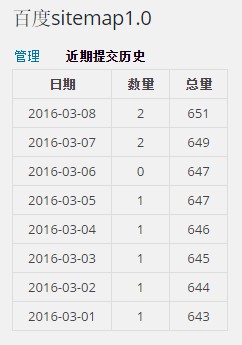 baidu sitemap[/caption]
No comments yet. Be the first to share your thoughts.