
1. Observer Pattern
Using the observer pattern, one can easily establish a "one-to-many" dependency relationship between objects; The mechanism of the observer pattern allows for easy dynamic maintenance of this dependency relationship.
(Cited from Ayqy: Design Patterns - Observer Pattern)
The observer pattern decouples the subject and the observers. The subject knows nothing of the observers' details except that they all implement an update interface. Observers know even less about the subject, simply waiting passively for updates. Observers are entirely unaware of each other and don't even know if others are watching the same subject.
Loose coupling implies flexibility (elasticity). As long as the established interface is implemented, the subject and observers can be modified independently without affecting their interaction.
2. Classic Observer Pattern
The concept of the observer pattern is relatively simple. A classic implementation requires adding a layer of abstraction (interface definitions for Observer and Subject). A simple implementation in JS is as follows:
/* Classic Observer Pattern
 * Observer, Subject
 * A layer of abstraction could be added, but since inheritance in JS is cumbersome, we'll keep it simple here.
 * Manually maintain the list.
 */

// Subject
function Subject(name) {
    this.name = name;
    this.list = [];
}
// Subscribe
Subject.prototype.regist = function(obj) {
    this.list.push(obj);
};
// Unsubscribe
Subject.prototype.unregist = function(obj) {
    var list = this.list;

    for(var i = 0, len = list.length; i < len; i++) {
        if (list[i] === obj) {
            list.splice(i, 1);
        }
    }
};
// Notify all fans
Subject.prototype.notify = function() {
    var list = this.list;

    for(var i = 0, len = list.length; i < len; i++) {
        list[i].update({data: this.name});
    }
};

// Observer
function Observer(id) {
    this.id = id;
    // Update method called by Subject
    this.update = function(dataObj) {
        // ...
        console.log(this.id + ' received ' + dataObj.data + '\'s update');
    };
}

// test
var subject = new Subject('My Topic');
var observer1 =  new Observer(1);
var observer2 =  new Observer(2);
var observer3 =  new Observer(3);

subject.regist(observer1);
subject.regist(observer2);
subject.notify();   // Subject updates, notifying all observers

subject.regist(observer3);  // observer3 joins
subject.notify();

// observer1 leaves
subject.unregist(observer1);
subject.notify();
Execution results are as follows:
[caption id="attachment_663" align="alignnone" width="239"]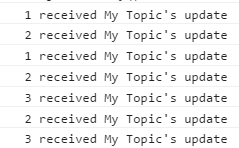 Observer Pattern[/caption]
P.S. If you are interested in the first layer of abstraction, you can refer to Ayqy: Re-understanding JS's 6 Inheritance Methods to implement it yourself.
3. Publish/Subscribe Pattern
The observer pattern separates the subject and the observer, with the interaction logic embedded within both (requiring the implementation of defined interfaces). If this interaction logic is further decoupled, it is known as the publish/subscribe pattern.
The publish/subscribe pattern adds an event mechanism layer between the subject and the observers. This event mechanism provides interfaces for both parties and maintains the interaction. The benefit of this extra layer is that it allows for features like event queues, event bubbling (not just in the DOM!), and more control.
At this point, decoupling has been pushed to its limit. While this provides immense flexibility, it also has unavoidable drawbacks. For example, if an observer crashes, the message cannot be propagated due to the decoupling; the subject won't know, nearby observers won't know, and other modules dependent on that observer won't know either. (While this could theoretically be controlled by strengthening the event management mechanism, it would make the event layer increasingly complex and bloated.)
4. Implementing Publish/Subscribe Pattern via Custom Event Mechanisms
Note that it's an "event mechanism" rather than "events," because custom events are part of the DOM API and can only be bound to DOM elements. For details, see Document.createEvent() - Web API Interfaces | MDN.
Thus, a custom "event mechanism" must be implemented. For implementation details, please see the bottom of Ayqy: JS Study Notes 11_Advanced Techniques.
DOM Level 3 APIs support the creation of custom events, as follows:
// Create a custom event object
var event = document.createEvent('CustomEvent');
// Initialize the event
event.initCustomEvent('myeve', true, true);
// The initCustomEvent interface is defined as follows:
/*
void initCustomEvent(
    in DOMString type,
    in boolean canBubble,
    in boolean cancelable,
    in any detail
);
*/
document.createEvent and initCustomEvent are now obsolete. You can now create custom event objects directly via constructors (for examples, see JavaScript CustomEvent). Currently (2015-07-13), obsolete features still have the best compatibility; see Document.createEvent() - Web API Interfaces | MDN for details.
To maintain compatibility with [IE8-], other means must be employed, which will not be detailed here. Please see JavaScript Custom Events.
P.S. If a project uses major JS libraries or frameworks, they generally support custom events, but these are tied to DOM elements. Event mechanisms for non-DOM objects must be implemented independently. There is a minimalist publish/subscribe implementation you can refer to: addyosmani/pubsubz. The code is elegant and well worth reading.
5. Specific Applications of the Observer Pattern
A crucial application scenario for the observer pattern is the callback logic of Ajax requests. The subject is the data returned by the Ajax request, and the observers are the various logic blocks within the callback function (the list ensures execution order). You only need to notify all observers within the callback. Example code is as follows:
// The publish/subscribe implementation is from: https://github.com/addyosmani/pubsubz
(function(window) {
    var topics = {},
        subUid = -1,
        pubsubz = {};

    pubsubz.publish = function(topic, args) {
        if (!topics[topic]) {
            return false;
        }

        var subscribers = topics[topic],
            len = subscribers ? subscribers.length : 0;
        while (len--) {
            subscribers[len].func(topic, args);
        }

        return true;
    };

    pubsubz.subscribe = function(topic, func) {
        if (!topics[topic]) {
            topics[topic] = [];
        }

        var token = (++subUid).toString();
        topics[topic].push({
            token: token,
            func: func
        });

        return token;
    };

    pubsubz.unsubscribe = function(token) {
        for (var m in topics) {
            if (topics[m]) {
                for (var i = 0, j = topics[m].length; i < j; i++) {
                    if (topics[m][i].token === token) {
                        topics[m].splice(i, 1);
                        return token;
                    }
                }
            }
        }
        return false;
    };

    window.pubsubz = pubsubz;
}(this));


// Specific application
var psz = pubsubz;
var eventName = 'DataUpdate';

var obs1 = psz.subscribe(eventName, function(data) {
    console.log('obs1 received ' + data);
    console.log('Clear invalid data');
});
var obs2 = psz.subscribe(eventName, function(data) {
    console.log('obs2 received ' + data);
    console.log('Show new data');
});
var obs3 = psz.subscribe(eventName, function(data) {
    console.log('obs3 received ' + data);
    console.log('Update icon list');
});

// Simulate ajax
function ajax(url, callback) {
    // Execute callback after 50ms (assuming data has been received)
    setTimeout(function(data) {
        data = 'data';  // Simulated data

        callback(data);
    }, 50);
}

ajax('emptyUrl', function(data) {
    psz.publish(eventName, data);
});

// Execution results are as follows:
// obs3 received DataUpdate
// Update icon list
// obs2 received DataUpdate
// Show new data
// obs1 received DataUpdate
// Clear invalid data
// (Reverse order because pubsubz.publish uses decreasing iteration)
Of course, this approach also introduces certain problems, such as logic being scattered across various observers, which can increase coding difficulty (a common drawback of event-driven programming). One must weigh the pros and cons based on the specific scenario.
References
-
JavaScript Design Patterns
-
Various related blog posts
No comments yet. Be the first to share your thoughts.