
Preface
Backbone seems to be the first widely adopted frontend MVC framework, and it does appear to be getting old (first release was in 2010). Now facing the dazzling array of MV* frameworks, it's almost hard to remember Backbone, let alone have a reason to choose it
Is that really the case? Are people still using Backbone just because they're too lazy to switch? Is choosing Backbone now just about nostalgia?
No. Because it's flexible enough. Backbone is not the most powerful among MV* frameworks (actually it's quite weak), but it's the most flexible, bar none
I. Backbone v0.1.0
Back to 2010, let's see what Backbone originally intended to do
Structure
View        Wraps DOM elements. Combined with jq event delegation, manages view-related logic
-------
Collection  Model collection
    Model   Data structure
Data CRUD -> Triggers CRUD (create, read, update, delete) -> Backbone.sync() -> Server
-------
Events                      sync(method, model, success, error)
Provides custom event support for any object   Converts CRUD to RESTful API, sends requests via jq.ajax()
Visually, it looks like this:
[caption id="attachment_1178" align="alignnone" width="814"]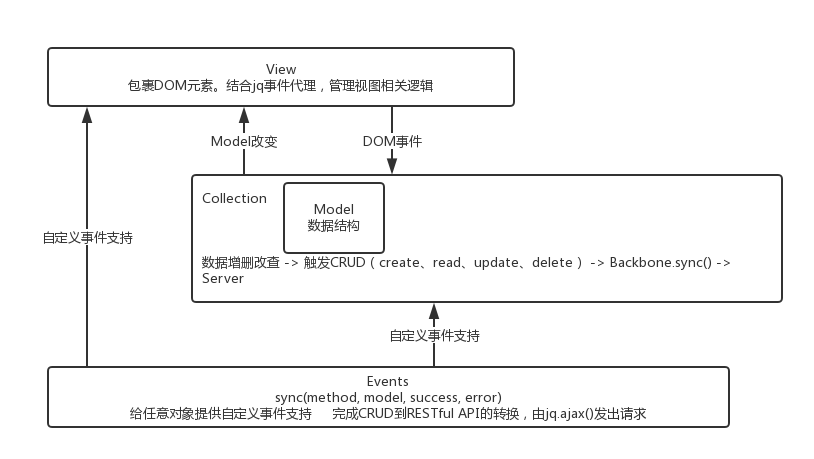 backbone-0.1.0[/caption]
The most fundamental and important part is Events. Communication from M to V, M change notifications to Server are all accomplished through custom events provided by Events. There's even a trick of using the Backbone object itself as an event bus, as follows:
// Topic
var EVENT_DATA_READY = 'dataReady';
// Subscribe
Backbone.on(EVENT_DATA_READY, function(data) {
    console.log(data);  // Object {res: 1}
});
// Publish
Backbone.trigger(EVENT_DATA_READY, {res: 1});
All classes provided by Backbone (Model, Collection, View, and Router, History in the latest version) are based on Events. So you can use custom events on any Backbone instance, such as a Model instance:
var EVENT_BEFORE_CHANGE = 'beforeChange';
var Model = Backbone.Model.extend({
    // Overriding set
    set: function(attributes, options) {
        this.trigger(EVENT_BEFORE_CHANGE, attributes, options);

        // Will be triggered whenever set is called
        if (attributes.hasOwnProperty('prop')) {
           this.trigger('change:prop');
        }

        return Backbone.Model.prototype.set.call(this, attributes, options);
    }
});
var model = new Model();
model.on(EVENT_BEFORE_CHANGE, function() {
    console.log(arguments); // ["key", "value"]
});
// test
model.set('key', 'value');
Before the model property changes, we emit a beforeChange notification. That is, if Backbone's native events are not enough, we can freely add various beforeXXX, afterXXX, and completely independent custom events
Data Synchronization
Key source code is as follows:
// Map from CRUD to HTTP for our default `Backbone.sync` implementation.
var methodMap = {
  'create': 'POST',
  'update': 'PUT',
  'delete': 'DELETE',
  'read'  : 'GET'
};

// Override this function to change the manner in which Backbone persists
// models to the server. You will be passed the type of request, and the
// model in question. By default, uses jQuery to make a RESTful Ajax request
// to the model's `url()`. Some possible customizations could be:
//
// * Use `setTimeout` to batch rapid-fire updates into a single request.
// * Send up the models as XML instead of JSON.
// * Persist models via WebSockets instead of Ajax.
//
Backbone.sync = function(method, model, success, error) {
  $.ajax({
    url       : getUrl(model),
    type      : methodMap[method],
    data      : {model : JSON.stringify(model)},
    dataType  : 'json',
    success   : success,
    error     : error
  });
};
Specify the url corresponding to the resource in the Model, then trigger CRUD when the Model instance changes, and notify the Server via jQuery.ajax()
Provides RESTful API support, but encourages rewriting according to actual scenarios. Or if you don't want to use this data synchronization mechanism, just don't specify url in Model. There are no imposed rules
Routing
Actually, the first version of Backbone didn't provide routing control. It just provided a relatively generic toolset to implement MVC. Even the data synchronization mechanism could be considered a bonus (optional)
MVC
M and V have clear positions (corresponding to Model and View respectively), but C has no clear position, so it has to be scattered in M and V. Data validation, data synchronization and other business logic go in Model, interaction logic goes in View
II. Backbone v1.3.3
Design Philosophy
Philosophically, Backbone is an attempt to discover the minimal set of data-structuring (models and collections) and user interface (views and URLs) primitives that are generally useful when building web applications with JavaScript.
It wants to propose a generic minimal set above raw data and interface
So after all these years, only routing support was added. The original Events, Model, Collection, View have hardly changed
Routing Structure
Router      Responsible for building routing table
-------
History     Actually implements routing control, modifies url, listens for changes, extracts URL parameters and executes routing callbacks, triggers routing events
Visually, it looks like this:
[caption id="attachment_1179" align="alignnone" width="761"]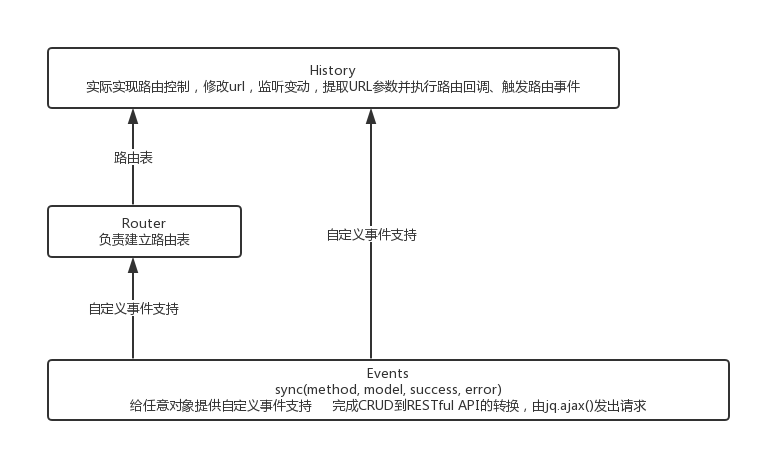 backbone-1.3.3[/caption]
Routing is divided into two parts: building the routing table (Router) and routing control (History). In actual use, it looks like this:
var App = Backbone.Router.extend({
    routes: {
        // key is path pattern, val is event name
        '': 'index',
        ':list1ItemId': 'list2',     // 'rsshelper/2'
        ':list1ItemId/:list2ItemId': 'detail'   // 'rsshelper/2/5'
    }
});
//--- run
var app = new App();
// listen route events
app.on('route:index', function() {
    console.log('trigger route:index');
}).on('route:list2', function(list1ItemId) {
    console.log('trigger route:list2');
}).on('route:detail', function(list1ItemId) {
    console.log('trigger route:list2');
});
// Enable pushState, default is hashchange
Backbone.history.start({pushState: true,
    root: location.pathname.replace('index.html', '')
});
Build the routing table in Router, listen to routing events through Router instance, finally enable routing through History
It appears that Router is fully responsible, but actually Router is a dependency of History. Actual control is accomplished by History
Routing Implementation
//--- History
// Navigation function, passed fragment needs to be manually encoded
// Routing events are only triggered when options {trigger: true} is passed, default is not
// Current URL is only replaced when options {replace: true} is passed, cannot go back, default is insert one, go back
// pushState/replaceState | location.hash assignment/location.replace | location.assign(url) refresh
navigate: function(fragment, options) {
  if (!History.started) return false;
  if (!options || options === true) options = {trigger: !!options};

  // Normalize the fragment.
  fragment = this.getFragment(fragment || '');

  // Don't include a trailing slash on the root.
  var rootPath = this.root;
  if (fragment === '' || fragment.charAt(0) === '?') {
    rootPath = rootPath.slice(0, -1) || '/';
  }
  var url = rootPath + fragment;

  // Strip the hash and decode for matching.
  fragment = this.decodeFragment(fragment.replace(pathStripper, ''));

  if (this.fragment === fragment) return;
  this.fragment = fragment;

  // If pushState is available, we use it to set the fragment as a real URL.
  if (this._usePushState) {
//!!! backbone doesn't use state parameter, passes {}
    this.history[options.replace ? 'replaceState' : 'pushState']({}, document.title, url);

  // If hash changes haven't been explicitly disabled, update the hash
  // fragment to store history.
  } else if (this._wantsHashChange) {
    this._updateHash(this.location, fragment, options.replace);
    // Update iframe url
    if (this.iframe && fragment !== this.getHash(this.iframe.contentWindow)) {
      var iWindow = this.iframe.contentWindow;

      // Opening and closing the iframe tricks IE7 and earlier to push a
      // history entry on hash-tag change.  When replace is true, we don't
      // want this.
      if (!options.replace) {
        iWindow.document.open();
        iWindow.document.close();
      }

//! Pass iframe's window.location object
      this._updateHash(iWindow.location, fragment, options.replace);
    }

  // If you've told us that you explicitly don't want fallback hashchange-
  // based history, then `navigate` becomes a page refresh.
  } else {
    return this.location.assign(url);
  }
  // Check routing table
  if (options.trigger) return this.loadUrl(fragment);
}

//--- Router
// Manually bind a single named route to a callback. For example:
//
//     this.route('search/:query/p:num', 'search', function(query, num) {
//       ...
//     });
//
route: function(route, name, callback) {
  if (!_.isRegExp(route)) route = this._routeToRegExp(route);
  if (_.isFunction(name)) {
    callback = name;
    name = '';
  }
  if (!callback) callback = this[name];
  var router = this;
  Backbone.history.route(route, function(fragment) {
    var args = router._extractParameters(route, fragment);
    if (router.execute(callback, args, name) !== false) {
      router.trigger.apply(router, ['route:' + name].concat(args));
      router.trigger('route', name, args);
      Backbone.history.trigger('route', router, name, args);
    }
  });
  return this;
}
When actually building the routing table (Backbone.history.route() in Router.route()), the entire Router instance is passed to History. So History is above Router
The routing implementation in History is also a pushState -> onhashchange -> iframe poll degradation scheme. But Backbone doesn't use pushState by default; you need to manually enable pushState. This differs from other frameworks' routing implementation schemes:
// Enable pushState, default is hashchange
Backbone.history.start({pushState: true,
    root: location.pathname.replace('index.html', '')
});
Server Support
Backbone routing requires server support, as follows:
Note that using real URLs requires your web server to be able to correctly render those pages, so back-end changes are required as well. For example, if you have a route of /documents/100, your web server must be able to serve that page, if the browser visits that URL directly.
At minimum, defined routes must be accessible. Forcing path accessibility is very uncomfortable for single-page applications that are unwilling/unnecessary to do synchronous mirroring. This greatly limits routing flexibility
Also need to pay attention to the root issue
If your application is not being served from the root url / of your domain, be sure to tell History where the root really is, as an option: Backbone.history.start({pushState: true, root: "/public/search/"})
After default history.start(), it directly jumps to /, not the current path where the page is located. So the example above does something strange:
// Enable pushState, default is hashchange
Backbone.history.start({pushState: true,
    //!!! Change root to current path
    root: location.pathname.replace('index.html', '')
});
Although routing plays a key role in single-page applications, after all, it's not business logic. Struggling so much with routing seems troublesome
III. Backbone and Single-Page Applications
Single-page applications require at least:
-
Views (pseudo-pages)
-
Routing (establish connection between pages and URLs)
-
Templates (used to restore pages from cache)
-
Caching mechanism (a major advantage of single-page applications)
Backbone provides the first three, but it's hard to satisfy application scenarios because:
-
Doesn't support sub-views, while slightly complex scenarios require nested views
-
Routing is not easy to use, troublesome, and inflexible
-
Templates come from underscore, also doesn't support sub-templates
Of course, if you insist on using it, it's possible. You just need to do more things, write more code. The benefit is everything is under control
Almost every detail is under control. This is a very tangible benefit and also the biggest difference between Backbone and other frameworks. Fewer constraints, very flexible
But I still don't recommend single-page applications adopt Backbone because it's too laborious and unnecessary. Angular is obviously more suitable and convenient
IV. Flexibility
As a framework, Backbone is the most flexible. Compared to heavyweights like Angular, Backbone has the fewest restrictions and the highest degree of freedom:
-
Not enough native View events. Easy to add your own
-
Don't want to modify Model, insist on manually manipulating DOM. Fine, then just manually keep Model consistent
-
Performance is too poor, there are many unnecessary
render(). Don't use built-inadd,remove,change,sortevents. Customize events to notify View to render when rendering is needed -
Underscore templates are too weak, want to switch to jade. Change it freely. Anyway,
view.render()is fully controllable -
jQuery is too large, want to switch to Zepto. Sure, changing this has almost no cost (if you don't use jQuery APIs that Zepto doesn't support)
-
Underscore is too slow, want to switch to lodash. Of course you can, no cost at all
Backbone hands DOM manipulation to jQuery/Zepto, Collection manipulation to underscore/lodash. It only guarantees the most core part between data and interface. There's no built-in rendering mechanism. Backbone just suggests where things should be placed. Not placing them in suggested positions is also completely fine. Especially suitable for scenarios requiring fine-grained control
V. Application Scenarios
I previously thought Backbone was outdated and useless because compared to other MV* frameworks, Backbone seemed too weak
Business needed to implement something similar to YiQiXiu, Sohu KuaiZhan, etc., quickly generating pages through drag-and-drop. Initially considered data binding as an issue, decided to adopt Angular. Soon found Drag&Drop is hard to combine with Angular because DnD needs to hold DOM elements, while Angular constantly creates new DOM elements. Don't want to directly access DOM elements because it might cause state inconsistency
Flexible Combination
Switched to Backbone, immediately discovered its huge advantage. Backbone is easy to combine with other third-party things because there are no constraints and restrictions. Like accessing DOM? Fine. Want to modify directly? Fine. Will state inconsistency affect rendering? Of course it will, but the rendering part is also all written by yourself. What it will affect is crystal clear
Third-party libraries that depend on DOM elements, such as DnD, are hard to combine with heavyweight MV* frameworks because comprehensive frameworks generally have moral constraints: strongly discourage directly modifying DOM, should modify Model instead, let the rendering mechanism re-render DOM. With Backbone, there's no such problem. It's loose, casual, freely controllable
Even if you barely combine them, if you find third-party libraries can't meet requirements and need extension/rewriting, you'll find the层层 restrictions of MV* frameworks make everything difficult. Because frameworks provide many unknown internal mechanisms, changing one thing may affect the whole. Backbone has almost no built-in mechanisms. Model, View can be shaped however you want
Detail Control
Using Backbone guarantees everything is under control. Every Model property, every change, every render() is fully controllable. Backbone seems to only provide event mechanism. Everything else is shaped by yourself. Logic is clear, no so many unknown internal mechanisms. No need to carefully follow thick best practices
Find there are redundant render(), easy to filter out in render(). Find built-in change events not easy to use, can completely not use them, easily switch to custom events... Almost all details are controllable. Model, View are not mysterious or special at all, just ordinary objects supporting custom events
Simple and Clean
If you just want simple data binding (Model, View), then Backbone is undoubtedly the best choice. Because it doesn't impose any restrictions, doesn't introduce too many unnecessary things. Just barely meets requirements, without extra costs (learning costs, migration costs, etc.)
P.S. Actually, what the first version of Backbone provided was already enough. The Router and History added later are somewhat chicken ribs (useless). Because routing doesn't need to be very flexible, but must be convenient enough. What we want from routing is the connection between URLs and corresponding handler functions, like Angular routing. But Backbone, which has always pursued generality, provides such routing that is neither flexible (strong constraints, requires server support) nor convenient (default root is /). Of course it feels uncomfortable to use
No comments yet. Be the first to share your thoughts.