
Preface
BEM is a practice summary from yandex (Russia's largest search engine). The whole thing looks very big, because official documentation always emphasizes words like methodology, the BEM world that sound big and empty, easily scaring people away
If we map from our universally accepted theories to BEM, we'll find BEM is nothing mysterious, just combining modularization, engineering concepts with MVC and other design patterns. They call themselves the BEM world because they constructed their own worldview, trying to force it on others through documentation (similar to plot in "The Genius on the Left, the Madman on the Right"), no need to care too much
BEM(Block-Element-Modifier) briefly introduces BEM concepts, proposes a bunch of terminology to redefine modules, states, logic layering, purpose is to decouple as much as possible, pursuing high maintainability and engineering beauty, such as:
-
Strict inter-component interaction limits (minimize dependencies between Blocks)
-
Forced unified naming conventions (environment-level strong constraints, developers must comply)
-
Flexible logic layering (through Redefinition level)
-
State-based CSS and JS structure (Modifier)
Looks very perfect, but exists many questions:
-
Q1. Is module loading, packaging and publishing convenient?
-
Q2. Supports arbitrary multi-level redefinition?
-
Q3. Is build controllable?
-
Q4. Where to put base styles like
body{margin: 0; font-size: 12px}? -
Q5. Where to put global logic?
-
Q6. How to handle dynamic data? (Dynamically modify
page.bemjson.js? Or dynamically create components?) -
Q7. How to implement cross-component business logic?
If starting BEM mode, will inevitably face these problems, next goal is to assimilate (map from this to that) BEM, seek answers
1. Pages
test-project structure obtained from beginner tutorial is as follows:
common.blocks/      #Library modules
desktop.blocks/     #Project modules
desktop.bundles/    #Project build results
libs/               #Third-party modules
node_modules/
bower.json          #Manage lib with bower
favicon.ico
package.json
README.md
README.ru.md
Among them desktop.bundles/index/index.bemjson.js is project homepage, yes, not xxx.html, page corresponds to BEMJSON in BEM, writing pages is writing BEMJSON configuration, as follows:
module.exports = {
    block : 'page',
    title : 'BEM-Componentization',
    favicon : '/favicon.ico',
    head : [
        { elem : 'meta', attrs : { name : 'viewport', content : 'width=device-width, initial-scale=1' } },
        { elem : 'css', url : 'index.min.css' }
    ],
    scripts: [{ elem : 'js', url : 'index.min.js' }],
    content : [{
        block : 'header',
        content : [
            'header is fixed'
        ]
    }, {
        block : 'goods',
        goods : [{
            title: 'Apple iPhone 4S 32Gb',
            image: 'http://www.ayqy.net/image/logo.png',
            price: '259',
            url: 'http://www.ayqy.net/'
        },
        ...]
    }, {
        block : 'footer',
        content : [
            'footer content goes here'
        ]
    }]
};
page.bemjson.js describes a page, compiled to generate page.html. Daily development is writing such configurations, functions, styles etc. are encapsulated in components
Specific compilation process is like this:
-
pageName.bemjson.jsdeclares HTML structure and data model for each page -
BEMHTML template engine parses BEMJSON to generate page HTML and related resources
For template engine, BEMJSON provides component organization structure, which is the so-called BEMTree
Page development process is combining components, if none or unsuitable, can create new components or override components at upper level, and each component has strict constraints, guaranteeing reusability, this means quite high component output rate
2. Components
Components are elements for assembling pages, each component is isolated in independent file directories, for example:
my-block/
  css/styl    #CSS files/stylus files
  js          #JS files
  bemhtml.js  #Define HTML structure
  deps.js     #Declare dependencies
  bemjson.js  #Describe test page, used for unit testing
CSS
CSS naming namespace has always been moral constraint, BEM turned it into mandatory rules, for example:
.goods {
    display: -webkit-flex;
    display: -moz-flex;
    display: -ms-flex;
    display: -o-flex;
    display: flex;
    text-align: center;
    padding-left: 0;
}
.goods__item {
    -webkit-flex: 1;
    -moz-flex: 1;
    -ms-flex: 1;
    -o-flex: 1;
    flex: 1;
    list-style: none;
}
.goods__item_new {
    background-color: #ff0;
}
Writing is indeed uncomfortable, doesn't look pretty either, but clearly expresses meaning, how long to find target line from 200 lines of CSS? 2 seconds is enough, because you absolutely know target line's exact class name, and no problem of modifying in multiple places across generations
P.S. B-name__E-name_M-name rule is not hard requirement, completely configurable, for example team decides B_name--E_name-M_name, this is completely fine
P.S. BEM development environment defaults to introducing stylus
JS
JS here is not ordinary $('#id').on(...), but state-based, supported by i-bem.js, as follows:
modules.define('box', ['i-bem__dom'], function(provide, BEMDOM) {

provide(BEMDOM.decl('box', {

    onSetMod : {
        'closed': {
            'yes': function() {
                this.domElem.animate({
                    'margin-left' : '54em'
                }, 1000);
            },
            '': function() {
                this.domElem.css({
                    'margin-left' : 'auto'
                });
            }
        }
    }
}));

});
Means when box_close is yes state, execute a left collapse animation (yes, i-bem__dom depends on jQuery), when box_close state doesn't exist, return to normal
Don't see DOM lookup like $('id'), nor DOM Events handling like $el.on(...). This is to avoid JS directly accessing DOM to update views, basic principle of frontend MVC. To avoid component coupling caused by ubiquitous global DOM lookup and view updates, i-bem.js provides a set of restricted DOM API, as follows:
// Inside the block — On DOM nodes nested in the DOM node of the current block.
findBlocksInside([elem], block)
findBlockInside([elem], block)
// Outside the block — On DOM nodes that the current block DOM node is a descendent of.
findBlocksOutside([elem], block)
findBlockOutside([elem], block)
// On itself — On the same DOM node where the current block is located. This is relevant when multiple JS blocks are located on a single DOM node (a mix).
findBlocksOn([elem], block)
findBlockOn([elem], block)
BEMHTML
BEMHTML is similar to BEMJSON, used to declare HTML structure (commonly known as: template), for example:
block('goods')(
    tag()('ul'),

    content()(function() {
        return this.ctx.goods.map(function(item){
            return [{
                elem: 'item',
                elemMods: {
                    new: item.new ? 'yes' : undefined
                },
                content: [{
                    elem: 'title',
                    content: {
                        block: 'link',
                        mix: [{block: 'goods', elem: 'link'}],
                        url: item.url,
                        content: item.title
                    }
                }, {
                    block: 'box',
                    content: {
                        block: 'image',
                        url: item.image
                    }
                }, {
                    elem: 'price',
                    content: item.price
                }]
            }];
        });
    }),

    elem('item')(
        tag()('li')
    ),
    elem('title')(
        tag()('h3')
    ),
    elem('price')(
        tag()('span')
    )
);
Actually defines template, data is defined in page (page.bemjson.js), assembled during compilation
Similar to traditional templates (jade, ejs), just explains two things:
-
HTML structure
-
Data loading rules
deps
Similar to package dependencies, as follows:
({
    mustDeps: [],
    shouldDeps: [
        { block: 'link' },
        { block: 'box' }
    ]
})
Similarly, dependency configuration is to ensure dependent components are already introduced during build
3. Logic Levels
A series of components form a logic level, BEM calls this Redefinition level, as follows:
common.blocks/
  attach/
  button/
  checkbox/
  checkbox-group/
  control/
  control-group/
  dropdown/
  icon/
  image/
  ...
Each component has independent directory, common.blocks is the logic level they belong to
Folders equal logic levels? How is this achieved?
Very simple, load in order during build, later ones naturally override earlier ones, as follows:
// .enb/make.js
levels = [
    { path: 'libs/bem-core/common.blocks', check: false },
    { path: 'libs/bem-core/desktop.blocks', check: false },
    { path: 'libs/bem-components/common.blocks', check: false },
    { path: 'libs/bem-components/desktop.blocks', check: false },
    { path: 'libs/bem-components/design/common.blocks', check: false },
    { path: 'libs/bem-components/design/desktop.blocks', check: false },
    { path: 'libs/j/blocks', check: false },
    'common.blocks',
    'desktop.blocks'
];
This is the implementation of logic levels, which is the secret of BEM Redefinition level
Components are layered by folders, has built-in common.blocks, project-customized desktop.blocks, can override built-in components at project level, can also add new level, override project-level components
4. Inter-Component Interaction
Components introduced above seem to have many isolation restrictions (logic levels, component independent directories), if all logic is distributed to components, then of course no problem, but this is impossible, there's always some logic needing component interaction
Don't want components tightly coupled, but still want components to interact, then no need to think, definitely event mechanism is correct
BEM has 4 rules about component interaction, as follows:
-
BEM Event subscription handling
-
Directly call public methods of other Block instances and Block's static methods
-
Detect state of other Blocks
-
event channel
BEM provides two sets of events, DOM Event and BEM Event, corresponding APIs are different,分别是 bindTo/unbindFrom() and on/un(), and constrained from moral perspective:
Don't use DOM Event across components, DOM Event is only used inside Block
Can directly call other Block's instance methods and static methods, then how to get instance object? Mentioned earlier:
// Outside the block — On DOM nodes that the current block DOM node is a descendent of.
findBlocksOutside([elem], block)
findBlockOutside([elem], block)
After finding instance naturally can hasMod/getMod() detect its state
Final event channel is a variant of observer pattern (basic structure is Subject changes state, Observer responds to state changes), similar to transit station, as follows:
[caption id="attachment_1137" align="alignnone" width="438"]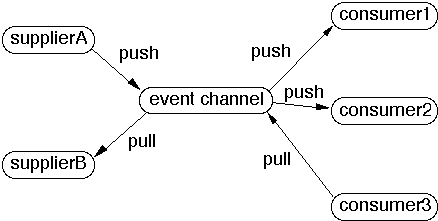 event channel[/caption]
3 lines, as follows:
1.Producer new item -> push to event channel -> event channel pushes this item to all consumers; meanwhile temporarily stores item, until all consumers have pulled this item

2.Consumer pull item -> event channel gives it to him

3.event channel polls all producers (pull can be initiated by consumer and event channel)
For more information about event channel please see CS635: Doc 8, Observer Variants (San Diego State University?)
5. enb Commands
make
node_modules/.bin/enb make
run a server
node_modules/.bin/enb server
node_modules/.bin/enb server -p portNum
Create css file
node_modules/bem/bin/bem create -l desktop.blocks -b header -T css
l is redefinition level
b is block
T is implementation technology
Redefine library block at desktop.blocks level
node_modules/bem/bin/bem create -l desktop.blocks -b input -T css
node_modules/bem/bin/bem create -l desktop.blocks -b page -T bemhtml.js
At page level, modify structure (wrapper), add styles (same as creating css file method)
node_modules/bem/bin/bem create -l desktop.blocks -b page -T bemhtml.js
node_modules/bem/bin/bem create -l desktop.blocks -b page -T css
Create bemhtml and css simultaneously
node_modules/bem/bin/bem create -l desktop.blocks -b goods -T bemhtml.js -T css
mix combined blocks
Supports 2 types of mix:
    mix(block, elem)
    mix(block, block)
Define mix structure in component's bemhtml, and load data
elem: 'title',
content: {
    block: 'link',
    mix: [{block: 'goods', elem: 'link'}],
    url: item.url,
    content: item.title
}
Can also define in page's BEMJSON
{
    block : 'footer',
    mix: [{
        block: 'box'
    }],
    content : [
        'footer content goes here'
    ]
}
Declare block dependencies, ensure dependent components are correctly introduced
node_modules/bem/bin/bem create -l desktop.blocks -b goods -T deps.js
Introduce third-party libraries, libraries that also follow BEM
Declare dependencies in bower.json
node_modules/.bin/bower i
Then update make.js
Configure redefinition levels
.enb/make.js
Override component js
node_modules/bem/bin/bem create -l desktop.blocks -b box -T js
Add new page, service will compile on first access to that page
node_modules/bem/bin/bem create -l desktop.bundles -b about
Visit http://localhost:8080/desktop.bundles/about/about.html
6. Question Answers
- Q1. Is module loading, packaging and publishing convenient?
Configuration file loads on demand, rarely needs manual configuration, packaging and publishing has command line tools, very convenient
- Q2. Supports arbitrary multi-level redefinition?
Supports .enb/make.js
- Q3. Is build controllable?
Controllable, can modify build rules in .enb/make.js
- Q4. Where to put base styles like
body{margin: 0; font-size: 12px}?
body itself is also a Block: block : 'page', title : 'BEM-Componentization', just redefine page component, for example .page { margin: 0; font-size: 12px; background-color: #fff; }
- Q5. Where to put global logic?
Put global logic in page component (similar to base style approach), can be as a state of body, for example mods : { map: 'show' }
- Q6. How to handle dynamic data? (Dynamically modify
page.bemjson.js? Or dynamically create components?)
Dynamically request data, after getting notify related Blocks through event mechanism
- Q7. How to implement cross-component business logic?
See 4 methods mentioned in inter-component interaction section
7. Summary
BEM looks slightly bulky, but every file every line in project is clear, readability is very good
Advantages:
- High component output rate
Writing pages is assembling components, if no components customize anytime, component boundaries are strict, can guarantee reusability
- Components are maintainable
Each component has independent folder, boundary limits, harder to couple with other components
- Performance advantages
Small component granularity, load on demand, no redundancy
- Unified coding style
Style class names, JS function names etc. are all built-in set of rules, guaranteeing everyone's code looks about the same
- Control by state
Blur event concept, only focus on components and component states, SoC advantages
- Logic separation
Modularization, logic levels, MVC decompose everything as much as possible, clearer
[caption id="attachment_1138" align="alignnone" width="395"]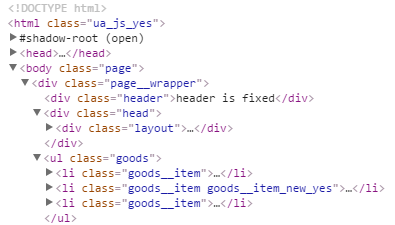 HTML structure generated by BEM[/caption]
If it can bring high maintainability, what does it matter if it's a bit longer, uglier, and more troublesome?
And as BEM says, they only provide a methodology, we can modify freely according to actual situation (for example WeChat team uses improved version, see references for details)
Or even if not using BEM, many principles therein are also universal and usable, such as "guarantee minimal dependencies in component development", "prohibit directly accessing DOM elements", "4 component interaction methods" etc.
No comments yet. Be the first to share your thoughts.