
I. Problem Restatement
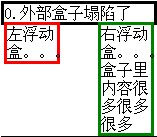 Well, this is the collapsing box. The outer box should wrap around the two inner floated boxes, but it doesn't.
II. Cause of the Problem
All three boxes only have width set, without height specified. The two inner boxes have left and right floats applied respectively. The layout is this simple, but the result is different from what we expect.
The reason for this problem is that the two inner boxes have the float property, which removes elements from the normal document flow. The direct consequence is that the outer box loses its two children. Since there are no other inner boxes, the outer box only wraps the text node content, leaving the two inner boxes outside.
III. Solutions
- Based on the analysis of the cause above, it's not difficult to find the first solution (since the children are lost, let's go find them)
—— Add float to the outer box as well
Remove the outer box from the normal document flow too, letting it meet its children.
Disadvantage: Poor readability, not easy to maintain (others will find it hard to understand why float should be added to the parent element), and may require adjusting the entire page layout
- —— Add an empty box with clear property at the bottom inside the outer box
It can be a div or other block-level elements, or even simpler: put <br style="clear:both;" /> at the bottom inside the box
Use the empty box at the bottom to clear the float and prop up the box again.
Disadvantage: Introduces redundant elements
- —— Clear float using overflow:auto
Just add this property to the outer box
Very simple
Disadvantage: Scrollbars may appear when applying borders and margins, affecting appearance
- —— Clear float using after pseudo-element
Set clear property on the after pseudo-element of the outer box, then hide it
This is actually an improvement on the empty box solution, a pure CSS solution that doesn't require introducing redundant elements. This is the recommended solution in books and the best solution provided online, but the problem is that [IE7-] doesn't support the after pseudo-element. Books say [IE6-] needs to be used with the hack: .wrapper{height:1%;}. Regardless of who is right or wrong, [IE7-] doesn't seem to cause problems at all. Let's look at the facts.
IV. Test Results
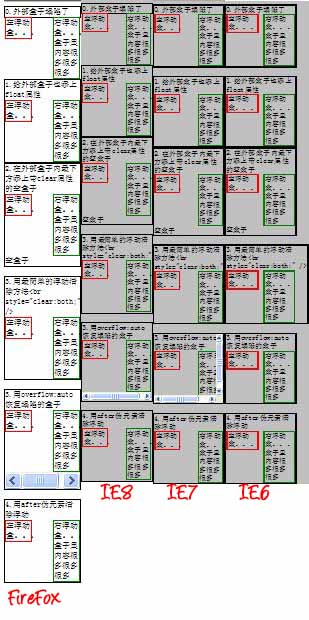
(Test results for IE6/7 are from IETester, IE8 and FF are from local machine. Chrome results are basically consistent with FF, but Chrome's scaling is not very scientific, so no screenshot was taken. Interestingly, looking carefully at the screenshots, you can find that: IE6/7/8 all have different rendering results...)
You can click experimental source code to test directly. As for which method is better, it's hard to say, but judging from IETester test results, the same code doesn't cause box collapse problems in IE. If IETester is correct, IE shouldn't have box collapse problems at all.
But having several optional solutions is always good, you can choose according to specific situations.
Off-topic
Actually, there's another most direct solution: specify width and height for each box, make it as big as needed. But this doesn't count as a solution because such layout is not content-adaptive. However, if page content rarely changes, this is also a good solution because its compatibility is unquestionable.
No comments yet. Be the first to share your thoughts.