
I. What is DNS?
DNS (Domain Name System) is equivalent to the internet's address book, capable of translating domain names (www.example.com) into IP addresses (93.184.216.34):
Address book for all of internet.
From a technical perspective, DNS is a hierarchical distributed database, plus some established protocols, including database query and update mechanisms, replication mechanisms for database information between different servers, and database schema.
DNS architecture is a hierarchical distributed database and an associated set of protocols.
P.S. Besides hierarchical databases, there are also relational databases and network databases.
II. Origin of DNS
DNS originated in the early days of the internet, when the internet was still a small network established by the United States Department of Defense for research purposes. A HOSTS file was used to manage hostnames of various computers in the network, and this HOSTS file was placed on a centrally managed server. Each site that needed to resolve hostnames had to download this file first.
As the number of hosts in the network continued to increase, the traffic generated by the HOSTS file update process and file size issues gradually emerged. Thus, there was an expectation to establish a distributed hostname management system that could flexibly scale and support various data types, as key infrastructure in the internet.
And this new distributed system is DNS (Domain Name System).
P.S. The earliest DNS specifications were RFC 882 and RFC 883, later replaced by RFC 1034 and RFC 1035. Subsequent related specifications expanded on security, implementation, management, and other parts based on these.
III. Basic Concepts
Domain Names
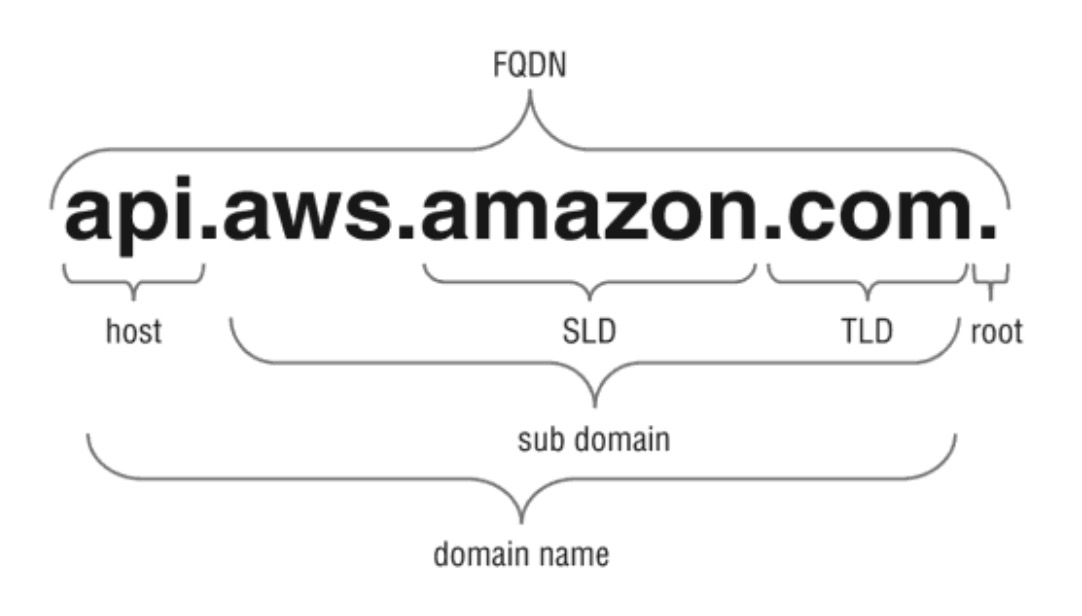
Among them, each part has a corresponding name:
-
Root domain: Tree root, represents the unnamed first level, such as the trailing dot in
www.example.com. -
Top-level domain: Used to indicate country, region, or organization type, such as
.com,.edu -
Second-level domain: Variable length, registered by individuals or organizations, such as the
examplepart inexample.com. -
Subdomain: Derived from second-level domain, created by the organization/individual holding the second-level domain, such as
www.example.com -
Host or resource name: Leaves in the tree structure, such as the leftmost
apiinapi.aws.amazon.com
P.S. Additionally, FQDN in the figure refers to Fully Qualified Domain Name, composed of hostname and domain name, capable of uniquely identifying a host's position in the tree structure.
Top-level domains are maintained by domain name registration institutions managing DNS, allocated to various organizations by country or region, for example:
-
.com: Commercial organizations -
.edu: Educational institutions -
.org: Non-profit organizations -
.net: Networks (the backbone of the Internet) -
.gov: Non-military government organizations -
mil: Military government organizations -
arpa: Reverse DNS -
.**: Two-letter country codes, such as.us,.au,.ca,.fr
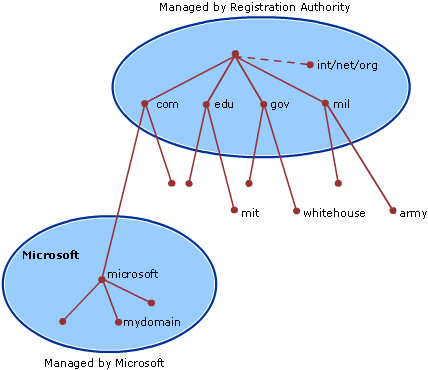
Taking mydomain.microsoft.com. (trailing dot . indicates root domain) as an example:
Resource Records
Resource records (RR) compose the DNS database, common types include:
-
A record (Address record): Address record, points domain name to IP address
-
AAAA record (IPv6 address record): IPv6 address record, equivalent to A record supporting IPv6
-
CAA record (Certification Authority Authorization): Certificate authority authorization record, used to specify which CA institutions are allowed to issue certificates for the domain
-
CNAME record (Canonical name record): Alias record, points one domain name to another domain name, or other CNAME records, A records
-
MX record (Mail exchange record): Mail exchange record, specifies mail servers used to receive messages; if there are multiple mail servers, can specify respective priorities
-
NAPTR record (Naming Authority Pointer): Allows matching and replacing domain names through regular expressions, such as VoIP systems converting phone numbers entered by users into SIP URIs
-
NS record (Name server record): Name server record, specifies DNS servers used to resolve domain names and subdomain names
-
PTR record (PTR Resource Record): PTR record, points IP address to domain name; difference from CNAME is it ends directly and returns results, mostly used for reverse lookup (looking up domain name via IP)
-
SOA record (Start of authority record): Specifies DNS authority information, including primary domain name server, domain administrator's email, domain serial number, etc.
-
SPF record (Sender Policy Framework record): Sender policy framework record, early used to verify mail sender identity, now deprecated; TXT record is recommended instead
-
SRV record (Service locator record): Generic service location record, specifies server where service is located (domain name and port number), mostly used for SIP (Session Initiation Protocol)
-
TXT record (Text record): Text record, used for strings
Among them, CAA record is a certificate security mechanism; CA institutions check CAA records when issuing certificates, and refuse to issue certificates for the domain if not authorized. See DNS Certification Authority Authorization for details.
Note, NS records and SOA records are not easy to understand, related to DNS structure, see structure section below for details.
P.S. For nearly a hundred other DNS record types, see List of DNS record types.
For example:
# A record
$ dig -t A ayqy.net
ayqy.net.		600	IN	A	121.42.135.10

# CNAME record
$ dig -t CNAME www.baidu.com
www.baidu.com.		600	IN	CNAME	www.a.shifen.com.

# NS record
$ dig -t NS ayqy.net
ayqy.net.		86400	IN	NS	dns10.hichina.com.
ayqy.net.		86400	IN	NS	dns9.hichina.com.

# MX record
$ dig -t MX ayqy.net
ayqy.net.		600	IN	MX	10 mxw.mxhichina.com.
ayqy.net.		600	IN	MX	5 mxn.mxhichina.com.
P.S. The second column above is the TTL (Time-to-Live) value related to caching mentioned above, unit is seconds.
Routing Policies
Besides basic mapping rules, DNS services may also support some routing policies, such as:
-
Weighted routing policy: Distributes traffic by priority according to specified weight values, can be used for A/B testing, Blue Green Deployment and other scenarios
-
Latency routing policy: Resolves domain names based on latency conditions, such as selecting the IP with minimum latency
-
Geolocation routing policy: Resolves domain names based on user's geographic location (countries, continents, etc.)
-
Geoproximity routing policy: Resolves domain names based on proximity between user's location and target resource location
-
Failover routing policy: Used for Active-Passive Failover Mode, switches to another IP after one IP has issues
-
Multivalue answer routing policy: Simple DNS layer Load Balancing, can configure one-to-many mapping, randomly select from them
P.S. For more information about routing policies, see Creating and Managing Traffic Policies.
IV. Structure

DNS domain space is divided into Zones for management; zones are equivalent to DNS server's jurisdiction scope.
Zones
A DNS database is divided into multiple zones; each zone contains resource records and their owner information for consecutive parts of the domain space. The formed Zone files are maintained by DNS servers, and one DNS server can manage zero to multiple zones.
Each zone corresponds to a specific domain name, called the zone's Root domain. The zone contains all domain name information ending with the zone's root domain. The first record in zone files is SOA (Start of Authority) resource record, identifying the primary DNS domain name server in that zone as the best information source, and some timers related to information updates (such as Refresh Interval, Expire Time, etc.).
Delegation
Domain names in a zone can be delegated to another zone located on a different DNS server. Delegation is the process of handing over part of DNS space to another DNS server, such as another organization, department, or workgroup. This delegation relationship is identified through NS resource records, specifying the delegated zone and its corresponding authoritative server domain name in the record.
Cross-zone delegation is one of DNS's original design goals, to satisfy:
-
Delegate management work of one DNS domain to multiple organizations or departments
-
Distribute maintenance work of a large DNS database across multiple DNS servers, to improve domain name resolution performance and fault tolerance
-
Place hosts under appropriate domains according to organizational affiliation
When needing to resolve domain names across zones, ask the DNS server of the target zone in the NS record.
For example, microsoft.com. is delegated to microsoft.com and mydomain.microsoft.com two zones for management:

V. Implementation Principles
Replication Mechanism
The same part of domain space can be represented by multiple zones, divided into:
-
Primary zone
-
Secondary zone
-
Stub zone
Updates of all records under a zone occur in the primary zone; secondary zones and stub zones are read-only primary zone copies. The difference is stub zones only contain records used to identify authoritative servers (DNS servers hosting these three zone types). And the DNS server hosting the primary zone is that zone's primary DNS server; DNS servers hosting secondary zones are secondary DNS servers.
Zone files on primary DNS servers (or secondary DNS servers) can be replicated to multiple DNS servers; this process is called Zone transfer, with 2 transfer methods:
-
Push: When zone files change on primary DNS server, notify one or more secondary DNS servers
-
Pull: When DNS service on secondary DNS server starts, and when zone file refresh interval expires, secondary server actively asks primary DNS server about changes
According to data volume transferred, divided into:
-
Full: AXFR (A Full Zone Transfer), transfers all records
-
Incremental: IXFR (incremental zone transfer), only transfers changed records
Query Mechanism
DNS queries occur between DNS clients and DNS servers, and between two DNS servers. Generally, a set of records for a specific domain name is queried at once, such as all its A records.
Specifically, DNS queries are divided into 2 types:
-
Recursive query: DNS server must contact other relevant DNS servers
-
Iterative query: DNS server responds based on local data; if really unable to resolve, returns a negative response
The former is commonly used for DNS clients (such as DNS resolvers) and DNS forwarding services. If unable to resolve relying only on local data (local zone files and previous query result cache), escalate to root DNS server (forwarding service escalates to source server first). The latter is commonly used when DNS services query domain names outside their domain; at this point, may need to ask multiple external DNS servers to complete resolution.
Taking www.whitehouse.gov as an example:

Specific query process is as follows:
-
Client initiates recursive query to local DNS server (A record)
-
Local DNS server initiates iterative query to root DNS server (A record)
-
Root DNS server returns referral to
.govdomain name server (A record) -
Local DNS server initiates iterative query to
.govdomain name server (A record) -
.govdomain name server returns referral towhitehouse.govdomain name server (NS record) -
Local DNS server initiates iterative query to
whitehouse.govdomain name server (A record) -
whitehouse.govdomain name server responds to iterative query (IP address ofwww.whitehouse.gov) -
Local DNS server responds to original recursive query (IP address of
www.whitehouse.gov)
P.S. Among them, Referral (DNS Referral) refers to indirect answer:
DNS Referrals. The term referral indicates a response to a query which does not contain an answer section (it is empty) but which contains one or more authoritative name servers (in the Domain Authority section) that are closer to the required query question.
See DNS Referrals for details.
Caching Mechanism
TTL (Time-to-Live) value in resource records is equivalent to the record's expiration date; other DNS servers decide how long to cache this information based on TTL. If a record doesn't specify its own TTL, DNS server inherits default TTL from SOA record, to prevent other DNS servers from extending cache for resource records.
Client's DNS resolver also caches received DNS query results; cache duration also follows TTL. When DNS server responds with query cache, it passes down cached TTL; receiver takes received TTL value as standard (not reset according to own TTL), to ensure resource records can expire normally.
Setting TTL needs to consider accuracy of cached information, as well as DNS server utility and network traffic issues; the two somewhat conflict. If TTL is too short, possibility of old information appearing is reduced, but DNS server utility and traffic issues emerge. If TTL is too long, cached information may become outdated, meaning resolvers may return wrong results, but can alleviate utility and traffic issues.
P.S. For more information about DNS caching and updates, see DNS Processes and Interactions.
At this point, DNS inside and out is clear.
No comments yet. Be the first to share your thoughts.