
Zero. 7 Modularization Methods
1. Section Comments
<!--html-->
<script>
    // module1 code
    // module2 code
</script>
Manually add comments to mark module scope, similar to section comments in CSS:
/* -----------------
 * TOOLTIPS
 * ----------------- */
The only function is to make browsing code easier, quickly find specified modules, the fundamental reason is single file content is too long, already encountered maintenance troubles, so manually insert some anchors for quick jumping
Very primitive modularization solution, no substantial benefits (such as module scope, dependency handling, inter-module error isolation, etc.)
2. Multiple script Tags
<!--html-->
<script type="application/javascript" src="PATH/polyfill-vendor.js" ></script>
<script type="application/javascript" src="PATH/module1.js" ></script>
<script type="application/javascript" src="PATH/module2.js" ></script>
<script type="application/javascript" src="PATH/app.js" ></script>
Split each module into independent files, has 3 benefits:
-
Handle module dependencies by controlling resource loading order
-
Has inter-module error isolation (
module1.jsinitialization execution exception won't blockmodule2.jsandapp.jsexecution) -
Each module is in separate file, truly improves maintenance experience
But still exists 2 problems:
-
No module scope
-
Resource request quantity relates to modularization granularity, need to find balance between performance and modularization benefits
3. IIFE
const myModule = (function (...deps){
   // JavaScript chunk
   return {hello : () => console.log('hello from myModule')};
})(dependencies);
Can be used as patch, used together with other methods, provides module scope
4. Asynchronous module definition (AMD)
RequireJS example:
// polyfill-vendor.js
define(function () {
    // polyfills-vendor code
});

// module1.js
define(function () {
    //...
    return module1;
});
// module2.js
define(function () {
    //...
    return module2;
});

// app.js
define(['PATH/polyfill-vendor'] , function () {
    define(['PATH/module1', 'PATH/module2'] , function (module1, module2) {
        var APP = {};

        if (isModule1Needed) {
            APP.module1 = module1({param: 1});
        }
        APP.module2 = new module2({a: 42});
    });
});
A relatively complete module definition solution, solves module dependency problems, provides module scope, error isolation/capture and other solutions. But looks somewhat redundant
P.S. Additionally there's SeaJS (official website is gone, no introduction). Community-implemented modularization patches are all transition products, currently it seems JS is finally about to welcome modularization features
5. CommonJS
NodeJS example:
// polyfill-vendor.js
    // polyfills-vendor code

// module1.js
    // module1 code
    module.exports= module1;
// module2.js
module.exports= module2;

// app.js
require('PATH/polyfill-vendor');

const module1 = require('PATH/module1');
const module2 = require('PATH/module2');

const APP = {};
if(isModule1Needed){
    APP.module1 = module1({param:1});
}
APP.module2 = new module2({a: 42});
NodeJS follows CommonJS specification, file is module, also a relatively complete solution, but not suitable for browser environment
6. UMD (Universal Module Dependency)
UMD example:
(function (global, factory) {
    typeof exports === 'object' && typeof module !== 'undefined' ? factory() :
    typeof define === 'function' && define.amd ? define(factory) :
(factory());
}(this, function () {
    // JavaScript chunk
    return {
       hello : () => console.log('hello from myModule')
    }
});
Also a patch, compatible with AMD and CommonJS module definitions, achieves module cross-environment universality. The fundamental reason for UMD's appearance is too many community module definition methods, open source module maintenance becomes very troublesome (various MD issues appear, had to switch to UMD), so urgently need standardization, ES6 shoulders this mission
P.S. Of course, open source module maintenance problems still exist (to accommodate ES Module, added specialized ES6 build version), but won't intensify, after all already on the road to standardization
7. ES6 Module
Basic usage example:
// myModule.js
export {fn1, fn2};

function fn1() {
    console.log('fn1');
}
function fn2() {
    console.log('fn2');
}

// app.js
import {fn1, fn2} from './myModule.js';
fn1();
fn2();

// index.html
<script type="module" src="app.js"></script>
Note:
-
scripttag must declaretype="module"to indicate parsing content as ES Module way, otherwise won't execute -
importmodule file exact path (./), file extension (.js) and corresponding MIME type must all exist, otherwise import fails
Currently major mainstream browsers all provide ES Module experimental functionality:
-
Safari 10.1.
-
Chrome Canary 60 – behind the Experimental Web Platform flag in chrome:flags.
-
Firefox 54 – behind the dom.moduleScripts.enabled setting in about:config.
-
Edge 15 – behind the Experimental JavaScript Features setting in about:flags.
The Demo I've been waiting 2 years for can finally run: http://ayqy.net/temp/module/index.html
P.S. Generally all called ES Module, because Module feature doesn't exist in multiple versions, ES Module refers to the Module feature introduced by ES6
I. Syntax
export
// Basic syntax
export { name1, name2, …, nameN };
export { variable1 as name1, variable2 as name2, …, nameN };
export let name1, name2, …, nameN; // also var, function
export let name1 = …, name2 = …, …, nameN; // also var, const

// Default export
export default expression;
export default function (…) { … } // also class, function*
export default function name1(…) { … } // also class, function*
export { name1 as default, … };

// Aggregate export
export * from …;
export { name1, name2, …, nameN } from …;
export { import1 as name1, import2 as name2, …, nameN } from …;
Note the difference between export and export default:
-
Each module (/file) can only have one
export default, can have multipleexport -
export defaultcan follow any expression, whileexportsyntax only has 3 types
For example:
// Illegal, syntax error
export {
    a: 1
};
// Instead should use export { name1, name2, …, nameN };
let a = 1;
export {
    a
};
// Or export let name1 = …, name2 = …, …, nameN; // also var, const
export let a = 1;
Default Export
Default export is a special export form, for example:
// module.js
export {fn1, fn2};
function fn1() {
    console.log('fn1');
}
function fn2() {
    console.log('fn2');
}
export default {
    a: 1
};
let b = 2;
export {
    b
};
export let c = 3;

// app.js
import * as m from './module.js';
console.log(m);
// Output result
Module {
    b: 2,
    c: 3,
    default: {
        a: 1
    },
    fn1: ƒn1,
    fn2: ƒn2
}
Default export is isolated in Module object's default property, treated differently from other export
Aggregate Export
Equivalent to import + export, but won't introduce each API variable into current module scope (import then directly export, cannot reference), only serves as API aggregation transit function, for example:
// lib.js
let util = {name: 'util'};
let dialog = {name: 'core'};
let modal = {name: 'modal'};

export {
    util,
    dialog,
    modal
}

// module.js
console.log(`before export from lib: ${typeof dialog}`);
export * from './lib.js';
console.log(`after export from lib: ${typeof dialog}`);
Before and after are both undefined, because only transit, not introduced into current module scope. While import + export will first import, available in current module
import
// Import default export content
import defaultMember from "module-name";
// Import all export content, including default, and package into object named name
import * as name from "module-name";
// Import specified export content by name
import { member } from "module-name";
import { member as alias } from "module-name";
import { member1, member2 } from "module-name";
import { member1, member2 as alias2 , [...] } from "module-name";
// Import default export content, while import specified export content by name
import defaultMember, { member [ , [...] ] } from "module-name";
import defaultMember, * as name from "module-name";
// Don't import things exposed in module, only execute that module's code
import "module-name";
The last type is quite interesting, called Import a module for its side effects only, only execute module code, don't introduce anything new (only parts affecting external state will take effect, i.e. side effects)
P.S. For more information about ES Module syntax, please see [module_ES6 notes 13](/articles/module-es6 笔记 13/), or ES Module Spec in reference materials section
P.S. NodeJS is also considering supporting ES Module, but encountered problem of how to distinguish CommonJS modules and ES Module, still under discussion, for more information please see ES Module Detection in Node
II. Loading Mechanism
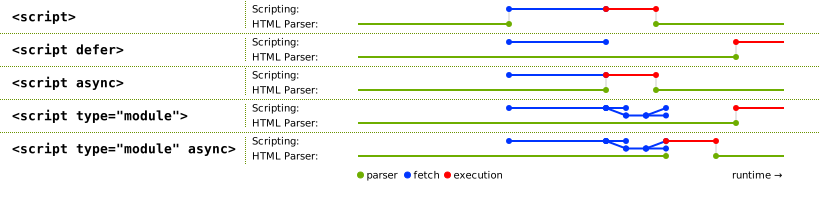
That is to say:
-
type="module"resources equivalent to having built-indefereffect (execute after HTML document parsing completes) -
asyncstill valid (execute immediately after resource loads, continue parsing HTML document after execution completes) -
importresource loading is parallel
Has built-in defer effect, different from bare script default behavior (load resource execute immediately, and block HTML document parsing). Additionally, although import loading same-level resources is parallel, the process of finding next-level dependencies is inevitably sequential, this part of performance cannot be ignored, even if browser natively supports ES Module, also cannot import recklessly
Similar to @import rule in CSS, may develop best practices, seeking balance between modularization and loading performance
III. Characteristics
1. Static Mechanism
Cannot use import in if, try-catch statements, functions or eval etc., can only appear at module outermost layer
And import has hoisting characteristic, like variable declarations being hoisted to current scope top, import declared in module will be hoisted to module top
P.S. Static module mechanism benefits parsing/execution optimization
2. New script Type
Need to use new script type attribute type="module". Because parser has no way to infer whether content is ES Module (for example no import, export keywords, also follows strict mode, then does it count as a module?)
Additionally, guessing based on content exists multiple parsing performance overhead
3. Module Scope
Each module has its own scope, variable declarations under module won't expose to global
4. Strict Mode Enabled by Default
this doesn't point to global, but undefined
5. Supports Data URI and Blob URI
import grape from 'data:text/javascript,export default "grape"';

// create an empty ES module
const scriptAsBlob = new Blob([''], {
    type: 'application/javascript'
});
const srcObjectURL = URL.createObjectURL(scriptAsBlob);
 // insert the ES module and listen events on it
const script = document.createElement('script');
script.type = 'module';
document.head.appendChild(script);
// start loading the script
script.src = srcObjectURL;
6. Restricted by CORS
Cross-origin module resources cannot be imported, also cannot load via script tag as module way
7. HTTPS Resources Cannot import HTTP Resources
Similar to HTTPS page loading HTTP resources, will be blocked
8. Modules are Singletons
Different from ordinary script, imported modules are singletons (execute only once), whether through import or script tag with type="module" introduction
9. Request Module Resources Without Credentials
Same temperament as Fetch API, by default doesn't bring ID card, need to add crossorigin attribute to script tag
IV. Problems
1. import Errors
Must give exact module file path, otherwise won't execute module content, and Chrome 60 doesn't even have error reporting
P.S. import errors currently still have differences across browsers
2. Inter-Module Error Isolation Still a Problem
Resource loading errors: dynamically insert script to load modules, onerror listens for loading exceptions
Module initialization errors: window.onerror global capture, try to find module name through error information, record module initialization failure
3. Request Quantity Explosion
For example lodash demo, needs to load 600+ files
Using HTTP2 can alleviate fragmented file problems, but from root perspective, need a set of best practices suitable for production environment, standardize modularization granularity
4. Dynamic import
Currently not yet implemented, import() API specifically solves this problem, specification still at draft stage 3, for more information please see Native ECMAScript modules: dynamic import()
5. Module Environment Detection
Check if current execution environment is module:
const inModule = this === undefined;
Looks not very reliable, but seems can only do it this way, because document.currentScript is null in ES Module, no way to do type check
V. Fallback Solutions
1. Feature Detection
Go through feature detection, introduce modules by environment detection util, quite laborious and loses performance, for example malyw/es-modules-utils
typeof doesn't work, because import, export are keywords, can insert type="module" script tag, load empty module (can use Blob URI or Data URI), triggering onload indicates support
Additionally there's a clever method:
<script type="module">
    window.__browserHasModules = true;
</script>
Introduce such modules for feature detection, but because ES Module has built-in defer effect, to guarantee execution order, all subsequent JS resources must have defer attribute (including normal version used for fallback)
2. nomodule
nomodule attribute, function similar to noscript tag, <script nomodule>console.log('only execute in environments not supporting ES Module')</script>
But relies on browser support, in environments not supporting this attribute but supporting ES Module there's problems (both execute), already added to HTML specification, but currently compatibility still relatively poor:
-
Firefox latest version supports
-
Edge doesn't support
-
Safari 10.1 doesn't support, but has way to solve
-
Chrome 60 supports
For more information about fallback solutions, please see Native ECMAScript modules: nomodule attribute for the migration
No comments yet. Be the first to share your thoughts.