
Preface
ES2020 (i.e. ES11) was officially released last week (June 2020), all 10 proposals that entered Stage 4 before this have been incorporated into the specification, becoming new features of the JavaScript language
I. Feature Overview
ES Module received some enhancements:
-
import(): A syntax that can use dynamic module identifiers to asynchronously import modules
-
import.meta: An object used to carry module-related metadata
-
export * as ns from "mod";: A new aggregate export syntax
Formally supported safe chaining operations:
-
Optional chaining: New operator
?.can check existence before property access, method calls -
Nullish coalescing Operator: New operator
??used to provide default values
Provided native support for big number operations:
- BigInt – arbitrary precision integers: A new primitive numeric type, supports arbitrary precision integer operations
Some basic APIs also have new changes:
-
Promise.allSettled: A new Promise combinator, doesn't have short-circuit characteristics like
all,race -
String.prototype.matchAll: Returns all results matched by regular expressions in global match mode as an iterator (
index,groups, etc.) -
globalThis: Universal method to access global scope
this -
for-in mechanics: Specifies certain behaviors of
for-inloops
II. ES Module Enhancements
Dynamic import
We know ES Module is a static module system:
The existing syntactic forms for importing modules are static declarations.
Static is reflected in:
They accept a string literal as the module specifier, and introduce bindings into the local scope via a pre-runtime "linking" process.
-
Static loading:
import/exportdeclarations can only appear in top-level scope, doesn't support on-demand loading, lazy loading -
Static identifiers: Module identifiers can only be string literals, doesn't support module names dynamically calculated at runtime
For example:
if (Math.random()) {
    import 'foo'; // SyntaxError
}

// You can't even nest `import` and `export`
// inside a simple block:
{
    import 'foo'; // SyntaxError
}
This strict static module mechanism gives static analysis based on source code, compilation optimization more room to play:
This is a great design for the 90% case, and supports important use cases such as static analysis, bundling tools, and tree shaking.
But very unfriendly to some other scenarios, such as:
-
Scenarios demanding first-screen performance: All modules referenced through
importdeclarations (including modules not temporarily needed during initialization) will be preloaded during initialization phase, affecting first-screen performance -
Scenarios where target module identifiers are difficult to determine in advance: For example, dynamically loading different modules based on user's language options (
module-en,module-zh, etc.) -
Scenarios where certain modules are only needed under special circumstances: For example, loading fallback modules under exceptional circumstances
To meet these needs for dynamically loading modules, ES2020 introduced dynamic import feature (import()):
import(specifier)
import() "function" inputs module identifier specifier (its parsing rules are same as import declarations), outputs Promise, for example:
// Target module  ./lib/my-math.js
function times(a, b) {
  return a * b;
}
export function square(x) {
  return times(x, x);
}
export const LIGHTSPEED = 299792458;

// Current module index.js
const dir = './lib/';
const moduleSpecifier = dir + 'my-math.mjs';

async function loadConstant() {
  const myMath = await import(moduleSpecifier);
  const result = myMath.LIGHTSPEED;
  assert.equal(result, 299792458);
  return result;
}
// Or without async & await
function loadConstant() {
  return import(moduleSpecifier)
  .then(myMath => {
    const result = myMath.LIGHTSPEED;
    assert.equal(result, 299792458);
    return result;
  });
}
Compared to import declarations, import() features are as follows:
-
Can be used in non-top-level scopes like functions, branches, on-demand loading, lazy loading are not problems
-
Module identifiers support variable input, can dynamically calculate and determine module identifiers
-
Not limited to
module, can also be used in ordinaryscript
Note, although looks like a function, import() is actually an operator, because operators can carry current module related information (used to parse module identifiers), while functions cannot:
Even though it works much like a function,
import()is an operator: in order to resolve module specifiers relatively to the current module, it needs to know from which module it is invoked. A normal function cannot receive this information as implicitly as an operator can. It would need, for example, a parameter.
import.meta
Another ES Module new feature is import.meta, used to expose module-specific metadata:
import.meta, a host-populated object available in Modules that may contain contextual information about the Module.
For example:
-
Module's URL or filename: For example
__dirname,__filenamein Node.js -
The
scripttag where it's located: For exampledocument.currentScriptsupported by browsers -
Entry module: For example
process.mainModulein Node.js
All such metadata can be hung on import.meta property, for example:
// Module's URL (browser environment)
import.meta.url
// Current module's script tag
import.meta.scriptElement
But need to note, specification doesn't clearly define specific property names and meanings, all determined by specific implementations, so these two properties hoped to be supported by browsers in feature proposals may or may not be supported in future
P.S. import.meta itself is an object, prototype is null
export-ns-from
Third ES Module related new feature is another module export syntax:
export * as ns from "mod";
Belongs to aggregate export of export ... from ... form, functionally similar to:
import * as ns from "mod";
export {ns};
But won't introduce target module's various API variables into current module scope
P.S. Comparing to import * as ns from "mod"; syntax, looks like an omission in ES6 module design's permutation and combination;)
III. Chaining Operation Support
Optional Chaining
Quite practical feature, used to replace such lengthy safe chaining operations:
const street = user && user.address && user.address.street;
Can use new feature (?.):
const street = user?.address?.street;
Syntax format as follows:
obj?.prop     // Access optional static property
// Equivalent to
(obj !== undefined && obj !== null) ? obj.prop : undefined

obj?.[?expr?] // Access optional dynamic property
// Equivalent to
(obj !== undefined && obj !== null) ? obj[?expr?] : undefined

func?.(?arg0?, ?arg1?) // Call optional function or method
// Equivalent to
(func !== undefined && func !== null) ? func(arg0, arg1) : undefined
P.S. Note operator is ?. not single ?, somewhat strange in function calls alert?.(), this is to distinguish from ? in ternary operator
Mechanism is very simple, if value appearing before question mark is not undefined or null, then execute operation after question mark, otherwise return undefined
Also has short-circuit characteristics:
// Short-circuits and returns undefined at .b?.m, won't alert 'here'
({a: 1})?.a?.b?.m?.(alert('here'))
Compared to &&, new ?. operator is more suitable for scenarios safely performing chaining operations, because:
-
Semantics clearer:
?.returnsundefinedwhen encountering property/method doesn't exist, unlike&&returning left side value (almost useless) -
Existence judgment more accurate:
?.only targetsnullandundefined, while&&returns when encountering any falsy value, sometimes cannot satisfy needs
For example commonly used regex extracting target string, syntax description quite concise:
'string'.match(/(sing)/)?.[1] // undefined
// Previously needed to do this
('string'.match(/(sing)/) || [])[1] // undefined
Can also cooperate with Nullish coalescing Operator feature to fill default values:
'string'.match(/(sing)/)?.[1] ?? '' // ''
// Previously needed to do this
('string'.match(/(sing)/) || [])[1] || '' // ''
// Or
('string'.match(/(sing)/) || [, ''])[1] // ''
Nullish coalescing Operator
Similarly introduced a new syntax structure (??):
actualValue ?? defaultValue
// Equivalent to
actualValue !== undefined && actualValue !== null ? actualValue : defaultValue
Used to provide default values, when left side actualValue is undefined or null, return right side defaultValue, otherwise return left side actualValue
Similar to ||, main difference is ?? only targets null and undefined, while || returns right side default value when encountering any falsy value
IV. Big Number Operations
Added a new primitive type, called BigInt, provides big integer operation support:
BigInt is a new primitive that provides a way to represent whole numbers larger than 2^53, which is the largest number Javascript can reliably represent with the Number primitive.
BigInt
Maximum integer Number type in JavaScript can accurately represent is 2^53, doesn't support operations on larger numbers:
const x = Number.MAX_SAFE_INTEGER;
// 9007199254740991 i.e. 2^53 - 1
const y = x + 1;
// 9007199254740992 correct
const z = x + 2
// 9007199254740992 wrong, didn't change
P.S. As for why it's 2 to the 53rd power, it's because numeric values in JS are all stored as 64-bit floating point numbers, removing 1 sign bit, 11 exponent bits (exponent in scientific notation), remaining 52 bits used to store values, 2 to the 53rd power corresponds to all these 52 bits being 0, next representable number is 2^53 + 2, middle 2^53 + 1 cannot be represented:
[caption id="attachment_2213" align="alignnone" width="625"]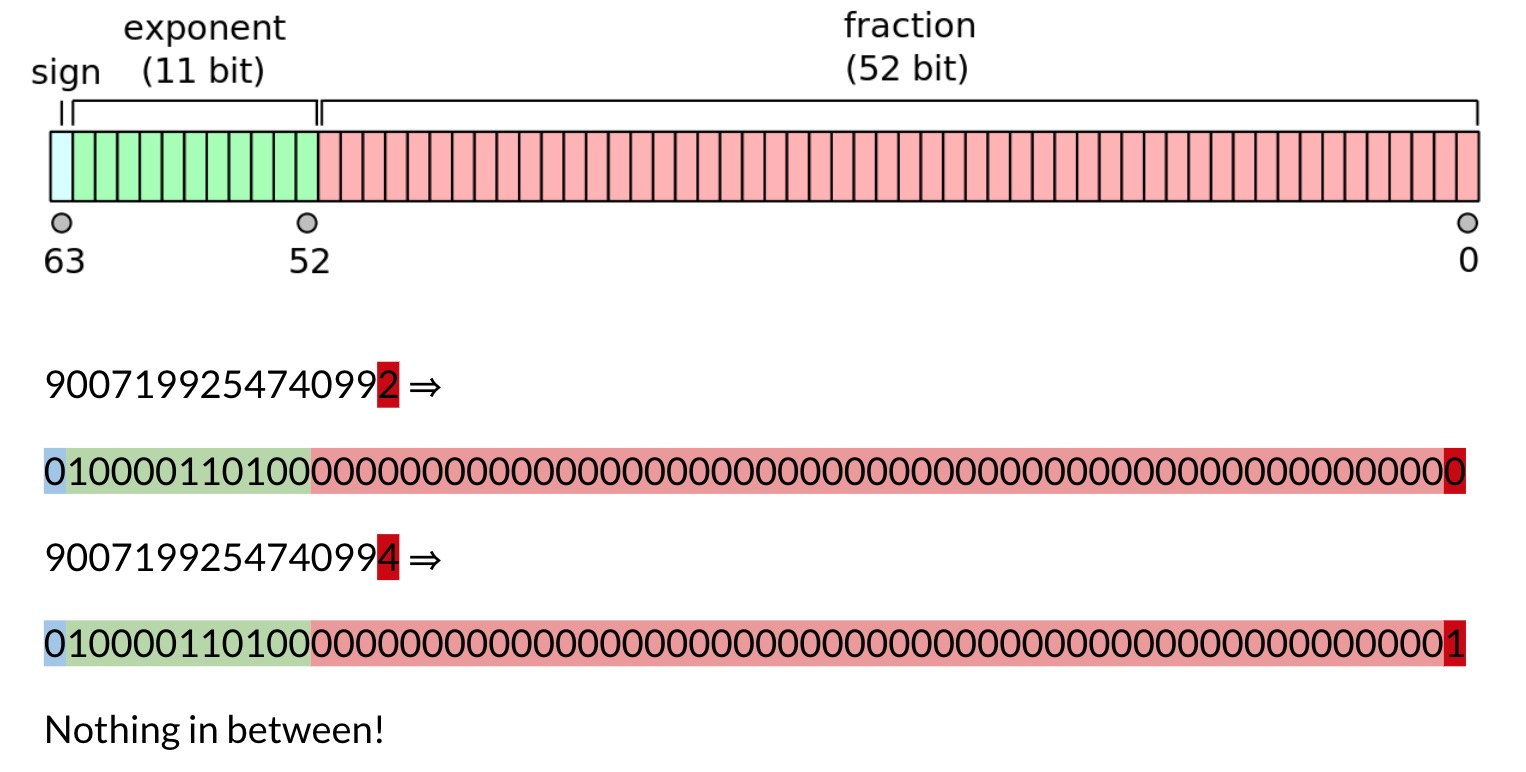 JavaScript Max Safe Integer[/caption]
Specific explanation see BigInts in JavaScript: A case study in TC39
BigInt type's appearance is precisely to solve such problems:
9007199254740991n + 2n
// 9007199254740993n correct
New things introduced include:
-
Big integer literals: Suffix a number with
nto represent big integer, for example9007199254740993n,0xFFn(binary, octal, decimal, hexadecimal literals can all suffix withnto becomeBigInt) -
bigintprimitive type:typeof 1n === 'bigint' -
Type constructor:
BigInt -
Overloaded mathematical operators (addition, subtraction, multiplication, division, etc.): Support big integer operations
For example:
// Create a BigInt
9007199254740993n
// Or
BigInt(9007199254740993)

// Multiplication operation
9007199254740993n * 2n
// Power operation
9007199254740993n ** 2n
// Comparison operation
0n === 0  // false
0n === 0n // true
// toString
123n.toString() === '123'
P.S. For more information about BigInt API details, see ECMAScript feature: BigInt – arbitrary precision integers
Need to note BigInt cannot be mixed with Number for operations:
9007199254740993n * 2
// Error Uncaught TypeError: Cannot mix BigInt and other types, use explicit conversions
And BigInt can only represent integers, so division directly truncates (equivalent to Math.trunc()):
3n / 2n === 1n
V. Basic APIs
Basic APIs also have some new changes, including Promise, string regex matching, for-in loops, etc.
Promise.allSettled
After Promise.all, Promise.race, Promise added a new static method called allSettled:
// After all passed promises have results (change from pending state to fulfilled or rejected), trigger onFulfilled
Promise.allSettled([promise1, promise2]).then(onFulfilled);
P.S. Additionally, any is also on the way, currently (2020/6/21) at Stage 3
Similar to all, but won't short-circuit because certain items are rejected, that is to say, allSettled will wait until all items have results (regardless of success or failure) before entering next link of Promise chain (so it will definitely become Fulfilled state):
A common use case for this combinator is wanting to take an action after multiple requests have completed, regardless of their success or failure.
For example:
Promise.allSettled([Promise.reject('No way'), Promise.resolve('Here')])
  .then(results => {
    console.log(results);
    // [
    //   {status: "rejected", reason: "No way"},
    //   {status: "fulfilled", value: "Here"}
    // ]
  }, error => {
    // No error can get here!
  })
String.prototype.matchAll
A common scenario in string processing is wanting to match all target substrings in a string, for example:
const str = 'es2015/es6 es2016/es7 es2020/es11';
str.match(/(es\d+)\/es(\d+)/g)
// Successfully get ["es2015/es6", "es2016/es7", "es2020/es11"]
In match() method, multiple results matched by regular expression will be packaged into array and returned, but cannot know relevant information about each match besides results, such as captured substrings, matched index positions, etc.:
This is a bit of a messy way to obtain the desired information on all matches.
At this time can only turn to most powerful exec:
const str = 'es2015/es6 es2016/es7 es2020/es11';
const reg = /(es\d+)\/es(\d+)/g;
let matched;
let formatted = [];
while (matched = reg.exec(str)) {
  formatted.push(`${matched[1]} alias v${matched[2]}`);
}
console.log(formatted);
// Get ["es2015 alias v6", "es2016 alias v7", "es2020 alias v11"]
And matchAll() method newly added in ES2020 is precisely a supplement for such scenarios:
const results = 'es2015/es6 es2016/es7 es2020/es11'.matchAll(/(es\d+)\/es(\d+)/g);
// Convert to array for processing
Array.from(results).map(r => `${r[1]} alias v${r[2]}`);
// Or take from iterator and process directly
// for (const matched of results) {}
// Get same results as above
Note, matchAll() doesn't return array like match(), but returns an iterator, more friendly to large data volume scenarios
for-in Traversal Mechanism
In JavaScript, key order when traversing objects through for-in is uncertain, because specification doesn't clearly define, and being able to traverse prototype properties makes for-in implementation mechanism quite complex, different JavaScript engines have their own deeply rooted different implementations, very difficult to unify
So ES2020 doesn't require unified property traversal order, but clearly defines some rules for some special cases during traversal process:
-
Cannot traverse Symbol type properties
-
During traversal, target object's properties can be deleted, ignore properties that have been deleted before being traversed
-
During traversal, if there are new properties, doesn't guarantee new properties can be processed in current traversal
-
Property names won't appear repeatedly (a property name appears at most once)
-
Properties on entire prototype chain of target object can all be traversed
Specifically see 13.7.5.15 EnumerateObjectProperties
globalThis
Last new feature is globalThis, used to solve problem that in different environments like browsers, Node.js, etc., global object names are not unified, getting global object is quite troublesome:
var getGlobal = function () {
  // the only reliable means to get the global object is
  // `Function('return this')()`
  // However, this causes CSP violations in Chrome apps.
  if (typeof self !== 'undefined') { return self; }
  if (typeof window !== 'undefined') { return window; }
  if (typeof global !== 'undefined') { return global; }
  throw new Error('unable to locate global object');
};
globalThis as unified global object access method, always points to this value in global scope:
The global variable globalThis is the new standard way of accessing the global object. It got its name from the fact that it has the same value as this in global scope.
P.S. Why not called global? Because global might affect some existing code, so started a new globalThis to avoid conflicts
At this point, all ES2020 new features are clear
VI. Summary
Compared to ES2019, ES2020 is a major update, dynamic import, safe chaining operations, big integer support... all added to the deluxe lunch
No comments yet. Be the first to share your thoughts.