
I. Positioning
A pattern used to strengthen unidirectional data flow.
II. Role
Decouple the data layer to make data predictable (React makes the UI predictable, while Flux makes data predictable).
Specific practices:
-
Use explicit data instead of derived data (declare before use, don't create data on the fly).
-
Separate data and view state (extract the data layer).
-
Avoid the side effects brought by cascading updates (mutual influence between M and V makes the data flow unclear).
Impact:
-
Improve data consistency.
-
Easy to pinpoint bugs accurately.
-
Facilitate unit testing.
III. Structure
         Generate action          Pass action          Update state
View Interaction ----------> Dispatcher ----------> Stores --------------> Views
There is only one global dispatcher, but there can be multiple stores. The dispatcher is only responsible for distributing/passing actions. The mapping between an action and specific state changes is maintained by the store. Therefore, a store is not a simple state collection model; it also contains the logic to update state based on actions. Following that is the connection from state to view, which depends on the specific implementation of data binding, such as notifying updates by triggering events in React (implicit setState()).
Most business logic resides in the store, while a small portion related to interactions and asynchronous operations is in the view (e.g., React components).
Business often involves cascading updates. For example, an interaction that marks a message as read needs to update the display style of that message in the list and decrement the unread count. Cascading updates make the unidirectional data flow no longer clear. Flux avoids this by mandating that actions must be triggered at the top level. A single view interaction triggers a set of actions (flattening cascading actions and gathering the relationships at the top level, directly related to the interaction), rather than a single view interaction triggering one large action, which then triggers nested cascading actions below.
Inversion of Control (IoC) is achieved by the store. The store does not provide setXXX() methods to allow external influence on internal state. The only way is through callbacks registered with the dispatcher to receive external data and update internal state itself, maintaining a clear separation of concerns.
[caption id="attachment_1422" align="alignnone" width="625"]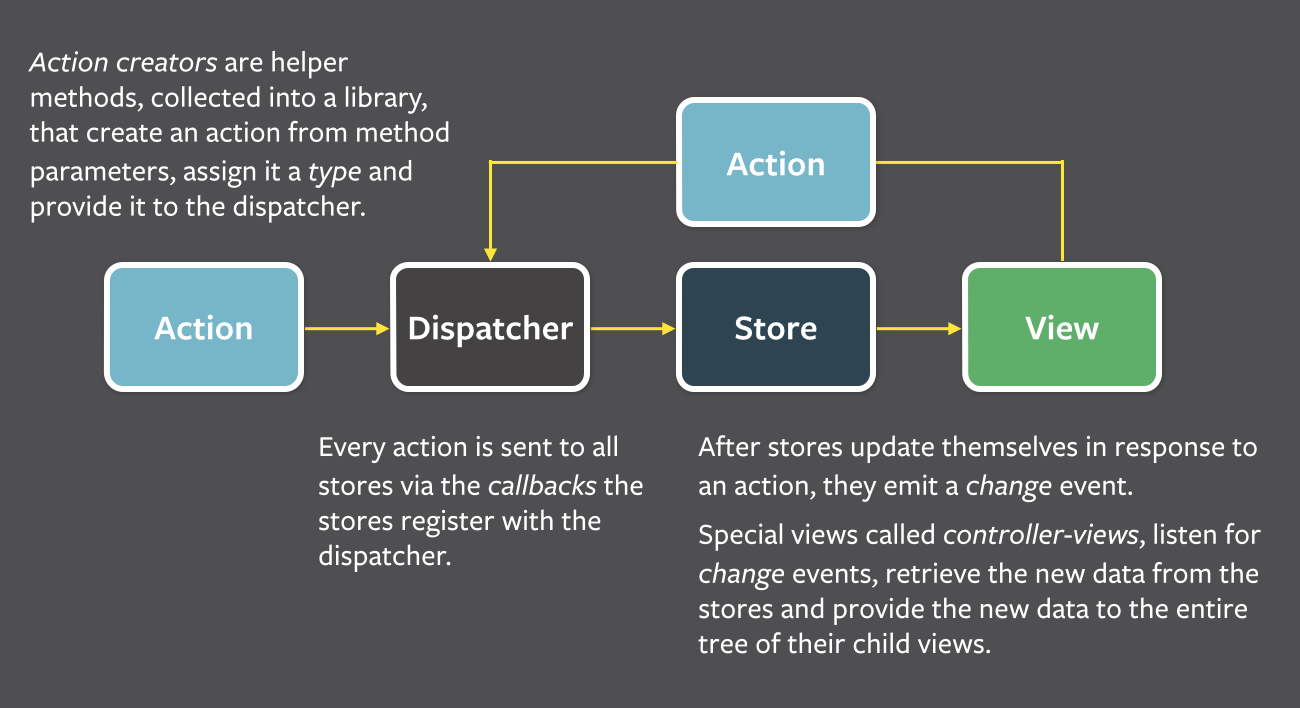 flux-simple-f8-diagram-explained[/caption]
Single Dispatcher
The central hub. All data flow passes through here. it has a callback registry and establishes connections with each store. The dispatcher itself is only responsible for passing actions to all stores. Each store registers itself with the dispatcher and provides a callback. When the dispatcher receives an action, all registered stores will receive the action and its payload through their respective callbacks.
As the application scales, the dispatcher becomes more complex, managing dependencies between stores (calling registered callbacks in order). A store can explicitly declare that it waits for other stores to complete their updates before updating itself.
A Collection of Stores
Contains application state and logic, acting as the Heavy Model in MVC, but managing a collection of states, unlike an ORM where a model represents a single data record. It is also different from a Backbone collection, simply managing a set of ORM-style objects.
A store is responsible for managing the internal state corresponding to a specific piece of application functionality. That is, stores are not divided by specific data models (ORM models) or types (Backbone collections), but by business function. For example, ImageStore records the state of a group of images, while TodoStore records a group of to-do items. Thus, a store represents a set of models in terms of data and a single piece of functionality in terms of logic.
The callback registered by a store with the dispatcher accepts an action parameter. Inside the store is a switch statement that dispatches to specific state update methods based on the action type. After the store updates, it broadcasts an event to tell the view that some states have changed, and the corresponding view retrieves the new state to update itself.
A Collection of Views
Some special views listen to broadcast events from the stores they depend on. These views are called controller-views, which contain the logic for fetching data from stores and passing it down to descendant views. A controller-view usually corresponds to a logical piece of content on the page, like a logical grouping of views.
After receiving an event from a store, the controller-view first retrieves new data through the getter exposed by the store, then calls its own setState() or forceUpdate(), triggering render(), which in turn triggers the render() of descendant components.
Usually, a large chunk of state is passed down, and components below take what they need. This reduces the number of states that need to be managed (avoiding fine-grained state slicing). Compared to top-level controllers updating state externally, this keeps descendant functionality as pure as possible.
A Collection of Actions
Utility methods are generally used to wrap the generation of actions and their registration with stores. The connection between stores and actions is maintained internally (via the action type).
Actions may also come from elsewhere, such as the server. During data initialization, if a service returns an error code or service data is updated, the view is synchronized by triggering an action.
IV. Characteristics
Mandatory Synchronicity
Action distribution/passing and internal state updates within the store are all synchronous. For asynchronous operations, an action is manually triggered upon completion; the mechanism itself does not manage asynchronous operations.
This makes the application's information flow very explicit. A bug scenario's state can be traced back to the store, then to the corresponding action, and finally to the point in the view layer that triggered the action. Since all steps in the process are synchronous, the state corresponding to an action is predictable, with no unexpected timing issues.
Inversion of Control (IoC)
The store updates its own state internally rather than from the outside, so other parts do not need to know the specific state changes; they only concern the store. Since the store only receives actions, unit testing it only requires providing an initial state, passing an action, and verifying if the final state matches expectations.
Semantic Actions
The store updates state based on actions, so an action is equivalent to a name for a set of state update operations. With semantic meaning, an action doesn't know how to update the state, but it describes the expected result and is relatively stable (rarely needing modification as it only describes a feature of the application). For example, MARK_THREAD_READ intends to set a message as read.
Extra semantic information helps trace state changes. Debugging tools like Redux DevTools make state changes traceable.
No Cascading Actions
An action is not allowed to trigger another action, avoiding the debugging complexity of cascading updates. Thus, actions are "atomic" without complex hierarchical relationships.
V. Conventions
In the best practices section, also known as the moral constraints of Flux.
Store
-
Cache data.
-
Only expose
gettersfor data access, nosetters. -
Respond to specific
actionsfrom thedispatcher. -
Trigger a
changeevent whenever any data changes. -
Only trigger
changeevents during the dispatch process.
Maintain internal state and only update it internally. Focus on specific actions. Trigger change unconditionally when data changes, and at no other time, unless initiated by the dispatcher.
Action
- Describe user behavior instead of
setters(e.g., it should beselect-pagerather thanset-page-id).
Container
-
React components used to control
views. -
Primary responsibility is to gather information from
storesand save it in their ownstate. -
Do not contain
propsor UI logic.
In fact, they are controller-views; the differences from regular views are as mentioned above.
View
-
React components controlled by a
container. -
Contain UI and rendering logic.
-
Receive all information and callbacks as
props.
Ordinary views, nothing special.
No comments yet. Be the first to share your thoughts.