
1. HMR
The Hot Module Replacement (HMR) feature, first provided by webpack, enables hot updating of JavaScript modules at runtime (replacing, adding, or removing modules without a full reload):
Hot Module Replacement (HMR) exchanges, adds, or removes modules while an application is running, without a full reload.
(Excerpted from Hot Module Replacement Concepts)
Compared to a full reload, the greatest significance of module-level hot updates is its ability to retain the application's current runtime state, making the more efficient Hot Reloading development model possible.
P.S. Later, other build tools implemented similar mechanisms, such as Browserify and even React Native Packager.
However, how are file changes generated by editing source code during compilation connected to module replacement at runtime?
2. Basic Principle

Upon detecting file changes, the build tool (HMR plugin) is notified. It sends the changed files (modules) to the runtime framework (HMR Runtime) running within the application. The runtime framework then injects these modules into the module system (adding/removing, or replacing existing modules).
The HMR Runtime is injected by the build tool during compilation. It maps compiled files to runtime modules using a unified module ID and exposes a series of APIs for application-layer frameworks (like React, Vue, etc.) to interface with.
3. HMR API
The most commonly used API is accept:
module.hot.accept(dependencies, callback): Listens for updates to specified dependent modules.
For example:
import printMe from './print.js';

if (module.hot) {
  module.hot.accept('./print.js', function() {
    console.log('Accepting the updated printMe module!');
    printMe();
  })
}
When accept (the callback) is triggered, it indicates that the new module has been injected into the module system. Any subsequent access will yield the new module instance.
P.S. For a complete example, see Hot Module Replacement Guides.
However, in practical scenarios, there are usually multi-level dependencies between modules. Replacing one module will affect all modules that depend on it (directly or indirectly):
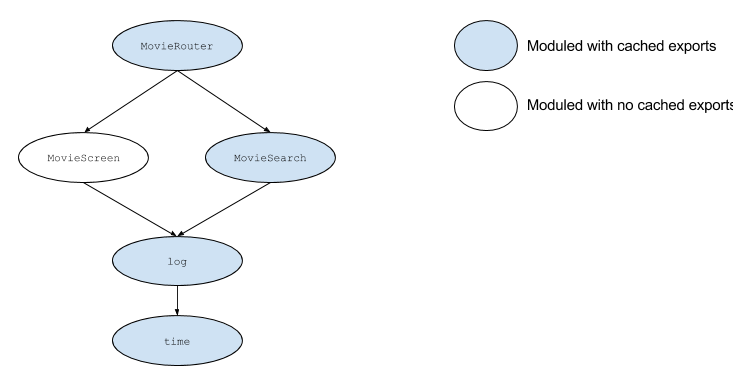
Does this mean we need to add similar update handling logic in all modules?
Usually, no, because module update events have a bubbling mechanism. Update events not handled by accept will bubble up the dependency chain. It's only necessary to handle them centrally at certain key nodes (like a Router component).
Besides accept, the API also provides:
-
module.hot.decline(dependencies): Flags dependencies as non-updatable (expecting a full reload). -
module.hot.dispose/addDisposeHandler(data => {}): Triggered when the current module is replaced. Used to clean up resources or pass state (via thedataparameter) to the new module. -
module.hot.invalidate(): Invalidates the current module, forcing it to update. -
module.hot.removeDisposeHandler(callback): Removes the listener for module replacement events.
P.S. For detailed information on the webpack HMR API, see Hot Module Replacement API.
4. HMR Runtime
From the application's perspective, the module replacement process is as follows:
-
The application asks the HMR Runtime to check for updates.
-
The HMR Runtime asynchronously downloads updates and notifies the application.
-
The application asks the HMR Runtime to apply these updates.
-
The HMR Runtime synchronously applies the updates.
Upon receiving a module update notification (sent by the build tool), the HMR Runtime queries the Webpack Dev Server for the update list (manifest). It then downloads each updated module. Once all new modules are downloaded, it prepares for and enters the application phase.
It flags all modules in the update list as invalid. For each invalid module, if no accept event handler is found in the current module, it bubbles up, flagging its parent module as invalid, continuing up to the application's entry module.
Afterward, all invalid modules are released (dispose) and unloaded from the module system. Finally, the module hash is updated, and all relevant accept event handlers are invoked.
5. Implementation Details
In implementation, the application establishes a WebSocket connection with the Webpack Dev Server during initialization:
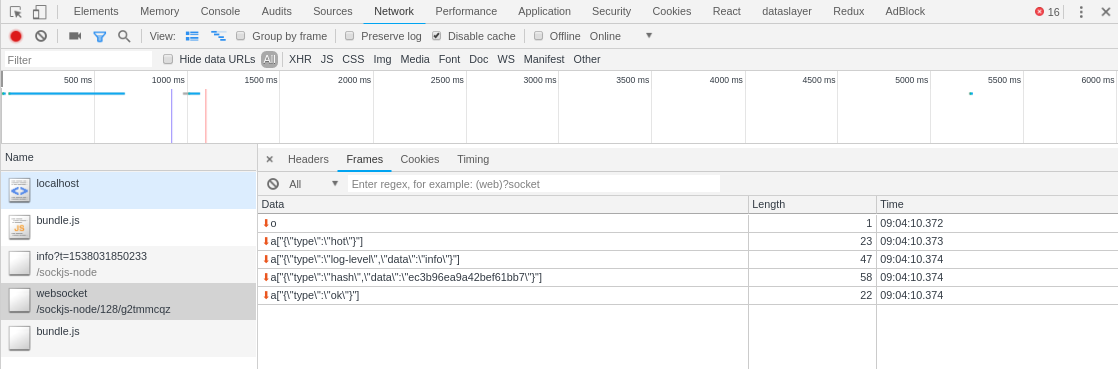
The Webpack Dev Server sends a series of messages to the application:
o
a["{"type":"log-level","data":"info"}"]
a["{\"type\":\"hot\"}"]
a["{"type":"liveReload"}"]
a["{"type":"hash","data":"411ae3e5f4bab84432bf"}"]
a["{"type":"ok"}"]
When file content changes, the Webpack Dev Server notifies the application:
a["{"type":"invalid"}"]
a["{"type":"invalid"}"]
a["{"type":"hash","data":"a0b08ce32f8682379721"}"]
a["{"type":"ok"}"]
Next, the HMR Runtime initiates an HTTP request to fetch the module update manifest:
XHR GET http://localhost:8080/411ae3e5f4bab84432bf.hot-update.json
{"h":"a0b08ce32f8682379721","c":{"main":true}}
It "downloads" all module updates via script tags:
SCRIPT SRC http://localhost:8080/main.411ae3e5f4bab84432bf.hot-update.js
webpackHotUpdate("main", {
  "./src/App.js": (function(module, __webpack_exports__, __webpack_require__) {
    // (New) file content
  })
})
Thus, the runtime HMR Runtime successfully obtains the compilation-time file changes. Next, it injects the new module into the module system (the modules large table):
// insert new code
for (moduleId in appliedUpdate) {
  if (Object.prototype.hasOwnProperty.call(appliedUpdate, moduleId)) {
    modules[moduleId] = appliedUpdate[moduleId];
  }
}
Finally, it notifies the application layer via the accept event to use the new module for "partial refresh":
// call accept handlers
for (moduleId in outdatedDependencies) {
  module = installedModules[moduleId];
  if (module) {
    moduleOutdatedDependencies = outdatedDependencies[moduleId];
    var callbacks = [];
    for (i = 0; i < moduleOutdatedDependencies.length; i++) {
      dependency = moduleOutdatedDependencies[i];
      cb = module.hot._acceptedDependencies[dependency];
      if (cb) {
        if (callbacks.indexOf(cb) !== -1) continue;
        callbacks.push(cb);
      }
    }
    for (i = 0; i < callbacks.length; i++) {
      // Trigger accept module update event
      cb(moduleOutdatedDependencies);
    }
  }
}
And the mystery is solved.
No comments yet. Be the first to share your thoughts.