
I. HMR
HMR (Hot Module Replacement) can perform hot updates on JavaScript modules at runtime (can replace, add, delete modules without refreshing)
(From webpack HMR)
HMR feature is provided by build tools like webpack, and exposes a series of runtime APIs for application layer frameworks (such as React, Vue, etc.) to connect:
Basically it's just a way for modules to say "When a new version of some module I import is available, run a callback in my app so I can do something with it".
Its basic principle is to poll the Dev Server (started by build tool) at runtime, inject updated modules into runtime environment through script tags, and execute related callback functions:
HMR is just a fancy way to poll the development server, inject
For example:
import printMe from './print.js';

if (module.hot) {
  module.hot.accept('./print.js', function() {
    console.log('Accepting the updated printMe module!');
    printMe();
  })
}
After enabling HMR, when ./print.js module has updates, callback function will be triggered, indicating module replacement is complete, thereafter accessing this module will get new module instance
Based on runtime module replacement capability (HMR), can combine with application layer frameworks (React, Vue, even Express) to further implement more efficient development modes like Live Reloading, Hot Reloading, etc.
II. Live Reloading
So-called Live Reloading is reloading entire application when module files change:
Live reloading reloads or refreshes the entire app when a file changes. For example, if you were four links deep into your navigation and saved a change, live reloading would restart the app and load the app back to the initial route.
Taking React as example:
const App = require('./App')
const React = require('react')
const ReactDOM = require('react-dom')

// Render the root component normally
const rootEl = document.getElementById('root')
ReactDOM.render(<App />, rootEl)

// Are we in development mode?
if (module.hot) {
  // Whenever a new version of App.js is available
  module.hot.accept('./App', function () {
    // Require the new version and render it instead
    const NextApp = require('./App')
    ReactDOM.render(<NextApp />, rootEl)
  })
}
Use HMR to replace root component, and re-render. Because HMR module updates have bubbling mechanism, update events not handled by accept will propagate backwards along dependency chain, so at component tree top level can listen to changes of all components in tree, at this point recreate entire component tree, during process all obtained are already updated components, render to get new view
This solution has very little dependency on application layer frameworks (only re-render part), implementation is simple and stable reliable, but all previous runtime states will be lost, extremely unfriendly for SPA and other scenarios with many and complex runtime states, after refreshing need to operate again to return to previous view state, improvement in development efficiency is very limited
So, is there a way to preserve runtime state data, only refresh changed views?
Yes, Hot Reloading
III. Hot Reloading
Lower layer also based on HMR, but Hot Reloading can preserve application's runtime state, only perform partial refresh on changed parts:
Hot reloading only refreshes the files that were changed without losing the state of the app. For example, if you were four links deep into your navigation and saved a change to some styling, the state would not change, but the new styles would appear on the page without having to navigate back to the page you are on because you would still be on the same page.
Partial refresh targeting views eliminates tedious operations of returning to previous state after entire refresh, thereby truly improving development efficiency
However, partial refresh requires hot replacement of components (even part of components), this has considerable challenges in implementation (including how to guarantee correctness, narrow impact scope, timely feedback errors, etc., see My Wishlist for Hot Reloading for details)
How to Dynamically Replace Components?
Because new modules after HMR replacement, in runtime view are completely different two components, equivalent to:
function getMyComponent() {
  // Through script tag, reload same component code
  class MyComponent {}
  return MyComponent;
}

getMyComponent() === getMyComponent() // false
Obviously cannot complete harmless replacement through React's own Diff mechanism, so, can only look for possibilities from JavaScript language
A classic React component is defined through [ES6 Class](/articles/class-es6 笔记 10/):
class Foo extends Component {
  state = {
    clicked: false
  }
  handleClick = () => {
    console.log('Click happened');
    this.setState({ clicked: true });
  }
  render() {
    return <button onClick={this.handleClick}>{!this.state.clicked ? 'Click Me' : 'Clicked'}</button>;
  }
}
At runtime create series of component instances according to component class, they have render lifecycle and other prototype methods, also have instance methods like handleClick, and instance properties like state
Prototype methods, prototype properties not hard to replace, but replacing instance methods and instance properties not that easy, because they are tightly wrapped in component tree
For this, someone thought of a very clever method
IV. React Hot Loader
In React ecosystem, currently (2020/5/31) most widely applied Hot Reloading solution is still RHL (React Hot Loader):
Tweak React components in real time.
To achieve dynamic replacement of component methods, RHL adds a layer of proxy on top of React components:
Proxies React components without unmounting or losing their state.
P.S. See react-proxy for details
Key Principle
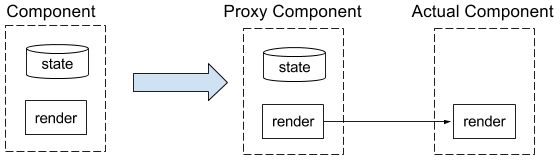
Separate component state through a layer of proxy, put into proxy component to maintain (all other lifecycle methods etc. all proxied to source component), therefore after replacing source component can still preserve component state:
The proxies hold the component's state and delegate the lifecycle methods to the actual components, which are the ones we hot reload.
Source component is wrapped by proxy component, hanging on component tree are all proxy components, component types before and after hot update have no change (source component behind has been secretly replaced with new component instance), therefore won't trigger extra lifecycles (like componentDidMount):
Proxy component types so that the types that React sees stay the same, but the actual implementations change to refer to the new underlying component type on every hot update.
Specific implementation details, see:
-
Proxy component: react-hot-loader/src/proxy/createClassProxy.js
-
Component update strategy: Not all methods could|should be updated
-
Online Demo: http://gaearon.github.io/react-hot-loader/
Redux Store
Specially, for Redux applications, necessary to let Reducer changes also take effect hotly (because most states are managed by Redux):
// configureStore.js
import { createStore, applyMiddleware, compose } from 'redux';
import thunk from 'redux-thunk';
import reducer from '../reducers';

export default function configureStore(initialState) {
  const store = createStore(
    reducer,
    initialState,
    applyMiddleware(thunk),
  );

  if (module.hot) {
    module.hot.accept(() => {
      const nextRootReducer = require('../reducers/index').default;
      store.replaceReducer(nextRootReducer);
    });
  }

  return store;
};
Use replaceReducer to replace Reducer, while preserving store state
P.S. For more information about Redux application Hot Reloading, see RFC: remove React Transform from examples
No comments yet. Be the first to share your thoughts.