
I. Problem Restatement
Although Ionic officially provides many icons (ion-xx), they are still not enough. Many icons cannot be found (WeChat/QQ/QR code/shake...).
Of course, according to previous practices, you can search in some open source icon libraries, such as Iconfont-Alibaba Vector Icon Library.
After finding them, how to import third-party iconfont into Ionic so that they can be used in template files?
II. Solution
1. Iconfont Import Method
Checking Ionic's lib folder, you can find:
lib\ionic\fonts font files
lib\ionic\css   style files
The style file ionic.css defines iconfont:
@font-face {
    font-family: "Ionicons";
    src: url("../fonts/ionicons.eot?v=2.0.1");
    src: url("../fonts/ionicons.eot?v=2.0.1#iefix") format("embedded-opentype"), url("../fonts/ionicons.ttf?v=2.0.1") format("truetype"), url("../fonts/ionicons.woff?v=2.0.1") format("woff"), url("../fonts/ionicons.woff") format("woff"), url("../fonts/ionicons.svg?v=2.0.1#Ionicons") format("svg");
    font-weight: normal;
    font-style: normal;
}
/*...*/
.ion-alert:before {
    content: "\f101";
}
.ion-alert-circled:before {
    content: "\f100";
}
.ion-android-add:before {
    content: "\f2c7";
}
/*...*/
The way to reference iconfont is the same as what we are familiar with, nothing special. We can also use this method to import custom iconfont.
Note: Do not modify lib. Messing with other people's stuff is not good.
2. Specific Operations
Create a font folder under www, put ttf, woff, eot, svg in it, then import the font file in our own www/css/style.css:
@font-face {font-family: 'iconfont';
    src: url('../font/iconfont.eot'); /* IE9*/
    src: url('../font/iconfont.eot?#iefix') format('embedded-opentype'), /* IE6-IE8 */
    url('../font/iconfont.woff') format('woff'), /* chrome、firefox */
    url('../font/iconfont.ttf') format('truetype'), /* chrome、firefox、opera、Safari, Android, iOS 4.2+*/
    url('../font/iconfont.svg#iconfont') format('svg'); /* iOS 4.1- */
}
/*!!! This class name must be icon*/
.icon{
    font-family:"iconfont" !important;
    font-size:16px;font-style:normal;
    -webkit-font-smoothing: antialiased;
    -webkit-text-stroke-width: 0.2px;
    -moz-osx-font-smoothing: grayscale;
}
Special Note: The CSS class that sets font effects must be called icon. The reason will be explained later.
Then you can use these icons in template HTML, but you will still encounter some problems, such as:
[caption id="attachment_855" align="alignnone" width="302"] Set ion-tab's icon-on/off[/caption]
The above image shows using custom icons in ion-tab directive. Naming the font effect class as icon is for direct use in similar directives, for example:
<ion-tab title="Contacts" icon-on="icon-tongxunlu" icon-off="icon-tongxunluxianxing" href="#/root/contacts">
    <ion-nav-view name="tab-contacts"></ion-nav-view>
</ion-tab>
Ionic automatically processes the above directive, generating a structure like a>i+span, and the icon is displayed through the i tag:
<i class="icon icon-tongxunluxianxing" ng-if="getIconOff() && !isTabActive()"></i>
Here the i tag will only automatically have the icon class. Style classes whose name is not icon will not be applied.
P.S. It's easy to think of adding class="my-icon" to ion-tab, but unfortunately, the generated i tag does not have class="my-icon". Resistance is futile, so just change the class name to icon.
3. Other Possible Problems
- How to adjust icon size (dimensions)
Ionic's icon default font-size is 32px, but third-party fonts have inconsistent initial sizes. The same font-size will display different sizes. You can modify the before of the corresponding icon, for example:
.icon-tongxunluxianxing:before { content: "\e6bf"; font-size: 27px;}
This font's 27px is about the same width and height as ion-xx's 32px. Just fine-tune visually.
- How to control icon vertical centering
This is a serious problem. After modifying font-size, the icon is not vertically centered. You need to apply line-height: 1 to custom icons, for example:
    .icon:before {
        line-height: 1;
    }
This line was found in Ionic styles. Theoretically, there should be no strange side effects. It's safer than line-height: 100% or line-height: 32px;.
- How to fine-tune icon position
After setting line-height, you find it's still not centered. This is scientific. It may be because when making the font, the SVG image itself is offset from the center. So this situation is occasionally encountered. You need relative fine-tuning:
.icon-faxian:before { content: "\e607"; font-size: 20px; position: relative; top: 3px;}
If left and right are not aligned, you can fine-tune left/right.
- How to combine icons (similar to badge)
If you want to add a small red dot to the corner of the icon (similar to badge effect), you can do this:
    /* Bottom right corner */
    .icon-badge-rb:before {
        font-size: 16px;
        position: relative;
        bottom: -2px;
    }
Use it in template file like this:
    <i class="icon ion-ios-person positive">
        <span class="icon icon-badge-rb ion-ios-checkmark-outline"></span>
    </i>
Effect as shown below:
[caption id="attachment_856" align="alignnone" width="301"]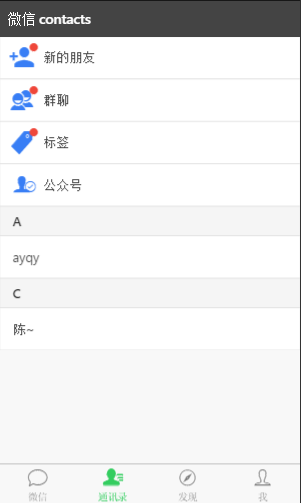 Imitate WeChat Contacts[/caption]
III. Summary
Ionic is not very convenient in controlling layout details (building rough framework is fast). When using it, you may need additional utility styles, such as:
.mt10 {
    margin-top: 10px;
}

.fz-sm {
    /*Default 16px*/
    font-size: 14px;
}

.icon-sm:before {
    font-size: 20px;
}
It's not convenient to implement slightly complex layouts with grid, but using float/relative etc. can achieve it quickly. Therefore, having your own utility styles is still necessary.
No comments yet. Be the first to share your thoughts.