
Preface
Many times we need to connect a set of points with smooth curves, from points to curves, this is curve fitting. And the least squares method is the simplest method to implement curve fitting, although the effect is not very good, but it wins in simplicity
I. Curve Fitting
A data processing method that uses continuous curves to approximately describe or simulate the functional relationship between coordinates represented by discrete point groups on a plane
Well, simply put, it's connecting with smooth curves. Easy to do with a pencil in hand, but有一定 difficulty to implement programmatically. The method we use below is called the least squares method. As for the principle, mathematical formulas, proof process, sorry, I don't know.
II. Complete Code
P.S. The code below is rewritten from a Java implementation, click me to view the original
function PolyFitForcast() {
    /**
     * <p>
     * 函数功能:最小二乘法曲线拟合
     * </p>
     * <p>
     * 方程:Y = a(0) + a(1) * (X - X1)+ a(2) * (X - X1)^2 + ..... .+ a(m) * (X -
     * X1)^m X1 为 X 的平均数
     * </p>
     *
     * @param x
     *            实型一维数组,长度为 n. 存放给定 n 个数据点的 X 坐标
     * @param y
     *            实型一维数组,长度为 n.存放给定 n 个数据点的 Y 坐标
     * @param n
     *            变量。给定数据点的个数
     * @param a
     *            实型一维数组,长度为 m.返回 m-1 次拟合多项式的 m 个系数
     * @param m
     *            拟合多项式的项数,即拟合多项式的最高次数为 m-1. 要求 m<=n 且 m<=20。若 m>n 或 m>20
     *            ,则本函数自动按 m=min{n,20} 处理.
     *            <p>
     *            Date:2007-12-25 16:21 PM
     *            </p>
     * @author qingbao-gao
     * @return 多项式系数存储数组
     */
    function PolyFit(x, y, n, a, m) {
        var i, j, k;
        var z, p, c, g, q = 0, d1, d2;
        var s = new Array(20);
        var t = new Array(20);
        var b = new Array(20);
        var dt = new Array(3);
        for (i = 0; i <= m - 1; i++) {
            a[i] = 0.0;
        }
        if (m > n) {
            m = n;
        }
        if (m > 20) {
            m = 20;
        }
        z = 0.0;
        for (i = 0; i <= n - 1; i++) {
            z = z + x[i] / (1.0 * n);
        }
        b[0] = 1.0;
        d1 = 1.0 * n;
        p = 0.0;
        c = 0.0;
        for (i = 0; i <= n - 1; i++) {
            p = p + (x[i] - z);
            c = c + y[i];
        }
        c = c / d1;
        p = p / d1;
        a[0] = c * b[0];
        if (m > 1) {
            t[1] = 1.0;
            t[0] = -p;
            d2 = 0.0;
            c = 0.0;
            g = 0.0;
            for (i = 0; i <= n - 1; i++) {
                q = x[i] - z - p;
                d2 = d2 + q * q;
                c = c + y[i] * q;
                g = g + (x[i] - z) * q * q;
            }
            c = c / d2;
            p = g / d2;
            q = d2 / d1;
            d1 = d2;
            a[1] = c * t[1];
            a[0] = c * t[0] + a[0];
        }
        for (j = 2; j <= m - 1; j++) {
            s[j] = t[j - 1];
            s[j - 1] = -p * t[j - 1] + t[j - 2];
            if (j >= 3)
                for (k = j - 2; k >= 1; k--) {
                    s[k] = -p * t[k] + t[k - 1] - q * b[k];
                }
            s[0] = -p * t[0] - q * b[0];
            d2 = 0.0;
            c = 0.0;
            g = 0.0;
            for (i = 0; i <= n - 1; i++) {
                q = s[j];
                for (k = j - 1; k >= 0; k--) {
                    q = q * (x[i] - z) + s[k];
                }
                d2 = d2 + q * q;
                c = c + y[i] * q;
                g = g + (x[i] - z) * q * q;
            }
            c = c / d2;
            p = g / d2;
            q = d2 / d1;
            d1 = d2;
            a[j] = c * s[j];
            t[j] = s[j];
            for (k = j - 1; k >= 0; k--) {
                a[k] = c * s[k] + a[k];
                b[k] = t[k];
                t[k] = s[k];
            }
        }
        dt[0] = 0.0;
        dt[1] = 0.0;
        dt[2] = 0.0;
        for (i = 0; i <= n - 1; i++) {
            q = a[m - 1];
            for (k = m - 2; k >= 0; k--) {
                q = a[k] + q * (x[i] - z);
            }
            p = q - y[i];
            if (Math.abs(p) > dt[2]) {
                dt[2] = Math.abs(p);
            }
            dt[0] = dt[0] + p * p;
            dt[1] = dt[1] + Math.abs(p);
        }
        return a;
    }// end

    /**
     * <p>
     * 对 X 轴数据节点球平均值
     * </p>
     *
     * @param x
     *            存储 X 轴节点的数组
     *            <p>
     *            Date:2007-12-25 20:21 PM
     *            </p>
     * @author qingbao-gao
     * @return 平均值
     */
    function average(x) {
        var ave = 0;
        var sum = 0;
        if (x !== null) {
            for (var i = 0; i < x.length; i++) {
                sum += x[i];
            }
            ave = sum / x.length;
        }
        return ave;
    }

    /**
     * <p>
     * 由 X 值获得 Y 值
     * </p>
     * @param x
     *            当前 X 轴输入值,即为预测的月份
     * @param xx
     *            当前 X 轴输入值的前 X 数据点
     * @param a
     *            存储多项式系数的数组
     * @param m
     *            存储多项式的最高次数的数组
     *            <p>
     *            Date:2007-12-25 PM 20:07
     *            </p>
     * @return 对应 X 轴节点值的 Y 轴值
     */
    function getY(x, xx, a, m) {
        var y = 0;
        var ave = average(xx);

        var l = 0;
        for (var i = 0; i < m; i++) {
            l = a[0];
            if (i > 0) {
                y += a[i] * Math.pow((x - ave), i);
            }
        }
        return (y + l);
    }

    /**
     * 返回拟合后的点坐标数组
     * @param  {Array} arr 点坐标数组
     * @return {Array}     拟合后的点坐标数组
     */
    this.get = function(arr) {
        var arrX = [], arrY = [];

        for (var i = 0; i < arr.length; i++) {
            arrX.push(arr[i].x);
            arrY.push(arr[i].y);
        }

        var len = arrY.length;
        var m = 3;
        var a = new Array(arrX.length);
        var aa = PolyFit(arrX, arrY, len, a, m);
        var arrRes = [];
        for(var i = 0; i < len; i++){
           arrRes.push({x: arrX[i], y: getY(arrX[i], arrX, aa, m)});
        }

        return arrRes;
    };
}

// var arr = [{x: 10, y: 10},{x: 40, y: 90},{x: 70, y: 65},{x: 100, y: 15}];
// // 最小二乘法拟合
// var res = new PolyFitForcast().get(arr);
// var canvas = document.createElement('canvas');
// var ctx2d = canvas.getContext('2d');

// ctx2d.lineWidth = 1;

// ctx2d.strokeStyle = '#000';
// ctx2d.beginPath();
// ctx2d.moveTo(arr[0].x, arr[0].y);
// ctx2d.lineTo(arr[1].x, arr[1].y);
// ctx2d.lineTo(arr[2].x, arr[2].y);
// ctx2d.lineTo(arr[3].x, arr[3].y);
// ctx2d.stroke();

// ctx2d.strokeStyle = '#f00';
// ctx2d.beginPath();
// ctx2d.moveTo(res[0].x, res[0].y);
// ctx2d.lineTo(res[1].x, res[1].y);
// ctx2d.lineTo(res[2].x, res[2].y);
// ctx2d.lineTo(res[3].x, res[3].y);
// ctx2d.stroke();
// document.body.appendChild(canvas);
III. Effect
Copy the code above to browser console, remove comments and press Enter to see the effect. Of course, the effect of 4 points is very poor. Below is the effect diagram of 10 points fitting:
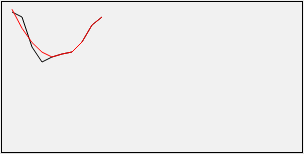
Actually, after fitting 10 points, the curve is still not smooth enough. But if there's a scenario that can恰好 provide many points, and requires drawing speed with not high precision requirements, this method is still quite good
IV. Smoother and More Natural Curve Fitting
The least squares method is hopeless, unless repeated multiple fittings, but the effect improvement is not obvious, the curve will become flatter and flatter, finally approximating a straight line, which is not the result we want
There's another method called Bézier curve, besides a set of information points, it also needs to provide two control points. If control points are properly selected, it can achieve quite perfect smooth curve effect. The difficulty is how to calculate 2 control points based on existing information points. For specific methods, please see Smoother Signatures
No comments yet. Be the first to share your thoughts.