
##I. Loose Coupling of UI Layers
Loose coupling requires each layer to follow the "Principle of Least Knowledge", or each layer does its own job without overstepping authority:
-
HTML: Structure layer
-
CSS: Presentation layer
-
JS: Behavior layer
There is a fitting explanation for the functions of each layer: HTML is nouns (n), CSS is adjectives (adj) and adverbs (adv), JS is verbs
Because the three layers are closely related, it's easy to overstep authority in practical applications:
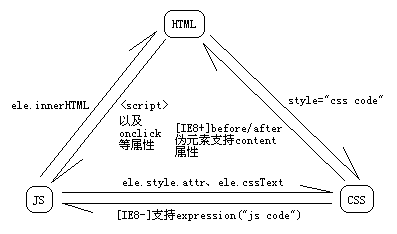
###1.Separating JS from CSS
Try not to use CSS expressions. If you must use them, you should put the corresponding code in hacks for easier maintenance
###2.Separating CSS from JS
Do not use ele.style.attr and ele.cssText; you should use class name manipulation instead
###3.Separating JS from HTML
Do not use onclick and other attributes to directly specify event handler functions; you should use the add event handler method instead
Generally do not use <script> tags to directly embed JS code; try to put it in external JS files. Of course, for code with single functionality and no need for reuse, you can directly embed it in HTML, such as form validation code
###4.Separating HTML from JS
Do not use innerHTML for hard coding; you can use the following 3 methods instead:
-
Use Ajax to get HTML strings from the server to avoid hard coding
-
Use simple client-side templates, with 2 implementation methods:
-
Use comments to carry pattern strings
-
Use script tags to carry pattern strings, set the type attribute to a value that browsers cannot recognize, and you should also set the id attribute for the script tag to facilitate getting the pattern string, for example:
 <script type="text/x-my-template" id="list-item">
     <li><a href="%s">%s</li>
 </script>
This method is recommended because it's easier to get the pattern string
-
-
Use complex client-side templates, such as jade, ejs
P.S. Because the decoupling of html and css has nothing to do with JS programming, there is no corresponding content in the book
##II. Use Fewer Global Variables
###1.Trouble Caused by Global Variables
-
Naming conflicts
-
Code is not robust; all external data needed by functions should be passed in via parameters, not via global variables
-
Difficult to test; requires rebuilding the entire global environment
###2.Implicit Global Variables
Do not declare global variables using implicit global variable methods; it is recommended to include the var keyword for all variable declarations
To avoid implicit global variables, you should also enable strict mode ("use strict";), supported by [IE10+]
###3.Single Global Variable Method
-
Use namespaces, providing a method to avoid namespace conflicts:
// Top-level namespace var app = { /* * Create/get sub-namespace, supports chain calling */ namespace: function(ns) { var parts = ns.split("."), object = this, i, len; for (i = 0, len = parts.length; i < len; i++) { if (!object[parts[i]]) { object[parts[i]] = {}; } object = object[parts[i]]; } return object; // Supports chain calling } } // Test app.namespace("Consts").homepage = "http://ayqy.net/"; app.namespace("Consts").author = "ayqy"; // http://ayqy.net/, ayqy alert(app.Consts.homepage + ", " + app.Consts.author); -
Modularization
AMD/CMD, some extended knowledge as follows:
CommonJS is a set of theoretical specifications (such as the theoretical specification for JS is ES), while SeaJS and RequireJS are concrete implementations of the Modules part of CommonJS
CommonJS was formulated for JS outside the browser (server-side), so it uses synchronous module loading. SeaJS is an implementation of CommonJS, while RequireJS, although also an implementation of CommonJS, uses asynchronous module loading, which is more suited to the browser's single-threaded environment
Summary: The Modules part of CommonJS proposed the theory of modular code management. To enable modular loading of JS, various implementations like RequireJS and SeaJS can be called modular script loaders
-  CMD: Common Module Definition, such as SeaJS

-  AMD: Asynchronous Module Definition, such as RequireJS
Both are specifications for defining code modules, facilitating modular script loading and improving response speed
Differences between CMD and AMD:
-
CMD has nearby dependencies. Easy to use; dependencies can be fetched as needed within the module without declaring dependencies in advance, so there is some performance reduction (need to traverse the entire module to find dependencies)
-
AMD has前置 dependencies. Must strictly declare dependencies; for dependencies within logic (soft dependencies), resolve them via asynchronous loading and callback handling
###4.Zero Global Variable Method
Implemented using IIFE (Immediately Invoked Function Expression). For functional modules that don't need reuse, IIFE can completely eliminate global variables, so generally IIFE is used to assist namespace/modularization methods
##III. Event Handling
###1.Typical Usage (Not Good)
// Event handler
function handleClick(event) {
    var popup = document.getElementById("popup");
    popup.style.left = event.clientX + "px";
    popup.style.top = event.clientY + "px";
    popup.className = "display";
}

// Add event handler
ele.addEventListener("click", handleClick);
###2.Separating Application Logic (Slightly Better)
var app = {
    // Event handling
    handleClick: function(event) {
        this.showPopup(event);
    },

    // Application logic
    showPopup: function(event) {
        var popup = document.getElementById("popup");
        popup.style.left = event.clientX + "px";
        popup.style.top = event.clientY + "px";
        popup.className = "display";
    }
};

// Add event handler
// P.S. Event handler is a method declaration, not a method call, cannot pass parameters, so needs an extra layer of anonymous function
ele.addEventListener("click", function() {
    app.handleClick(event);
});
###3.Do Not Pass Event Object (Best)
var app = {
    // Event handling
    handleClick: function(event) {
        this.showPopup(event.clientX, event.clientY);   // Parameters changed
    },

    // Application logic
    showPopup: function(x, y) { // Formal parameters changed
        var popup = document.getElementById("popup");
        popup.style.left = x + "px";
        popup.style.top = x + "px";
        popup.className = "display";
    }
};

// Add event handler
ele.addEventListener("click", function() {
    app.handleClick(event);
});
"Do not pass event object" is an optimization principle, also mentioned in [the optimization section of JS High-Level Programming](http://ayqy.net/blog/JS 学习笔记 12_优化/), but this book gives detailed reasons
Directly passing event objects has the following disadvantages:
-
Interface definition is unclear; parameter function is unknown
-
Difficult to test (rebuild an event object?)
##IV. Compare Less with null
###1.Detecting Primitive Values
Use typeof for detection, but note that typeof null returns object, which is not very scientific because JS considers null a reference to an empty object
But using === null to detect DOM elements is reasonable because null is one of the possible outputs of document.getXXByXXX
###2.Detecting Reference Values
instanceof cannot accurately detect subtypes, and do not use it to detect fun and arr because it cannot cross frames
- Detecting fun
Use typeof to detect general methods; use in to detect DOM methods
- Detecting arr
Use Object.prototype.toString.call(arr) === "[Object Array]" for detection
Note: ES5 has the native Array.isArray() method, supported by [IE9+]
###3.Detecting Properties
Use in配合 hasOwnProperty() for detection
Note: [IE8-] DOM elements do not support hasOwnProperty(); you need to check before using it
##V. Separating Configuration Data
###1.What is Configuration Data?
-
Hard-coded values
-
Values that may change in the future
For example:
-
URL
-
Strings that need to be displayed to users
-
Unique values used repeatedly
-
Settings (such as how many list items to display per page)
-
Any values that may change (anything hard to maintain counts as configuration data)
###2.Separating Configuration Data
First separate configuration data from application logic. The simplest way is to store all configuration data hierarchically in a custom config object
###3.Storing Configuration Data
You can use JS files to store configuration data for easy loading, but configuration data must strictly conform to JS syntax, which is error-prone. The author suggests storing configuration data as simple property files and then using tools to convert them to JSON/JSONP/JS format files for loading. The author recommends a self-written tool props2js
##VI. Throwing Custom Errors
###1.The Essence of Error
Used to mark unexpected things, avoid silent failures, and facilitate debugging
###2.Throwing Errors in JS
Do not throw other types; throw Error objects for compatibility, for example:
throw "error: invalid args"; // Some browsers do not display this string
###3.Advantages of Throwing Errors
Precisely locate errors; it is recommended that error message format be: function name + error reason
###4.When to Throw Errors
Only throw errors in commonly used methods (utility methods). General principles:
-
After fixing weird bugs, you should add some custom errors to prevent errors from happening again
-
If you feel certain points may cause big trouble when writing code, you should throw custom errors
-
If the code is written for others to use, you should think about what problems others may encounter when using it, and should give prompts in custom errors
###5.try-catch Statements
finally is not commonly used because it affects return in catch
Do not leave empty catch blocks; silent failures may make problems more troublesome
###6.Several Error Types
You can throw instances of several native error types,配合 instanceof for targeted error handling
P.S. For more information about specific error types and error handling, please see [AnYuQingYang: JS Learning Notes 8_Error Handling](http://ayqy.net/blog/JS 学习笔记 8_错误处理/)
##VII. Respect Object Ownership
###1.Which Objects Do Not Belong to Us?
-
Native objects (Object, Array, etc.)
-
DOM objects (such as document)
-
BOM objects (such as window)
-
Library objects (such as JQuery)
###2.Specific Principles
-
Do not rewrite methods
-
Do not add new methods; if you must modify library functionality, you can develop plugins for the library
-
Do not delete methods; if you don't want to use them, don't delete them, just mark them as deprecated
Note: delete is ineffective on prototype properties, only useful for instance properties
    function Fun() {
        this.attr1 = 1; // Instance property
    }
    Fun.prototype.attr2 = 2;    // Prototype property

    // Test
    var obj = new Fun();
    alert(obj.attr1 + ", " + obj.attr2);    // 1, 2
    delete obj.attr1;
    delete obj.attr2;
    alert(obj.attr1 + ", " + obj.attr2);    // undefined, 2
    delete Fun.prototype.attr2;
    alert(obj.attr1 + ", " + obj.attr2);    // undefined, undefined
###3.Better Ways
- Object-based Inheritance
That is, clone a new object; the new object belongs to you and can be modified freely
- Type-based Inheritance
Note: Do not inherit DOM/BOM/Array because support is poor
P.S. For specific implementation of object inheritance/type inheritance, please see [AnYuQingYang: Re-understanding 6 JS Inheritance Methods](http://ayqy.net/blog/重新理解 JS 的 6 种继承方式/)
- Facade Pattern
Actually it's composition, because inheritance/composition are both ways to achieve code reuse. For more information about the facade pattern, please see AnYuQingYang: Design Pattern - Facade Pattern
A side note: the difference between facade and adapter is that the former creates a new interface, while the latter only implements an existing interface. The author hits the nail on the head
###4.Pros and Cons of Polyfill
Polyfill is "a JavaScript supplement that replicates standard APIs on older browsers". "Standard APIs" refer to HTML5 technologies or features, such as Canvas. "JavaScript supplement" refers to dynamically loading JavaScript code or libraries to simulate them in browsers that do not support these standard APIs. Because polyfills simulate standard APIs, they enable development targeting these APIs in a way that faces all browser futures. The ultimate goal is: once support for these APIs becomes the absolute majority, polyfills can be conveniently removed without any extra work.
For more information about polyfills, please see CnBlogs: [Translation] What's the Difference Between Shim and Polyfill?
Advantages: Easy to remove when not needed
Disadvantages: If the polyfill implementation is not fully consistent with the standard, it's troublesome
It is recommended not to use polyfills; you should use native methods + facade pattern instead, which is more flexible
###5.Anti-tampering
You should enable strict mode because silent failures in non-strict mode are difficult to debug
##VIII. Browser Detection
###1.UA (User Agent) Detection
If you must do UA detection, try to detect backward rather than forward because the latter will not change anymore
P.S. The author thinks you don't need to worry about whether UA will change; the reason is that users who set UA should also know the consequences of doing so
###2.Feature Detection
The general format of feature detection is as follows:
-
Try the standard way
-
Try browser-specific implementations
-
If not supported, give logical feedback (such as return null)
For example:
function setAnimation (callback) {
    // 1. Try standard way
    if (window.requestAnimationFrame) {                 // standard
        return requestAnimationFrame(callback);
    }
    // 2. Try browser-specific implementations
    else if (window.mozRequestAnimationFrame) {         // Firefox
        return mozRequestAnimationFrame(callback);
    }
    else if (window.webkitRequestAnimationFrame) {      // WebKit
        return webkitRequestAnimationFrame(callback);
    }
    else if (window.oRequestAnimationFrame) {           // Opera
        return window.oRequestAnimationFrame(callback);
    }
    else if (window.msRequestAnimationFrame) {          // IE
        return window.msRequestAnimationFrame(callback);
    }
    // 3. Logical feedback if not supported
    else {
        return setTimeout(callback, 0);
    }
}
###3.Eliminate Feature Inference
Cannot infer one feature from another because something that looks like a duck doesn't necessarily quack like a duck
###4.Eliminate Browser Inference
Do not infer browsers from features, such as the typical:
if (document.all) { // IE
    // ...
}
This is incorrect; you should not try to describe something with features, which can easily lead to inaccurate descriptions due to too few or too many conditions
###5.Which One Should Be Used After All?
Try to use direct feature detection; only use UA detection if that doesn't work. As for inference, don't consider it at all; there is no reason to use inference
###Reference Materials
- "Maintainable JavaScript"
No comments yet. Be the first to share your thoughts.