
1. Basic Usage
TypeScript also supports JSX, besides being able to compile JSX to JavaScript like Babel, also provides type checking
Only need 2 steps to use TypeScript to write JSX:
-
Source files use
.tsxextension -
Enable
--jsxoption
Additionally, TypeScript provides 3 JSX processing modes, corresponding to different code generation rules:
| Mode | Input | Output | Output File Extension |
|---|---|---|---|
| preserve | <div /> | <div /> | .jsx |
| react | <div /> | React.createElement("div") | .js |
| react-native | <div /> | <div /> | .js |
That is:
-
preserve: Generate
.jsxfiles, but preserve JSX syntax without conversion, hand over to subsequent build steps (such as Babel) to handle -
react: Generate
.jsfiles, convert JSX syntax toReact.createElement -
react-native: Generate
.jsfiles, but preserve JSX syntax without conversion
These modes are specified through --jsx option, defaults "preserve", only affects code generation, doesn't affect type checking (for example --jsx "preserve" requires no conversion, but still performs type checking on JSX)
In specific usage, JSX syntax is completely consistent, only thing to note is type assertions
Type Assertions
In JSX can only use
as type(angle bracket syntax conflicts with JSX syntax)
let someValue: any = "this is a string";
// <type>
let strLength: number = (<string>someValue).length;
In .tsx files will trigger error:
JSX element 'string' has no corresponding closing tag.
'</' expected.
Due to syntax conflict, type assertion part in <string>someValue (<string>) is treated as JSX element. So in .tsx can only use as type form of type assertion:
// as type
let strLength: number = (someValue as string).length;
P.S. For more information about TypeScript type assertions, see [3. Type Assertions](/articles/基本类型-typescript 笔记 2/#articleHeader4)
2. Element Types
For a JSX expression <expr />, expr can be intrinsic element in environment (intrinsic element, i.e. built-in components, such as div or span in DOM environment), or can be value-based element, i.e. custom components. Difference between two types of elements lies in:
-
Generated target code is different
In React, intrinsic elements generate strings (such as
React.createElement("div")), while custom components don't (such asReact.createElement(MyComponent)) -
Element property (i.e. Props) type lookup method is different
Intrinsic element properties are known, while custom components may want to specify their own property sets
In form, requires custom components must have first letter capitalized, to distinguish two types of JSX elements
P.S. Actually, intrinsic element/value-based element and built-in component/custom component are talking about same thing, for TypeScript compiler, built-in component types are known, called intrinsic elements, custom component types are related to component declaration (value), called value-based elements
Intrinsic Elements
Intrinsic element types are looked up from JSX.IntrinsicElements interface, if this interface is not declared, then all intrinsic elements don't do type checking, if declared, look up corresponding properties on JSX.IntrinsicElements, as basis for type checking:
declare namespace JSX {
  interface IntrinsicElements {
    foo: any
  }
}

// Correct
<foo />;
// Error Property 'bar' does not exist on type 'JSX.IntrinsicElements'.
<bar />;
Of course, can also cooperate with index signature to allow using unknown built-in components:
declare namespace JSX {
  interface IntrinsicElements {
    foo: any;
    [elemName: string]: any;
  }
}

// Correct
<bar />;
Benefit is after extending support for new built-in components in future, don't need to immediately modify type declarations, cost is losing strict validation of whitelist
Value-Based Elements
Value-based elements directly find corresponding identifiers from scope, for example:
import MyComponent from "./myComponent";

// Correct
<MyComponent />
// Error Cannot find name 'SomeOtherComponent'.
<SomeOtherComponent />
There are 2 types of value-based elements:
-
Stateless Functional Component (so-called SFC)
-
Class Component
These two cannot be distinguished from JSX expression form alone, therefore first try to parse as SFC according to function overloads, if parsing fails then handle as class component, if still fails then error
Stateless Functional Components
In form is a normal function, requires first parameter is props object, return type is JSX.Element (or its [subtype](/articles/深入类型系统-typescript 笔记 8/#articleHeader4)), for example:
function Welcome(props: { name: string }) {
  return <h1>Hello, {props.name}</h1>;
}
Similarly, [function overloads](/articles/函数-typescript 笔记 5/#articleHeader9) still apply:
function Welcome(props: { content: JSX.Element[] | JSX.Element });
function Welcome(props: { name: string });
function Welcome(props: any) {
  <h1>Hello, {props.name}</h1>;
}

<div>
  <Welcome name="Lily" />
  <Welcome content={<span>Hello</span>} />
</div>
P.S. JSX.Element type declaration comes from @types/react
Class Components
Class components inherit from React.Component, no difference from JavaScript version:
class WelcomeClass extends React.Component {
  render() {
    return <h1>Hello, there.</h1>;
  }
}

<WelcomeClass />
Similar to Class's [dual type meanings](/articles/类-typescript 笔记 4/#articleHeader8), for JSX expression <Expr />, class component types are divided into 2 parts:
-
Element class type:
Expr's type, i.e.typeof WelcomeClass -
Element instance type:
Exprclass instance's type, i.e.{ render: () => JSX.Element }
For example:
// Element class type
let elementClassType: typeof WelcomeClass;
new elementClassType();
// Element instance type
let elementInstanceType: WelcomeClass;
elementInstanceType.render();
Requires element instance type must be subtype of JSX.ElementClass, defaults JSX.ElementClass type is {}, in React then limits must have render method:
namespace JSX {
  interface ElementClass extends React.Component<any> {
    render(): React.ReactNode;
  }
}
(From DefinitelyTyped/types/react/index.d.ts)
Otherwise error:
class NotAValidComponent {}
function NotAValidFactoryFunction() {
  return {};
}

<div>
  {/* Error JSX element type 'NotAValidComponent' is not a constructor function for JSX elements. */}
  <NotAValidComponent />
  {/* Error JSX element type '{}' is not a constructor function for JSX elements. */}
  <NotAValidFactoryFunction />
</div>
3. Property Types
Property checking first needs to determine element attribute type (element attributes type), intrinsic elements and value-based elements have slight differences in property types:
-
Intrinsic element property type: Type of corresponding property on
JSX.IntrinsicElements -
Value-based element property type: Type of corresponding property on specific property type on element instance type, this specific property is specified through
JSX.ElementAttributesProperty
P.S. If JSX.ElementAttributesProperty is not declared, take component class constructor or SFC first parameter's type
Specifically, intrinsic element properties taking a's href as example:
namespace JSX {
  interface IntrinsicElements {
    // Declare various intrinsic elements, and their property types
    a: {
      download?: any;
      href?: string;
      hrefLang?: string;
      media?: string;
      rel?: string;
      target?: string;
      type?: string;
      referrerPolicy?: string;
    }
  }
}

// Element property type is { href?: string }
<a href="">链接</a>
Value-based element properties for example:
namespace JSX {
  // Specify specific property name as props
  interface ElementAttributesProperty { props: {}; }
}

class MyComponent extends React.Component {
  // Declare property type
  props: {
    foo?: string;
  }
}
// Element property type is { foo?: string }
<MyComponent foo="bar" />
Optional properties, spread operators etc. also apply, for example:
class MyComponent extends React.Component {
  // Declare property type
  props: {
    requiredProp: string;
    optionalProp?: string;
  }
}

const props = { optionalProp: 'optional' };
// Correct
<MyComponent { ...props } requiredProp="required" />
P.S. Additionally, JSX frameworks can specify framework's required extra properties through JSX.IntrinsicAttributes, such as key in React, specifically see Attribute type checking
P.S. Specially, property validation only targets properties with property names being legal JavaScript identifiers, data-* etc. don't do validation
Child Component Type Checking
Child component types come from children property on element property type, similar to using ElementAttributesProperty to specify props, here use JSX.ElementChildrenAttribute to specify children:
namespace JSX {
  // Specify specific property name as children
  interface ElementChildrenAttribute { children: {}; }
}

const Wrapper = (props) => (
  <div>
    {props.children}
  </div>
);
<Wrapper>
  <div>Hello World</div>
  {"This is just a JS expression..." + 1000}
</Wrapper>
Method to specify children type is similar to normal properties:
interface PropsType {
  children: JSX.Element
  name: string
}
class Component extends React.Component<PropsType, {}> {
  render() {
    return (
      <h2>
        {this.props.children}
      </h2>
    )
  }
}

<Component name="hello">
  <h1>Hello World</h1>
</Component>
Child component type mismatch will error:
// Error Type '{ children: Element[]; name: string; }' is not assignable to type 'Readonly<PropsType>'.
<Component name="hello">
  <h1>Hello World</h1>
  <h1>Hi</h1>
</Component>
4. Result Types
By default, a JSX expression's result type is any:
// a's type is any
let a = <a href="" />;
a = {};
Can specify through JSX.Element, for example in React:
let a = <a href="" />;
// Error Type '{}' is missing the following properties from type 'Element': type, props, key.
a = {};
Corresponding type declaration is similar to:
namespace JSX {
  interface Element<T, P> {
    type: T;
    props: P;
    key: string | number | null;
  }
}
P.S. React's specific JSX element type declarations see DefinitelyTyped/types/react/index.d.ts
5. Embedded Expressions
JSX allows inserting expressions through curly brace syntax ({ }) inside tags:
const name = 'Josh Perez';
const element = <h1>Hello, {name}</h1>;
(From Embedding Expressions in JSX)
TypeScript also supports, and can do type checking on embedded expressions:
const a = <div>
  {/* Error The left-hand side of an arithmetic operation must be of type 'any', 'number', 'bigint' or an enum type. */}
  {["foo", "bar"].map(i => <span>{i / 2}</span>)}
</div>
6. Combining with React
After introducing React type definitions, easy to describe Props types:
interface WelcomeProps {
  name: string;
}
// Pass Props type as first type parameter
class WelcomeClass extends React.Component<WelcomeProps, {}> {
  render() {
    return <h1>Hello, {this.props.name}</h1>;
  }
}
// Error Property 'name' is missing in type '{}' but required in type 'Readonly<WelcomeProps>'.
let errorCase = <WelcomeClass />;
let correctCase = <WelcomeClass name="Lily" />;
P.S. For more information about type parameters and generics, see [2. Type Variables](/articles/泛型-typescript 笔记 6/#articleHeader3)
Factory Functions
Under React mode (--jsx react), can configure specific JSX element factory method to use, has 2 ways:
-
--jsxFactoryoption: Project-level configuration -
Inline
@jsxcomment directive: File-level configuration
Defaults to --jsxFactory "React.createElement", convert JSX tags to factory method calls:
const div = <div />;
// Compilation result
var div = React.createElement("div", null);
In Preact corresponding JSX element factory method is h:
/* @jsx preact.h */
import * as preact from "preact";
<div />;
// Or
/* @jsx h */
import { h } from "preact";
<div />;
P.S. Note, @jsx comment directive must appear on file's first line, other positions are invalid
Compilation results respectively:
/* @jsx preact.h */
var preact = require("preact");
preact.h("div", null);
// Or
/* @jsx h */
var preact_1 = require("preact");
preact_1.h("div", null);
P.S. Additionally, factory method configuration also affects JSX namespace lookup, for example default --jsxFactory React.createElement, first look up React.JSX, then look at global JSX namespace, if specify --jsxFactory h, first look up h.JSX
7. Summary
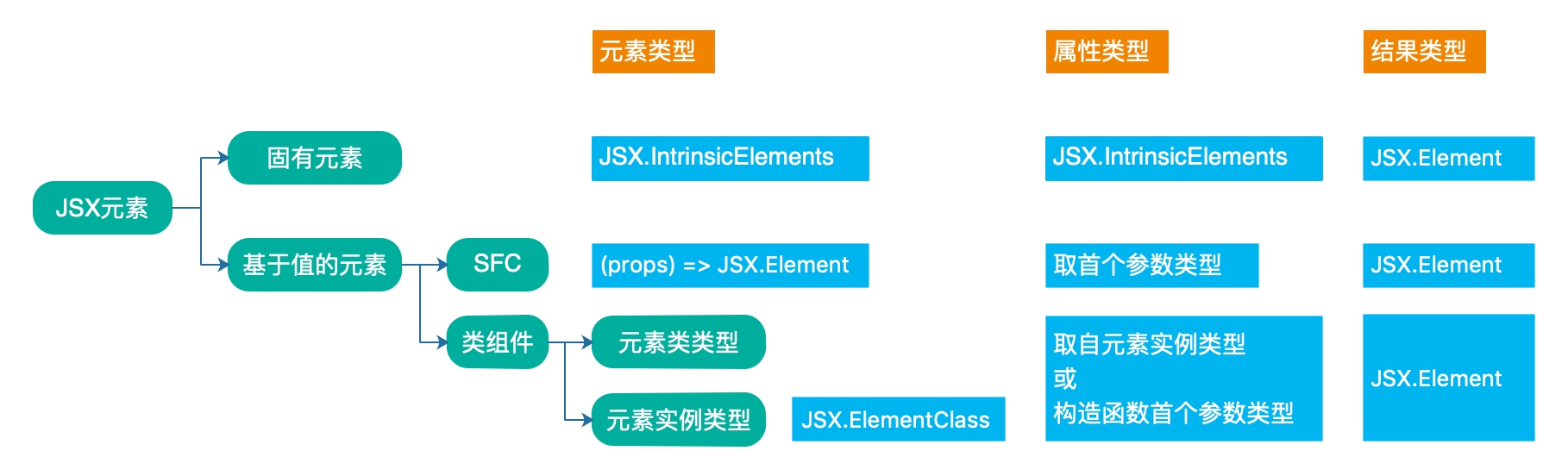
TypeScript's JSX type support is divided into element types, property types and result types 3 parts, as diagram below:
No comments yet. Be the first to share your thoughts.