
1. Introduction to Next.js
The React Framework for Production
A React framework designed for production use (obviously). Provides many out-of-the-box features, supporting mixed static rendering/server-side rendering, TypeScript support, bundling optimization, route-based preloading, and more:
Next.js gives you the best developer experience with all the features you need for production: hybrid static & server rendering, TypeScript support, smart bundling, route pre-fetching, and more. No config needed.
Among these, comprehensive static rendering/server-side rendering support makes Next.js unique in the React ecosystem
2. Core Features
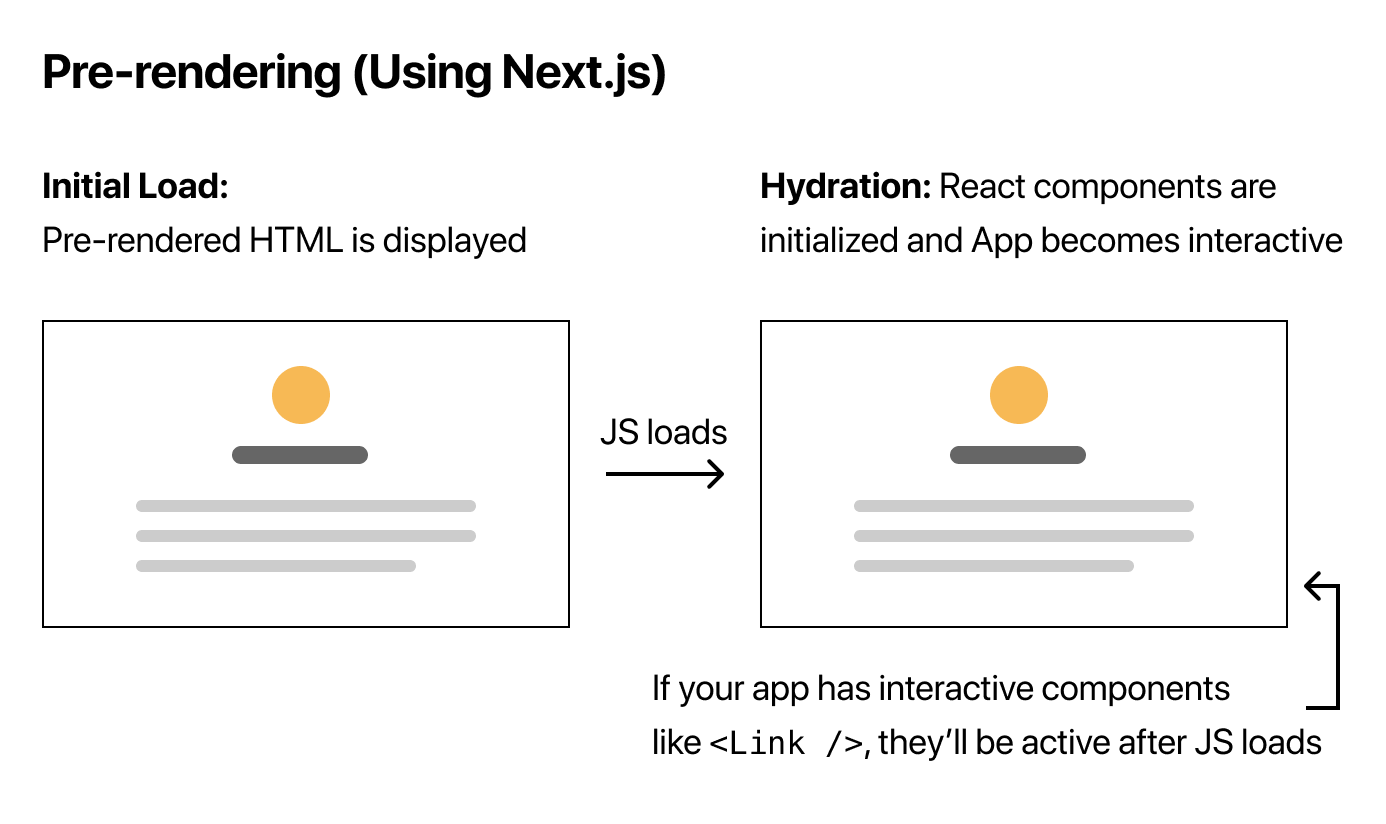
If Next.js does only one thing, it's Pre-rendering:
By default, Next.js pre-renders every page. This means that Next.js generates HTML for each page in advance, instead of having it all done by client-side JavaScript.
Specifically, pre-rendering comes in two forms:
-
SSG (Static Site Generation): Also called Static Generation, generates static HTML at build time
-
SSR (Server-Side Rendering): Also called Server Rendering, dynamically generates HTML when user requests arrive
Compared to SSR, Next.js prefers SSG because it has greater performance advantages (static content can be hosted on CDN, with immediate performance improvements). Therefore, it's recommended to prioritize SSG, and only consider SSR or CSR when SSG cannot meet requirements (such as personalized content that cannot be statically generated at build time)
P.S. For more rendering modes like CSR, SSR, etc., see Exploration of Frontend Rendering Modes
Around the core pre-rendering functionality, a series of related supports have emerged, such as:
- Routing (file conventions, API): Foundation for multi-page applications
- Page-level pre-rendering and code splitting: Naturally follows
- Incremental Static Generation: Build-time pre-rendering strategy for large numbers of pages (i.e., static generation)
- Route-based preloading: A nice addition
- Internationalization (combined with routing): A nice addition
- Serverless function integration: A nice addition
- Automatic polyfills, custom
headtags: Bonus features
Additionally, some general scenario support is provided:
- Out of the box (zero configuration)
- TypeScript
- CSS module, Sass
- Fast Refresh (reliable Hot Reload support)
- Real user data collection and analysis (page load performance, experience scores, etc.)
Imagecomponent with default optimizations
3. Routing Support
Next.js provides two types of routing support: static routing and dynamic routing
Static Routing
Static routing is defined through file conventions. js files under the pages directory are considered routes (each static route corresponds to a page file), for example:
pages/index.js → /
pages/blog/index.js → /blog
pages/blog/first-post.js → /blog/first-post
pages/dashboard/settings/username.js → /dashboard/settings/username
Dynamic Routing
Similarly, dynamic routes also need to be created under the pages directory, but the file names are slightly different:
pages/blog/[slug].js → /blog/:slug (/blog/hello-world)
pages/[username]/settings.js → /:username/settings (/foo/settings)
pages/post/[...all].js → /post/* (/post/2020/id/title)
Changing parameters in the path are filled through getStaticPaths:
// pages/posts/[id].js
export async function getStaticPaths() {
  return {
    // Must be called paths, value must be an array
    paths: [{
      // Each item must be in this form
      params: {
        // Must contain id
        id: 'ssg-ssr'
      }
    }, {
      params: {
        id: 'pre-rendering'
      }
    }],
    fallback: false
  }
}
Further passed to getStaticProps to fetch data by parameters and render the page:
// pages/posts/[id].js
export async function getStaticProps({ params }) {
  // Fetch corresponding data based on route parameters
  const postData = await getPostData(params.id)
  return {
    props: {
      postData
    }
  }
}

// Render page
export default function Post({ postData }) {
  return (
    <Layout>
      <Head>
        <title>{postData.title}</title>
      </Head>
      <article>
        <h1 className={utilStyles.headingXl}>{postData.title}</h1>
        <div className={utilStyles.lightText}>
          <Date dateString={postData.date} />
        </div>
        <div dangerouslySetInnerHTML={{ __html: postData.contentHtml }} />
      </article>
    </Layout>
  )
}
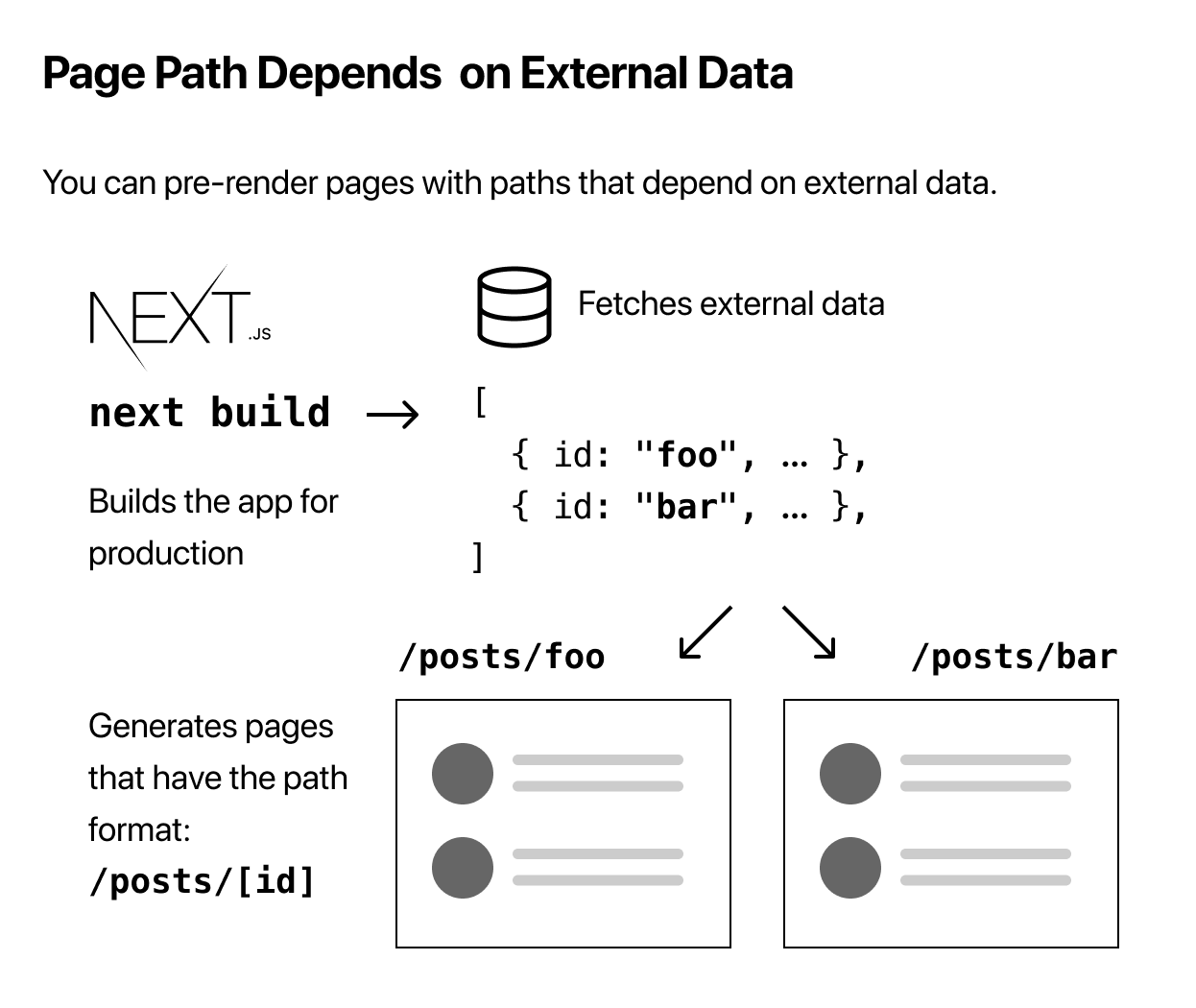
It can be understood as first creating a factory page (e.g., pages/[route parameter 1]/[route parameter 2].js), then getStaticPaths fills the route parameters, getStaticProps({ params }) requests different data based on parameters, and finally data enters the page component to begin pre-rendering:
4. SSG Support
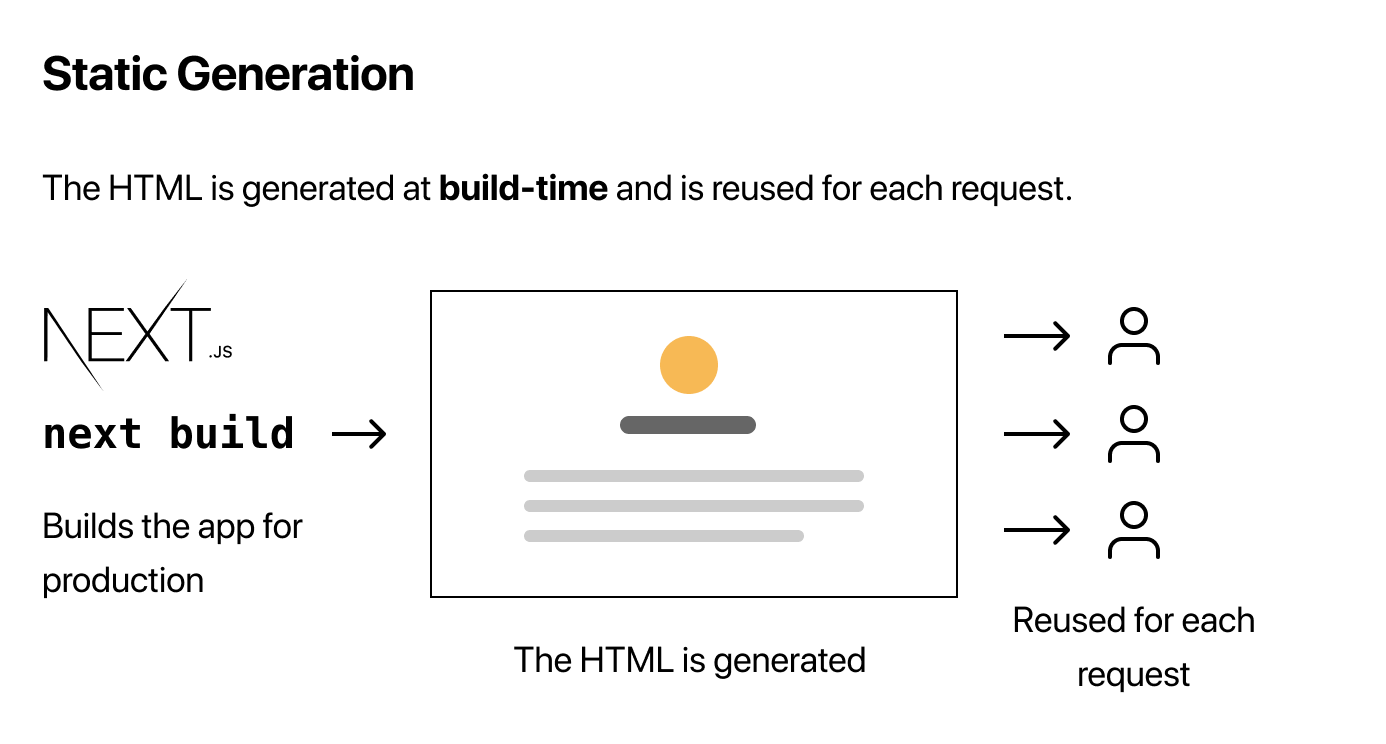
The simplest and most performant pre-rendering method is static generation (SSG), completely moving component rendering work to build time:
- (Build time) Fetch data
- (Build time) Render components, generate HTML
Just host the generated HTML static assets to a web server or CDN, combining React engineering advantages with ultimate web performance
First, we need to solve how to fetch data. Next.js's approach is to centrally manage data dependencies for pages:
// pages/index.js
export default function Home(props) { ... }

// Fetch static data
export async function getStaticProps() {
  // Get external data from the file system, API, DB, etc.
  const data = ...

  // The value of the `props` key will be
  //  passed to the `Home` component
  return {
    props: ...
  }
}
Here, getStaticProps only executes on the server side (never enters the client bundle), and the returned static data is passed to the page component (Home in the above example). In other words, all data dependencies for the page must be prepared in advance through getStaticProps, and only after data is ready does the component begin rendering and generate HTML
P.S. Note that only pages can declare their data dependencies through getStaticProps, regular components are not allowed, so all data dependencies for an entire page must be organized in one place
As for the part of rendering and generating HTML, it can be completed using React's SSR API
At this point, theoretically any page whose data dependencies can be fetched in advance can be compiled into static HTML, but 2 problems arise:
-
Data may change, and already generated static pages need to be updated
-
The amount of data may be so large that compilation never finishes
Taking e-commerce pages as an example, compiling massive product data into static pages is almost impossible (perhaps taking a century to compile), and even if all generated, product information will update from time to time, requiring static pages to be regenerated:
If your app has a very large number of static pages that depend on data (think: a very large e-commerce site). You want to pre-render all product pages, but then your builds would take forever.
Therefore, Incremental Static Regeneration was created
ISR Support
For massive pages that cannot be enumerated at build time and scenarios requiring updates, Next.js allows regeneration at runtime (equivalent to runtime static generation):
Incremental Static Regeneration allows you to update existing pages by re-rendering them in the background as traffic comes in.
For example:
export async function getStaticProps() {
  const res = await fetch('https://.../posts')
  const posts = await res.json()

  return {
    props: {
      posts,
    },
    // Set expiration time, enable ISR
    revalidate: 1, // In seconds
  }
}
revalidate: 1 means attempting to regenerate static HTML at runtime (when user requests come in), regenerating at most once per second
Runtime static generation takes some time (user requests are waiting for HTML), during which there are 3 choices:
-
fallback: false: No fallback, routes hitting not-yet-generated static pages directly return 404 -
fallback: true: With fallback, routes hitting not-yet-generated static pages first return a fallback page (at this pointpropsis empty, usually showing a loading indicator), while generating static HTML, a JSON copy is also generated for the fallback page to use with CSR, after completion the browser gets the data (filling inpropson the client), rendering the complete page -
fallback: 'blocking': No fallback, and requires user requests to wait until new page static generation completes (actually this is SSR, the rendering process is blocking, but the resulting HTML is retained after completion)
That is, combining with routing (getStaticPaths) to provide fallback for not-yet-generated pages, for example:
// pages/index.js
import { useRouter } from 'next/router'

function Post({ post }) {
  const router = useRouter()

  // Render fallback page
  if (router.isFallback) {
    return <div>Loading...</div>
  }

  // Render post...
}

export async function getStaticPaths() {
  return {
    paths: [{ params: { id: '1' } }, { params: { id: '2' } }],
    // (Page-level) fallback strategy, true means giving a fallback page for not-yet-generated ones, client automatically updates after generation completes
    fallback: true,
  }
}
P.S. See Incremental Static Regeneration and The fallback key for details
However, not all scenarios can happily statically generate at build time. Typically, if component-dependent data is dynamic, obviously data cannot be obtained in advance at build time, making static generation impossible
5. SSR Support
For scenarios where static pages cannot be generated at build time, SSR must be considered:
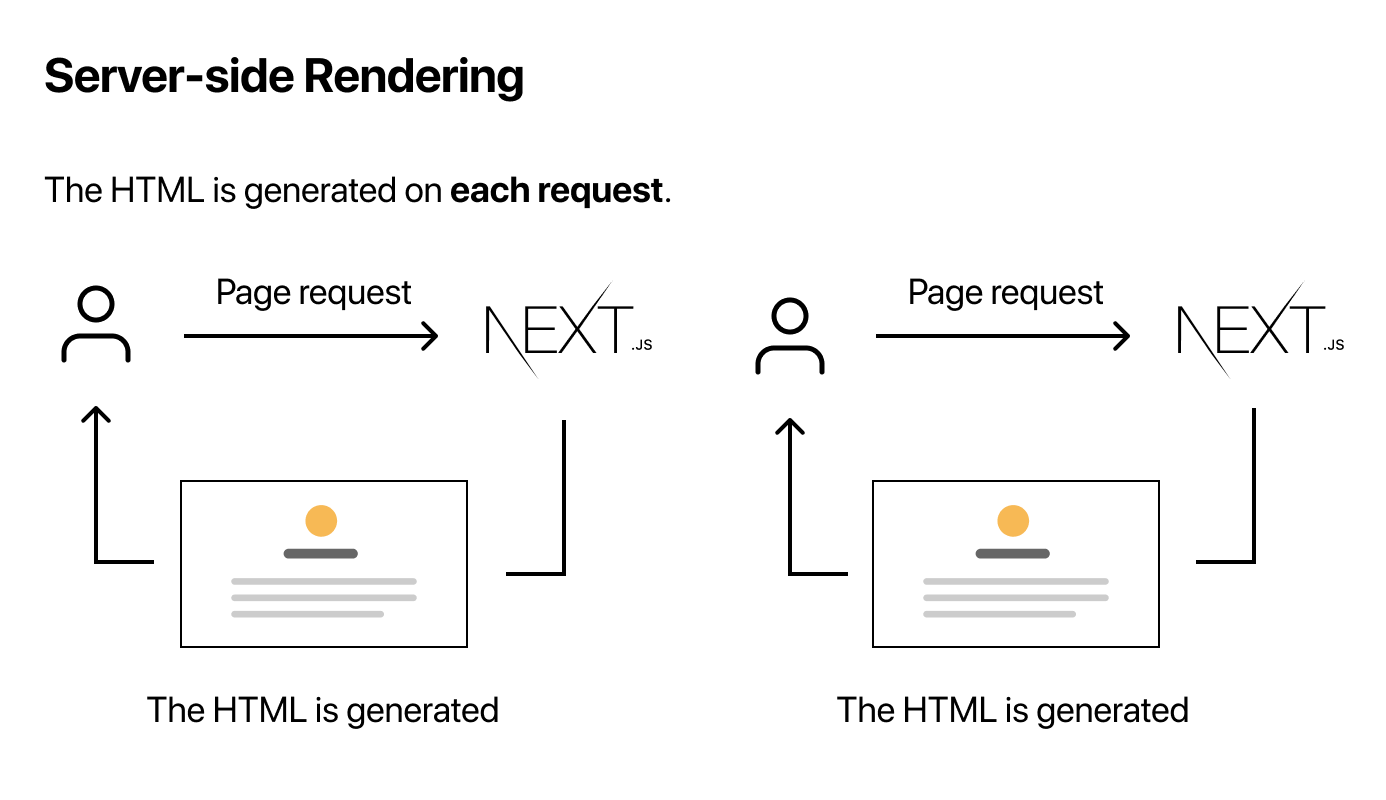
Different from SSG's getStaticProps, Next.js provides SSR-specific getServerSideProps(context):
// pages/index.js
export async function getServerSideProps(context) {
  const res = await fetch(`https://...`)
  const data = await res.json()

  if (!data) {
    return {
      notFound: true,
    }
  }

  return {
    props: {}, // will be passed to the page component as props
  }
}
Also used to fetch data, the biggest difference from getStaticProps is that it executes for every request, so it can obtain request context parameters (context)
P.S. For more detailed information, see getServerSideProps (Server-side Rendering)
6. Summary
Around the question of how to fetch data for pre-rendering, Next.js has explored unique routing support and elegant SSG and SSR support. Not only that, Next.js also provides hybrid support where you can have the best of both worlds. How powerful combining different rendering modes really is, see the next article for details
References
- Pages
- Data Fetching
- Create a Next.js App: Interesting tutorial
- vercel/next-learn-starter: Example Demo
No comments yet. Be the first to share your thoughts.