
I. What Happens When require()?
In Node.js, module loading process is divided into 5 steps:
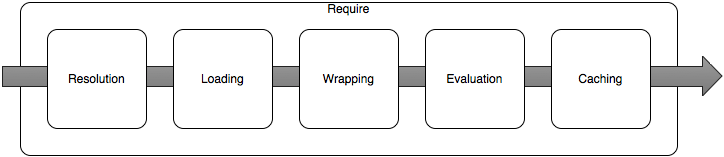
-
Resolution: Find the absolute path of the corresponding module (entry) file according to the module identifier
-
Loading: If it's a JSON or JS file, read the file content into memory. If it's a built-in native module, dynamically link its shared library to the current Node.js process
-
Wrapping: Wrap the file content (JS code) into a function, establish module scope, inject
exports, require, moduleetc. as parameters -
Evaluation: Pass parameters, execute the wrapped function
-
Caching: After function execution completes, cache the
module, and returnmodule.exportsas the return value ofrequire()
Among them, Module Identifiers is the first string parameter id passed to require(id), for example './myModule' in require('./myModule'), no need to specify suffix (but including it is also fine)
For file paths starting with ., .., /, try to match as files, directories, specific process is as follows:
-
If path exists and is a file, load as JS code (no matter what the file suffix is,
require(./myModule.abcd)is completely correct) -
If doesn't exist, try appending
.js,.json,.node(Node.js supported binary extension) suffixes in order -
If path exists and is a folder, find
package.jsonin that directory, take itsmainfield, and load the specified module (equivalent to a redirection) -
If no
package.json, tryindex.js,index.json,index.nodein order
For module identifiers that are not file paths, first check if it's a Node.js native module (fs, path, etc.). If not, start from current directory, search upwards level by level in various node_modules, all the way to top-level /node_modules, and some global directories:
-
Positions specified in
NODE_PATHenvironment variable -
Default global directories:
$HOME/.node_modules,$HOME/.node_librariesand$PREFIX/lib/node
P.S. For more information about global directories, see Loading from the global folders
After finding the module file, read content, and wrap with a function:
(function(exports, require, module, __filename, __dirname) {
// Module code actually lives in here
});
(Extracted from The module wrapper)
Inject these module variables (exports, require, module, __filename, __dirname) from external during execution, things exported by module are brought out through module.exports, and cache the entire module object, finally return require() result
Circular Dependencies
Specially, circular dependencies may appear between modules, for this, Node.js's handling strategy is very simple:
// module1.js
exports.a = 1;
require('./module2');
exports.b = 2;
exports.c = 3;

// module2.js
const module1 = require('./module1');
console.log('module1 is partially loaded here', module1);
module1.js references module2.js during execution, module2 references module1, at this time module1 hasn't finished loading (exports.b = 2; exports.c = 3; haven't executed yet). And in Node.js, partially loaded modules can also be normally referenced:
When there are circular require() calls, a module might not have finished executing when it is returned.
So module1.js execution result is:
module1 is partially loaded here { a: 1 }
P.S. For more information about circular references, see Cycles
II. How is Node.js Internally Implemented?
In implementation, most work of module loading is completed by module module:
const Module = require('module');
console.log(Module);
Module is a function/class:
function Module(id = '', parent) {
  this.id = id;
  this.path = path.dirname(id);
  // i.e. module.exports
  this.exports = {};
  this.parent = parent;
  updateChildren(parent, this, false);
  this.filename = null;
  this.loaded = false;
  this.children = [];
}
Every time a module is loaded, a Module instance is created, after module file execution completes, the instance still remains, things exported by module attach to Module instance
All work of module loading is completed by module native module, including Module._load, Module.prototype._compile
Module._load
Module._load() is responsible for loading new modules, managing cache, specifically as follows:
Module._load = function(request, parent, isMain) {
  // 0. Resolve module path
  const filename = Module._resolveFilename(request, parent, isMain);
  // 1. Priority find cache Module._cache
  const cachedModule = Module._cache[filename];
  // 2. Try to match native module
  const mod = loadNativeModule(filename, request, experimentalModules);
  // 3. Cache miss, also didn't match native module, create a new Module instance
  const module = new Module(filename, parent);
  // 4. Cache the new instance
  Module._cache[filename] = module;
  // 5. Load module
  module.load(filename);
  // 6. If loading/execution errors, delete cache
  if (threw) {
    delete Module._cache[filename];
  }
  // 7. Return module.exports
  return module.exports;
};

Module.prototype.load = function(filename) {
  // 0. Determine module type
  const extension = findLongestRegisteredExtension(filename);
  // 1. Load module content by type
  Module._extensions[extension](this, filename);
};
Supported types are .js, .json, .node 3 kinds:
// Native extension for .js
Module._extensions['.js'] = function(module, filename) {
  // 1. Read JS file content
  const content = fs.readFileSync(filename, 'utf8');
  // 2. Wrap, execute
  module._compile(content, filename);
};

// Native extension for .json
Module._extensions['.json'] = function(module, filename) {
  // 1. Read JSON file content
  const content = fs.readFileSync(filename, 'utf8');
  // 2. Directly JSON.parse() and done
  module.exports = JSONParse(stripBOM(content));
};

// Native extension for .node
Module._extensions['.node'] = function(module, filename) {
  // Dynamically load shared library
  return process.dlopen(module, path.toNamespacedPath(filename));
};
P.S. process.dlopen specifically see process.dlopen(module, filename[, flags])
Module.prototype._compile
Module.prototype._compile = function(content, filename) {
  // 1. Wrap with a function
  const compiledWrapper = wrapSafe(filename, content, this);
  // 2. Prepare parameters to inject
  const dirname = path.dirname(filename);
  const require = makeRequireFunction(this, redirects);
  const exports = this.exports;
  const thisValue = exports;
  const module = this;
  // 3. Inject parameters, execute
  compiledWrapper.call(thisValue, exports, require, module, filename, dirname);
};
Wrapping part implementation is as follows:
function wrapSafe(filename, content, cjsModuleInstance) {
  let compiled = compileFunction(
    content,
    filename,
    0,
    0,
    undefined,
    false,
    undefined,
    [],
    [
      'exports',
      'require',
      'module',
      '__filename',
      '__dirname',
    ]
  );

  return compiled.function;
}
P.S. Complete implementation of module loading see node/lib/internal/modules/cjs/loader.js
III. What's the Use of Knowing These?
Knowing the module loading mechanism is very useful in some scenarios needing to extend tamper with loading logic, such as implementing virtual modules, module aliases, etc.
Virtual Modules
For example, VS Code plugins access plugin API through require('vscode'):
// The module 'vscode' contains the VS Code extensibility API
import * as vscode from 'vscode';
And vscode module actually doesn't exist, it's a virtual module extended at runtime:
// ref: src/vs/workbench/api/node/extHost.api.impl.ts
function defineAPI() {
  const node_module = <any>require.__$__nodeRequire('module');
  const original = node_module._load;
  // 1. Hijack Module._load
  node_module._load = function load(request, parent, isMain) {
    if (request !== 'vscode') {
      return original.apply(this, arguments);
    }

    // 2. Inject virtual module vscode
    // get extension id from filename and api for extension
    const ext = extensionPaths.findSubstr(parent.filename);
    let apiImpl = extApiImpl.get(ext.id);
    if (!apiImpl) {
      apiImpl = factory(ext);
      extApiImpl.set(ext.id, apiImpl);
    }
    return apiImpl;
  };
}
Specifically see [API Injection Mechanism and Plugin Startup Process_VSCode Plugin Development Notes 2](/articles/api 注入机制及插件启动流程-vscode 插件开发笔记 2/), won't elaborate here
Module Aliases
Similarly, can implement module aliases by rewriting Module._resolveFilename, for example map @lib/my-module module reference in proj/src to proj/lib/my-module:
// src/index.js
require('./patchModule');

const myModule = require('@lib/my-module');
console.log(myModule);
patchModule specific implementation is as follows:
const Module = require('module');
const path = require('path');

const _resolveFilename =  Module._resolveFilename;
Module._resolveFilename = function(request) {
  const args = Array.from(arguments);
  // Alias mapping
  const LIB_PREFIX = '@lib/';
  if (request.startsWith(LIB_PREFIX)) {
    console.log(request);
    request = path.resolve(__dirname, '../' + request.slice(1));
    args[0] = request;
    console.log(` => ${request}`);
  }
  return _resolveFilename.apply(null, args);
}
P.S. Of course, generally don't need to do this, can complete through Webpack and other build tools
Clear Cache
By default Node.js modules have cache after loading, and sometimes may want to disable cache, force reload a module, for example want to read JS files that can be frequently modified by users (such as webpack.config.js)
At this time can manually delete module.exports cache hanging on require.cache:
delete require.cache[require.resolve('./b.js')]
However, if b.js also references other external (non-native) modules, also need to delete together:
const mod = require.cache[require.resolve('./b.js')];
// Delete all module caches on reference tree
(function traverse(mod) {
  mod.children.forEach((child) => {
    traverse(child);
  });

  console.log('decache ' + mod.id);
  delete require.cache[mod.id];
}(mod));
P.S. Or adopt decache module
No comments yet. Be the first to share your thoughts.