
I. Module Types
Node.js supports 2 types of modules by default:
-
Core Modules: Compiled into binary, source code located in lib/ directory
-
File Modules: Including JavaScript files (
.js), JSON files (.json), C++ extension files (.node)
From easy to difficult, let's first look at the JS modules we most commonly deal with
II. JS Modules
[caption id="attachment_2169" align="alignnone" width="496"]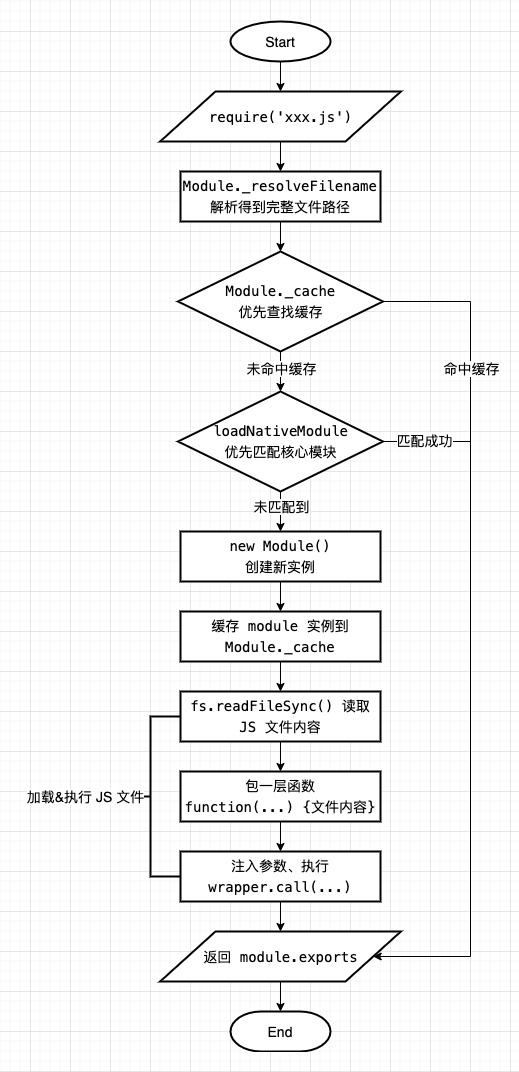 js module[/caption]
Note a detail: the module instance is cached before loading & executing the module file, not after. This is the fundamental reason why Node.js can calmly handle circular dependencies:
When there are circular require() calls, a module might not have finished executing when it is returned.
If circular references occur during module loading, causing an unfinished module to be referenced, according to the illustrated module loading process, it will also hit the cache (without entering infinite recursion), even though at this point module.exports may be incomplete (module code hasn't finished executing, some things haven't been attached yet)
P.S. For how to find the absolute path of the corresponding module (entry) file based on module identifier, same-name module loading priority, and related Node.js source code interpretation, see [Node Module Loading Mechanism](/articles/node 模块加载机制/)
III. JSON Modules
Similar to JS modules, JSON files can also be loaded directly as modules through require. The specific process is as follows:
[caption id="attachment_2170" align="alignnone" width="541"]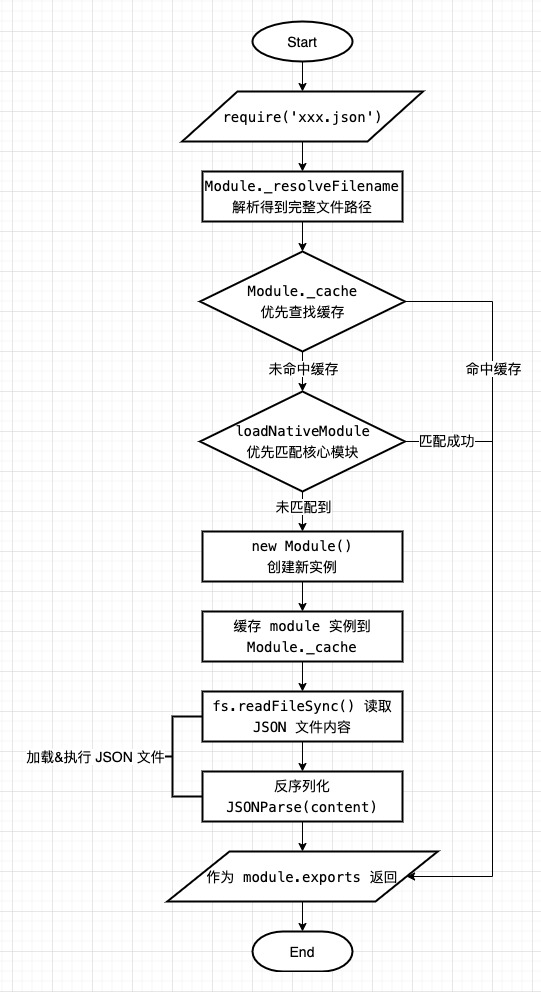 json module[/caption]
Except for the different loading & execution methods, the loading process is completely consistent with JS modules
IV. C++ Extension Modules
Compared to JS and JSON modules, the loading process of C++ extension modules (.node) is more closely related to the C++ layer:
[caption id="attachment_2171" align="alignnone" width="532"]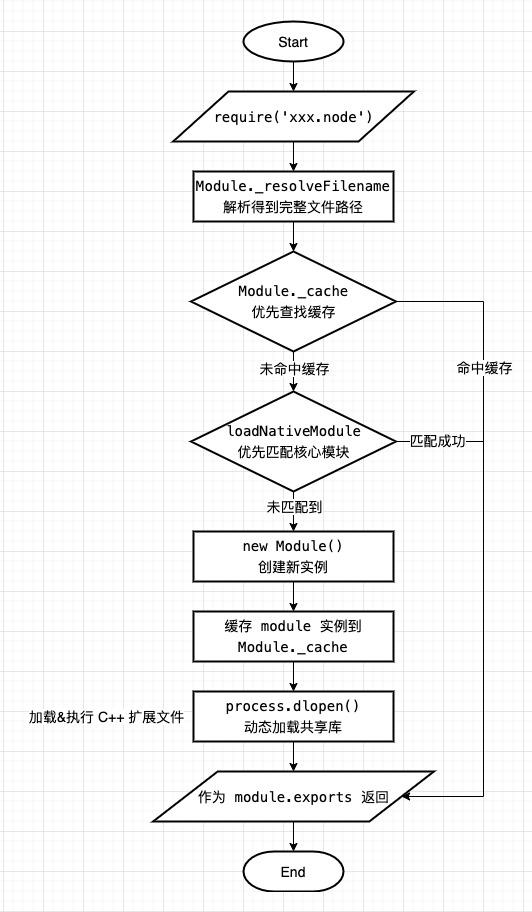 addon module[/caption]
JS layer processing stops at process.dlopen(). Actual loading, execution, and how the properties/methods exposed by extension modules are passed into the JS runtime are all completed by the C++ layer:
[caption id="attachment_2172" align="alignnone" width="625"]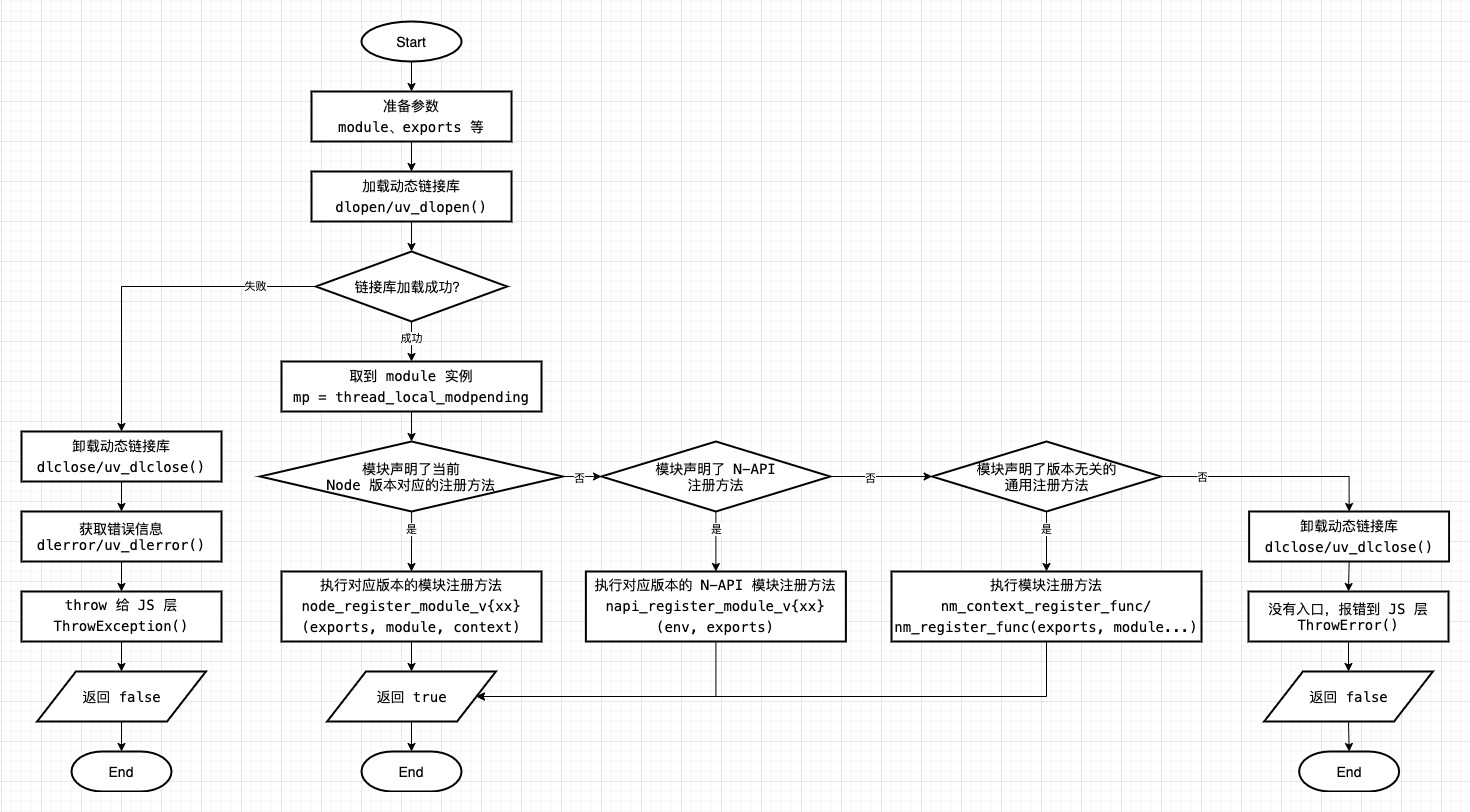 addon module cpp[/caption]
The key is loading C++ dynamic link libraries (i.e., .node files) through dlopen()/uv_dlopen. Related Node.js source code (Node v14.0.0):
-
Module loading: DLOpen, DLib::Open, DLib::Close
-
Module self-registration: NODE_MODULE macro, node_module_register
The reason why the module instance of extension modules can be obtained externally is because extension modules have a self-registration mechanism:
// When module registers
extern "C" void node_module_register(void* m) {
  struct node_module* mp = reinterpret_cast<struct node_module*>(m);

  if (mp->nm_flags & NM_F_INTERNAL) {
    mp->nm_link = modlist_internal;
    modlist_internal = mp;
  } else if (!node_is_initialized) {
    // "Linked" modules are included as part of the node project.
    // Like builtins they are registered *before* node::Init runs.
    mp->nm_flags = NM_F_LINKED;
    mp->nm_link = modlist_linked;
    modlist_linked = mp;
  } else {
    // Hang module instance on global variable, expose it
    thread_local_modpending = mp;
  }
}

// When loading module
void DLOpen(const FunctionCallbackInfo<Value>& args) {
  /* ...omit some non-critical code */
  const bool is_opened = dlib->Open();
  // After loading dynamic link library, read global variable, get module instance
  node_module* mp = thread_local_modpending;
  thread_local_modpending = nullptr;
  // Finally pass exports and module to module entry function, bring out properties/methods exposed by module
  if (mp->nm_context_register_func != nullptr) {
    mp->nm_context_register_func(exports, module, context, mp->nm_priv);
  } else if (mp->nm_register_func != nullptr) {
    mp->nm_register_func(exports, module, mp->nm_priv);
  }
}
P.S. For detailed information about C++ extension module development, compilation, and running, see [Node.js C++ Extension Beginner's Guide](/articles/node-js-c 扩展入门指南/)
V. Core Modules
Similar to C++ extension modules, most core module implementations depend on corresponding lower-level C++ modules (such as file I/O, network requests, encryption/decryption, etc.), just wrapped with JS to expose user-facing upper-layer interfaces (such as fs.writeFile, fs.writeFileSync, etc.)
Essentially they are all C++ class libraries. The main difference is that core modules are compiled into the Node.js installation package (including the upper-layer wrapped JS code, already linked into the executable at compile time), while extension modules need to be dynamically loaded at runtime
P.S. For more information about C++ dynamic link libraries and static libraries, see [Node.js C++ Extension Beginner's Guide](/articles/node-js-c 扩展入门指南/#articleHeader1)
Therefore, compared to the previous types of modules, the core module loading process is slightly more complex, divided into 4 parts:
-
(Pre-compilation phase) "Compile" JS code
-
(At startup) Load JS code
-
(At startup) Register C++ modules
-
(At runtime) Load core modules (including JS code and referenced C++ modules)
[caption id="attachment_2173" align="alignnone" width="625"]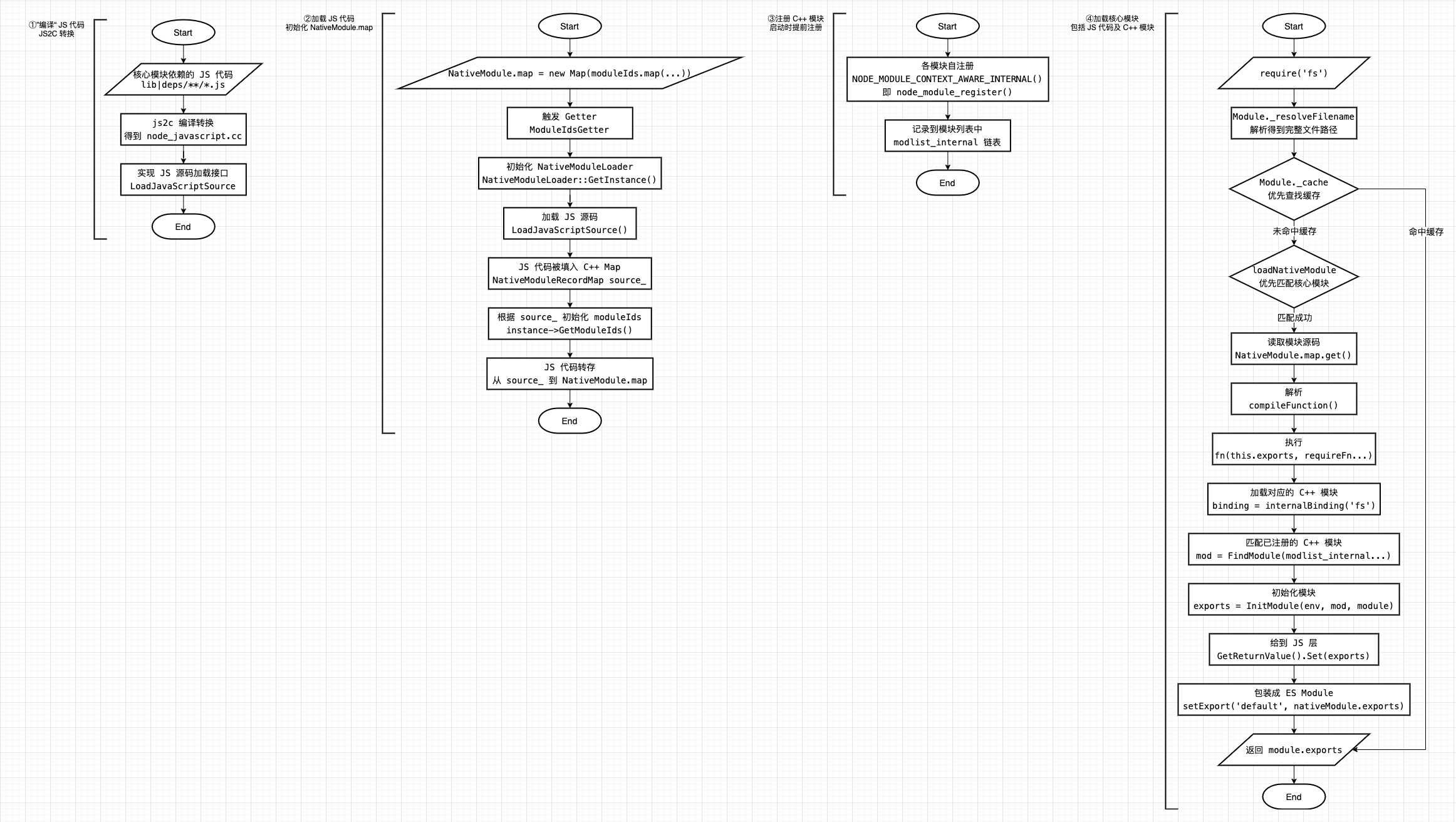 core module[/caption]
Among them, the more interesting parts are JS2C transformation and core C++ module registration
JS2C Transformation
Through pre-processing before compilation, the JS code part of core modules is converted into C++ files (located at ./out/Release/obj/gen/node_javascript.cc), then embedded into the executable:
NativeModule: a minimal module system used to load the JavaScript core modules found in lib/**/*.js and deps/**/*.js. All core modules are compiled into the node binary via node_javascript.cc generated by js2c.py, so they can be loaded faster without the cost of I/O. This class makes the lib/internal/*, deps/internal/* modules and internalBinding() available by default to core modules, and lets the core modules require itself via require('internal/bootstrap/loaders') even when this file is not written in CommonJS style.
(Excerpted from node/lib/internal/bootstrap/loaders.js)
The main content of the generated node_javascript.cc is as follows:
static const uint8_t internal_bootstrap_environment_raw[] = {
  39,117,115,101, 32,115,116,114,105, 99,116, 39, 59, 10, 10, 47, 47, 32, 84,104,105,115, 32,114,117,110,115, 32,110,101,
  99,101,115,115, 97,114,121, 32,112,114,101,112, 97,114, 97,116,105,111,110,115, 32,116,111, 32,112,114,101,112, 97,114
  // ...
}

void NativeModuleLoader::LoadJavaScriptSource() {
  source_.emplace("internal/bootstrap/environment", UnionBytes{internal_bootstrap_environment_raw, 374});
  source_.emplace("internal/bootstrap/loaders", UnionBytes{internal_bootstrap_loaders_raw, 10110});
  // ...
}

UnionBytes NativeModuleLoader::GetConfig() {
  return UnionBytes(config_raw, 3030);  // config.gypi
}
That is to say, LoadJavaScriptSource that can't be found by searching through source code is actually automatically generated during the pre-compilation phase:
// ref https://github.com/nodejs/node/blob/v14.0.0/src/node_native_module.cc#L24
NativeModuleLoader::NativeModuleLoader() : config_(GetConfig()) {
  // Implementation of this function is not in source code, but in compiled node_javascript.cc
  LoadJavaScriptSource();
}
Core C++ Module Registration
All C++ code that core modules depend on has a line of registration code at the end, for example:
// src/node_file.cc
NODE_MODULE_CONTEXT_AWARE_INTERNAL(fs, node::fs::Initialize)
// src/timers.cc
NODE_MODULE_CONTEXT_AWARE_INTERNAL(timers, node::Initialize)
// src/js_stream.cc
NODE_MODULE_CONTEXT_AWARE_INTERNAL(js_stream, node::JSStream::Initialize)
After NODE_MODULE_CONTEXT_AWARE_INTERNAL macro expands, it's node_module_register, recording the registered C++ modules to the modlist_internal linked list:
extern "C" void node_module_register(void* m) {
  struct node_module* mp = reinterpret_cast<struct node_module*>(m);

  if (mp->nm_flags & NM_F_INTERNAL) {
    // Record internal C++ modules
    mp->nm_link = modlist_internal;
    modlist_internal = mp;
  } else if (!node_is_initialized) {
    // "Linked" modules are included as part of the node project.
    // Like builtins they are registered *before* node::Init runs.
    mp->nm_flags = NM_F_LINKED;
    mp->nm_link = modlist_linked;
    modlist_linked = mp;
  } else {
    thread_local_modpending = mp;
  }
}
At runtime, these built-in C++ modules are loaded through internalBinding
Related Node.js source code (Node v14.0.0):
-
JS layer module loading: Module._load, loadNativeModule, compileForInternalLoader, nativeModuleRequire, internalBinding
-
JS2C transformation: tools/js2c.py, LoadJavaScriptSource, NativeModule.map, moduleIds, ModuleIdsGetter, GetModuleIds
-
Core C++ module registration: NODE_MODULE_CONTEXT_AWARE_INTERNAL, node_module_register, InitModule
-
C++ layer module loading: internalBinding, getInternalBinding, FindModule, InitModule
No comments yet. Be the first to share your thoughts.