
1. The Concept of Streams
A stream is a collection of data, similar to arrays or strings. However, streams do not access all the data at once; instead, they send/receive data piece by piece (in chunks). Therefore, they don't require large amounts of memory, making them particularly suitable for processing large amounts of (external) data.
Streams have pipeline characteristics, for example:
const grep = ... // A stream for the grep output
const wc = ... // A stream for the wc input
grep.pipe(wc)
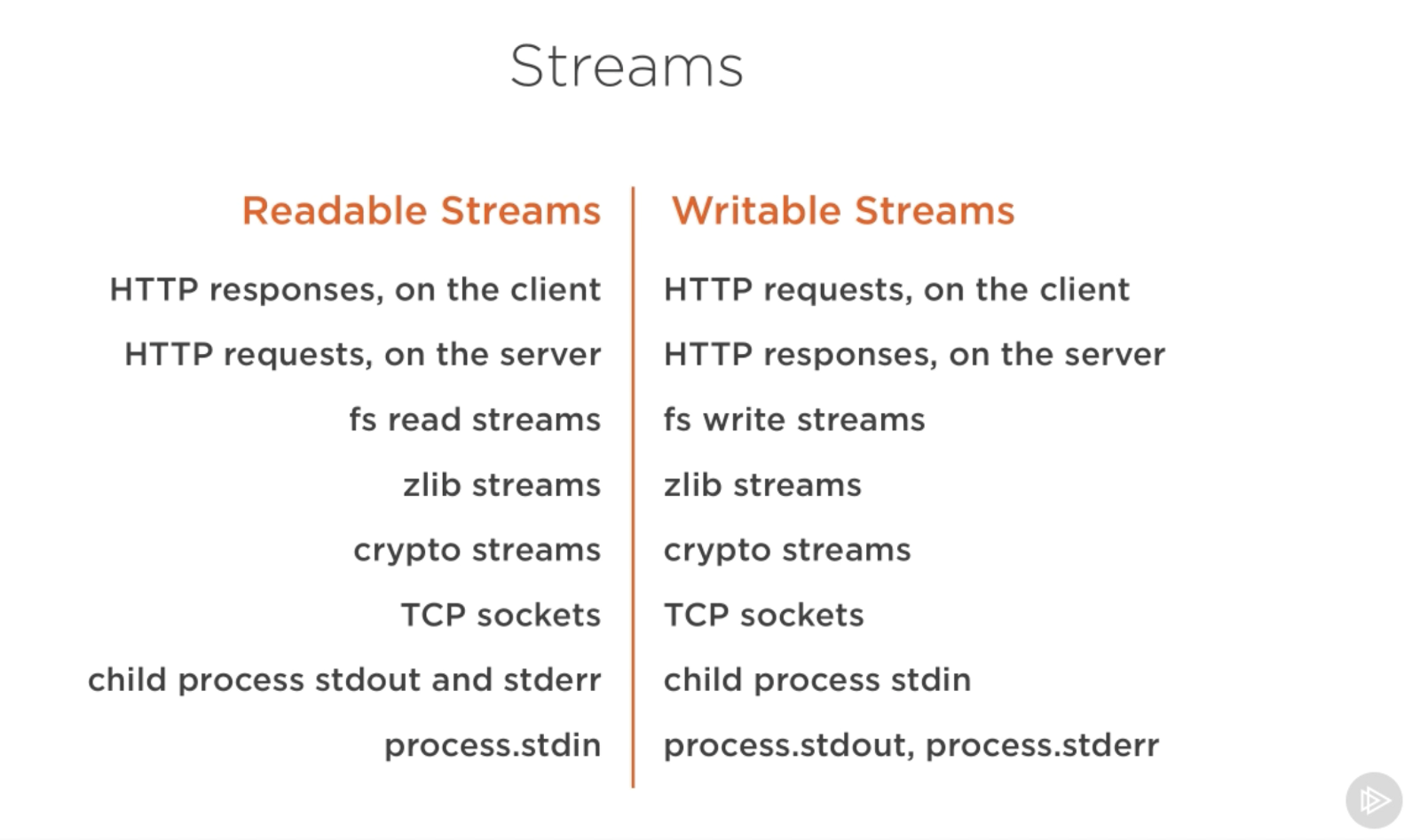
Many native modules are based on streams, including a process's stdin/stdout/stderr:
For example, in a common scenario:
const fs = require('fs');
const server = require('http').createServer();

server.on('request', (req, res) => {
  const src = fs.createReadStream('./big.file');
  src.pipe(res);
});

server.listen(8000);
The pipe method takes the output of a readable stream (the data source) as the input for a writable stream (the destination), directly connecting the file-reading output stream as an input to the HTTP response output stream. This avoids reading the entire file into memory.
P.S. Even the internal implementation of the commonly used console.log() is a stream.
2. Types of Streams
There are 4 fundamental stream types in Node:
-
Readable
A readable stream is an abstraction for a source from which data can be consumed, such as
fs.createReadStream. -
Writable
A writable stream is an abstraction for a destination to which data can be written, such as
fs.createWriteStream. -
Duplex
A duplex stream is both readable and writable, such as a TCP socket.
-
Transform
A transform stream is essentially a duplex stream used to modify or transform data as it is written and read, such as
zlib.createGzipused to compress data with gzip.You can think of a transform stream as a function that takes a writable stream as input and outputs a readable stream.
P.S. There is a type of transform stream called a (Pass)Through Stream, similar to the
identity = x => xfunction in Functional Programming (FP).
3. Pipelines
src.pipe(res) requires the source to be readable and the destination to be writable. Therefore, if you are piping duplex streams, you can chain them together like Linux pipelines:
readableSrc
  .pipe(transformStream1)
  .pipe(transformStream2)
  .pipe(finalWrtitableDest)
The pipe() method returns the destination stream, so:
// a (readable), b and c (duplex), and d (writable)
a.pipe(b).pipe(c).pipe(d)
// 等价于
a.pipe(b)
b.pipe(c)
c.pipe(d)
# Linux下,等价于
$ a | b | c | d
4. Streams and Events
Event-driven architecture is an important design feature of Node. Many native Node objects are implemented based on an event mechanism (the EventEmitter module), including streams (the stream module):
Most of Node’s objects?—?like HTTP requests, responses, and streams?—?implement the EventEmitter module so they can provide a way to emit and listen to events.
All streams are instances of EventEmitter, reading and writing data through an event mechanism. For example, the pipe() method mentioned above is roughly equivalent to:
// readable.pipe(writable)

readable.on('data', (chunk) => {
  writable.write(chunk);
});
readable.on('end', () => {
  writable.end();
});
P.S. pipe also handles some other things, such as error handling, EoF (End of File), and situations where a stream is faster or slower.
The main events and methods for Readable and Writable streams are as follows:
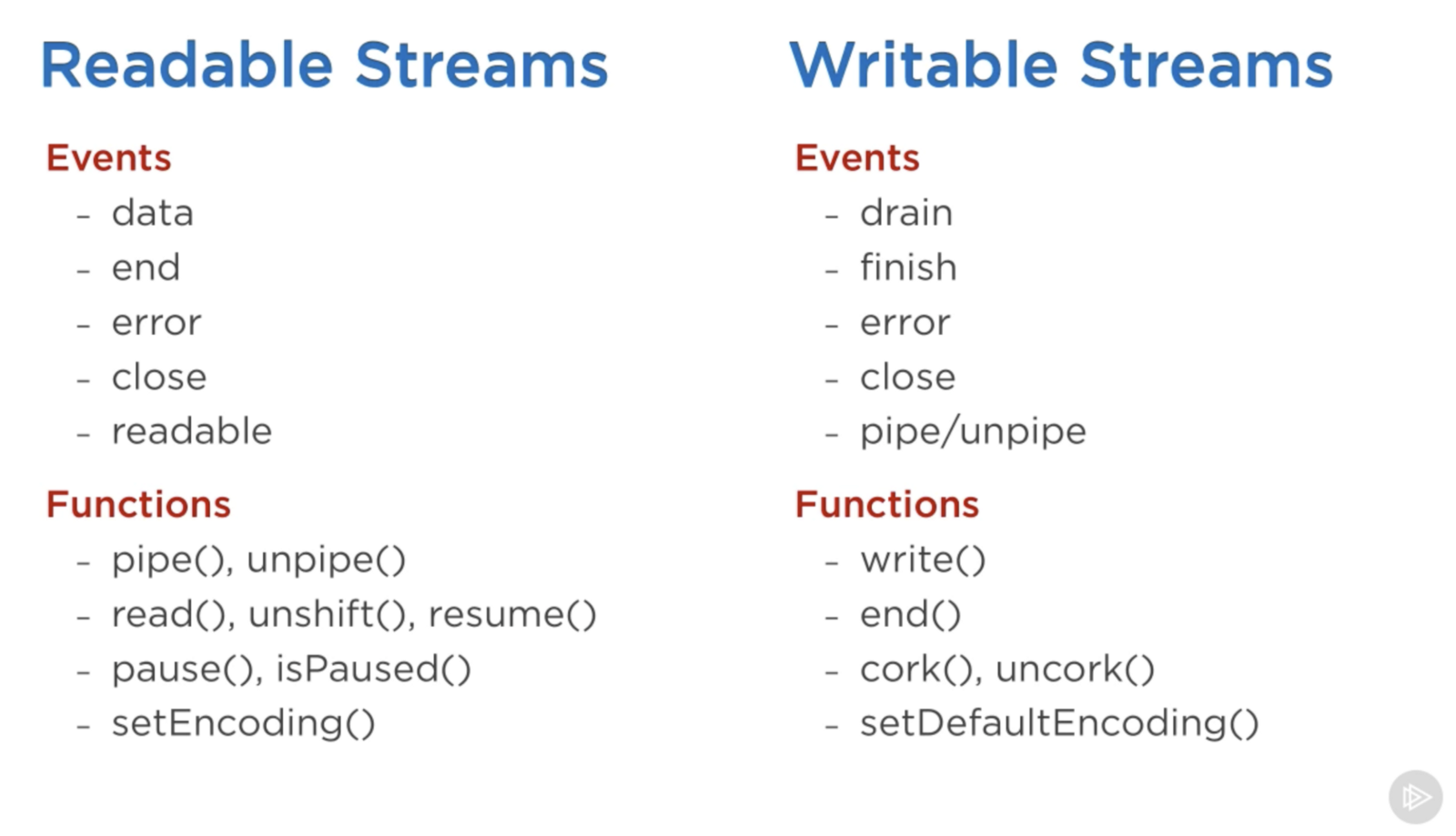
The main events for a Readable stream are:
-
dataevent: emitted when the stream passes a chunk to a consumer. -
endevent: emitted when there is no more data to consume from the stream.
The main events for a Writable stream are:
-
drainevent: the stream was blocked, and this is a signal that the Writable stream can receive more data. -
finishevent: emitted when all data has been flushed to the underlying system.
5. The Two Modes of Readable Streams: Paused and Flowing
A Readable stream is either flowing or paused, also known as pull and push modes, respectively.
By default, a newly created stream is in the Paused state, and data can be read using the read() method. If it is in the Flowing state, data will continuously flow out. At this time, you just need to listen to events to use the data. If there is no consumer, the data will be lost, so people usually listen to the data event of the Readable stream. Actually, listening to the data event will switch the Readable stream from Paused to Flowing, and removing the data event listener will switch it back. If you need to switch manually, you can use resume() and pause().
When using the pipe() method, you don't need to worry about these details; they are handled automatically:
-
The Readable stream emits
dataevents until the Writable stream becomes too busy. -
After receiving a signal,
pipecallsReadable.pause(), entering the Paused mode. -
When the Writable stream has processed the backlog and pressure decreases, it will emit a
drainevent. At this point,pipecallsReadable.resume()to enter Flowing mode, allowing the Readable stream to resume emittingdataevents.
highWaterMark and backpressure
Actually, the drain event is used to handle the Backpressure phenomenon. Simply put, Backpressure is when the downstream consumption speed limits the transmission, causing reverse pressure from downstream to upstream.
If the consumption speed is slower than the production speed, an accumulation will occur downstream. The data that cannot be processed in time will be stored in the Writable stream's buffer. Without intervention (flow control), this buffer will continue to grow, potentially overflowing and causing errors or data loss.
The indicator that Backpressure has occurred is when Writable.write() returns false, meaning the amount of pending data from upstream has reached the highWaterMark (default 16kb):
Buffer level when stream.write() starts returning false. Defaults to 16384 (16kb), or 16 for objectMode streams.
This is a signal that the downstream is getting stressed (has enough tasks to stay busy for a while). It is recommended to apply flow control to the upstream at this point, that is, call Readable.pause() to pause it temporarily, giving the downstream more time to process the accumulated data. When the downstream feels relieved, it will emit a drain event, indicating it now has the capacity to process more data. At this point, the floodgates should be opened (Readable.resume()).
Note that the data of a Readable stream will be kept in the buffer until a Writable stream consumes it. So the Paused state just means it's not flowing down; the already buffered data is still in the Readable stream's buffer. Therefore, without flow control, data that cannot be processed in time is buffered downstream and continues to accumulate. With flow control, this data is buffered upstream and stops accumulating because the flow has been limited.
Additionally, Readable streams also have the concept of highWaterMark:
The maximum number of bytes to store in the internal buffer before ceasing to read from the underlying resource. Defaults to 16384 (16kb), or 16 for objectMode streams
This is a limit on the reading speed from the actual data source (e.g., reading a file from disk) to prevent the production speed from being too fast and causing a buffer backlog (e.g., rapid consecutive push() calls). So the normal working mode of a Flowing Readable stream is being push()ed repeatedly... hey, the amount in the buffer is enough for a chunk, spit it out downstream. Similarly, the indicator that a Readable stream has reached highWaterMark is when push() returns false, indicating that the Readable stream's buffer is no longer very empty. If push() continues at this point, yes, Backpressure will also occur (the Readable stream's consumption capability limits the transmission speed from the data source to the Readable stream):
  Fast-------------Slow
Data Source-------->Readable------->Writable
                 Fast--------------Slow
As long as the upstream (production) is fast and the downstream (consumption) is slow, Backpressure will occur. So in a simple readable.pipe(writable) scenario, there might be two segments of Backpressure.
6. Examples
Writable stream
Creating a large file is a common scenario:
const fs = require('fs');
const file = fs.createWriteStream('./big.file');

for(let i=0; i<= 1e6; i++) {
  file.write('Lorem ipsum dolor sit amet, consectetur adipisicing elit, sed do eiusmod tempor incididunt ut labore et dolore magna aliqua. Ut enim ad minim veniam, quis nostrud exercitation ullamco laboris nisi ut aliquip ex ea commodo consequat. Duis aute irure dolor in reprehenderit in voluptate velit esse cillum dolore eu fugiat nulla pariatur. Excepteur sint occaecat cupidatat non proident, sunt in culpa qui officia deserunt mollit anim id est laborum.\n');
}

file.end();
Create a Writable stream pointing to the file using fs.createWriteStream(), fill it with data using write(), and call end() when finished.
Or more generally, directly instantiate a Writable with new:
const { Writable } = require('stream');
const outStream = new Writable({
  write(chunk, encoding, callback) {
    console.log(chunk.toString());
    // nowrap version
    // process.stdout.write(chunk.toString());
    callback();
  }
});

process.stdin.pipe(outStream);
This is a minimal echo implementation, connecting the current process's standard input to a custom output stream outStream, acting like a logging middleware (standard input flows through outStream, then proceeds via callback):
cc
oo
nn
ss
oo
ll
ee

Console {
  log: [Function: bound consoleCall],
  ...
}
Among the 3 parameters of the write() method, chunk is a Buffer. encoding is needed in some scenarios but can usually be ignored. callback is a notification function that should be called after the chunk has been processed, indicating whether the write was successful (if it failed, pass an Error object into it), similar to next() in a tail-trigger mechanism.
Or an even simpler echo implementation:
process.stdin.pipe(process.stdout);
Directly pipe standard input to standard output.
Readable stream
const { Readable } = require('stream');
const inStream = new Readable();
inStream.push('ABCDEFGHIJKLM');
inStream.push('NOPQRSTUVWXYZ');
inStream.push(null); // No more data
inStream.pipe(process.stdout);
Fill the Readable stream with data using push, and use push(null) to indicate the end. In the example above, all data is read in before being passed to standard output. In reality, there is a more efficient way (pushing data to the consumer on demand):
const { Readable } = require('stream');
const inStream = new Readable({
  read(size) {
    this.push(String.fromCharCode(this.currentCharCode++));
    if (this.currentCharCode > 90) {
      this.push(null);
    }
  }
});
inStream.currentCharCode = 65;
inStream.pipe(process.stdout);
The read() method spits out one character at a time. When a consumer requests data from the Readable stream, read() is continuously triggered.
Duplex/Transform stream
A Duplex stream combines the characteristics of both Readable and Writable streams: it can act as both a data source (producer) and a destination (consumer). For example:
const { Duplex } = require('stream');

const inoutStream = new Duplex({
  write(chunk, encoding, callback) {
    console.log(chunk.toString());
    callback();
  },

  read(size) {
    this.push(String.fromCharCode(this.currentCharCode++));
    if (this.currentCharCode > 90) {
      this.push(null);
    }
  }
});

inoutStream.currentCharCode = 65;
process.stdin.pipe(inoutStream).pipe(process.stdout);
The above example combines the previous two examples. inoutStream is connected to the standard output stream, and A-Z will be passed as a data source to the standard output (printed out). At the same time, the standard input stream is connected to inoutStream, and all data from standard input will be logged. The result is as follows:
ABCDEFGHIJKLMNOPQRSTUVWXYZcc
oo
nn
ss
oo
ll
ee

Console {
  log: [Function: bound consoleCall],
  ...
}
P.S. A-Z is output first because pipe() switches the Readable stream to Flowing mode, so A-Z is "streamed" out right from the start.
Note that the Readable and Writable parts of a Duplex stream are completely independent, and reading and writing do not affect each other. Duplex simply combines the two features into one object, like a one-way pipe bound together like two chopsticks.
A Transform stream is an interesting type of Duplex stream: its output is calculated based on its input. Therefore, you don't need to implement read/write() methods separately; implementing just a transform() method is enough:
const { Transform } = require('stream');

const upperCaseTr = new Transform({
  // 函数签名与write一致
  transform(chunk, encoding, callback) {
    this.push(chunk.toString().toUpperCase());
    callback();
  }
});

process.stdin.pipe(upperCaseTr).pipe(process.stdout);
Similarly, the Readable and Writable parts of a Transform stream are also independent (if you don't manually push, data won't automatically transfer to the Readable part), they are just combined in form.
P.S. Additionally, besides transferring Buffers/Strings, streams can also transfer Objects (including Arrays). For details, see Streams Object Mode.
Node provides some native Transform streams, such as zlib and crypto streams:
const fs = require('fs');
const zlib = require('zlib');
const file = process.argv[2];

fs.createReadStream(file)
  .pipe(zlib.createGzip())
  .pipe(fs.createWriteStream(file + '.gz'));
A simple command-line tool for gzip compression. For more examples, see Node’s built-in transform streams.
No comments yet. Be the first to share your thoughts.