
I. What?
A new way to deliver amazing user experiences on the web.
A way to enhance the Web user experience. In addition to the inherent (convenient) experience of the Web, it has three characteristics: Reliable, Fast, Engaging.
-
Reliable: Loads instantly even under uncertain network conditions, without (due to disconnection) suddenly returning to the 'Stone Age'.
Reliability refers to offline caching. It uses cache when disconnected to ensure availability in offline scenarios. service worker works with the cache API to establish a cache-proxy mechanism.
-
Fast: Responds quickly with silky-smooth animations as interaction feedback, without dropped frames or stuttering scrolls.
'Fast' simply emphasizes that interaction feedback 'feels fast.' It's related to the promoted Material Design and doesn't have a real speed advantage (at least not for the first paint).
Additionally, thanks to the cache-proxy mechanism, subsequent visits using the local cache will be quite fast.
-
App-like (Engaging): Like a native device app, it provides an immersive user experience (i.e., full screen).
In addition to full screen, there are home screen icons (giving the Web App a place on the home screen) and system notifications (the ability to 're-engage' users), implemented through Web App Manifest configurations and depending on user environment support.
P.S. The abstract adjective 'Engaging' is hard to translate; here I'll temporarily use its practical meaning: app-like.
So, on the surface, the highlights of PWA are divided into two parts:
-
(Offline) Cache-proxy mechanism
-
App-like features such as full screen, home screen icons, and system notifications
Cache mechanisms are not new in Web Apps/SPAs. After extracting the data layer, caching is done naturally. However, the focus is different: PWA caching leans toward static resource caching, while Web App/SPA caching layers are mostly used for dynamic content (if the previous content hasn't expired, it doesn't refetch the dynamic part but performs client-side rendering directly).
As for native-like features such as full screen, home screen icons, and system notifications, they are the progressive part of progressive enhancement, available in supported user environments (some browsers provide support, but the broader WebView environment might still not work in the near future). However, this indicates that the Web is leaving the PC era in a progressive enhancement way and moving towards mobilization.
II. Trying It Out
Dependency Environment
- HTTPS
Requires that the service origin must be secure, hence the need for an HTTPS environment. Besides Web information security considerations, promoting the adoption of HTTPS is also an important reason. As a necessary infrastructure for Web technology development, new features like the camera, recording, and push APIs require user permission, and HTTPS is a critical and indispensable part of the permission workflow.
P.S. At permission.site, you can experience the difference between HTTPS and HTTP environments in obtaining user authorization.
App-like Enhancement
App-like enhancement is achieved by introducing a Web App Manifest configuration file, which takes effect in browsers that support PWA (in unsupported environments, the worst result is just an extra request for a JSON file):
<link rel="manifest" href="./manifest.json">
Note that there is a similar thing called Application Cache (an HTML5 feature, now obsolete), which has a different way of introducing its manifest:
<html manifest="example.appcache">
  ...
</html>
Because the two have different introduction methods, Web App Manifest and Application Cache are unrelated, avoiding concerns about historical baggage.
P.S. Application Cache supports SPAs well but is not suitable for multi-page applications, and it has many problems, so I won't introduce it further here.
Home Screen Icons
An example of Web App Manifest content is as follows:
{
  "short_name": "App name on home screen",
  "name": "App name on install banner",
  "icons": [
    {
      "src": "launcher-icon-1x.png",
      "type": "image/png",
      "sizes": "48x48",
      "density": "1.0"
    },
    {
      "src": "launcher-icon-2x.png",
      "type": "image/png",
      "sizes": "96x96",
      "density": "1.0"
    },
    {
      "src": "launcher-icon-4x.png",
      "type": "image/png",
      "sizes": "192x192",
      "density": "1.0"
    }
  ],
  "start_url": "index.html?launcher=true"
}
P.S. An installation banner refers to a pop-up panel similar to obtaining permissions, where users can choose to add to the home screen or cancel. If certain conditions are met, Chrome will automatically pop up the installation banner. For details, see Web App Install Banners.
In this way, ideally, we have a home screen icon, and environments that support Web App Manifest will select the most suitable icon (closest to 48dp).
Note: The content in index.html should be the minimized content required for the first paint. To achieve the effect of instant loading, the page frame with a loading indicator and default placeholders can be displayed as an App Shell. Additionally, to achieve 'instant-open' first-paint performance, other conventional Web App performance optimization methods are also recommended for PWA, such as direct data output. As mentioned at the beginning, PWA does not have an inherent (first-paint) performance advantage; conventional optimization means applicable to Web Apps are still necessary.
Splash Screen
Entering from the home screen icon, customizable content displayed during the startup process includes: title, background color, and image. New configuration items are as follows:
// Background color
"background_color": "#2196F3",
// Theme color, including the toolbar
"theme_color": "#2196F3",
The image closest to 128dp is selected from icons as the splash screen. Animated images are not supported.
Additionally, you can specify the display mode and page orientation:
// Full screen (hides browser UI)
"display": "standalone",
// Shows browser shell, like opening a bookmark
"display": "browser",
// Landscape orientation
"orientation": "landscape"
P.S. For examples and more information about splash screens, please check Adding a Splash Screen for Installed Web Apps in Chrome 47.
Special Note: If the manifest.json file is updated, these changes will not take effect automatically unless the user re-adds the application to the home screen.
System Notifications
Unrelated to Web App Manifest, it depends on the Push API. A simple example is as follows:
// service-worker.js
self.addEventListener("push", function (event) {
  event.waitUntil(
    self.self.registration.showNotification("New article published", {
      body: "A new article has been published, click to view."
    })
  );
});
I won't introduce much here (as of 2017/12/15, you can almost consider this feature as non-existent), because the specification defines the API but doesn't mandate a unified push protocol. Therefore, the push mechanisms of different browsers vary; for example, Chrome's GCM is unavailable 'under our sky' (referring to the firewall in China).
For more information about the Push API, please check 【Service Worker】Push Notification Feature 'Totally Wiped Out'.
Cache-Proxy
Caching is divided into several parts:
-
First paint static resource caching (pre-caching)
-
Visited resource caching (runtime caching)
-
Dynamic content caching (runtime caching)
Caching is a pure data operation (including persistence), and service worker can run in the background, making it particularly suitable for handling tasks unrelated to the page and interaction. Thus, service worker has become a partner with Cache API and Push API. However, service worker itself should be viewed as an 'enhancement' item; in environments that do not support service worker, the cache mechanism should be skipped to ensure a basic page experience. A simple feature detection scheme is as follows:
if ('serviceWorker' in navigator) {
  navigator.serviceWorker
           .register('./service-worker.js')
           .then(function() { console.log('Service Worker Registered'); });
}
The service worker completes the first-paint static resource caching, including the App Shell, in the install event handler:
// service-worker.js
var cacheName = 'weatherPWA-step-6-1';
var filesToCache = [
  // Entry URL
  '/',
  '/index.html',
  '/scripts/app.js',
  '/styles/inline.css',
  // Resources needed for App Shell
  '/images/ic_add_white_24px.svg',
  '/images/ic_refresh_white_24px.svg',
  // Resources that might be used for content display
  '/images/clear.png',
  '/images/cloudy-scattered-showers.png',
  '/images/cloudy.png',
  '/images/fog.png',
  '/images/partly-cloudy.png',
  '/images/rain.png',
  '/images/scattered-showers.png',
  '/images/sleet.png',
  '/images/snow.png',
  '/images/thunderstorm.png',
  '/images/wind.png'
];

self.addEventListener('install', function(e) {
  console.log('[ServiceWorker] Install');
  e.waitUntil(
    caches.open(cacheName).then(function(cache) {
      console.log('[ServiceWorker] Caching app shell');
      //! If any one fails, it won't proceed with the next one
      return cache.addAll(filesToCache);
    })
  );
});
Of course, basic version control for the cache is also needed:
// service-worker.js
self.addEventListener('activate', function(e) {
  console.log('[ServiceWorker] Activate');
  e.waitUntil(
    caches.keys().then(function(keyList) {
      return Promise.all(keyList.map(function(key) {
        // Assuming cacheName is the cache key, if an old cache exists, delete it
        if (key !== cacheName) {
          console.log('[ServiceWorker] Removing old cache', key);
          return caches.delete(key);
        }
      }));
    })
  );
  // Require the service worker to be activated immediately to avoid edge cases
  return self.clients.claim();
});
P.S. Edge cases refer to certain situations where the service worker cannot immediately return to an active state, resulting in the cache not being used. To shield against these edge cases, it is recommended to use GoogleChromeLabs/sw-precache to help handle cache control issues (including expiration, update strategies, etc.).
Now that we have a cache, let's implement the proxy part: intercept requests and use the cached content as the response:
// service-worker.js
// Intercept requests
self.addEventListener('fetch', function(event) {
  console.log('[ServiceWorker] Fetch', e.request.url);
  // Custom response content
  e.respondWith(
    // Find in cache; fetch only if not found
    caches.match(e.request).then(function(response) {
      return response || fetch(e.request);
    })
  );
});
By now, the basic cache-proxy mechanism is ready. We have done these things:
-
Pre-cache static resources according to a resource list.
-
Intercept requests.
-
Provide cached content as the response.
There are three Precautions:
-
Browser caching may affect cache updates, so requests in the
installevent handler will not use the cache but go directly to the network. -
Unregistering a service worker will not clear the cache; if the cache key remains unchanged, old cached content will still be retrieved later.
-
By default, a newly registered service worker only takes effect after the page is reloaded, unless special handling is done.
Additionally, our simple implementation still has some issues, such as:
-
Cache version control depends on a static cache key; this key must be modified every time
service-worker.jsis updated. -
If the cache key changes, it wipes out all caches and re-fetches everything, which is wasteful for static resources.
-
Lack of runtime caching; the resource list is not flexible enough, and a more powerful 'cache-as-you-visit' is desired.
There isn't a great solution for the first problem. The second problem can be alleviated by subdividing resource types, for example:
// Shorthand identifier mapped to specific versioned cache.
var CURRENT_CACHES = {
  font: 'font-cache-v' + FONT_CACHE_VERSION,
  css: 'css-cache-v' + CSS_CACHE_VERSION,
  img: 'img-cache-v' + IMG_CACHE_VERSION
};
Through finer-grained version control, the cost of forcing cache updates can be reduced to some extent. Of course, there is still HTTP Cache beneath the cache layer as a fallback, so the cost of cache updates is not extremely critical.
As for runtime caching, only one last small step is needed:
- If there is a cache miss, fetch the resource *and cache it*
Details are as follows:
// Find in cache; fetch only if not found
caches.match(e.request).then(function(response) {
  return response || fetch(e.request).then(function(res) {
    return caches.open(dataCacheName).then(function(cache) {
      // And cache it
      cache.put(e.request.url, res.clone());
      return res;
    )
  })
})
Additionally, you can select the most suitable cache strategy according to resource types and scenario requirements, for example:
// service-worker.js
self.addEventListener('fetch', function(e) {
  console.log('[Service Worker] Fetch', e.request.url);
  var dataUrl = 'https://cache.domain.com/fresh/';
  // Strategy 1: For resources with real-time requirements, fetch priority, fetch then cache
  if (e.request.url.indexOf(dataUrl) > -1) {
    e.respondWith(
      caches.open(dataCacheName).then(function(cache) {
        return fetch(e.request).then(function(response){
          cache.put(e.request.url, response.clone());
          return response;
        });
      })
    );
  } else {
    // Strategy 2: For general resources, cache priority, cache falling back to fetch
  }
});
P.S. For more cache strategies, see the references section.
III. Demo
Official Demo: Weather PWA, might be inaccessible.
Mirrored Demo (moved the official demo to GitHub Pages): https://ayqy.github.io/pwa/demo/weather-pwa/index.html
P.S. GitHub Pages is very suitable as a testing ground. It provides stable and reliable HTTPS, and there are no restrictions on published content, allowing for experimentation. Future blog demos will gradually be migrated there (it was really stupid to keep them on my own FTP before...).
[caption id="attachment_1610" align="alignnone" width="169"]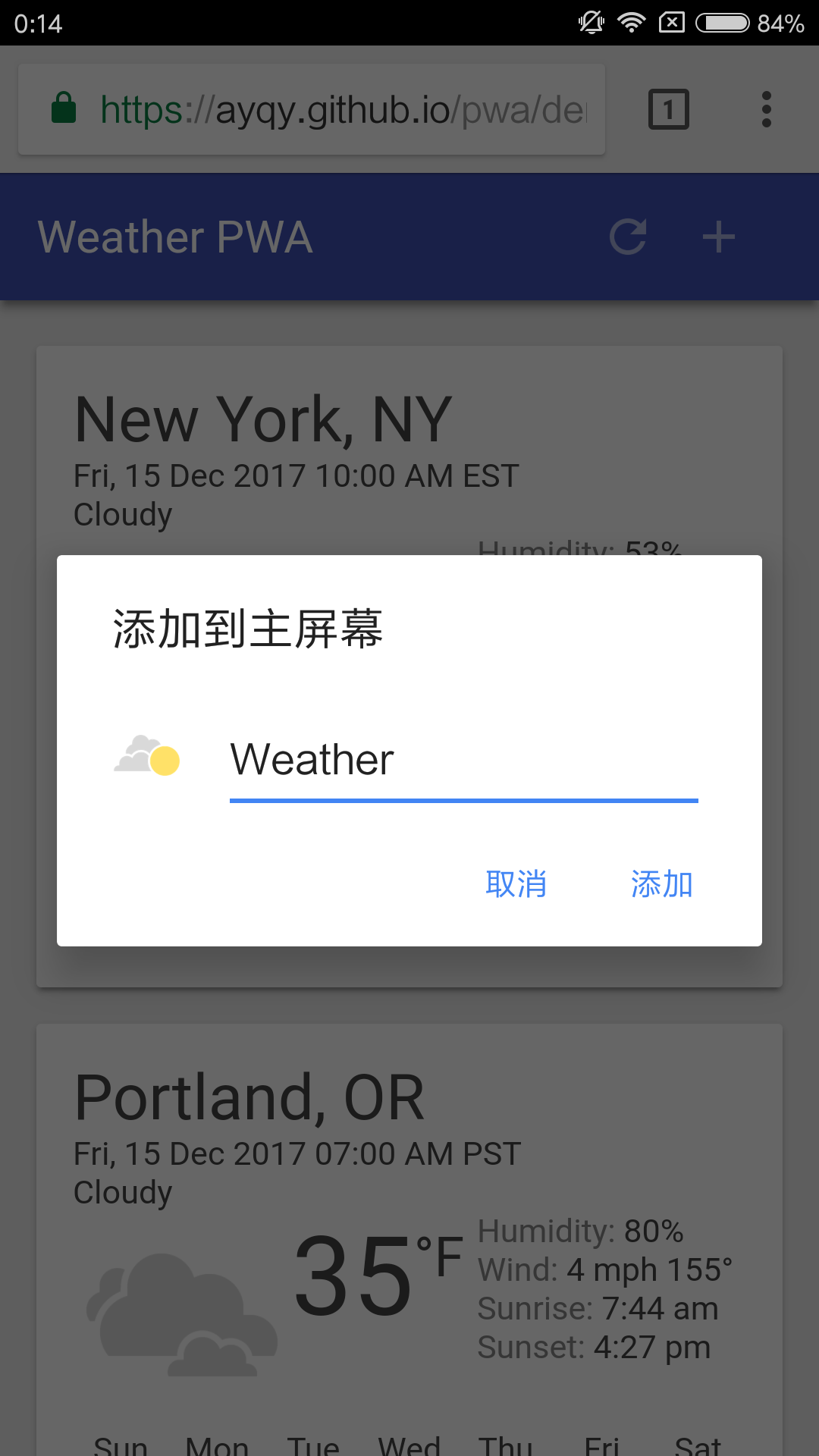 weather-pwa[/caption]
Not-so-optimistic news: In fact, after deliberately and carefully preparing the user environment (official Chrome + official demo), the installation banner did not automatically pop up on a Xiaomi 4 (perhaps the operational posture or other conditions were not met, see above). Manually clicking 'Add to Home Screen' showed a success toast, but there was nothing on the home screen... This is why I can't muster interest in writing hand-coded demos to play with (well, the main reason is laziness ;)).
IV. Case Studies
-
Ele.me: Strange, why don't I feel the effect of the Cache?
Note that incognito mode may cause Alibaba.com's service worker to throw the following error:
Uncaught (in promise) DOMException: Quota exceeded.
Experience it normally in a regular environment.
P.S. For more case studies, please check Case Studies | Web | Google | Developers
V. Application Scenarios
In short, PWA can be considered an upgraded version of Web App, with its main highlight being native-like support. Using progressive enhancement, a Web App can be 'upgraded' to a PWA without much cost, allowing some users (in environments that support PWA) to get a faster (cached) and more convenient (home screen icon) native-like experience (full screen).
The specific application scenarios are divided into several types:
-
Web Apps where caching brings significant benefits.
-
Web applications that desire offline capabilities, native-like experiences, or simply want a home screen icon.
-
Web applications or browser vendors that want to hop on a technical trend or help promote its development.
Regardless of the application scenario, at the end of the day, as a certain article by zxx about caching (or workers?) said, if such a small cost can grant a page offline capabilities and let you truly see the benefits brought by caching, why not do it?
In addition, mainstream frameworks such as Angular, React, and Vue all provide PWA boilerplates. For details, please check The Ultimate Guide to Progressive Web Applications.
References
-
The offline cookbook: Cache strategy illustrations, great stuff, to be translated, watch it along with ServiceWorker Cookbook.
-
How to view the development prospects of Progressive Web Apps?
-
Your First Progressive Web App: Official tutorial.
-
A Beginner's Guide To Progressive Web Apps: A relatively comprehensive introductory guide.
-
Retrofit Your Website as a Progressive Web App: Original text Retrofit Your Website as a Progressive Web App.
No comments yet. Be the first to share your thoughts.