
Preface
React recently released v17.0.0-rc.0, nearly 3 years have passed since the previous major version v16.0 (released on 2017/9/27)
Compared to React 16 full of new features and previous major versions, React 17 appears particularly special—no new features:
React v17.0 Release Candidate: No New Features
Not only that, it also brings 7 breaking changes...
1. Really No New Features?
React's official positioning for v17 is a technical refactoring, with the main goal of reducing upgrade costs for subsequent versions:
This release is primarily focused on making it easier to upgrade React itself.
Therefore, v17 is just a groundwork, not intending to release major new features, but to enable v18, v19... and subsequent versions to upgrade more smoothly and quickly:
When React 18 and the next future versions come out, you will now have more options.
But some of these refactorings had to break backward compatibility, so this major version change to v17 was proposed, and incidentally unloaded some historical baggage accumulated over more than two years
2. Gradual Upgrades Become Possible
Before v17, different versions of React could not be mixed (the event system would have problems), so developers either stuck with the old version or spent great effort upgrading the entire application to the new version, even some long-tail modules with no requirements for years also needed overall adaptation and regression testing. Considering developers' upgrade adaptation costs, the React maintenance team was equally constrained,不敢 easily deprecate APIs, either maintaining them for a long time or even indefinitely, or choosing to abandon those old applications
React 17 provides a new option—gradual upgrades, allowing multiple React versions to coexist, which is very friendly to large frontend applications. For example, modal components and long-tail pages under certain routes can be upgraded later, transitioning smoothly to the new version piece by piece (see Official Demo)
P.S. Note that (on-demand) loading multiple versions of React has significant performance overhead and should also be carefully considered
Multiple Versions Coexisting and Micro-Frontend Architecture
Multiple versions coexisting and mixed old/new usage support makes the gradual refactoring desired by Micro-Frontend Architecture possible:
Gradually upgrading, updating, or even rewriting partial frontend functionality becomes possible
Compared to React supporting multiple versions coexisting and gradually completing version upgrades, micro-frontends care more about allowing different technology stacks to coexist, smoothly transitioning to the upgraded architecture, solving a broader problem
On the other hand, when the difficult problem of mixing multiple React versions no longer exists, it's also necessary to reflect on micro-frontends:
-
Are some issues more appropriately solved by the technology stack itself?
-
Is multiple technology stacks coexisting the norm or a short-term transition?
-
For short-term transitions, do lighter-weight solutions exist?
For more thinking about what problems micro-frontends solve, see Why micro-frontends?
3. 7 Breaking Changes
Event Delegation No Longer Attached to document
The main problem with multiple versions coexisting before was React's event system's default delegation mechanism. For performance reasons, React only attaches event listeners to document. After DOM events bubble up to document, React finds the corresponding component, creates a React event (SyntheticEvent), and simulates event bubbling through the component tree (at this point, the native DOM event has already bubbled past document):
[caption id="attachment_2263" align="alignnone" width="625"]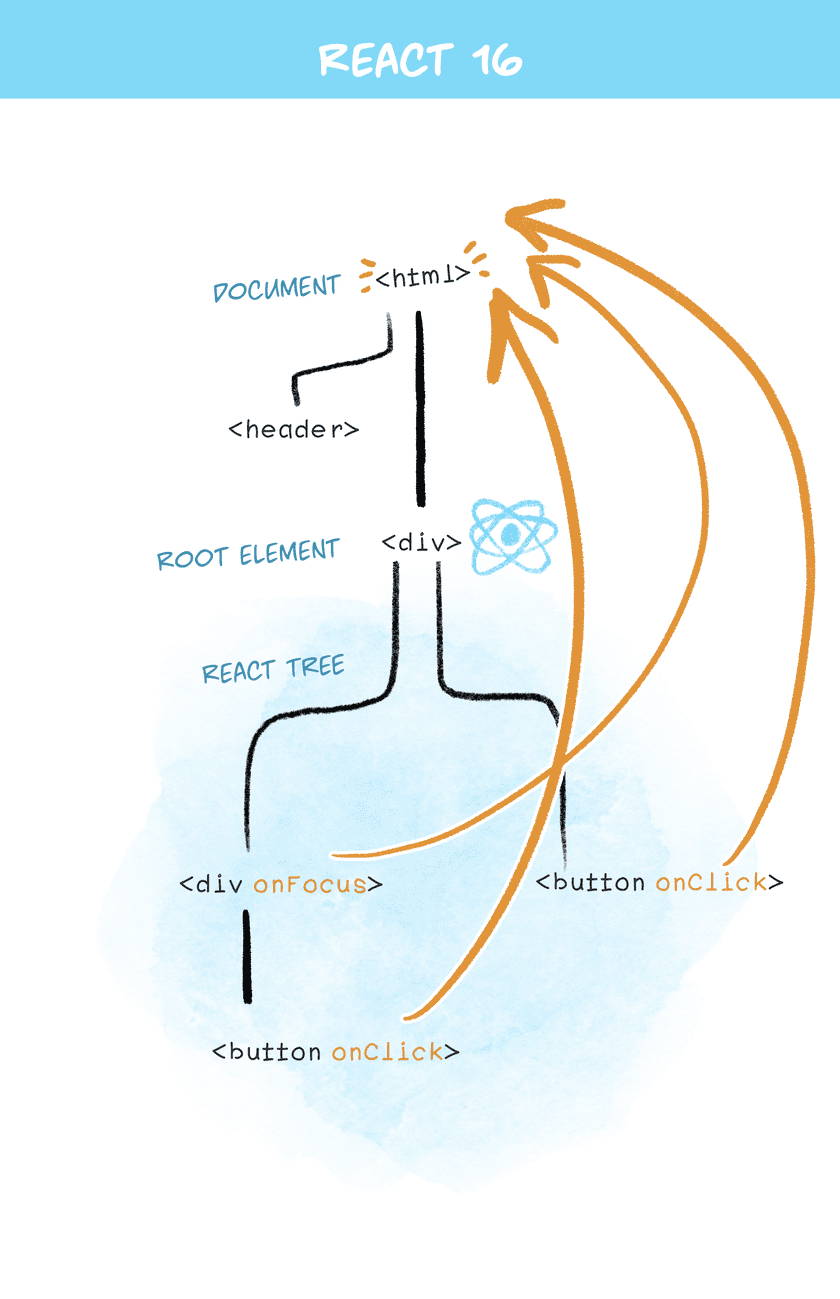 react 16 delegation[/caption]
Therefore, when using nested components of different React versions, e.stopPropagation() cannot work properly (two different versions of event systems are independent, and it's already too late when both reach document):
If a nested tree has stopped propagation of an event, the outer tree would still receive it.
P.S. Actually, Atom encountered this problem years ago
To solve this problem, React 17 no longer attaches event delegation to document, but to the DOM container:
[caption id="attachment_2264" align="alignnone" width="625"]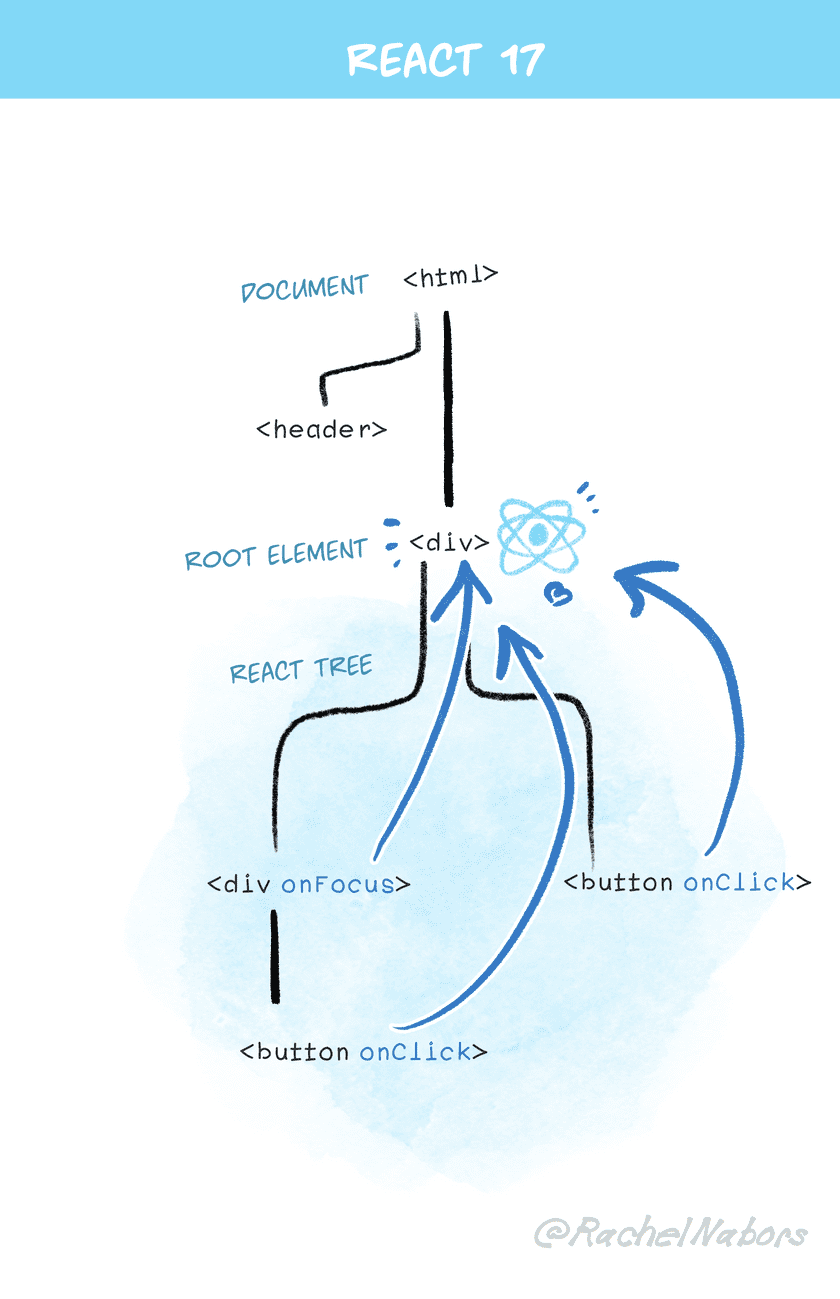 react 17 delegation[/caption]
For example:
const rootNode = document.getElementById('root');
// Taking render as an example
ReactDOM.render(<App />, rootNode);
// Portals are the same
// ReactDOM.createPortal(<App />, rootNode)
// React 16 event delegation (attached to document)
document.addEventListener()
// React 17 event delegation (attached to DOM container)
rootNode.addEventListener()
On the other hand, moving the event system back from document also makes React easier to coexist with other technology stacks (at least there are fewer differences in event mechanisms)
Moving Closer to Browser Native Events
Additionally, the React event system has made some small changes to make it closer to browser native events:
-
onScrollno longer bubbles -
onFocus/onBlurdirectly use nativefocusin/focusoutevents -
Event listeners in the capture phase directly use native DOM event listener mechanisms
Note that the underlying implementation change of onFocus/onBlur does not affect bubbling, meaning onFocus in React still bubbles (and there are no plans to change this, as this feature is considered very useful)
DOM Event Pooling is Deprecated
Previously, for performance reasons, to reuse SyntheticEvent, an event pool was maintained, causing React events to only be available during propagation, and immediately recycled afterwards, for example:
<button onClick={(e) => {
    console.log(e.target.nodeName);
    // Outputs BUTTON
    // e.persist();
    setTimeout(() => {
      // Error: Uncaught TypeError: Cannot read property 'nodeName' of null
      console.log(e.target.nodeName);
    });
  }}>
  Click Me!
</button>
All state on event objects outside the propagation process would be set to null, unless manually calling e.persist() (or doing value caching directly)
React 17 removed the event pooling mechanism because this performance optimization is meaningless in modern browsers and instead brings confusion to developers
Effect Hook Cleanup Changed to Asynchronous Execution
useEffect itself executes asynchronously, but its cleanup work was executed synchronously (just like Class component's componentWillUnmount executing synchronously), which might slow down scenarios like switching tabs, so React 17 changed to asynchronous cleanup execution:
useEffect(() => {
  // This is the effect itself.
  return () => {
    // Previously executed synchronously, changed to asynchronous after React 17
    // This is its cleanup.
  };
});
At the same time, the execution order of cleanup functions was corrected to execute in order on the component tree (previously order was not strictly guaranteed)
P.S. For certain special scenarios requiring synchronous cleanup, use LayoutEffect Hook instead
render Returning undefined Throws Error
Returning undefined from render in React throws an error:
function Button() {
  return; // Error: Nothing was returned from render
}
The original intention was to catch common errors where return was forgotten:
function Button() {
  // We forgot to write return, so this component returns undefined.
  // React surfaces this as an error instead of ignoring it.
  <button />;
}
In later iterations, forwardRef and memo were not checked, and React 17 filled this gap. Afterwards, whether class components, function components, or places expecting to return React components like forwardRef, memo, etc., will all check for undefined
P.S. Empty components can return null, which will not cause errors
Error Messages Reveal Component "Call Stack"
Starting from React 16, when encountering errors, the component "call stack" can be revealed to assist in locating problems, but there's still a significant gap compared to JavaScript error stacks, reflected in:
-
Missing source code location (filename, line/column numbers, etc.), cannot click to jump to the error location in Console
-
Cannot be used in production environments (
displayNameis minified)
React 17 adopts a new component stack generation mechanism, achieving effects comparable to JavaScript native error stacks (jumping to source code), and also applicable to production environments. The general approach is to rebuild the component stack when errors occur, triggering a temporary error inside each component (doing this once for each component type), then extracting key information from error.stack to construct the component stack:
var prefix;
// Construct "call stack" for built-in components like div
function describeBuiltInComponentFrame(name, source, ownerFn) {
  if (prefix === undefined) {
    // Extract the VM specific prefix used by each line.
    try {
      throw Error();
    } catch (x) {
      var match = x.stack.trim().match(/\n( *(at )?)/);
      prefix = match && match[1] || '';
    }
  } // We use the prefix to ensure our stacks line up with native stack frames.

  return '\n' + prefix + name;
}
// And describeNativeComponentFrame is used to construct Class, function component "call stacks"
// ...too long, not posting, interested parties can check source code
Because the component stack is generated directly from JavaScript native error stacks, you can click to jump back to source code, and in production environments, it can be restored according to sourcemap
P.S. The process of rebuilding the component stack will re-execute render and Class component constructors, this part belongs to Breaking change
P.S. For more information about rebuilding component stacks, see Build Component Stacks from Native Stack Frames, and react/packages/shared/ReactComponentStackFrame.js
Some Exposed Private APIs are Removed
React 17 removed some private APIs, mostly those originally exposed for React Native for Web use. Currently, new versions of React Native for Web no longer depend on these APIs
Additionally, when modifying the event system, the ReactTestUtils.SimulateNative utility method was also removed because its behavior and semantics don't match, recommending switching to React Testing Library
4. Summary
In short, React 17 is a groundwork, the core goal of this version is to enable React to upgrade gradually, therefore the biggest change is allowing multiple versions to mix, preparing for smooth landing of new features in the future
We've postponed other changes until after React 17. The goal of this release is to enable gradual upgrades.
No comments yet. Be the first to share your thoughts.