
I. Architecture Design
Overall, it is divided into three major parts: Native, JavaScript, and the Bridge:
[caption id="attachment_2013" align="alignnone" width="625"]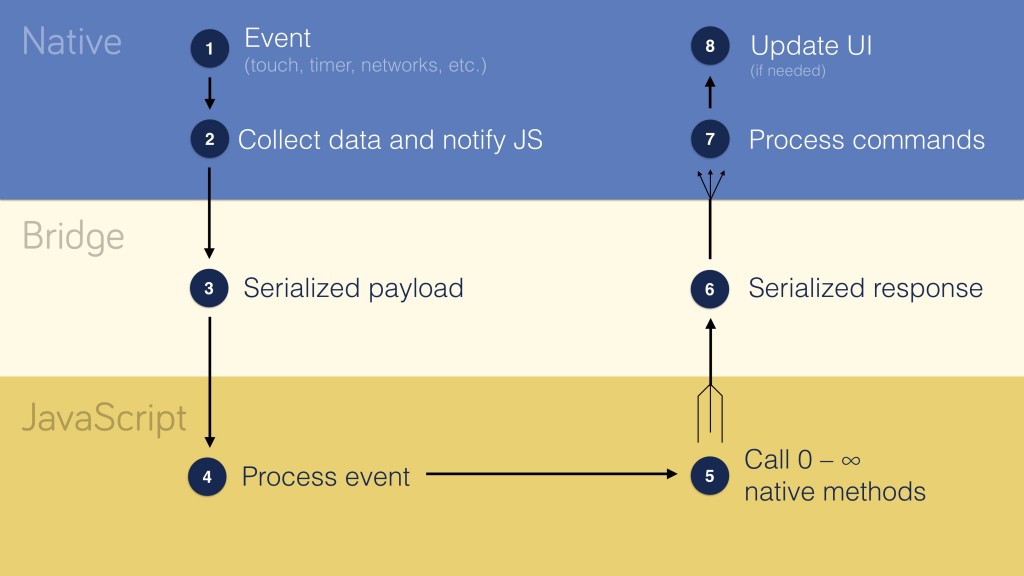 React Native layers[/caption]
Native manages UI updates and interactions, JavaScript calls Native capabilities to implement business functions, and the Bridge passes messages between the two. That is:

The topmost layer provides React-like support, running in the JavaScript runtime environment provided by JavaScriptCore. The Bridge layer connects the JavaScript and Native worlds. Specifically, the Shadow Tree is used to define UI effects and interactive functions, while Native Modules provide Native functionalities (such as Bluetooth). The two communicate with each other through JSON messages.
The Bridge layer is key to React Native technology and its design features three characteristics:
-
Asynchronous: It does not depend on synchronous communication.
-
Serializable: It ensures that all UI operations can be serialized into JSON and converted back.
-
Batched: Native calls are queued and processed in batches.
UI operations are described as a series of instructions and serialized into JSON format messages:
Just as React DOM turns React state updates into imperative, mutative calls to DOM APIs like document.createElement(attrs) and .appendChild(), React Native was designed to return a single JSON message that lists mutations to perform, like [["createView", attrs], ["manageChildren", ...]].
This is quite flexible; based on this imperative mechanism, JS code can even run on another JS engine, namely Chrome debugging:
Chrome debugging, which runs all the JavaScript code asynchronously over a WebSocket connection.
II. Threading Model
There are primarily three threads in React Native:
-
UI Thread: The main thread in Android/iOS (or other platform) applications.
-
Shadow Thread: The thread for layout calculation and constructing the UI interface.
-
JS Thread: Where JavaScript code like React is executed.
In addition, there is a class of Native Modules threads; different Native Modules can run on different threads (see Threading for details):
[caption id="attachment_2014" align="alignnone" width="625"]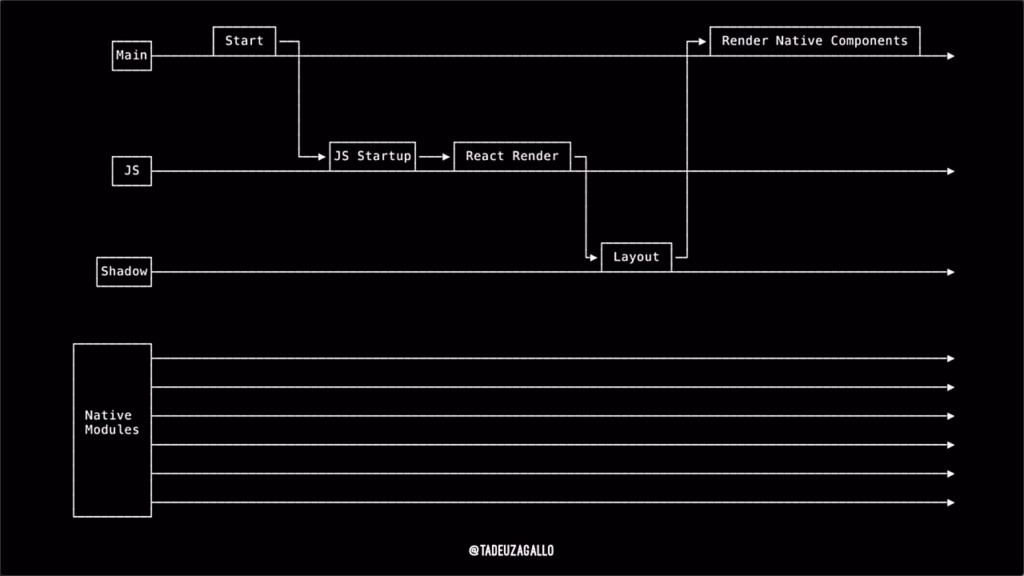 React Native threading model[/caption]
The interaction between threads is as follows:

P.S. The 'queue' in the diagram refers to the GCD dispatch queue, which can be simply understood as a thread (though not strictly correct).
III. Startup Process
In terms of sequence, the React Native runtime environment (i.e., the Bridge) is initialized when the App starts. Once the Bridge is ready, JS starts running, and finally, Native rendering begins:

The complete startup process is as follows:
[caption id="attachment_2015" align="alignnone" width="625"]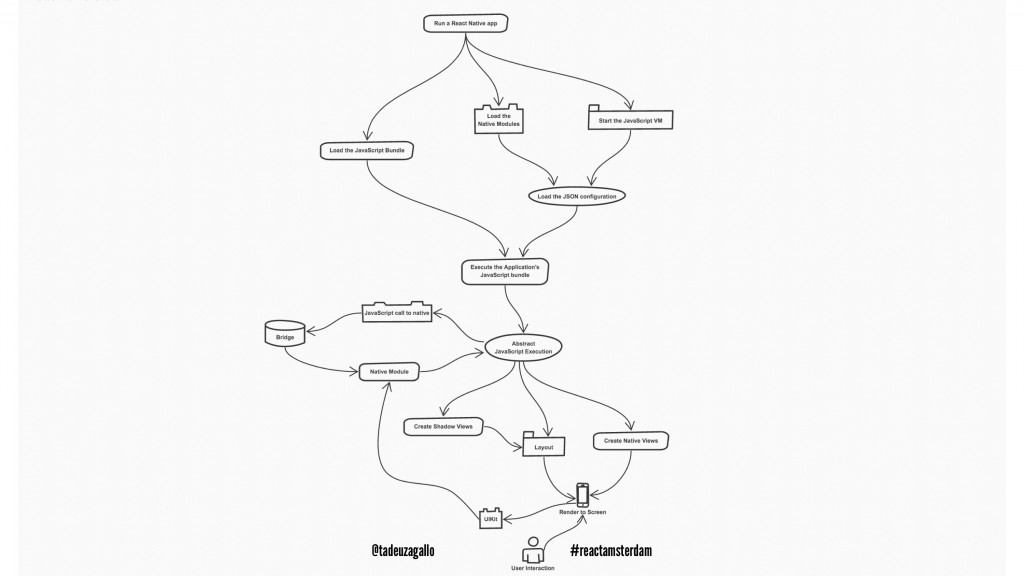 React Native App start up flow[/caption]
The upper part is the process of initializing the Bridge:

It is divided into four parts (these operations are performed at startup):
-
Loading JavaScript code: Downloaded from the network in development mode, and read from device storage in production.
-
Initializing Native Modules: Based on Native Module registration information, load and instantiate all Native Modules.
-
Injecting Native Module information: Retrieve Native Module registration information and inject it into the JS Context as global variables.
-
Initializing the JavaScript engine: Specifically, JavaScriptCore.
Once the Bridge is established, the JavaScript code begins to execute, rendering the user interface and implementing business functions.
IV. Rendering Mechanism
[caption id="attachment_2016" align="alignnone" width="625"]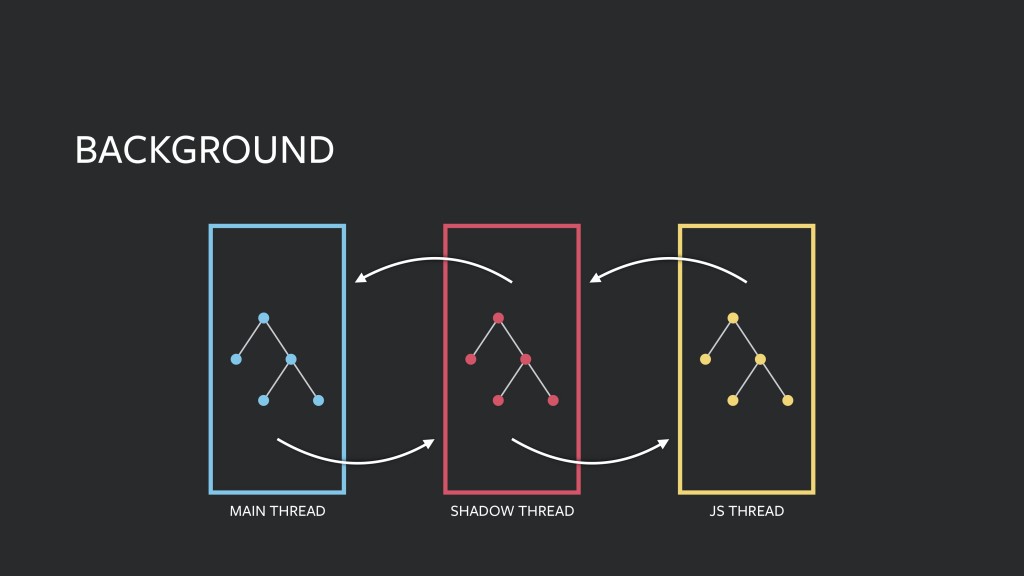 React Native threads[/caption]
The JS thread passes view information (structure, style, attributes, etc.) to the Shadow thread to create a Shadow Tree for layout calculation. After the Shadow thread calculates the layout, it passes the complete view information (including width, height, position, etc.) to the main thread, which creates the Native View accordingly.
For user input, the main thread first packages the relevant information into an event message and passes it to the Shadow thread. Then, according to the mapping relationship established by the Shadow Tree, the corresponding element's specific event is generated. Finally, the event is passed to the JS thread, where the corresponding JS callback function is executed:
[caption id="attachment_2017" align="alignnone" width="625"]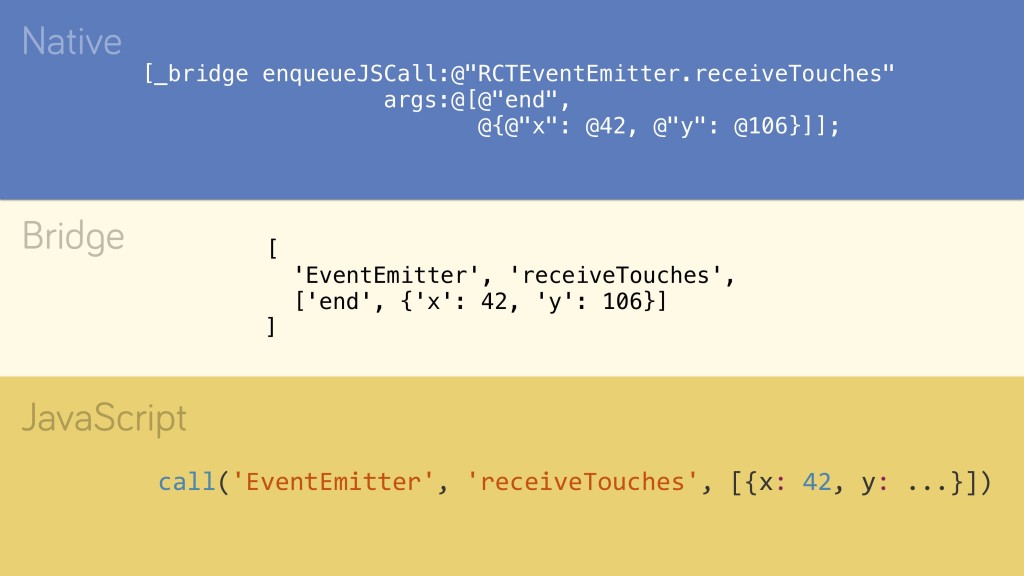 React Native UI interaction[/caption]
Now, everything is clear.
No comments yet. Be the first to share your thoughts.