
Preface
React's SSR API is divided into two parts, one面向 server-side (react-dom/server), the other still executes on client-side (react-dom)
[caption id="attachment_2317" align="alignnone" width="625"]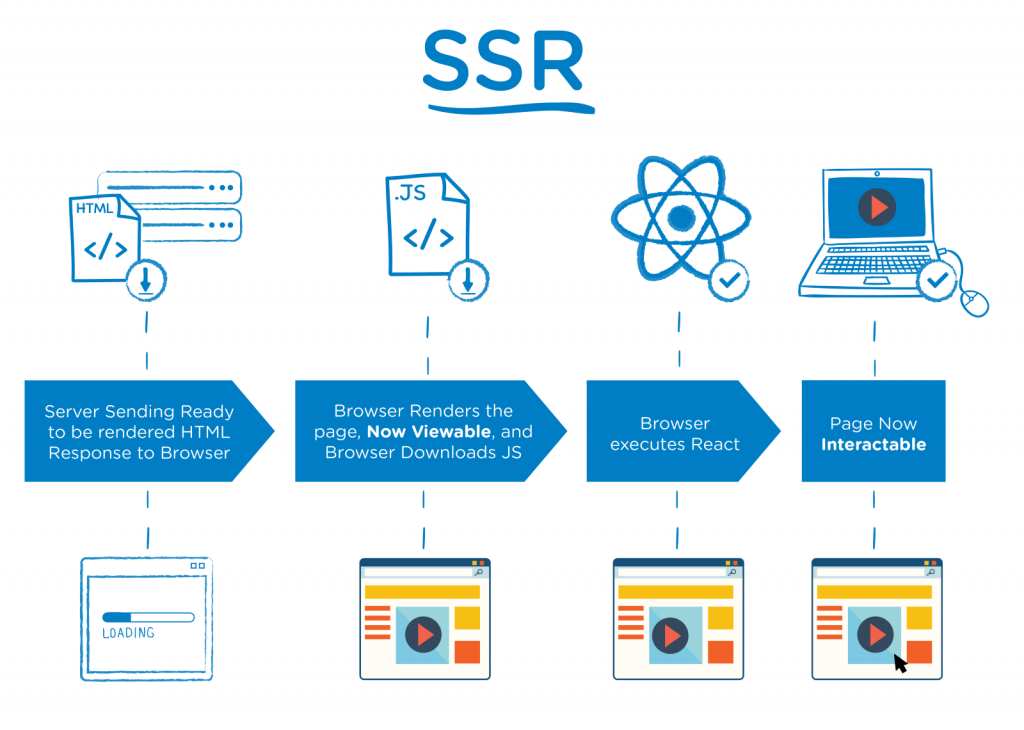 react ssr[/caption]
I. ReactDOMServer
ReactDOMServer related APIs can render React components into static (HTML) tags on server-side:
The ReactDOMServer object enables you to render components to static markup.
Rendering component tree into corresponding HTML tags work can also be completed in browser environment, therefore, server-side React DOM APIs are also divided into two categories:
-
String API that can run across Node.js, browser environments: renderToString(), renderToStaticMarkup()
-
Stream API that can only run in Node.js environment: renderToNodeStream(), renderToStaticNodeStream()
renderToString
ReactDOMServer.renderToString(element)
Most basic SSR API, input React component (accurately speaking ReactElement), output HTML string. Afterwards client-side hydrate API attaches interaction behavior to view structure returned by server-side, completes page rendering:
If you call ReactDOM.hydrate() on a node that already has this server-rendered markup, React will preserve it and only attach event handlers.
renderToStaticMarkup
ReactDOMServer.renderToStaticMarkup(element)
Similar to renderToString, difference lies in API design, renderToStaticMarkup only for pure display (no event interaction, no need to hydrate) scenarios:
This is useful if you want to use React as a simple static page generator, as stripping away the extra attributes can save some bytes. If you plan to use React on the client to make the markup interactive, do not use this method. Instead, use renderToString on the server and ReactDOM.hydrate() on the client.
Therefore renderToStaticMarkup only generates clean HTML, without extra DOM attributes (such as data-reactroot), has slight advantage in response volume
Why say volume advantage is slight, because before React 16, SSR adopted string checksum based HTML node reuse method, strictly validates consistency character by character, once mismatch is found completely discards server-side rendering result, re-renders on client-side:
If for any reason there's a mismatch, React raises a warning in development mode and replaces the entire tree of server-generated markup with HTML that has been generated on the client.
Generated lots of extra attributes:
// renderToString
<div data-reactroot="" data-reactid="1"
    data-react-checksum="122239856">
  <!-- react-text: 2 -->This is some <!-- /react-text -->
  <span data-reactid="3">server-generated</span>
  <!-- react-text: 4--> <!-- /react-text -->
  <span data-reactid="5">HTML.</span>
</div>
At this time renderToStaticMarkup generating clean and fresh HTML still has considerable volume advantage:
// renderToStaticMarkup
<div data-reactroot="">
  This is some <span>server-generated</span> <span>HTML.</span>
</div>
And React 16 changed to single node validation to reuse (server-returned) HTML nodes, no longer generates data-reactid, data-react-checksum and other volume hogs, volume difference between two APIs' rendering results becomes negligible. For example, for React component:
class MyComponent extends React.Component {
  state = {
    title: 'Welcome to React SSR!',
  }

  render() {
    return (
      <div>
        <h1 className="here">
          {this.state.title} Hello There!
        </h1>
      </div>
    );
  }
}
Their rendering results are respectively:
// renderToString
<div data-reactroot=""><h1 class="here">Welcome to React SSR!<!-- --> Hello There!</h1></div>

// renderToStaticMarkup
<div><h1 class="here">Welcome to React SSR! Hello There!</h1></div>
That is to say, currently (2020/11/8, React 17.0.1) actual difference between renderToStaticMarkup and renderToString mainly lies in:
-
renderToStaticMarkupdoesn't generatedata-reactroot -
renderToStaticMarkupdoesn't generate<!-- -->between adjacent text nodes (equivalent to merging text nodes, not considering node reuse, considered extra optimization measure for static rendering)
renderToNodeStream
ReactDOMServer.renderToNodeStream(element)
Corresponding Stream API to renderToString, returns HTML string generated by renderToString in Node.js Readable stream form
P.S. By default returns byte stream encoded in utf-8, other encoding formats need self-conversion
P.S. This API's implementation depends on Node.js Stream feature, so cannot be used in browser environment
renderToStaticNodeStream
ReactDOMServer.renderToStaticNodeStream(element)
Corresponding Stream API to renderToStaticMarkup, returns clean HTML string generated by renderToStaticMarkup in Node.js Readable stream form
P.S. Also encoded in utf-8, and cannot be used in browser environment
II. ReactDOM
hydrate()
ReactDOM.hydrate(element, container[, callback])
Completely consistent with commonly used render() function signature:
ReactDOM.render(element, container[, callback])
hydrate() used with SSR, difference from render() lies in can reuse existing HTML nodes returned by server-side during rendering process, only attaches interaction behavior (event listeners, etc.) to them, doesn't recreate DOM nodes:
React will attempt to attach event listeners to the existing markup.
Need to note, when HTML returned by server-side is inconsistent with client-side rendering result, for performance considerations, hydrate() doesn't correct SSR rendering results except text nodes, but goes with the mistake:
There are no guarantees that attribute differences will be patched up in case of mismatches. This is important for performance reasons because in most apps, mismatches are rare, and so validating all markup would be prohibitively expensive.
Only reports Warning for these inconsistency problems in development mode, therefore must take SSR HydrationWarning seriously, should solve them one by one as Error:
This performance optimization means that you will need to make extra sure that you fix any markup mismatch warnings you see in your app in development mode.
Specially, for expected inconsistency problems, such as timestamps, can explicitly ignore HydrationWarning for that element through suppressHydrationWarning={true} attribute (just ignores warning, doesn't correct error, so still retains server-side rendering result). If really want to render different content on server-side and client-side respectively, suggest first ensuring first render content is consistent, then complete through update (of course, performance will be slightly worse), for example:
class MyComponent extends React.Component {
  state = {
    isClient: false
  }

  render() {
    return this.state.isClient ? '渲染...客户端内容' : '渲染...服务端内容';
  }

  componentDidMount() {
    this.setState({
      isClient: true
    });
  }
}
III. API Limitations Related to SSR
Most Lifecycle Functions Don't Execute on Server-Side
In SSR mode, server-side only executes 3 lifecycle functions:
constructorgetDerivedStateFromPropsrender
Any other lifecycles don't execute on server-side, including getDerivedStateFromError, componentDidCatch and other error handling APIs
[caption id="attachment_2319" align="alignnone" width="625"]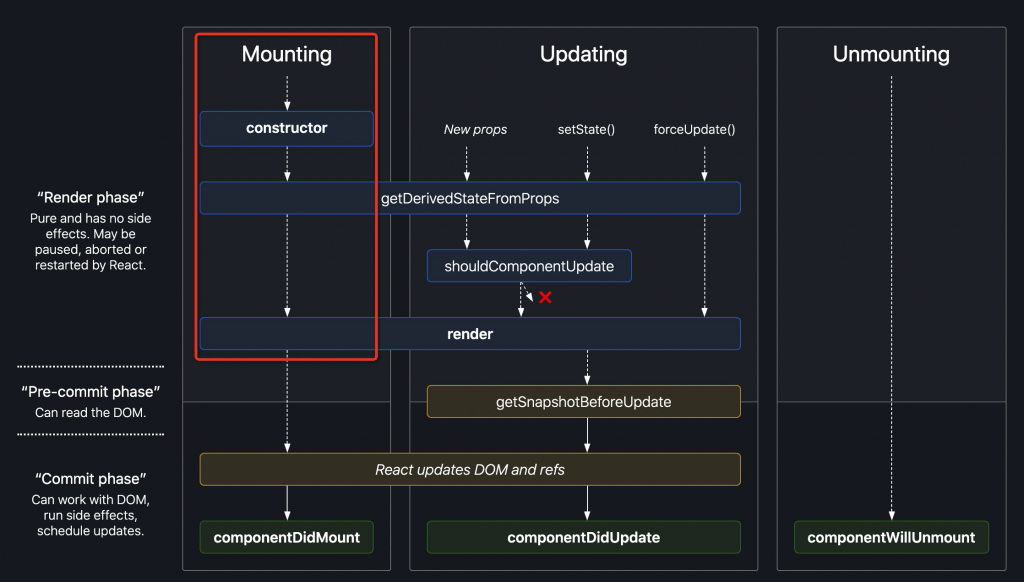 react ssr lifecycle[/caption]
P.S. Already deprecated componentWillMount, UNSAFE_componentWillMount are mutually exclusive with getDerivedStateFromProps, getSnapshotBeforeUpdate, if any of latter group of new APIs exists, former two old APIs won't be called
Doesn't Support Error Boundary and Portal
With streaming rendering it's impossible to "call back" markup that has already been sent, and we opted to keep renderToString and renderToNodeStream's output identical.
To support streaming rendering, while maintaining consistency between String API and Stream API output content, sacrificed two features that would trigger rendering backtracking:
-
Error Boundary: Can catch runtime errors in descendant components, and render a degraded UI
-
Portal: Can render components to any specified DOM nodes, while retaining events bubbling according to component hierarchy
Easy to understand, streaming renders and responds while rendering, cannot (backtrack to) modify already sent content, so other similar scenarios are also not supported, such as dynamically inserting style or script tags into head during rendering process
P.S. For more discussion about SSR Error Boundary, see componentDidCatch doesn't work in React 16's renderToString
No comments yet. Be the first to share your thoughts.