
Preface
Rollup was designed with libraries rather than apps in mind, and it is a perfect fit for React's use case.
I saw this in Behind the Scenes: Improving the Repository Infrastructure - React Blog and was surprised. Such a great tool, why is it only for libraries? What reasons make it unsuitable for building apps?
0. webpack
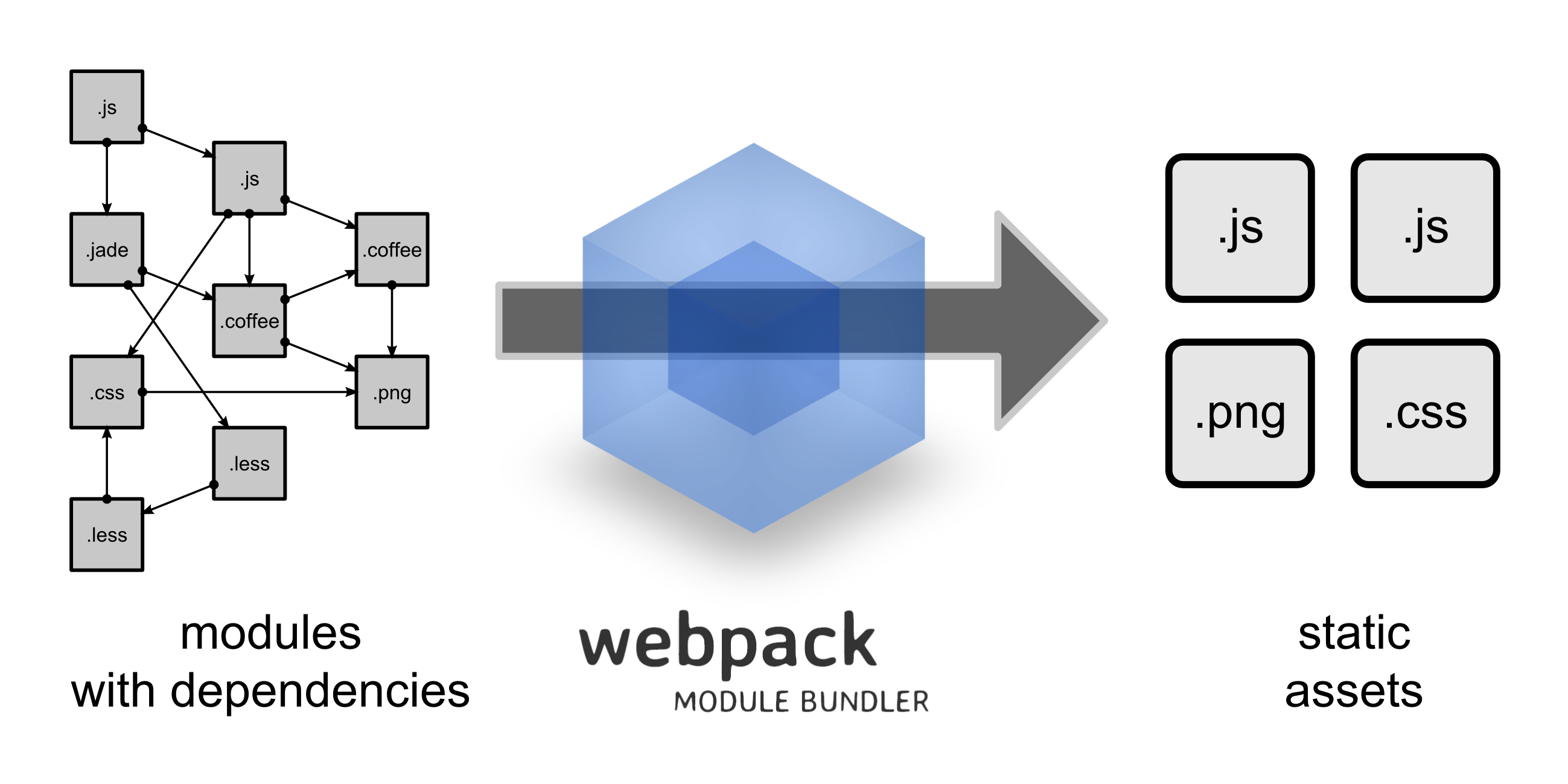
webpack is dedicated to modular builds for complex SPAs. What's very attractive are the various loaders:
Essentially, webpack loaders transform all types of files into modules that can be included in your application's dependency graph.
It handles various resource dependencies in a consistent way, shielding resource type differences through loaders (js is a module, css is a module, img is also a module...). The advantages are as follows:
No more carefully placing your files in the right folders and hacked-together scripts for adding hashes to file URLs?—?webpack can take care of it for you.
Some other very powerful features include:
-
Code Splitting: On-demand loading/parallel loading in production environments
-
Tree Shaking: Remove unused code (exports) during build
-
HMR: Hot module replacement during development
-
Commons Chunk: Extract common dependencies during build
-
Dependency Graph: Output module dependency graph after build completion, making bundles readable
1. Original Intention
rollup was designed for ES6 modules from the start:
Next-generation ES6 module bundler.
At that time, the format war between AMD, CMD, and UMD was still hot, and ES6 modules had no browser implementation yet. rollup emerged like this:
Rollup was created for a different reason: to build flat distributables of JavaScript libraries as efficiently as possible, taking advantage of the ingenious design of ES2015 modules.
(Quoted from Webpack and Rollup: the same but different, personally stated by the rollup author)
It hoped to fully utilize the ES6 module mechanism to build flat-structured, high-performance library bundles, i.e., designed for libraries
2. Core Advantages
It solves one problem well: how to combine multiple modules into a flat file with minimal junk code in between.
What's amazing about rollup is how clean its bundles are, especially the iife format—the content is very clean with no extra code, really just concatenating each module in dependency order one after another.
This is related to rollup's module processing approach:
To achieve this, instead of turning modules into functions like many other bundlers, it puts all the code in the same scope, and renames variables so that they don't conflict. This produces code that is easier for the JavaScript engine to parse, for a human to read, and for a minifier to optimize.
All modules are placed flatly in the outermost scope of the bundle file, with no scope isolation between modules, relying on renaming to solve naming conflicts under the same scope. Several obvious benefits:
-
Runtime performance (flat code structure, easy to parse)
-
Bundle source code readability (natural sequential structure, no module definitions/jumps)
-
Minification optimization (no boilerplate code like module definitions that can't be minified)
The disadvantages of this approach are also obvious:
-
The module system is too static, making features like HMR difficult to implement
-
Only面向 ES6 modules, cannot reliably handle cjs, umd dependencies (every time I use rollup-plugin-commonjs I encounter problems)
If it's only for libraries, not supporting the first point isn't a big deal, but the second point is really frustrating. Secondary dependencies are uncontrollable, and you always inevitably encounter some problems with cjs modules that can't be automatically converted to ES6 modules, for example:
'foo' is not exported by bar.js (imported by baz.js)
Some scenarios can be solved somewhat unpleasantly through namedExports according to Troubleshooting, other times bypassed through external or globals, and there are even solutions that require adjusting plugin application order... but there's no way to completely solve these kinds of problems:
Webpack gets around the need for namedExports by keeping everything as CommonJS modules and implementing Node's require system in the browser, which is why the resulting bundles are larger and take longer to start up. Both options are valid, but that's the tradeoff to be aware of — more config (Rollup, when using modules like React), or larger bundles (webpack).
(Quoted from Is "named exports" feature or bug?)
Although cjs will eventually become history, for now and in the near future, npm still has quite a lot of cjs modules. Whether SPA or library, you still frequently face the problem of handling cjs module dependencies.
3. Selection Principles
Use webpack for apps, and Rollup for libraries
For building apps, webpack is more suitable; if it's a library, of course rollup is better
webpack's advantages in building apps are reflected in the following aspects:
-
Powerful plugin ecosystem, mainstream frontend frameworks all have corresponding loaders
-
App-oriented feature support, such as HMR, Code Splitting, Commons Chunk mentioned earlier, etc., which are necessary features for app development
-
Simplify various links in web development, including automatic base64 for images, resource caching (chunkId), code splitting by route, lazy loading, etc., are all easy to implement
-
Reliable dependency module handling, unlike rollup facing cjs problems,
__webpack_require__doesn't have these worries
rollup doesn't have these advantages, and doing code splitting etc. will encounter some not-so-easy-to-solve problems. Without enough time and confidence, don't easily try using rollup as an app build tool.
rollup's advantage lies in high-efficiency bundling, which is exactly what libraries pursue. Even if it takes some effort (just as React 16 did), it's worth it for performance.
Note that this principle only means using the right tool for the right job, applicable to most general scenarios. Using rollup to build apps and webpack to build libraries is also very common:
That's not a hard and fast rule?—?lots of sites and apps are built with Rollup, and lots of libraries are built with webpack. But it's a good rule of thumb.
Typically, if the business itself doesn't have many third-party module dependencies, and the style conventions follow ES6 modules, using rollup to build apps is also very suitable (Code Splitting etc. is not completely impossible).
P.S. Additionally, rollup is not as easy as gulp or webpack for stream-based extensions, such as separating three parts from a vue file for separate processing (the vue plugin doesn't seem to support ts yet).
4. External Dependencies
For libraries like React, they should be kept external as third-party dependencies as much as possible, rather than built into the bundle. Several reasons:
-
Performance will degrade, for example React 16 put a lot of effort into switching to rollup + GCC (Google Closure Compiler) to achieve 109kb, but building it yourself immediately returns to square one.
-
Not conducive to caching—libraries don't update frequently and can be treated as static resources to fully leverage caching advantages, while manually built content is affected by tool configuration.
In rollup, you can mark external dependencies through external + globals configuration:
external: ['react', 'react-dom'],
output: {
  globals: {
    'react': 'React',
    'react-dom': 'ReactDOM'
  }
}
The generated bundle is:
// iife
(function (React,ReactDOM) {
    //...
}(React,ReactDOM));

// cjs
var React = _interopDefault(require('react'));
var ReactDOM = _interopDefault(require('react-dom'));
So generally, business code is bundled as iife, and then CDN third-party libraries are referenced via script:
<script crossorigin src="https://unpkg.com/react @16/umd/react.production.min.js"></script>
<script crossorigin src="https://unpkg.com/react-dom @16/umd/react-dom.production.min.js"></script>
<!-- Or aggregated version -->
<script crossorigin src="//cdn.jsdelivr.net/combine/npm/react @16.0.0/umd/react.production.min.js,npm/react-dom @16.0.0/umd/react-dom.production.min.js"></script>
P.S. rollup's external and globals are a bit strange—whether it's key or value, or the fact that these two things need to be used together. For more information, please see [question] Difference between externals and globals.
References
-
Webpack and Rollup: the same but different: An interesting article, discovered too late.
No comments yet. Be the first to share your thoughts.