
I. Project Background
No traffic, but still want to read blogs. So wanted plain text, easy to read, thought of RSS
Tried some RSS subscription apps, some important sources couldn't be parsed, such as FEX Weekly, QiWu Weekly, foreign sites, etc. Additionally, for web pages that don't provide RSS, there's no way to subscribe, so decided to make one myself:
-
Capture and display RSS latest 10 items (including directory summary and post content)
-
Night mode (often read at night back then)
Knew some Android back then, lazily adopted Android shell wrapping WebView container approach to implement, saw huge advantage of WebView in content layout
Now moved to iOS, looks like this:
[caption id="attachment_1390" align="alignnone" width="625"]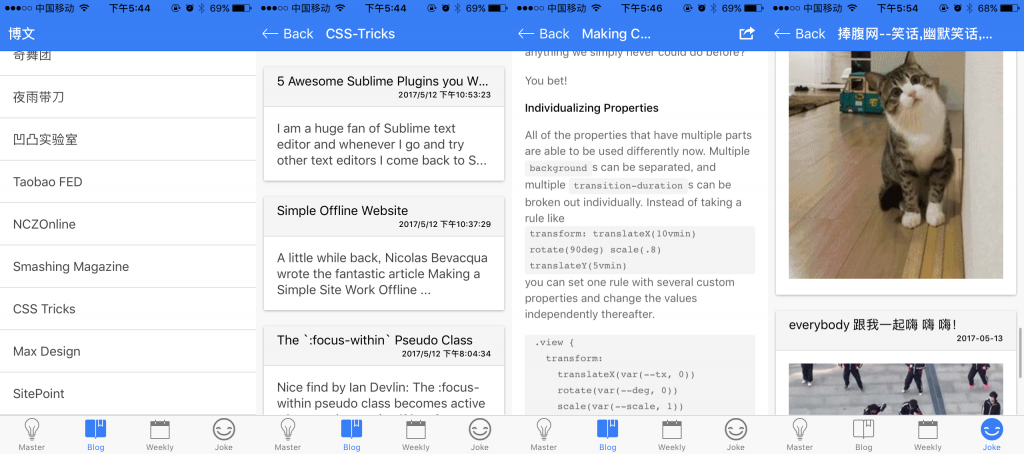 rsshelper_ios[/caption]
II. Android Hybrid App
Use WebView as container, all content is offline pages, no service, rely on Android cross-domain, no persistent storage (sqlite), not even basic memory cache
Encountered some problems:
-
XML parsing, use jsoup
-
Thread communication (process of fetching HTML and RSS and parsing is in sub-thread)
-
Cross-domain, requested by Android, bypassed
-
Android and JS two-way communication (including JS interface injection and WebView history stack management)
Found first internship job thanks to such a weak toy, frontend foundation was not good at the time, except personal homepage (homepage was self-made, content etc. were wordpress), couldn't produce presentable projects, Java was limited to Android toy and Hello World configured with SSH, this small toy might have been a bonus point (guess)
Used it myself for about half a year, later learned there's more suitable approach: ionic and other cross-platform solutions relying on Cordova implementation
III. Ionic Application
2 months of preliminary preparation (followed plan, learned some PHP, some angular), spent 1 week to complete:
-
PHP service fetches RSS/HTML on the spot
-
Memory cache + local cache, simple expiration strategy
-
Signed release, formal Android application
Encountered some problems:
-
JSONP cross-domain, connect angular
-
simplexml_load_filenative module parses XML -
splash screen, inappbrowser plugin version compatibility
Compared to purely handwritten Android application, ionic development encountered more problems, and harder to solve, many strange problems couldn't be located, could only google
IV. PHP Service Update
simplexml_load_file native module is fragile, reports error when encountering invalid XML/HTML, and parsing RSS from XML perspective requires manually compatible with various feed formats, such as RSS 2.0, Atom 1.0, etc.
RSS switched to simplexml, also doesn't support some non-standard feed formats, later RSS switched to native XMLReader, HTML uses DiDom, basically stable
Structure also underwent splitting and refactoring:
-
Introduce Composer module manager
-
Make HTML parsing rules configurable
But QiWu Weekly, FEX Weekly and other feeds couldn't be parsed, didn't find better RSS parsing solution in PHP ecosystem
V. Service Migration to Node
Original PHP server couldn't support HTTPS (cheap virtual hosting limitation), switched to HTTPS and顺便 rewrote with node, discovered huge effect of ecosystem:
-
RSS parsing uses feedparser
-
HTML parsing uses cheerio
feedparser can parse various strange non-standard XML (seems to have error correction and fault tolerance processing), cheerio also didn't encounter strange problems (BOM header causing garbled text etc.), much better than previous PHP with no choice, prosperous ecosystem in turn pushes language development
Added some support that should have been there:
-
Scheduled fetching
-
Server-side memory cache
Service functionality is still relatively simple, but currently fetching part is considered stable
VI. Package iOS Real Device Installation
Android packaging and release was mentioned before: [ionic Development Cross-Platform App Common Problems](/articles/ionic 开发跨平台 app 常见问题/#articleHeader9), environment requirements are quite troublesome
iOS packaging needs OSX environment and Xcode, currently real device debugging already doesn't need 99 dollar certified developer account, but listing on App Store still requires payment
0. Environment
- OSX @10.12.x:
Supports building ios10.x applications, lower versions can only build ios9.x applications
- Xcode @8.x:
Supports building ios10.x applications, Xcode 7.x can only build ios9.x applications
Note: Xcode version upgrade depends on OSX system version upgrade, OSX 10.9 cannot install/update Xcode 8 from App Store
1. Install iOS Simulator Support, and Add Platform
npm install -g ios-sim
ionic platform add ios
2. Build
ionic build ios
3. Simulator Run
ionic emulate ios
4. Real Device Installation
cd <path/to>/myapp/platforms/ios
# Open myapp.xcodeproj with Xcode
# USB connect the device
# Click Product>Destination>device name
# Click the triangle button(Build and run the current scheme)
Note: Xcode needs to configure developer account, no need to pay for certification, just needs to be legal apple id. Starting application will prompt untrusted, need to trust developer in settings
VII. Project Address
Github: https://github.com/ayqy/RSSHelper
In fact, first version of ionic was already put up, but at that time it was just a simple fragile application without design, now slightly better, became simple and robust, next step fill in functionality, after supporting self-subscription, user management, it will be small tool application
Have some follow-up plans, will complete someday:
-
UE Optimizing
-
UI Style & Theme
-
Interaction
-
-
Function Enhancement
-
Login & User Management
-
Constom catelogy list
-
History & Favorite
-
Feedback
-
Afterword
Besides WebView, another keyword that has indissoluble bond with author is Bezier curve
First heard Bezier curve in never-completable text recognition project, found reliable method for calculating control points when making curve spectrum with Web Audio, core of graduating Android doodle application is also Bezier curve
Like a feather falling on water spreading ripples, things that truly spent time on, will always have strange uses
No comments yet. Be the first to share your thoughts.