
1. What is Scalability?
Scalability is the property of a system to handle a growing amount of work by adding resources to the system.
(From Scalability)
That is, dealing with continuously increasing workload by adding resources to the system
So, how to add resources?
2. Scaling Hardware Resources
There are two ways to add resources: vertical scaling and horizontal scaling
Vertical Scaling
Vertical scaling, that is, improving single machine configuration, adding memory, processor, hard disk and other hardware resources to a single machine. With enough budget, you can build a server with luxurious configuration
However, this single-point reinforcement style scaling cannot continue indefinitely, because you'll soon reach the top configuration (or exhaust the budget), so it's not a complete solution
Horizontal Scaling
Another way to add resources is horizontal scaling, that is, adding machines, expanding from one machine to multiple machines in quantity, multiple servers form a topology structure. With enough budget, you can own a server room, or even data centers spread around the world
Theoretically, horizontal scaling has no upper limit, we can use infinitely many servers to support infinitely many user requests. Moreover, horizontal scaling is equivalent to introducing redundancy (Replication), more reliable than a single machine
But after machines change from one to many, the biggest problem faced is resource allocation, how to fully utilize these machines? That is, how to balance the load?
3. Load Balancing
Load Balancer is responsible for distributing user requests to multiple servers, specifically, public network Load Balancer distributes inbound HTTP requests according to routing rules, deciding which internal network server to actually send the data packets to
Common distribution strategies include:
-
Distribute based on load situation
-
Round robin
-
Distribute based on resource dependency situation
Of course, the most ideal distribution strategy is to distribute based on server's current load situation, such as giving new requests to less busy servers, but the problem is that load situation is not easy to know precisely
And the simplest distribution strategy is round robin, for example, the first time requesting URL returns Server1's IP address, the second time returns Server2's IP address... However, round robin work means treating everyone equally, assuming each request has the same workload, and each Server's processing capability is also the same, but actual scenarios mostly don't meet such conditions
P.S. Not recommended to use DNS as load balancer (adding a series of A records), because operating system and application layer DNS cache will destroy this round robin mechanism
On the other hand, different types of services may have different dependencies on resources (bandwidth, storage, computing power, etc.), so dedicated servers can also be used, and distribution based on resource dependency situation, such as using different dedicated servers for gif, jpg, image, video, etc., and distinguishing through subdomains and other methods
Session Persistence
Adding a layer of Load Balancer solves the resource allocation problem, but brings a new problem: two consecutive requests may be forwarded to different servers by the load balancer, if these two requests are related (such as login and placing an order), previous state will be lost (user just logged in and clicked to place an order, then may be asked to login again)
One solution is sticky sessions, forwarding related requests to the same server:
Send all requests in a user session consistently to the same backend server.
(From Load balancing (computing))
For example, carrying server identification information in Cookie, subsequent series of requests are all forwarded to that server
P.S. But Cookie may be disabled, so generally multiple methods are comprehensively used to maintain sessions
Another solution is to "outsource" Session, store it in a public place for other servers to share access:
Every server contains exactly the same codebase and does not store any user-related data, like sessions or profile pictures, on local disc or memory. Sessions need to be stored in a centralized data store which is accessible to all your application servers.
So far, we've added some machines, and through a load balancer let multiple machines share the workload together, looks like everything is perfect... So, what if this load balancer goes down?
4. Introducing Redundancy
After introducing load balancer, all requests must pass through the load balancer first, the load balancer becomes a fragile single point in the network topology structure, once a failure occurs, all servers behind it become inaccessible
Redundant Load Balancers
To avoid Single Point of Failure, load balancers also need to introduce redundancy (such as using a pair of load balancers), generally there are two Fail-over modes:
-
Active-passive: active works, passive is standby, passive takes over after active goes down
-
Active-active: work simultaneously, one going down doesn't affect
Regardless of which working mode is adopted, introducing redundancy can reduce downtime, improve system reliability and availability
5. Scaling Database
Theoretically, with reliable load balancing mechanism, we can easily scale 1 server to n servers, however, if these n machines still use the same database, soon the database will become the system's performance bottleneck and reliability bottleneck
Following the same approach, we can scale database's processing capability, add a few more databases, that is, introducing redundancy, generally there are two modes:
-
Master-slave replication: master database reads and writes directly, slave database executes the same query when master database receives a query. If master database goes down, promote one from slave databases as master database
-
Master-master replication: both can write, write operations will also be replicated to another database
After database introduces redundancy, can even load balance multiple slave databases (especially suitable for read-intensive scenarios):

And partitioned storage based on content characteristics (Partitioning):
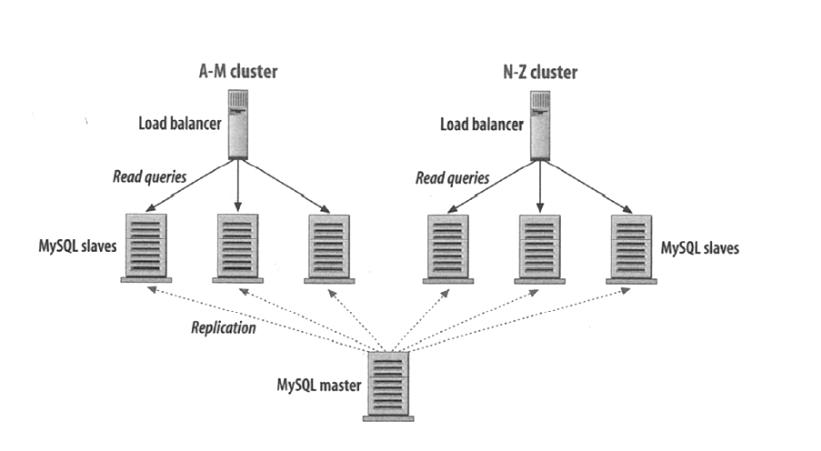
Store data with names starting with A-M in the left few databases, N-Z starting stored on the right
Meanwhile, can also optimize queries through sharding, denormalization, SQL tuning, etc.
So far, the scaling optimization that database layer can do seems to have reached its limit, so, are there other ways to reduce database pressure?
6. Caching
Another approach is to minimize database operations as much as possible, such as adding a layer of memory cache between Web service and data, prioritize cache when querying, only fetch from database when not in cache
Generally there are two caching modes:
-
Cache query results
-
Cache objects
The biggest problem with caching all query results is, after data changes, it's hard to determine if cache is expired:
It is hard to delete a cached result when you cache a complex query (who has not?). When one piece of data changes (for example a table cell) you need to delete all cached queries who may include that table cell.
And caching objects refers to caching data models assembled from original data (such as a Java class instance), the advantage is that after knowing data changes, can discard data objects logically associated with it, thus solving the cache expiration problem
So far, we've discussed scalability issues including hardware resources, database, caching from bottom to top, so, how should Web services themselves scale?
7. Asynchronous Processing
For Web services, the main way to improve scalability is to change time-consuming synchronous work to asynchronous processing, thus allowing these jobs to be "outsourced" to multiple Workers, or complete predictable parts in advance
No comments yet. Be the first to share your thoughts.