
I. Target Positioning
A unified multi-platform development framework following React syntax specifications
A multi-platform code conversion solution, where "platform" refers to WeChat Mini Programs, Web, ReactNative, Baidu Mini Programs, Alipay Mini Programs, Toutiao Mini Programs, Quick Apps, etc.
Specifically, convert a piece of React-like source code into a form compatible with the target platform through "compilation", that is:
             Transform
nerv business code ------> xx Mini Program business code +
                    Web business code +
                    ReactNative business code
The purpose is to reduce development costs and improve efficiency:
Enable projects that could only run on one platform to gain multi-platform running capabilities, reducing developers' refactoring costs.
II. Idea Exploration
Original Intention
Use React to write WeChat Mini Programs.
WeChat Mini Program native development is too laborious, so wanted to use React to develop WeChat Mini Programs
Extension
After implementing the initial requirement of converting React business code to WeChat Mini Program code, discovered that the same transformation approach can adapt to multiple platforms, i.e., extend from 1-to-1 to 1-to-n:
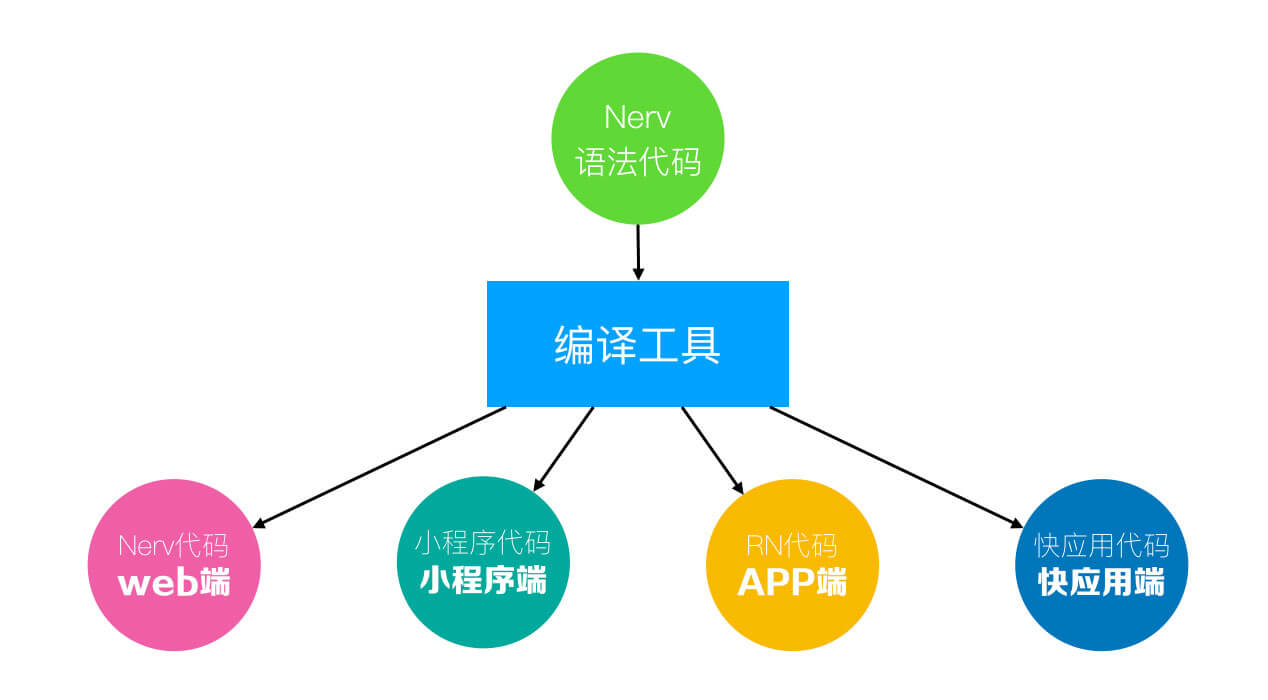
P.S. Nerv is a React-like framework, API is similar to React
P.S. The reason Taro component library uses WeChat Mini Programs as the standard is also due to the original intention (can't waste it after completing)
Approach
Wanting one codebase to work across n platforms, there are only 2 approaches:
-
Directly convert from
1platform ton - 1platforms -
Add a layer of abstraction, convert from this abstraction layer to
nplatforms
Taking Bash and Batch (Windows batch scripts) as examples, if writing only one script that should run on both *nix and Windows, the first approach only needs to implement 1 thing (convert from bash to n - 1 platforms):
function bash2batch(bash) {
  // ...
  return equivalentBatch;
}
Or (convert from batch to n - 1 platforms):
function batch2bash(batch) {
  // ...
  return equivalentBash;
}
If AtoB can be implemented, one A can adapt to both A and B, but "hard" conversion is usually difficult, therefore in the Bash and Batch scenario, the second approach was born:
Batsh: A language that compiles to Bash and Windows Batch.
That is, add an abstraction layer C, then implement CtoA and CtoB separately, convert from Batsh abstraction layer to n platforms:
// 1. Define abstraction layer Batsh
const batsh = 'Neither bash nor batch';
// 2. Implement abstraction layer to 2 platforms conversion
function batsh2batch(batsh) {
  // ...
  return equivalentBatch;
}
function batsh2bash(batsh) {
  // ...
  return equivalentBash;
}
Similarly, Taro also adopts the second approach, this abstraction layer is Taro business code:
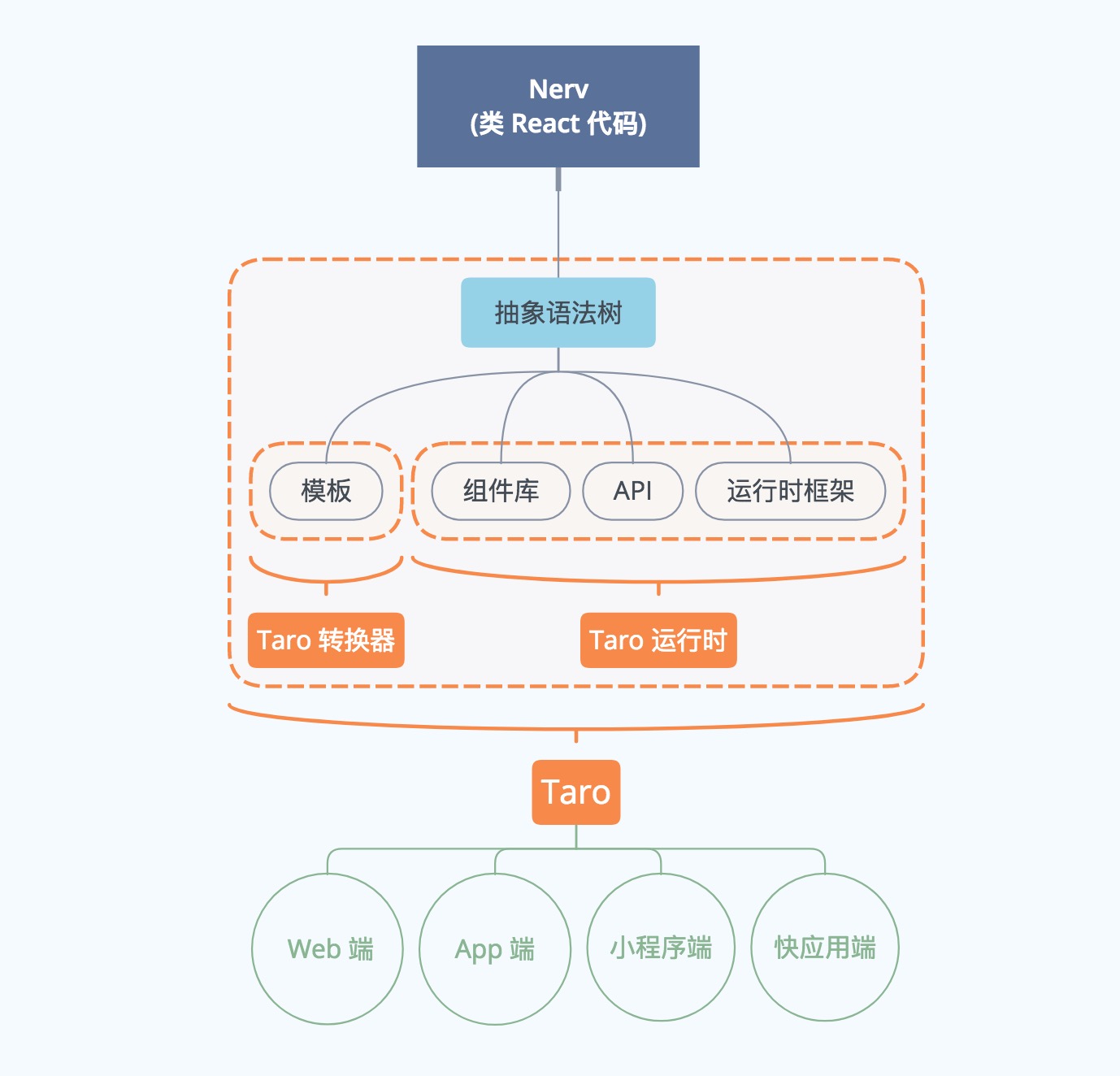
P.S. Taro business code is the Nerv code in the diagram, calling it Taro code is more accurate, because some Taro-specific API support is added (such as Taro.getEnv()), it's a superset of Nerv
III. Core Implementation
Taking WeChat Mini Programs as an example, it consists of 4 parts:
-
Configuration (JSON)
-
Template (WXML)
-
Style (WXSS)
-
Logic (JS)
Configuration and style don't need much explanation, the difficulties lie in template conversion and logic conversion
P.S. ReactNative style conversion is another matter, also a difficult problem, because RN has significant differences in selectors, property names/values and default values, and even CSS feature support
Compilation Conversion
To convert one piece of code A to another piece of code B, need to do 3 things:
-
Parse code A to generate abstract description (AST)
-
Operate on AST according to some mapping rules to generate new AST
-
Generate code B from the new AST
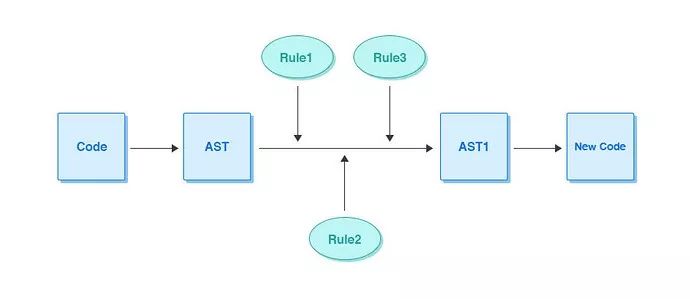
P.S. For more information about compilation conversion, please see Looking at Compilation Principles Again and [Babel Quick Guide](/articles/babel 快速指南/)
Template Conversion
Convert JSX syntax to string templates that can run in Mini Programs.
Input JSX:
render() {
  const { percent } = this.state;

  return (
    <View className='index'>
      <Button className='add_btn' onClick={this.props.add}>+</Button>
      { percent && <MyProgress percent={percent} strokeWidth={6} color='#FF4949' /> }
    </View>
  );
}
After conversion by @tarojs/transformer-wx, output WeChat Mini Program template:
<block>
  <view class="index">
    <button class="add_btn" bindtap="funPrivatesBrJC">+</button>
    <block wx:if="{{percent}}">
      <my-progress percent="{{percent}}" strokeWidth="{{6}}" color="#FF4949"></my-progress>
    </block>
  </view>
</block>
View, Button, etc. are Taro built-in components:
Taro uses WeChat Mini Program component library as the standard, combined with jsx syntax specifications, customized a set of its own component library specifications
Related packages are as follows:
-
@tarojs/components: Supports Web environment Nerv component library, replaced with target platform's native tags/components through compilation
-
@tarojs/taro-components-rn: React component library supporting ReactNative environment (the reason ReactNative component library is separated may be because differences are large, difficult to achieve conversion through compilation means)
All will be converted to target platform's native components:
In Mini Program platform, we can use all Mini Program native components, while in other platforms, we provide corresponding component library implementations
But custom component my-progress doesn't exist in WeChat Mini Programs, so it cannot run as expected
Inevitably need a cross-platform component definition, for this Taro provides 2 things:
-
Cross-platform component library Taro UI
-
Support packaging custom components into forms supported by each target platform (specifically see Developing Third-Party Multi-Platform UI Libraries Based on Taro)
The former solves the existence problem, dealing with general application scenarios. The latter opens a custom capability, satisfying scenarios needing customization
Logic Conversion
Similar to component library needing multi-platform adaptation, capability differences across platforms also need adaptation:
Component libraries and platform capabilities all rely on different implementations for different platforms to smooth out differences
Runtime framework is responsible for adapting platform capabilities, to support Taro business code running on top, mainly has 3 functions:
-
Adapt basic APIs like componentization solutions, configuration options, etc.
-
Adapt platform capability related APIs (such as network requests, payment, taking photos, etc.)
-
Provide some application-level features, such as event bus (
Taro.Events,Taro.eventCenter), runtime environment related APIs (Taro.getEnv(),Taro.ENV_TYPE), UI adaptation solutions (Taro.initPxTransform()), etc.
In implementation, @tarojs/taro is the unified entry point for API adaptation, platform replacement at compilation time:
- @tarojs/taro: Just an empty shell, provides API signatures
Platform adaptation related packages have 6:
-
@tarojs/taro-alipay: Adapt Alipay Mini Programs
-
@tarojs/taro-h5: Adapt Web
-
@tarojs/taro-rn: Adapt ReactNative
-
@tarojs/taro-swan: Adapt Baidu Mini Programs
-
@tarojs/taro-tt: Adapt Toutiao Mini Programs
-
@tarojs/taro-qapp: Adapt Quick Apps
P.S. Different from component library adaptation approach, API completely gives up the compilation conversion path, directly replaces the whole thing
Actually, to maintain only one business code, the APIs provided by Taro must be the union of n-platform APIs, for example:
// APIs supported by all Mini Programs
Taro.setStorage()
// Baidu Mini Program exclusive API
Taro.textToAudio()
// API with parameter handling differences between Alipay and WeChat Mini Programs
Taro.getStorageSync()
// ...
These APIs can be used directly, no need to care whether current platform supports them, because part of the runtime framework's adaptation work is to smooth out platform capability API differences, for example:
H5 platform cannot call scanning, Bluetooth and other platform capabilities
Adopting WeChat Mini Program standard, so these APIs will do nothing when running on H5 platform.
At the same time distinguish target environment at business layer, ensuring these platform-related code only executes in expected target environments:
-
Compilation time:
process.env.TARO_ENV -
Runtime:
Taro.getEnv()
For example:
// Call API by platform
if (process.env.TARO_ENV === 'swan') {
  Taro.textToAudio()
}
// Use different components by platform
<View>
  {process.env.TARO_ENV === 'weapp' && <ScrollViewWeapp />}
  {process.env.TARO_ENV === 'h5' && <ScrollViewH5 />}
</View>
P.S. Compilation-time static environment distinction is sufficient for most scenarios, runtime environment distinction is only for emergencies
IV. Structure
From a design perspective, Taro solution is divided into 3 layers:
Business layer (React-like code)
---------------------
Transformation layer (JSX to WeChat Mini Program)
---------------------
Adaptation layer  Component library (adapt n-platform native components)
                  Runtime framework (adapt n-platform API capabilities)
---------------------
In addition, there are
-
Ecosystem: UI library, routing, data flow management, CSS preprocessing, etc.
-
Build: Web uses Webpack, ReactNative uses Expo's xdl, the rest use their respective IDEs
-
Lint: For writing styles not supported by transformation layer, give some warnings through static checking
V. Source Code Brief Analysis
Corresponding to specific implementation, packages for each part are as follows (taro/packages/):
// Transformation
babel-plugin-transform-jsx-to-stylesheet
taro-plugin-babel
taro-plugin-csso
taro-plugin-uglifyjs
taro-transformer-wx

// Adaptation - Component library
taro-components-rn
taro-components

// Adaptation - Runtime framework
taro-alipay
taro-h5
taro-qapp
taro-rn
taro-swan
taro-tt
taro-weapp
taro

// Ecosystem
postcss-plugin-constparse
postcss-pxtransform
postcss-unit-transform
taro-async-await
taro-mobx-common
taro-mobx-h5
taro-mobx-prop-types
taro-mobx-rn
taro-mobx
taro-plugin-less
taro-plugin-sass
taro-plugin-stylus
taro-plugin-typescript
taro-redux-h5
taro-redux-rn
taro-redux
taro-router-rn
taro-router

// Build
taro-cli
taro-rn-runner
taro-webpack-runner

// Lint
eslint-config-taro
eslint-plugin-taro

// Others (common methods)
taro-utils
Additionally, there's an interesting thing:
// WeChat Mini Program to Taro
taroize
// Runtime after taroize
taro-with-weapp
Reverse conversion is another door, regarding conversion, after extending from 1-to-1 to 1-to-n, the next stage is n-to-1, that is:
// Target platform
A = weapp
B = ReactNative
C = ReactNative
// Abstraction layer
T = Taro

// First stage: 1-to-1
T2A()
// Second stage: 1-to-n
T2A(), T2B(), T2C()...
// Third stage: n-to-1
A2T(), B2T(), C2T()...
When the third stage is completed, it's great unity (can convert anything to n platforms)
P.S. Currently (2018/12/9), A2T() (Mini Program code to Taro) is awaiting release, specifically see Version Plan
VI. Limitations
The most deeply felt limitation should be JSX, after all JSX flexibility is outrageous (dynamic components, higher-order components), while WeChat Mini Program template syntax has many restrictions (even with WXS patch enhancing some capabilities), this creates an irreconcilable contradiction, therefore:
JSX writing style is extremely flexible and changeable, we can only support common, React officially recommended writing styles as conversion rules through exhaustive methods, while some obscure or not-so-recommended writing styles are not supported, instead prompt users to modify through eslint plugin
Specifically, JSX limitations are as follows:
- Does not support dynamic components
- Cannot use
ifexpressions inmaploops containing JSX elements - Cannot use methods other than
Array#mapto operate JSX arrays - Cannot use anonymous functions in JSX parameters
- Not allowed to pass JSX elements in JSX parameters (props)
- Only supports class components
- Temporarily does not support defining JSX in methods outside
render() - Cannot use object spread operator in JSX parameters
- Does not support stateless components (functional components)
props.childrencan only be passed, cannot be operated- ...
For these conversion limitations, the compensatory solution is Lint checking errors, and providing alternative solutions
Besides JSX, there are 2 other major limitations:
-
CSS: Limited by ReactNative's CSS support level (can only use flex layout)
-
Tags: Convention not to use HTML tags (all use multi-platform adapted built-in components, such as
View,Button)
P.S. Due to limitations of static conversion itself, many conversions cannot be implemented
VII. Application Scenarios
When business requires presentation on different platforms simultaneously, the cost of writing multiple sets of code for different platforms is obviously very high
That is to say, when the same business has overlapping requirements across multiple platforms, multi-platform code conversion solutions like Taro make sense
Another type of scenario is the WeChat Mini Program development experience problem Taro originally wanted to solve, if using Taro to develop WeChat Mini Programs, accidentally can also adapt to multiple platforms, also a good choice
No comments yet. Be the first to share your thoughts.