
I. Authentication
To distinguish requests from different users, the server needs to confirm the user's identity based on the client's request, which is known as authentication.
In human-computer interaction, authentication means requiring a user to log in to access certain information. To confirm the user's identity, the user must provide information known only to the user and the server (i.e., authentication factors), such as a username/password.
In a Web environment, common authentication schemes fall into two categories:
-
Session-based authentication
-
Token-based authentication
In the Session-based scheme, after a successful login, the server stores the user's identity information in a Session and passes the Session ID to the client via a Cookie. Subsequent data requests will include the Cookie, and the server identifies the user based on the Session ID carried in the Cookie.
In the Token-based scheme, the server generates a Token based on the user's identity information and issues it to the client. The client stores the Token and includes it in subsequent data requests. Upon receiving a request, the server verifies and parses the Token to determine the user's identity. The process is as follows:
[caption id="attachment_1957" align="alignnone" width="810"]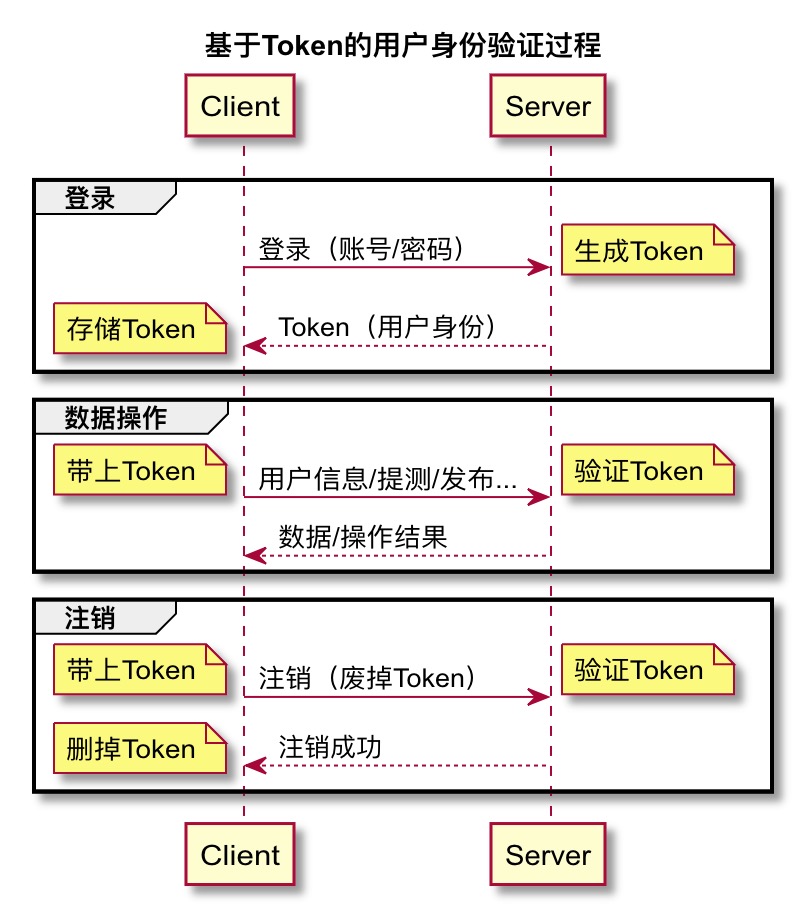 token based login[/caption]
P.S. Username/password belong to knowledge factors. There are also possession factors and inherence factors:
-
Knowledge factors: Things the user must know to log in, such as username, password, etc.
-
Possession factors: Things the user must have to log in, such as a security token, ID card, etc.
-
Inherence factors: Personal biometric characteristics, such as fingerprints, irises, facial features, etc.
P.S. Authentication is different from Authorization; the former verifies identity, while the latter verifies permissions.
II. Token
A Token in authentication is like an ID card. It is issued/verified by the server and is valid within its expiration period. It recognizes the "certificate" (Token), not the "person" (user).
In the Session scheme, user identity information (in the form of a Session record) is stored on the server. In the Token scheme, it is stored on the client (in the form of a Token), and the server only verifies the Token's validity. This difference is most apparent in Single Sign-On (SSO) scenarios:
-
Session-based SSO: Considers how to synchronize Sessions and share Cookies. For example, after a successful login, the response Cookie's domain is set as a wildcard for sibling application domains, and all applications synchronize their Sessions from an authentication service.
-
Token-based SSO: Considers how to share the Token. For example, passing the Token via the URL when entering a sibling application.
A Token is equivalent to an encrypted Session record. It contains identity information like the user ID, as well as metadata used for Token validity verification, such as the Token issuance time and expiration time. For example:
{
  // Identity information
  user_id: 9527,
  // Token metadata
  issued_at: 'March 5, 2012, 12:00 PM',
  expiration_time: '1 day'
}
// Encrypted
895u3485y3748%^HGdsbafjhb
Any request carrying this Token will be considered by the server as a message from user 9527, until the Token expires a day later, at which point the server will no longer recognize the user identity it represents.
Tokens come in various forms, among which JSON Web Token is a highly popular Token specification.
III. JSON Web Token
JSON Web Token (JWT) is a compact, URL-safe means of representing claims to be transferred between two parties.
In short, it's a communication specification (JWT for short) used to securely represent claims to be transferred between two parties, and it can be transmitted via URLs.
P.S. A claim can be any message, such as "I am user XXX" in a user authentication scenario, or "User A adds User B as a friend" in a friend request.
Token Format
A JWT Token is divided into three parts: Header, Payload, and Signature. For example:
eyJ0eXAiOiJKV1QiLCJhbGciOiJIUzI1NiJ9.eyJpc3MiOiJqb2UiLCJleHAiOjEzMDA4MTkzODAsImh0dHA6Ly9leGFtcGxlLmNvbS9pc19yb290Ijp0cnVlLCJvdGhlckZpZWxkIjoiZXRjLiJ9.BkrYadYHS66ZrONzFoA91gBJK0iE-S2ZYOWCpRhgFJQ
The three parts are separated by two . characters, i.e.:
Header.Payload.Signature
In terms of meaning, the Header represents basic metadata related to the Token, such as the Token type and encryption method (algorithm). Specifically (alg is required, the rest are optional):
-
typ: Token type -
cty: Content type -
alg: Message authentication code algorithm
The Payload represents the data carried by the Token and other Token metadata. Standard fields defined by the specification are:
-
iss: Issuer -
sub: Subject (identifies the party that this JWT carries information about) -
aud: Audience (recipient) -
exp: Expiration Time -
nbf: Not (valid) Before (activation time) -
iat: Issued At (generation time) -
jti: JWT ID (unique identifier)
These fields are all optional; the Payload just needs to be valid JSON.
Generation
The three parts of the Token are respectively:
Base64-encoded Header . Base64-encoded Payload . Result of encrypting the first two parts with the specified algorithm
For example, given:
// JOSE Header
const header = JSON.stringify({"typ":"JWT", "alg":"HS256"});
// JWT Claims Set
const claims = JSON.stringify({
  "iss":"joe", "exp":1300819380, "http://example.com/is_root":true
});
Base64 encoding the JOSE Header and JWT Claims Set separately gives the Header and Payload parts of the JWT Token:
const tokenHeader = Buffer.from(header).toString('base64');
const tokenPayload = Buffer.from(claims).toString('base64');
Next, concatenate the Header and Payload with a . character, and encrypt it using the HMAC SHA-256 algorithm (the algorithm specified by the alg field in the Header) to get the Signature part:
// https://www.npmjs.com/package/jwa
const jwa = require('jwa');
const hmac = jwa('HS256');

const toSign = `${tokenHeader}.${tokenPayload}`;
const tokenSignature = hmac.sign(toSign, 'mySecret');
Finally, append the Signature with a . character as well:
const token = `${toSign}.${tokenSignature}`;
Resulting in:
eyJ0eXAiOiJKV1QiLCJhbGciOiJIUzI1NiJ9.eyJpc3MiOiJqb2UiLCJleHAiOjEzMDA4MTkzODAsImh0dHA6Ly9leGFtcGxlLmNvbS9pc19yb290Ijp0cnVlLCJvdGhlckZpZWxkIjoiZXRjLiJ9.BkrYadYHS66ZrONzFoA91gBJK0iE-S2ZYOWCpRhgFJQ
P.S. You can parse and verify this Token via JWT.IO.
P.S. Note that the Base64-encoded Header and Payload need to have their trailing equals signs removed (padding trailing equals).
Transmission
After the server generates the Token, it is placed in the response body and sent to the client.
Upon receiving it, the client stores the Token in LocalStorage/SessionStorage. When requesting data later, the Token is placed in the Authorization field of the request header and sent to the server:
Authorization: Bearer <jwt_token>
When the server receives the data request, it extracts the Token from the Authorization field, verifies its validity, and further parses the Token content to ascertain the user's identity.
Verification
Verifying Token validity requires confirming a few things:
-
Has the Token expired?
-
Was it issued by the server itself?
Parse (directly Base64 decode) the iat, nbf, and exp time-related fields from the Payload part, and check if the following relationship holds:
iat (issued time) <= nbf (activation time) < current time < exp (expiration time)
Then extract the first two parts of the Token (Header.Payload), calculate the signature again, and see if the calculated result matches the Signature part.
Parsing
After confirming the Token is valid, you only need to simply Base64 decode the Payload to know the data carried by the Token. For example:
const token = 'eyJ0eXAiOiJKV1QiLCJhbGciOiJIUzI1NiJ9.eyJpc3MiOiJqb2UiLCJleHAiOjEzMDA4MTkzODAsImh0dHA6Ly9leGFtcGxlLmNvbS9pc19yb290Ijp0cnVlLCJvdGhlckZpZWxkIjoiZXRjLiJ9.BkrYadYHS66ZrONzFoA91gBJK0iE-S2ZYOWCpRhgFJQ';
const [_, rawPayload,] = token.split('.');
const payload = JSON.parse(new Buffer(rawPayload, 'base64').toString());
// { iss: 'joe',
//   exp: 1300819380,
//   'http://example.com/is_root': true,
//   otherField: 'etc.' }
IV. Login
In the Session scheme, the Cookie mechanism makes logging in very simple (almost imperceptible to the client). You Post the username and password, get a 200 return, and from then on, you are a logged-in user.
In the Token scheme, the Token is not necessarily written to a Cookie. For instance, in an SSO scenario, it might be passed directly via the URL to the application. Therefore, the identity credential after login is perceptible to the client, and the client needs to receive and manage the Token:
-
Store the Token
-
Include the Token when requesting data
-
Share the Token with sibling applications when navigating
-
Delete the Token after the user logs out
Similarly, when requesting data, the Token is not necessarily carried via a Cookie, but rather through the Authorization field in the request header.
V. Data Operations
When sending a data request, simply place the Token in the Authorization field in the format Bearer <jwt_token>:
Authorization: Bearer <jwt_token>
P.S. Bearer authentication is also called Token authentication. Similar to the well-known Basic authentication and Digest authentication, it is also an HTTP-based authentication method.
Upon receiving the request, the server will extract the Token from this field and verify it. After passing verification, it will send the expected data or operation result back to the client in the response.
VI. Logout
In Session-based authentication, a logout operation simply involves deleting the corresponding record in the Session. Because in Session mode, the user's login status is determined solely by the server's Session record. As long as you make the server forget this relationship, it won't recognize the client's subsequent advances.
Token authentication is different. The Token carries the complete state information, and the server acts more like a Certificate Authority (CA) responsible for issuing Tokens. Issued Tokens are valid until they automatically expire. The server cannot distinguish between a valid Token and a revoked (valid) Token merely by verifying it.
So, is there a way to invalidate a Token immediately?
Actually, SSL certificates, which HTTPS relies on, also face this issue. Hence, there is a Certificate revocation list (CRL):
In cryptography, a certificate revocation list (or CRL) is "a list of digital certificates that have been revoked by the issuing certificate authority (CA) before their scheduled expiration date and should no longer be trusted".
The CRL acts as a certificate blacklist, used to record valid certificates that need to be invalidated immediately. The CA checks the blacklist before verifying a certificate to distinguish revoked valid Tokens.
For example:
// 1. Maintain the blacklist
const tokenBlackLists = [];
function invalidateToken(token) {
  if (!isTokenInvalidated(token)) {
    tokenBlackLists.push(token);
  }
}
function removeInalidatedToken(token) {
  if (isTokenInvalidated(token)) {
    tokenBlackLists.splice(tokenBlackLists.indexOf(token), 1);
  }
}
function isTokenInvalidated(token) {
  return tokenBlackLists.includes(token);
}

// 2. Blacklist upon logout
router.get('/logout', ensureAuthenticated, (req, res, next) => {
  // Invalidate the token
  invalidateToken(res.locals.token);
  res.status(200).json({
    status: 'success'
  });
});
// 3. Remove from blacklist upon expiration
// 4. Verify if it's blacklisted during operations
decodeToken(token, (err, payload) => {
  if (err) {
    // remove expired token from blacklist
    removeInalidatedToken(token);
    return res.status(401).json({
      status: 'Token has expired'
    });
  } else {
    // check invalidated token
    if (isTokenInvalidated(token)) {
      return res.status(401).json({
        status: 'Token has been invalidated'
      });
    }
    //...
  }
});
P.S. In the example above, the blacklist is only kept in memory and will be lost when the service restarts. A more robust implementation would involve writing to a database when adding to/removing from the blacklist (i.e., upon expiration), using a memory cache for verification, and loading from the database upon restart.
Besides blacklists, there are other common strategies, such as:
-
Delete the client's Token: Kill the issued Token. If the Token disappears, the login state ceases to exist. However, the server still considers the Token valid, which is insecure.
-
Use Tokens with very short expiration times and rotate them frequently: If the expiration time is short enough, automatic expiration is equivalent to immediate expiration. But if it's too short, it loses the advantage of maintaining state.
-
Include a logout time in the Token: Store and verify the logout time in the database just like a password. This allows the Token to be invalidated immediately, just like changing a password. However, it requires storing/retrieving and verifying an extra field, which impacts performance.
If necessary, these four strategies can be used in combination. For instance, regardless of which strategy is used, the client's Token should ideally be deleted.
P.S. For more discussion on how to immediately invalidate a JWT, see:
-
How to log out when using JWT: A bit wordy.
VII. FAQ
-
Is the JWT Payload secure?
No, it is only Base64 encoded, which is equivalent to plain text transmission. Therefore, do not carry sensitive data in it.
-
Does the password entered by the user need to be encrypted on the client side?
No encryption is needed; transmit it in plain text. Client-side password security is guaranteed by SSL.
-
How should the server encrypt the password upon receiving it?
The common practice is Hashing with Salt. For details, see Adding Salt to Hashing: A Better Way to Store Passwords.
No comments yet. Be the first to share your thoughts.