
Preface
In [previous notes](/articles/7 种 webgl 图元-webgl 笔记 6/), we learned about 7 primitives, can draw different things by changing parameters, but specific details were not explained clearly, this starts from how shaders work, and varying variables as data channel between vertex shader and fragment shader, also must be mentioned
I. Varying Variables
Previously explained 2 types of shader variables: attribute variables, uniform variables, and varying variables are the last type of shader variable, slightly more complex than the first 2, because there's interpolation process
Varying variables' function is to pass values from vertex shader to fragment shader, varying variables can only be float type, as long as same-named varying variable is also declared in fragment shader, value assigned to this variable in vertex shader will automatically be passed to fragment shader (before assigning to same-named varying variable in fragment shader, there's interpolation process, 1.0 passed over may not be 1.0)
Note: varying variable values in vertex shader are not directly passed, will first undergo interpolation, interpolation is like tweening animation
II. Interpolation
Interpolation, missing data requires interpolation, for example want to connect a series of scattered points into smooth curve, many points missing between adjacent known points, at this point need to fill missing data through interpolation, finally all points on smooth curve except known points are obtained through interpolation
For example Photoshop's custom gradients, we only need to set colors of several points to automatically generate entire gradient band, colors between these several points are all obtained through built-in interpolation algorithm
Interpolation process performed before varying variable values are passed to fragment shader is called interpolation, similarly, we can also use interpolation to generate gradients
III. Gradient Triangle
As long as same-named varying variable as vertex shader is declared in fragment shader, values will automatically be passed over (of course, there's interpolation process)
1. Shader Source Programs
Declare same-named varying variable in fragment shader, specifically as follows:
// Vertex shader source program
var vsSrc = 'attribute vec4 a_Position;' +
    'attribute vec4 a_Color;' +
    'varying vec4 v_Color;' +       // Declare varying variable
    'void main() {' +
    'gl_Position = a_Position;' +   // Set coordinates
    'gl_PointSize = 7.0;' +         // Set size
    'v_Color = a_Color;' +          // Assign value to varying variable
'}';
// Fragment shader source program
//!!! Need to declare floating point precision, otherwise error No precision specified for (float)
var fsSrc = 'precision mediump float;' +
    'varying vec4 v_Color;' +   // Declare same-named varying variable
    'void main() {' +
    'gl_FragColor = v_Color;' + // Set color
'}';
Note: Cannot directly assign values to varying variables, need to use attribute variables to accept external values, then assign to varying variables inside vertex shader
2. Solid Color Triangle vs Gradient Triangle
Key is whether three vertex colors are consistent, because actual process is:
- Read vertex information (coordinates, colors, etc.)
Execute vertex shader, read related data of 1 vertex
- Graphics assembly (draw points or lines or triangles)
Assemble isolated vertex coordinates into geometric shapes, shape category determined by first parameter of gl.drawArrays, for example gl.POINTS, gl.TRIANGLES
- Rasterization (determine which pixels need coloring)
Convert assembled geometric shapes into fragments, convert vector geometric shapes into rasterized fragments (pixels)
- Execute fragment shader (coloring)
Color each fragment
- Return to first step, exit when finished reading, if not finished read next vertex and do it again
So vertex shader is executed per vertex, fragment shader is executed per fragment, like a double loop, outer loop traverses vertices, inner loop traverses fragments. Above process shown in diagram below:
[caption id="attachment_913" align="alignnone" width="773"]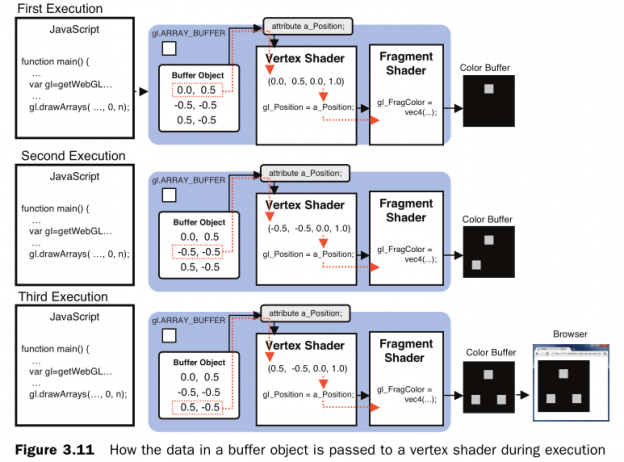 webgl-vertex-shader-execution[/caption]
[caption id="attachment_914" align="alignnone" width="738"]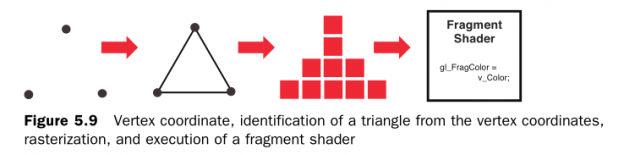 webgl-varying[/caption]
In previous DEMOs colors were all hardcoded in fragment shader, for example gl_FragColor = vec4(1.0, 0.0, 1.0, 0.75), so all things drawn are solid colors, but more scientific way is to pass vertex colors into vertex shader, interpolate color of each fragment according to vertex colors. For example draw an isolated line segment, fragments between 2 same-color vertices are all that color after interpolation, fragments between 2 different-color vertices will have other colors after interpolation
3. Draw Gradient Triangle
Set 3 vertices to different colors, as follows:
var arrVtx = new Float32Array([
    // x, y, r, g, b
    -0.5, 0.5, 1.0, 0.0, 1.0, 1.0,  // Red
    0.5, 0.5, 0.0, 1.0, 0.0, 1.0,   // Green
    -0.5, -0.5, 0.0, 0.0, 1.0, 1.0  // Blue
]);
//...Vertex array written to buffer
// Draw points
gl.drawArrays(gl.POINTS, 0, arrVtx.length / 6);
setTimeout(function() {
    gl.clear(gl.COLOR_BUFFER_BIT);
    // Draw triangle
    gl.drawArrays(gl.TRIANGLES, 0, arrVtx.length / 6);
}, 2000);
We first draw 3 isolated points (red green blue), draw triangle after 2s, gradient triangle appears, this also shows setting gl_PointSize is only effective when drawing points, drawing triangles will automatically ignore this value
IV. DEMO
Complete examples containing above code, please view:
-
Red green blue gradient triangle: http://www.ayqy.net/temp/webgl/varying/index.html
-
Red gradient triangle: http://www.ayqy.net/temp/webgl/fragment-shader-detail/index.html
Set fragment color according to coordinates, verify fragment shader executes per fragment process
Note: Fragment shader's built-in variable gl_FragCoord stores fragment coordinate information (gl_FragCoord.x, gl_FragCoord.y), if can output, will discover fragment shader executes per vertex process, but API doesn't provide method to output information to console, we can verify by setting color according to fragment coordinates
V. Summary
Varying variables not only can achieve gradient effects, can also use it to interpolate various numerical values that cannot be obtained, such as fragment's world coordinates, fragment's coordinates in light source coordinate system, etc., very useful
We can now draw colored graphics, another characteristic related to color is texture mapping (texture mapping), this is content of next notes
References
- "WebGL Programming Guide"
No comments yet. Be the first to share your thoughts.