
Preface
From [source code](/articles/vs-code 源码简析/#articleHeader4) perspective, VSCode main body is just an Editor (core part can run independently in Web environment, called Monaco), doesn't provide any language feature related functionality, for example:
-
Syntax support: syntax validation, highlighting, formatting, Lint checking, etc.
-
Editing experience: go to definition, intelligent hints, auto-completion, find references, variable renaming, etc.
None of these are provided, all are provided by plugins, support for JS is also like this
I. Built-in Plugins
Among VS Code built-in plugins, only one vscode/extensions/javascript/ is related to JavaScript, and it's a pure language support type plugin:
"contributes": {
  // Language id
  "languages": [],
  // Syntax
  "grammars": [],
  // Code snippets
  "snippets": [],
  // Language related configuration file validation rules and hints
  "jsonValidation": []
}
P.S. About jsonValidation function, see Json Schema with VS Code
A bunch of configuration files obviously can't provide powerful functions like go to definition, therefore, there are two TypeScript related plugins:
-
typescript-basics: Similar to
javascriptplugin, provides TS language syntax support -
typescript-language-features: Provides advanced support related to language features, such as jump, find declaration/references, completion hints, outline/breadcrumb and other advanced functions involving code semantics
Among them typescript-language-features is VS Code's ability to understand JS/TS (and JSX/TSX) code semantics, and support go to definition and other functions' key:
"activationEvents": [
  "onLanguage:javascript",
  "onLanguage:javascriptreact",
  "onLanguage:typescript",
  "onLanguage:typescriptreact",
  "onLanguage:jsx-tags",
  "onLanguage:jsonc"
]
II. typescript-language-features
Structure
./src
├── commands.ts   # TS related custom commands
├── extension.ts  # Plugin entry
├── features  # Various language features, such as highlighting, folding, go to definition, etc.
├── languageProvider.ts # Connect to VSCode function entry
├── protocol.const.ts   # TS language element constants
├── protocol.d.ts # tsserver interface protocol
├── server.ts     # Manage tsserver process
├── test
├── typeScriptServiceClientHost.ts  # Responsible for managing Client
├── typescriptService.ts        # Define Client interface form
├── typescriptServiceClient.ts  # Client specific implementation
├── typings
└── utils
P.S. Reference source code version v1.28.2, latest source code directory structure has changed, but idea is same
Among them the 3 most important parts are features, server and typescriptServiceClient:
-
Feature: Connect to VSCode, provide specific implementations for Editor function entries like highlighting, folding, jump, etc.
-
Server: Connect to TSServer, to obtain ability to understand JS code semantics, provide data source for semantics related functions
-
Client: Interact with Server (according to established interface protocol), initiate requests, and receive response data
Startup Flow
Specifically, when this plugin activates mainly these 3 things happen:
-
Find all
TypeScriptServerPluginadded by plugins, and register after Client ready -
Create TypeScriptServiceClientHost
-
Create
TypeScriptServiceClient, immediately create TSServer process -
Create
LanguageProvider, responsible for connecting to VSCode function entries -
After TSServer ready, start connecting VSCode and TSServer
-
LanguageProvider registers VSCode various functions, for example
vscode.languages.registerCompletionItemProviderconnects completion hints -
Immediately trigger diagnostics (syntax validation, type checking, etc.)
Among them interesting parts are registering TypeScriptServerPlugin, creating TSServer, and communication between Client and Server
Register TypeScriptServerPlugin
Only register external Plugin on TS v2.3.0+, pass through command line parameters:
if (apiVersion.gte(API.v230)) {
  const pluginPaths = this._pluginPathsProvider.getPluginPaths();

  if (plugins.length) {
    args.push('--globalPlugins', plugins.map(x => x.name).join(','));

    if (currentVersion.path === this._versionProvider.defaultVersion.path) {
      pluginPaths.push(...plugins.map(x => x.path));
    }
  }

  if (pluginPaths.length !== 0) {
    args.push('--pluginProbeLocations', pluginPaths.join(','));
  }
}
Because TSServer plugin API was launched in TS v2.3.0:
TypeScript 2.3 officially makes a language server plugin API available. This API allows plugins to augment the regular editing experience that TypeScript already delivers. What all of this means is that you can get an enhanced editing experience for many different workloads.
That is to say, VSCode's universe-level JS editing experience, all benefit from underlying TypeScript:
One of TypeScript's goals is to deliver a state-of-the-art editing experience to the JavaScript world.
(From Announcing TypeScript 2.3)
P.S. Reason for existence of low version TS situation is because VSCode allows using external TS (built-in is of course high version)
Create TSServer
TSServer runs in separate Node process:
public spawn(
  version: TypeScriptVersion,
  configuration: TypeScriptServiceConfiguration,
  pluginManager: PluginManager
): TypeScriptServer {
  const apiVersion = version.version || API.defaultVersion;

  const { args, cancellationPipeName, tsServerLogFile } = this.getTsServerArgs(configuration, version, pluginManager);

  // fork a tsserver process
  // Built-in TSServer located at extensions/node_modules/typescript/lib/tsserver.js
  const childProcess = electron.fork(version.tsServerPath, args, this.getForkOptions());

  return new TypeScriptServer(childProcess, tsServerLogFile, cancellationPipeName, this._logger, this._telemetryReporter, this._tracer);
}
Among them, electron.fork is wrapper around native fork(), limits Electron API access:
import cp = require('child_process');

export function fork(modulePath, args, options): cp.ChildProcess {
  const newEnv = generatePatchedEnv(process.env, modulePath);
  return cp.fork(modulePath, args, {
    silent: true,
    cwd: options.cwd,
    env: newEnv,
    execArgv: options.execArgv
  });
}
Difference from native cp.fork() is patching of environment variables:
function generatePatchedEnv(env: any, modulePath: string): any {
  const newEnv = Object.assign({}, env);

  newEnv['ELECTRON_RUN_AS_NODE'] = '1';
  newEnv['NODE_PATH'] = path.join(modulePath, '..', '..', '..');

  // Ensure we always have a PATH set
  newEnv['PATH'] = newEnv['PATH'] || process.env.PATH;

  return newEnv;
}
Among them ELECTRON_RUN_AS_NODE is used to limit access to Electron API:
ELECTRON_RUN_AS_NODE: Starts the process as a normal Node.js process.
Mainly out of UI customization limitation and security considerations, otherwise third-party VSCode plugins can access Electron API through [typescriptServerPlugins extension point](/articles/typescriptserverplugin-vscode 插件开发笔记 3/#articleHeader8), tamper with UI
P.S. Normal plugins' Node process also has this limitation, see [IV. Process Model](/articles/api 注入机制及插件启动流程-vscode 插件开发笔记 2/#articleHeader8) for details
Client and Server Communication
Because TSServer runs in child process, API calls have cross-process issues, therefore TSServer defines a set of JSON protocol protocol.d.ts, mainly including API names and message formats:
// Commands
const enum CommandTypes {
    Definition = "definition",
    Format = "format",
    References = "references",
    // ...
}

// Basic message format
interface Message {
    seq: number;
    type: "request" | "response" | "event";
}

// Request message format
interface Request extends Message {
    type: "request";
    command: string;
    arguments?: any;
}

// Response message format
interface Response extends Message {
    type: "response";
    request_seq: number;
    success: boolean;
    command: string;
    message?: string;
    body?: any;
    metadata?: unknown;
}
Send and receive messages through standard input/output, see Message format for details:
tsserver listens on stdin and writes messages back to stdout.
P.S. For more information about inter-process communication, please see [1. Pass json through stdin/stdout](/articles/nodejs 进程间通信/#articleHeader8)
III. TSServer
TSServer and TS are inseparable, as shown:
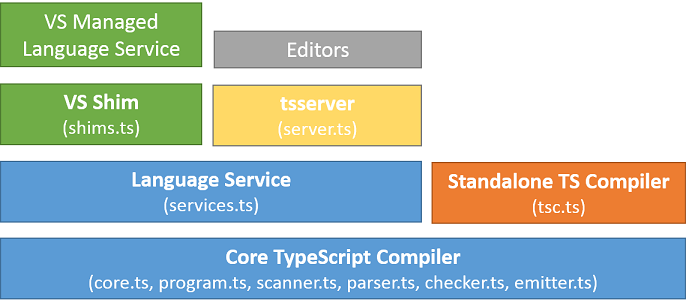
Among them, the 3 most important blocks are:
-
Compiler Core (Core TypeScript Compiler)
Implements a complete compiler, including lexical analysis, type validation, syntax analysis, code generation, etc.
-
Language Service for Editor (Language Service)
Provides statement completion, API hints, code formatting, in-file jump, coloring, breakpoint position validation, etc., also some more scenario-based APIs, such as incremental compilation, see Standalone Server (tsserver) for details
-
Standalone Compiler (
tsc)CLI tool, compiles and transforms input files, then outputs to files
And TSServer as independent process service (Standalone Server (tsserver)), builds a layer of encapsulation on top of Compiler and Service, exposes interfaces in JSON protocol form, see Using the Language Service API for details
So, TSServer has complete capabilities of tsc, also has language service support for editors, very suitable for editor background process and other application scenarios
IV. Summary
Up to this point, everything is clear. The most critical semantic analysis capability and data support comes from underlying TSServer, therefore, go to definition's general flow is like this:
-
User clicks Go to Definition in VSCode interface
-
Triggers corresponding Feature implementation registered by built-in plugin
typescript-language-features -
Feature initiates request to TSServer through Client
-
TSServer finds related AST to find Definitions, and outputs according to established protocol format
-
Client receives response, extracts data, passes to Feature
-
Feature converts raw data to format VSCode display needs
-
VSCode gets data, moves cursor to Editor specified position. Bang, and it jumped over
P.S. Other JS semantics related functions in VSCode are similar to this, all rely on TSServer for support
No comments yet. Be the first to share your thoughts.