
I. Trends
With the production application of technologies like containerization and deep learning, more and more scenarios face the problem of "remote" development, such as:
- Servers
- Virtual Machines
- Containers
And these remote environments are difficult or even impossible to rebuild locally, for example:
- Specific configurations: For instance, historical projects encountered involving
.Net Framework 4.0 + MSSQL 2000, each with a bunch of specific version patches installed, making it nearly impossible to restore the environment. - Specific operating systems: For example, developing a project on Windows that runs on Linux.
- Too destructive to the local environment: Some global elements are hard to isolate.
- Dependency on hardware capabilities not available locally: For example, the computing and storage power required for deep learning.
Regardless of the reason, one always faces various inconveniences brought about by the differences between local and remote environments.
II. Current Situation
For remote development scenarios, there are generally four solutions:
- Remote Desktop: The development experience is significantly different from the local environment, and some Linux distributions cannot install a remote desktop.
- SSH + Vim: Not as convenient as modern development tools, affecting productivity.
- File synchronization tools: Slow and error-prone.
- Browser-based tools: Difficult to use in conjunction with the local toolchain.
These can solve part of the problem, but most sacrifice many conveniences of the local development environment.
So, is there a way to seamlessly transition from a local environment to a remote environment? Can one enjoy the convenience of a familiar full toolchain while performing remote development?
Of course, there is.
III. The Concept
From the perspective of development tools, support is needed in three areas:
- Support for Linux development under Windows
- Support for SSH connections
- Support for container environments
Regarding the issue of Linux development under Windows, Windows 10 provided the Windows Subsystem for Linux (WSL) in 2016, allowing a Linux subsystem to run directly (yes, not as a virtual machine) under Windows:
[caption id="attachment_1972" align="alignnone" width="625"]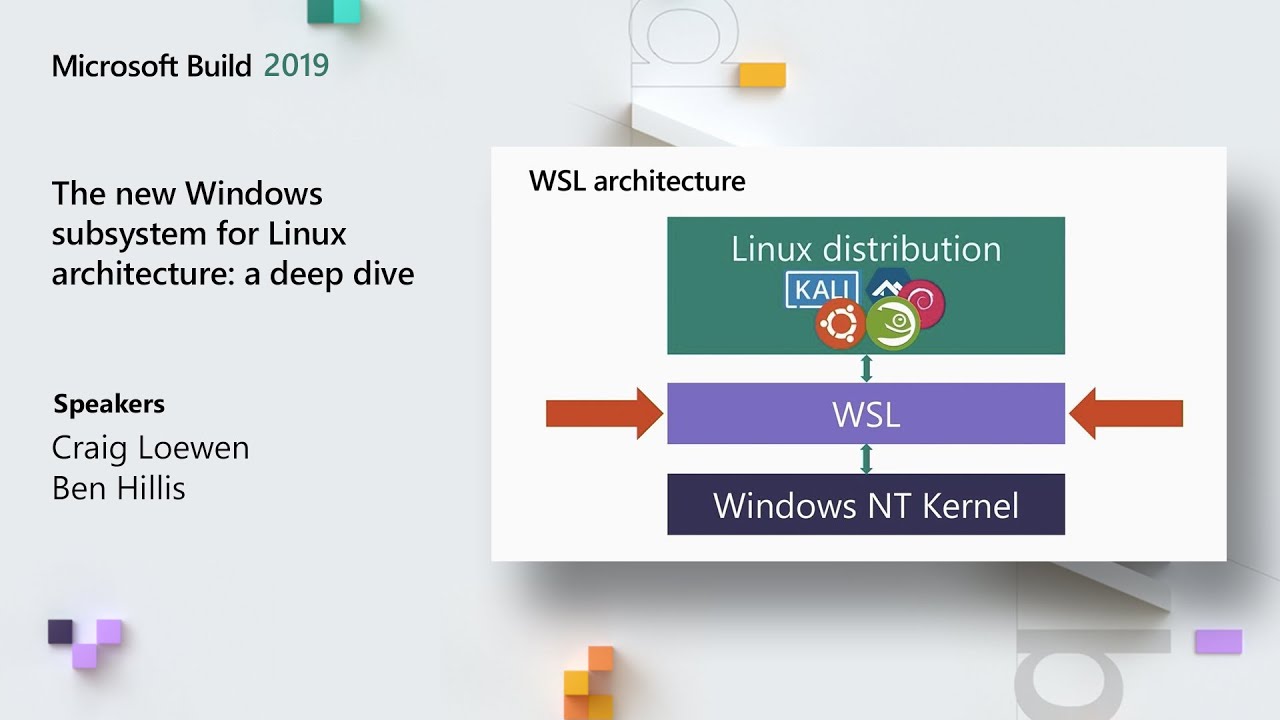 WSL[/caption]
WSL provides basic file sharing support, but the situation for development tools (such as VS Code) is more complex:
If you have Python 2.7 and Flask installed on Windows (or none at all!) and Python 3.7 and Django installed in the Linux distro, you wouldn't get proper completions or linting because VS Code was looking at the Windows versions of everything.
Development tools need to clearly distinguish between different environments, leading to an interesting idea:
We convinced ourselves that what we needed was a way to run VS Code in two places at once, to run the developer tools locally and connect to a set of development services running remotely in the context of a physical or virtual machine (for example, a container or VM).
In short, let some (environment-independent) plugins run locally, while others (environment-dependent) run in the remote environment, such as containers, virtual machines, WSL, servers, and so on...
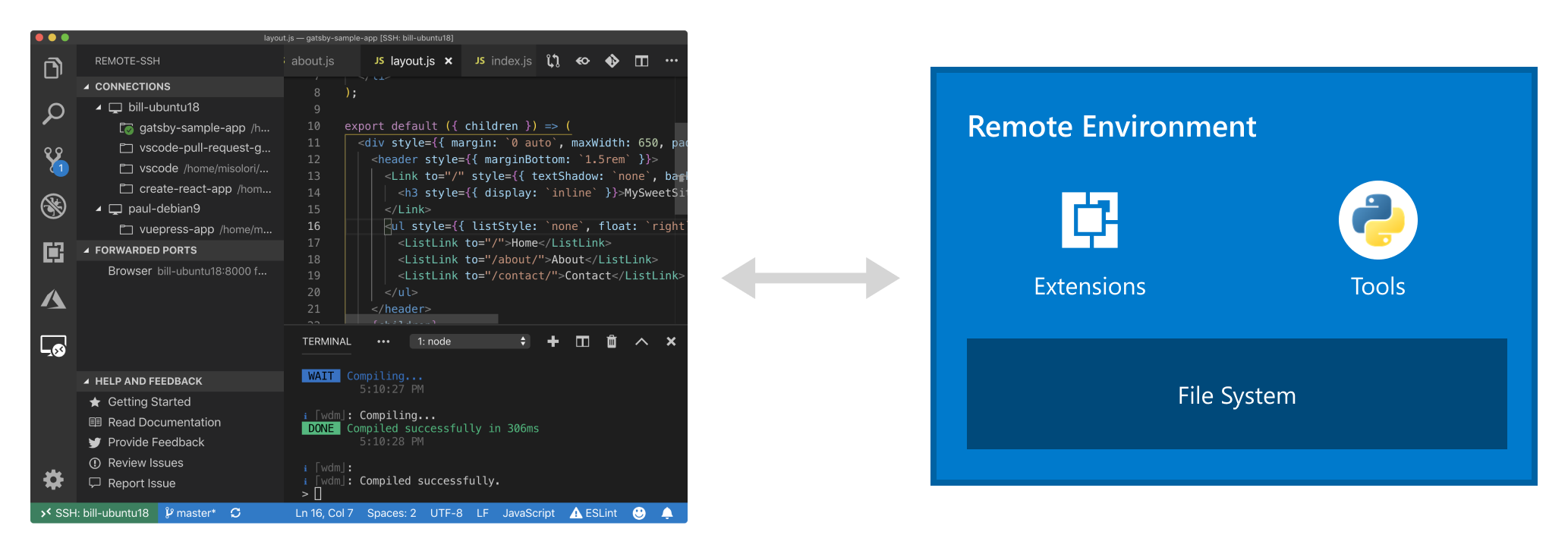
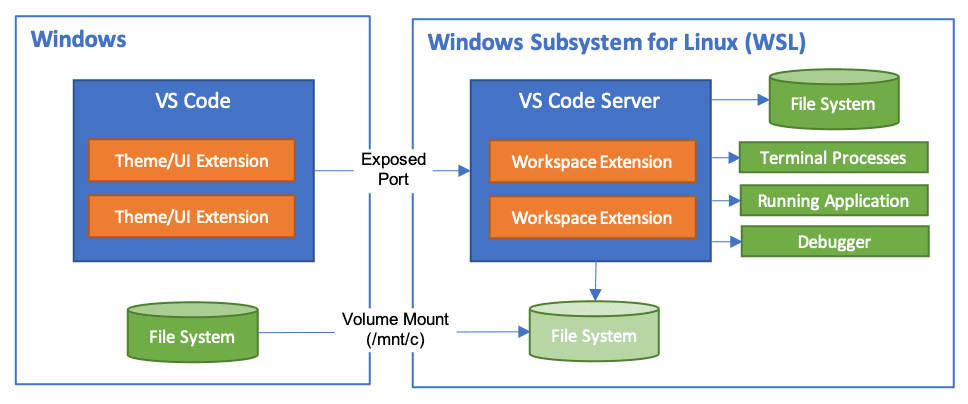
In this way, all problems are solved, catering to the local development experience while supporting remote development:
This gives you a rich local development experience in the context of what is in the remote environment.
IV. VS Code Remote Development Pack
VS Code officially released Remote Development support in version 1.35 (2019/6/4):
Remote Development (Preview) available in Stable - You can now use the Remote Development extensions in Stable.
And more features were added in the latest version 1.36:
Remote Development (Preview) improvements - Save to local file system, drag and drop files to remotes, and more.
Simply install the Remote Development extension pack. Currently (2019/7/6), the pack includes three extensions:
- Remote - SSH: Use a remote machine or virtual machine as the development environment.
- Remote - Containers: Use a Docker container as the development environment.
- Remote - WSL: Use the Windows Subsystem for Linux as the development environment.
Remote - SSH
Connect to remote machines, VMs, or containers through an SSH tunnel to access their file systems, manage terminals, and run/debug applications, as shown below:

Specifically, SSH-based remote development support allows us to:
- Not be limited by the hardware conditions of the local environment.
- Manage multiple different remote development environments.
- Perform remote debugging.
Applications run remotely, while development and debugging can be done locally, continuing to enjoy the convenience of the familiar local full toolchain.
P.S. For more details on SSH remote development, see:
- Demo video: Visual Studio Code Remote - SSH
- Usage documentation: Remote Development using SSH
Remote - Containers
Going a step further, container support allows a specific Docker container to be used as a development environment, thereby:
- Ensuring toolchain consistency and enabling rapid rebuilding of a full toolchain via containers.
- Providing natural environment isolation between containers, allowing switching between different development environments without affecting the local environment.
- Ensuring consistency across development, build, and test environments, facilitating collaboration.
In terms of implementation, the structure is identical to WSL support:

P.S. For more details on Docker container remote development, see:
- Demo video: Visual Studio Code Remote - Containers
- Usage documentation: Developing inside a Container
Remote - WSL
Through the Remote - WSL extension, WSL can be used as a complete development environment. Specifically, it supports the following features:
- Using Windows to develop in a Linux environment with access to platform-specific toolchains.
- Editing files located in WSL, including those mounted from the Windows file system (such as
/mnt/c). - Debugging and running Linux applications on Windows.
P.S. For more details on WSL remote development, see:
- Demo video: Visual Studio Code Remote - WSL
- Usage documentation: Developing in WSL
V. Summary
As it stands, an IDE that can seamlessly transition into a remote environment seems more practical than a Cloud IDE:
Browser-based tools are useful in a variety of scenarios, but developers don't want to give up the richness and familiarity that desktop tools provide, or their existing locally installed tool chains.
No comments yet. Be the first to share your thoughts.