
Preface
This article's content is organized from AudioContext - Web API Interface | MDN, which may be outdated. Please note the date (2015-06-24).
1. Relationship Between Web Audio API Nodes
[caption id="attachment_694" align="alignnone" width="300"]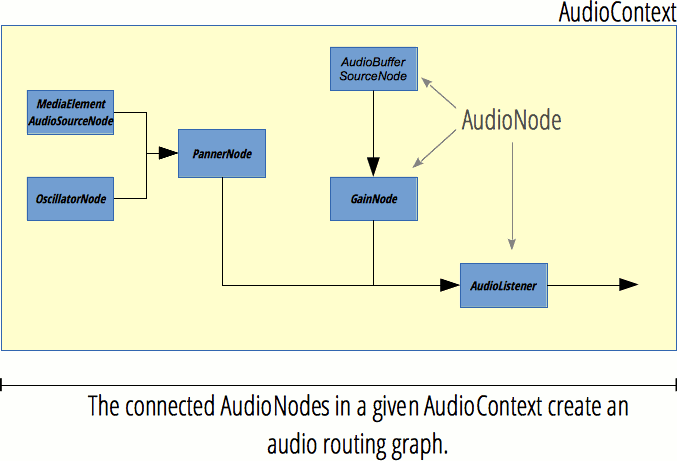 Relationship between Web Audio API nodes[/caption]
2. Functions of Web Audio API
1. Functions Also Achievable with Audio Tag
-
Play multiple audio files simultaneously
-
Crossfade multiple audio files (control based on simultaneous playback)
-
Adjust volume (adjust gain value)
-
Fade in/fade out (same as above)
2. Special Features
-
Get audio time, frequency, achieve data visualization (playback recording: http://mdn.github.io/voice-change-o-matic/)
-
Filter specific frequencies (filters: low-pass filter, high-pass filter, band-pass filter, low-shelf filter, high-shelf filter, peak filter, notch filter, all-pass filter. Low-pass filter guarantees low-frequency bandwidth while discarding high-frequency sound waves.)
-
Reverb effect (echo)
-
Audio spatialization
-
Access individual channels in audio stream and process separately
-
Stereo effects
-
Nonlinear distortion effects
-
Generate sound effects (simulate electronic organ: http://cool.techbrood.com/fiddle/5644)
3. Web Audio API Introduction
AudioContext
Properties
- AudioContext.currentTime
Description: Returns double seconds, starts from 0 as soon as AudioContext is created
Function: Used for audio playback, such as the time parameter in source.start(time);
- AudioContext.destination
Description: Returns AudioDestinationNode type object, represents the final node of all nodes in AudioContext, usually audio output device, such as speakers
Function: Sound is only produced when a series of nodes are connected to AudioContext.destination
- AudioContext.listener
Description: Returns AudioListener object
Function: [Implement 3D audio spatialization]
- AudioContext.mozAudioChannelType
Description: Non-standard, poor compatibility, not recommended
Function:
- AudioContext.sampleRate
Description: Returns floating point number, represents sample rate
Function: All nodes in the same AudioContext have the same sample rate, so sample rate conversion is not supported
Methods
- AudioContext.close()
Description: Close AudioContext, forcibly release all audio resources
Function: Cannot create nodes after closing, but can decode audio and create buffer
Note: https://developer.mozilla.org/en-US/docs/Web/API/AudioContext/close
- AudioContext.createAnalyser()
Description: Returns AnalyserNode object
Function: [Get audio time, frequency, achieve data visualization (spectrum?)]
- AudioContext.createBiquadFilter()
Description: Returns BiquadFilterNode object
Function: Second-order filter, can be configured as common filter types
- AudioContext.createBuffer()
Description: Returns empty AudioBuffer object
Function: Used to store audio data and play through AudioBufferSourceNode object
- AudioContext.createBufferSource()
Description: Returns AudioBufferSourceNode object
Function: Used to play audio data in AudioBuffer
- AudioContext.createChannelMerger()
Description: Returns ChannelMergerNode object
Function: Work with AudioContext.createChannelSplitter() to operate channels, merge channels from multiple audio streams into a single audio stream
- AudioContext.createChannelSplitter()
Description: Returns ChannelSplitterNode object
Function: Used to [access individual channels in audio stream and process separately], generally used with AudioContext.createChannelMerger()
- AudioContext.createConvolver()
Description: Returns ConvolverNode object
Function: Used to [add reverb effect to audio]
- AudioContext.createDelay()
Description: Returns DelayNode object
Function: Set delay, default parameter is 0 seconds
- AudioContext.createDynamicsCompressor()
Description: Returns DynamicsCompressorNode object
Function: Used to compress audio signal
- AudioContext.createGain()
Description: Returns GainNode object
Function: Used to [control overall volume]
- AudioContext.createJavaScriptNode()
Description: Deprecated
Function:
- AudioContext.createMediaElementSource()
Description: Returns new MediaElementAudioSourceNode object
Function: Get data from existing audio or video elements on page
- AudioContext.createMediaStreamDestination()
Description: Returns MediaStreamAudioDestinationNode object associated with WebRTC MediaStream
Function: Represents audio stream, can be saved as local file or sent to other computers
Note: Web RTC is web real-time communication, can achieve browser-to-browser sharing of audio/video data, has native API support, does not depend on third-party plugins. Details: https://developer.mozilla.org/en-US/docs/Web/Guide/API/WebRTC
- AudioContext.createMediaStreamSource()
Description: Returns new MediaStreamAudioSourceNode object
Function: Requires a MediaStream object parameter, such as navigator.getUserMedia instance
- AudioContext.createOscillator()
Description: Returns OscillatorNode object
Function: Represents periodic wave, mainly used to [generate constant tone (constant tone?)]
- AudioContext.createPanner()
Description: Returns PannerNode object
Function: Spatialize input audio stream into three-dimensional space
- AudioContext.createPeriodicWave()
Description: Create PeriodicWave
Function: Used to define periodic waveform, form OscillatorNode output
- AudioContext.createScriptProcessor()
Description: Returns ScriptProcessorNode object
Function: Process audio directly
- AudioContext.createStereoPanner()
Description: Returns StereoPannerNode object
Function: Implement [stereo effect], position input audio stream to stereo image using equal power panning algorithm
- AudioContext.createWaveShaper()
Description: Returns WaveShaperNode object
Function: Implement [nonlinear distortion effect]
- AudioContext.createWaveTable()
Description: Deprecated
Function:
- AudioContext.decodeAudioData()
Description: Asynchronously decode audio file data in ArrayBuffer
Function: ArrayBuffer is usually XMLHttpRequest response (set responseType attribute to arraybuffer when sending to return arraybuffer type response)
Note: Get return value is xhr.response not xhr.responseText
Related Pages for Web Audio API
- AnalyserNode
Description: Analyser node
Function: Provides real-time frequency and time-domain analysis information, only takes data, does not change input
Note: Time-domain analysis is signal-related terminology, filtering, amplifying, statistical feature calculation, correlation analysis, etc. processing of signals in time domain are collectively called signal time-domain analysis.
- AudioBuffer
Description: Audio buffer
Function: Can be created through AudioContext.decodeAudioData() or AudioContext.createBuffer(), after putting in buffer can be played through AudioBufferSourceNode
- AudioBufferSourceNode
Description: Audio buffer source node
Function: Convert data in AudioBuffer to audio signal
Note: One AudioBufferSourceNode can only play once, AudioBufferSourceNode.start() can only be called once. AudioBufferSourceNode cannot be reused (multiple playbacks require creating multiple AudioBufferSourceNode), but AudioBuffer can be reused
- AudioChannelManager
Description: Non-standard, currently only FF supports, not recommended
Function:
- AudioDestinationNode
Description: Audio destination (output) node
Function: Represents endpoint of all nodes in AudioContext, usually device speakers
Note: Input channel count is limited, exceeding maxChannelCount will trigger exception, should be 6
- AudioListener
Description: Audio listener, represents human position and direction
Function: Used for audio spatialization, all PannerNode in AudioContext are spatialized as AudioListener and stored in AudioContext.listener property
- AudioNode
Description: Audio node
Function: Highest-level abstract interface, see image rel.png for inheritance relationship
- AudioParam
Description: Audio parameter
Function: Represents a parameter related to audio, generally AudioNode parameter, such as GainNode.gain
- AudioProcessingEvent
Description: Deprecated, replaced by Audio Workers
Function:
- BiquadFilterNode
Description: Biquad filter
Function: Simple low-order filter, can be created with AudioContext.createBiquadFilter()
- ChannelMergerNode
Function: Channel merger node
Description: Used with ChannelSplitterNode, merges different mono inputs into single output
Note: Mostly used to process each channel separately, such as implementing channel mixing
- ChannelSplitterNode
Description: Channel splitter node
Function: Used with ChannelMergerNode, separates audio source channels into a set of mono outputs
Note: Same as above
- ConvolverNode
Description: Convolver node
Function: Implements linear convolution, commonly used to implement reverb effect
Note: Convolution reverb can enhance audio spatial sense (hall sense?), is a complex algorithm, may have relatively large overhead
- DelayNode
Description: Delay node
Function: Set input to output delay
- DynamicsCompressorNode
Description: Dynamic compressor node
Function: Implements compression effect, prevents clipping distortion, created through AudioContext.createDynamicsCompressor
Note: [Commonly used in music production and game audio]
- GainNode
Description: Gain node
Function: Used to adjust volume, does not change channel count
- MediaStreamAudioDestinationNode
Description: Media stream audio destination (output) node
Function: Represents audio destination containing single audio stream media track (AudioMediaStreamTrack) WebRTC MediaStream, can be created through Navigator.getUserMedia
- MediaStreamAudioSourceNode
Description: Media stream audio source node
Function: Represents audio source containing WebRTC MediaStream (such as network camera and microphone), is an AudioNode similar to audio source
- NotifyAudioAvailableEvent
Description: Non-standard, poor compatibility, not recommended
Function:
- OfflineAudioCompletionEvent
Description: Offline audio completion event
Function: Triggered when OfflineAudioContext processing ends
- OfflineAudioContext
Description: Offline audio context
Function: Represents audio processing graph connecting all AudioNode
Note: OfflineAudioContext does not render to device hardware, just completes processing as quickly as possible and outputs to AudioBuffer
- OscillatorNode
Description: Oscillator node
Function: Represents periodic waveform, such as sine wave, creates sine wave with given frequency, constant tone
- PannerNode
Description: Panner node
Function: Represents position and behavior of audio signal source in space
Note: Uses right-hand Cartesian coordinate system to describe position, uses velocity vector and direction cone to represent motion, Pan represents panning, Phase represents phase, panning refers to instrument's sound position point in sound field. Simply put, it's sound position, whether left or right.
- ParentNode
Description: Parent node
Function: Special Node, can have children
Note: ParentNode is abstract DOM node, cannot be created, Element, Document and DocumentFragment objects all implement it
- PeriodicWave
Description: Periodic wave
Function: Defines periodic waveform, can be used to form OscillatorNode output
- ScriptProcessorNode
Description: Script processor node
Function: Implements using JS to generate, process, analyze audio, contains 2 Buffers: InputBuffer and OutputBuffer
- StereoPannerNode
Description: Stereo panner node
Function: Pans audio flow left or right, uses low-cost equal power algorithm to put audio flow into stereo image
- WaveShaperNode
Description: Wave shaper node
Function: Nonlinear distortion amplifier, besides implementing obvious amplification effect also often used to add a warm tone to signal
No comments yet. Be the first to share your thoughts.