
Preface
writing-mode is a powerful CSS property, can make text vertical (actually can make anything vertical, because can change default layout flow), for example:
泉眼无声惜细流
树阴照水爱晴柔
小荷才露尖尖角
早有蜻蜓立上头
Demo see: http://ayqy.net/temp/writing-mode.html
The CSS rule playing key role is:
/* 竖直 - 从右向左 */
-webkit-writing-mode: vertical-rl;
writing-mode: vertical-rl;
Changing writing-mode from default horizontal top-to-bottom mode to vertical right-to-left mode. Seems like except special text typesetting scenarios, nothing else useful, but actually much more powerful. If applying this rule to html element, entire page will switch to right-to-left vertical mode, including scroll direction, dropdown list direction etc. will all be affected.
Powerful is powerful, but why understand this thing?
-
Languages in the world are diverse, besides English, Chinese these horizontal, there are Arabic, Hebrew etc. vertical, and some scenarios (such as multilingual mixed typesetting) need bidirectional arrangement (
bidi) -
writing-modecan change "CSS world's horizontal and vertical rules, can be said to be the most heaven-defying CSS attribute", "Theoretically, withwriting-mode, we can do 50% more things than before". This is an attribute with infinite creativity, not only can change existing things, future things will also be affected, such asmargin-start/end -
Helps understand Flexbox and CSS Grid
I. Property Values and Compatibility
From current (2017-1-21) draft, property optional values are as follows:
/* 默认 horizontal-tb */
writing-mode: horizontal-tb | vertical-rl | vertical-lr | sideways-rl | sideways-lr
Default is horizontal-tb horizontal top-to-bottom arrangement, which is the most basic rule in CSS, elements arrange from left to right, top to bottom in sequence. vertical-rl/lr respectively represent vertical right-to-left arrangement, vertical left-to-right arrangement. Remaining 2, not sure if they exist:
This value is at-risk and may be dropped during CR.
sideways-rl:纵向从右向左排列,但印刷方式(typographic mode)是横向的
sideways-lr:纵向从左向右排列,但印刷方式是横向的
writing-mode property is still in draft stage, but because IE proposed this thing early, later other browsers followed, currently compatibility is very good:
sideways-rl | sideways-lr 目前没有支持
horizontal-tb | vertical-rl | vertical-lr 广泛支持,Android[3+],iOS[5.1+],都需要 -webkit-
IE[6-10] 只支持老版本值:lr-tb | rl-tb | tb-rl | tb-lr,其中与上面 3 个广泛支持的对应的是 lr-tb | tb-rl | tb-lr
Mobile can use with prefix confidently, for detailed compatibility information, please see Can I use writing-mode ?
P.S. IE old version values see CSS3 Text Module W3C Candidate Recommendation 14 May 2003
II. Inline Direction, Block Direction and Character Direction
Inline direction: default writing-mode, blocks arrange vertically from page top
Inline direction refers to arrangement direction of each line in text flow, default left to right arrangement, imagine typewriter effect, characters come out one by one, that's inline direction
Character direction says which way character points, input a big A (this pointing is too obvious, like an arrow), character points to page top, but different languages will point to different directions
[caption id="attachment_1295" align="alignnone" width="625"]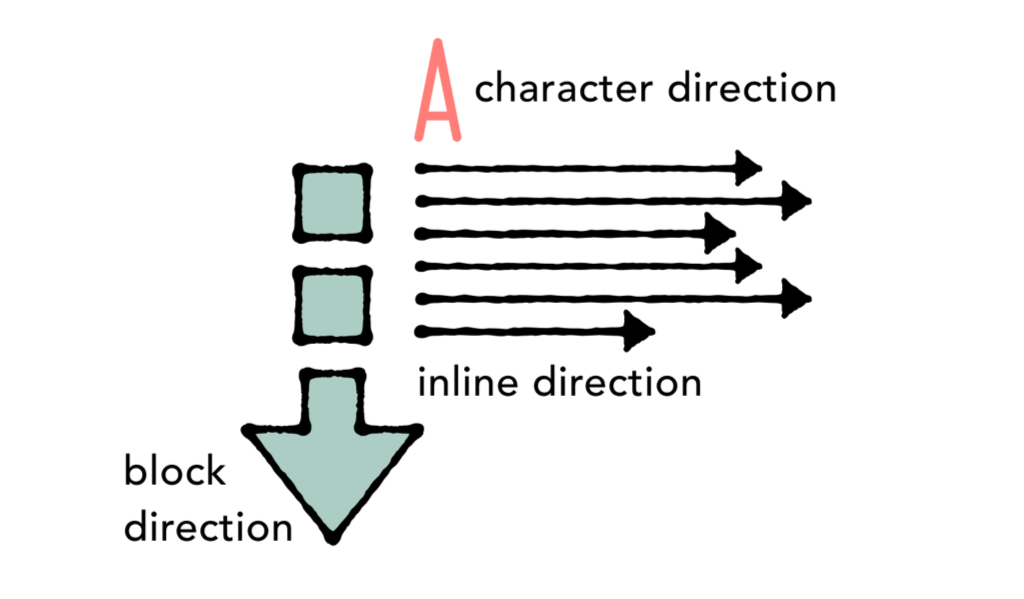 three concepts[/caption]
In the figure, block direction top to bottom, inline direction left to right, character direction points to page top
III. 4 Major Writing Systems
CSS Writing Mode satisfies 4 major writing systems from design: Latin, Arabic, Chinese and Mongolian
1. Latin Writing System
World's largest writing system, 70% people use this. Text arranges from left to right, block direction is top to bottom (see figure above)
Latin writing system is very large, includes all other languages using Latin letters, such as English, Spanish, German, French etc. In addition, many languages not using Latin letters also belong to Latin writing system, including those using Greek letters, Cyrillic letters, such as Russian, Ukrainian, Bulgarian, Serbian etc., and Brahmic scripts, such as Sanskrit, Thai, Tibetan etc.
No need to trigger this mode through CSS, default is like this. But best to declare language and arrangement direction, for example:
<html lang='en-gb' dir='ltr'>
Let browser know content is British English, arranges from left to right
2. Arabic Writing System
Arabic, Hebrew are minority with inline direction from right to left, called RTL
Note inline direction is still horizontal, block direction top to bottom, character direction upward:
[caption id="attachment_1296" align="alignnone" width="625"]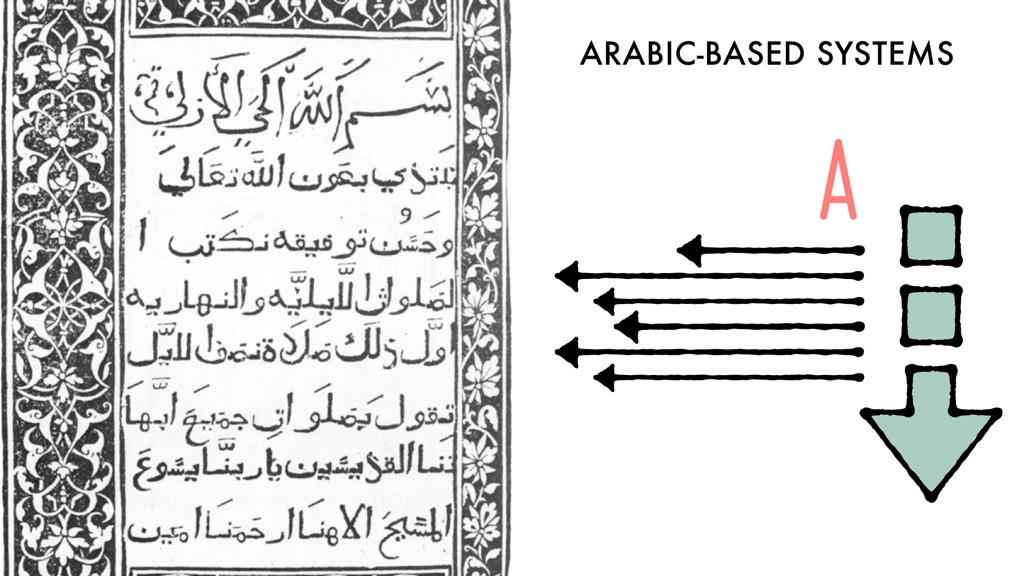 arabic system[/caption]
Not only text flow from right to left, all things related to layout are from right to left, starting from top-right corner, eyes browse from right to left, so generally RTL site layout is similar to LTR, just horizontally flipped
CSS Layout Under RTL
Generally to support RTL, need to do a lot of preparation work, such as first find all margin-left/right, padding-left/right, float: left/right, mark them out, then make a stylesheet to flip left and right. This work is very boring and error-prone, CSS needs to provide a way to write layout code once, can easily switch language direction through simple commands
New CSS layout systems are doing this, Flexbox, Grid and Alignment use start and end to replace left and right. This way can define layout according to writing system, easily switch direction. For example justify-content: flex-start; justify-items: end; margin-inline-start: 1rem don't need to move anymore. This way is better, although using start and end to replace left and right is confusing, but beneficial for multilingual projects, also beneficial for web big environment
So spend a little time figuring out inline direction, block direction, use start and end, will get used to it very soon
How to Declare Direction
Should declare direction in HTML, not in CSS, this way even if CSS isn't fully loaded, browser can still display content correctly. Mainly through html element completion, simultaneously should declare language, for example:
<html lang='ar' dir='rtl'>
Indicates page content is Arabic, uses RTL layout
Whether Latin writing system or Arabic writing system, writing-mode property should use the same:
writing-mode: horizontal-tb;
Because inline text flow is all horizontal, block direction is also all top to bottom, expressed in CSS is horizontal-tb, also default writing-mode, so no need to manually declare, unless want to override others or want higher cascade priority. So can imagine every page made before has a line:
html {
    writing-mode: horizontal-tb;
}
3. Chinese Character Writing System
Chinese character writing system includes CJK languages, Chinese, Japanese, Korean etc., has two layout methods, sometimes appear together
Many CJK text layouts are same as Latin languages, block direction top to bottom, inline direction left to right. CSS needed for layout is same as above:
section {
    writing-mode: horizontal-tb;
}
Or write nothing, default is like this
Additionally, Chinese character system can also arrange vertically, inline direction is vertical, block direction from right to left, as figure:
[caption id="attachment_1297" align="alignnone" width="625"]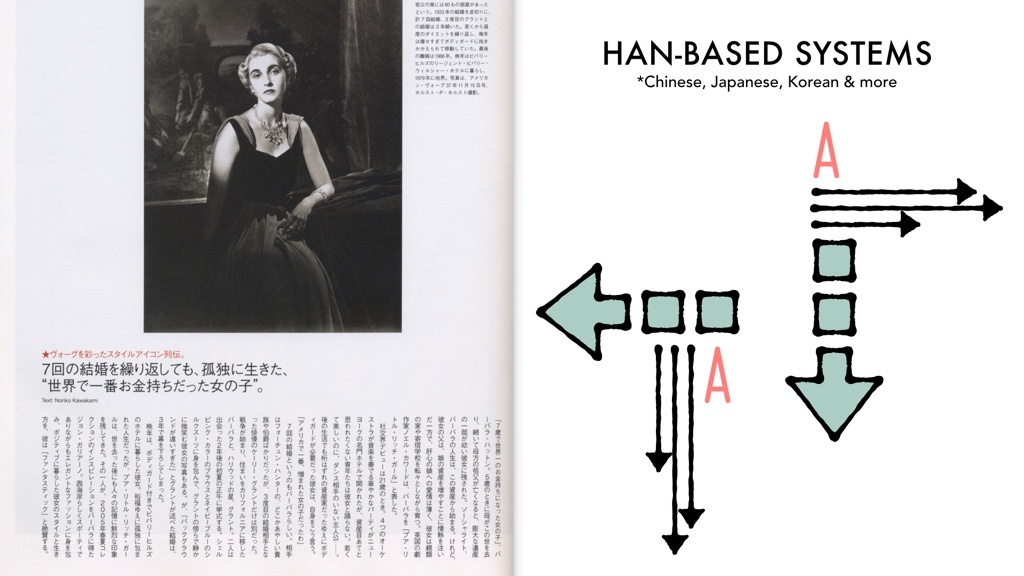 han system[/caption]
Note horizontal text flow left to right, while vertical text flow from right to left
Default settings for entire page depend on scenario, but each element, each line of title, each section, each article can all be set to opposite of default. For example, default set to horizontal-tb, then set for vertical elements:
div.articletext {
    writing-mode: vertical-rl;
}
Or can set page default to vertical arrangement, then set horizontal-tb for certain elements, for example:
html {
    writing-mode: vertical-rl;
}
h2, .photocaptions, section {
    writing-mode: horizontal-tb;
}
If page has lateral scrolling, writing-mode will make page layout start from top-left corner, scroll right (horizontal-tb), or page layout starts from top-right corner, scroll left to display overflow part
There's an example switching writing-mode: 文字的故事, interestingly switching is implemented through selector (daily sneaky code digging):
.c-switcher:not(:checked)~main figure {
    -ms-flex-wrap: wrap;
    flex-wrap: wrap;
    -webkit-box-pack: center;
    -ms-flex-pack: center;
    justify-content: center;
    text-align: center
}

.c-switcher:checked~main figure {
    -webkit-box-orient: vertical;
    -webkit-box-direction: normal;
    -ms-flex-direction: column;
    flex-direction: column;
    -webkit-box-align: center;
    -ms-flex-align: center;
    align-items: center;
    -ms-flex-wrap: nowrap;
    flex-wrap: nowrap
}
4. Mongolian Writing System
Mongolian is also a vertical text language, text arranges vertically on page, like Chinese character system. Has 2 main differences
First block direction is different, Mongolian block-level elements arrange from left to right. Block direction starts from screen left side, arranges to right side. Inline direction top to bottom, very similar to RTL text, imagine rotating this page 90 degrees counterclockwise.
Another difference is, character direction is upside down, Mongolian character top doesn't point to left side (points to block direction starting edge), but points to right side, as figure:
[caption id="attachment_1298" align="alignnone" width="625"]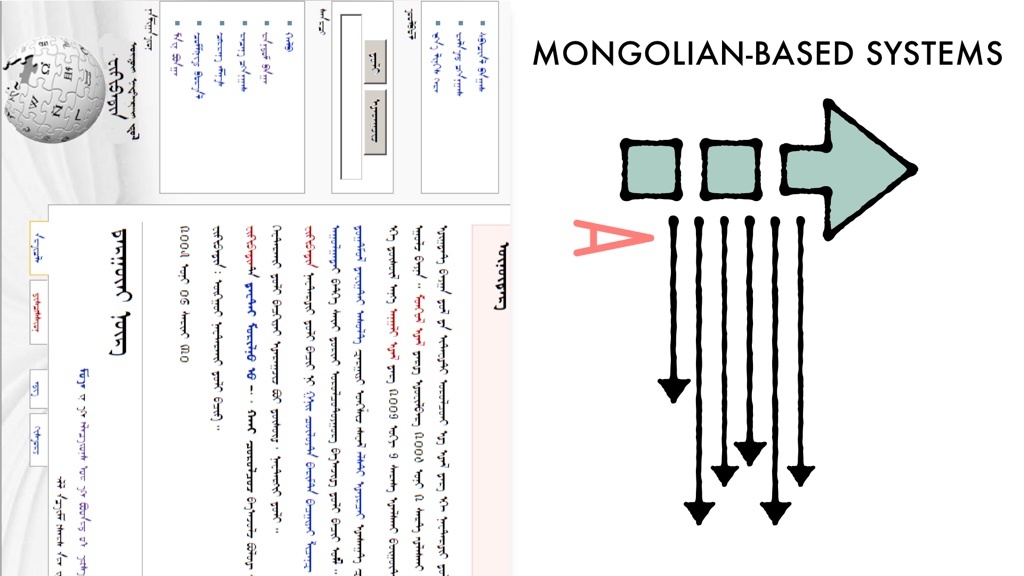 mongolian system[/caption]
writing-mode: vertical-lr is to handle this situation, is tailor-made for Mongolian, so writing-mode: vertical-lr actual effect may be different from imagination:
[caption id="attachment_1299" align="alignnone" width="625"]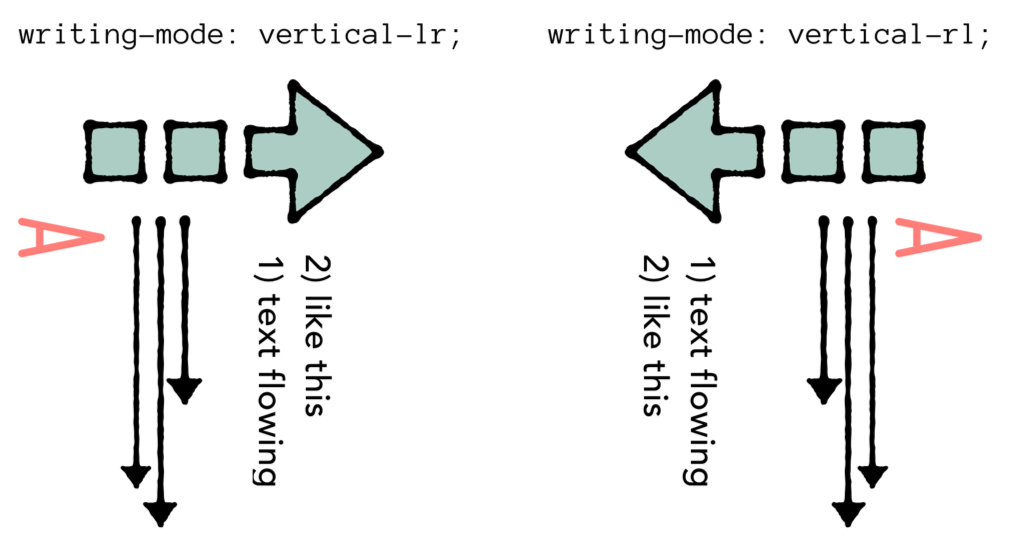 vertical actual[/caption]
Because vertical-rl is indeed result of rotating page 90 degrees clockwise, while vertical-lr after rotating 90 degrees counterclockwise, also needs to reverse text direction. Property value meanings are defined according to writing system performance, not literal meaning
There are exception cases, under writing-mode: vertical-rl/lr, Latin text all rotates clockwise, writing-mode can't make it rotate counterclockwise
If typesetting Mongolian content, CSS application method is same as Chinese character system, set on html element for entire page, or declare for specified elements:
section {
    writing-mode: vertical-lr;
}
If using writing-mode for graphic design effect of non-horizontal languages, writing-mode: vertical-lr may not be very useful, if text wraps, arrangement method will be very strange. So may often use vertical-rl, and not much use vertical-lr
IV. Writing Mode and Graphic Design
So how to use writing-mode to turn English title line sideways? Can use transform: rotate() to handle (because vertical-rl/lr will reverse character direction, so need vertical-rl + rotate to simulate)
/* 顺时针旋转 90 度效果 */
h1 {
    writing-mode: vertical-rl;
}

/* 逆时针旋转 90 度效果 */
h1 {
    writing-mode: vertical-rl;
    transform: rotate(180deg);
    text-align: right;
}
Here don't use writing-mode: vertical-lr, because aforementioned text arrangement will be very strange when wrapping (personally tested didn't find strange place, also don't know what it refers to), so use vertical-rl + rotate to implement, text-align: right; is to make text stick to container top, here is for vertical-rl, considered hack
Additionally, can cooperate with text-orientation: upright; to keep character direction upward
This way can make section titles vertical on side, reading experience "may" be better
V. Writing Mode Techniques
Use Writing Mode to move horizontal rules to vertical, for example margin: auto 0; implement vertical centering:
/* 容器 */
-webkit-writing-mode: vertical-rl;
writing-mode: vertical-rl;
/* 元素 */
height: 100px;
margin: auto 0;
Or more rough:
/* 容器 */
-webkit-writing-mode: vertical-rl;
writing-mode: vertical-rl;
text-align: center;
/* 元素 */
display: inline-block;
text-align: left;
But in era with transfrom, some techniques are not very practical, for example:
-
Vertical
text-indentimplement text sinking when pressing button -
Vertical iconfont implement expand/collapse arrow
text-indent will wrap in multi-character situation, vertical fonts can only rotate clockwise, can't do counterclockwise rotation
If without transform, writing-mode would shine brilliantly in layout effects, for example [IE6+] environment, writing-mode is like magic
But writing-mode indeed increased 50% possibilities, is another door
No comments yet. Be the first to share your thoughts.