
一。從 iframe 說起
利用 iframe 能夠嵌入第三方頁面,例如:
<iframe style="width: 800px; height: 600px;" src="https://www.baidu.com"/>
然而,並非所有第三方頁面都能夠通過 iframe 嵌入:
<iframe style="width: 800px; height: 600px;" src="https://github.com/join"/>
Github 登錄頁並沒有像百度首頁一樣乖乖顯示到 iframe 裡,並且在 Console 面板輸出了一行錯誤:
Refused to display 'https://github.com/join' in a frame because an ancestor violates the following Content Security Policy directive: "frame-ancestors 'none'".
這是為什麼呢?
二。點擊劫持與安全策略
沒錯,禁止頁面被放在 iframe 裡加載主要是為了防止點擊劫持(Clickjacking):

具體的,對於點擊劫持,主要有 3 項應對措施:
-
CSP(Content Security Policy,即內容安全策略)
-
X-Frame-Options
服務端通過設置 HTTP 響應頭來聲明 CSP 和 X-Frame-Options,例如:
# 不允許被嵌入,包括<frame>, <iframe>, <object>, <embed> 和 <applet>
Content-Security-Policy: frame-ancestors 'none'
# 只允許被同源的頁面嵌入
Content-Security-Policy: frame-ancestors 'self'
# 只允許被白名單內的頁面嵌入
Content-Security-Policy: frame-ancestors www.example.com

# 不允許被嵌入,包括<frame>, <iframe>, <embed> 和 <object>
X-Frame-Options: deny
# 只允許被同源的頁面嵌入
X-Frame-Options: sameorigin
# (已廢棄)只允許被白名單內的頁面嵌入
X-Frame-Options: allow-from www.example.com
P.S.同源是指協議、域名、端口號都完全相同,見 Same-origin policy
P.S. 另外,還有個與 frame-ancestors 長得很像的 frame-src,但二者作用相反,後者用來限制當前頁面中的 <iframe> 與 <frame> 所能加載的內容來源
至於 framekiller,則是在客戶端執行一段 JavaScript,從而反客為主:
// 原版
<script>
if(top != self) top.location.replace(location);
</script>

// 增強版
<style> html{display:none;} </style>
<script>
if(self == top) {
  document.documentElement.style.display = 'block';
} else {
  top.location = self.location;
}
</script>
而 Github 登錄頁,同時設置了 CSP 和 X-Frame-Options 響應頭:
Content-Security-Policy: frame-ancestors 'none';
X-Frame-Options: deny
因此無法通過 iframe 嵌入,那麼,有辦法打破這些限制嗎?
三。思路
既然主要限制來自 HTTP 響應頭,那麼至少有兩種思路:
-
篡改響應頭,使之滿足
iframe安全限制 -
不直接加載源內容,繞過
iframe安全限制
在資源響應到達終點之前的任意環節,攔截下來並改掉 CSP 與 X-Frame-Options,比如在客戶端收到響應時攔截篡改,或由代理服務轉發篡改
而另一種思路很有意思,藉助 Chrome Headless 加載源內容,轉換為截圖展示到 iframe 中。例如 Browser Preview for VS Code:
Browser Preview is powered by Chrome Headless, and works by starting a headless Chrome instance in a new process. This enables a secure way to render web content inside VS Code, and enables interesting features such as in-editor debugging and more!
也就是說,通過 Chrome 正常加載頁面,再將內容截圖放到 iframe 裡,因而不受上述(包括 framekiller 在內的)安全策略的限制。但這種方案也並非完美,存在另一些問題:
四。解決方案
客戶端攔截
Service Worker
要攔截篡改 HTTP 響應,最先想到的,自然是 Service Worker(一種 [Web Worker](/articles/理解 web-workers/)):
A service worker is an event-driven worker registered against an origin and a path. It takes the form of a JavaScript file that can control the web-page/site that it is associated with, intercepting and modifying navigation and resource requests.
(摘自 Service Worker API)
註冊 Service Worker 後能夠攔截並修改資源請求,例如:
// 1. 註冊 Service Worker
navigator.serviceWorker.register('./sw-proxy.js');

// 2. 攔截請求(sw-proxy.js)
self.addEventListener('fetch', async (event) => {
  const {request} = event;
  let response = await fetch(request);
  // 3. 重新構造 Response
  response = new Response(response.body, response)
  // 4. 篡改響應頭
  response.headers.delete('Content-Security-Policy');
  response.headers.delete('X-Frame-Options');

  event.respondWith(Promise.resolve(originalResponse));
});
注意,Fetch Response 不允許直接修改請求頭,需要重新構造一個,見 Alter Headers
P.S. 完整實現案例,可參考 DannyMoerkerke/sw-proxy
WebRequest
如果是在 Electron 環境,還可以藉助 WebRequest API 來攔截並篡改響應:
const { session } = require('electron')

session.defaultSession.webRequest.onHeadersReceived((details, callback) => {
  callback({
    responseHeaders: {
      ...details.responseHeaders,
      'Content-Security-Policy': ['default-src \'none\'']
    }
  })
})
(摘自 CSP HTTP Header)
但與 Service Worker 類似,WebRequest 同樣依賴客戶端環境,而出於安全性考慮,這些能力在一些環境下會被禁掉,此時就需要從服務端尋找出路,比如通過代理服務轉發
代理服務轉發
基本思路是通過代理服務轉發源請求和響應,在轉發過程中修改響應頭甚至響應體
具體實現上,分為 2 步:
-
創建代理服務,篡改響應頭字段
-
客戶端請求代理服務
以為 HTTPS 為例,代理服務簡單實現如下:
const https = require("https");
const querystring = require("querystring");
const url = require("url");

const port = 10101;
// 1. 創建代理服務
https.createServer(onRequest).listen(port);

function onRequest(req, res) {
  const originUrl = url.parse(req.url);
  const qs = querystring.parse(originUrl.query);
  const targetUrl = qs["target"];
  const target = url.parse(targetUrl);

  const options = {
    hostname: target.hostname,
    port: 80,
    path: url.format(target),
    method: "GET"
  };

  // 2. 代發請求
  const proxy = https.request(options, _res => {
    // 3. 修改響應頭
    const fieldsToRemove = ["x-frame-options", "content-security-policy"];
    Object.keys(_res.headers).forEach(field => {
      if (!fieldsToRemove.includes(field.toLocaleLowerCase())) {
        res.setHeader(field, _res.headers[field]);
      }
    });
    _res.pipe(res, {
      end: true
    });
  });
  req.pipe(proxy, {
    end: true
  });
}
客戶端 iframe 不再直接請求源資源,而是通過代理服務去取:
<iframe style="width: 400px; height: 300px;" src="http://localhost:10101/?target=https%3A%2F%2Fgithub.com%2Fjoin"/>
如此這般,Github 登錄頁就能在 iframe 裡乖乖顯示出來了:
[caption id="attachment_2078" align="alignnone" width="924"]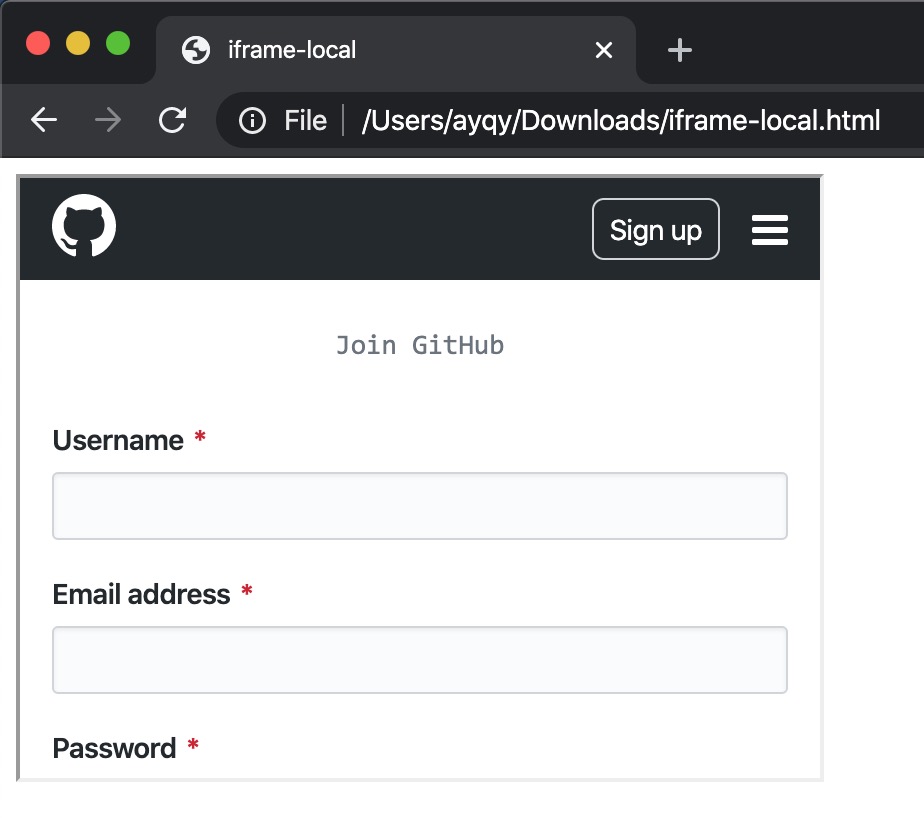 iframe github login[/caption]
暫無評論,快來發表你的看法吧