
一。Fast Refresh 又是什麼?
React Native(v0.6.1)新推出的一項特性,React 組件修改能立即生效:
Fast Refresh is a React Native feature that allows you to get near-instant feedback for changes in your React components.
聽起來像是...沒錯,其核心能力就是 Hot Reloading:
Fast Refresh is a feature that lets you edit React components in a running application without losing their state.
但不同於此前的社區方案(如 React Hot Loader),Fast Refresh 由 React 提供官方支持,更加穩定可靠:
It is similar to an old feature known as "hot reloading", but Fast Refresh is more reliable and officially supported by React.
為了徹底解決 舊方案 穩定性、可靠性、容錯性等方面的問題:
It didn't work reliably for function components, often failed to update the screen, and wasn't resilient to typos and mistakes. We heard that most people turned it off because it was too unreliable.
概念上,Fast Refresh 相當把 Live Reloading 與 Hot Reloading 合二為一了:
In React Native 0.61, We're unifying the existing "live reloading" (reload on save) and "hot reloading" features into a single new feature called "Fast Refresh".
二。運作機制
Reload 策略
基本的處理策略分為 3 種情況:
-
如果所編輯的模塊僅導出了 React 組件,Fast Refresh 就只更新該模塊的代碼,並重新渲染對應的組件。此時該文件的所有修改都能生效,包括樣式、渲染邏輯、事件處理、甚至一些副作用
-
如果所編輯的模塊導出的東西不只是 React 組件,Fast Refresh 將重新執行該模塊以及所有依賴它的模塊
-
如果所編輯的文件被 React(組件)樹之外的模塊引用了,Fast Refresh 會降級成整個刷新(Live Reloading)
根據模塊導出內容區分純組件模塊、非組件模塊和不純組件模塊,對純組件模塊(只導出 React 組件的模塊)支持程度最好,完全支持新 React(v16.x)的函數式組件和 Hooks
容錯處理
與 Hot Reloading 相比,Fast Refresh 的容錯性更強一些:
-
語法錯誤:Fast Refresh 期間的語法錯誤會被 catch 住,修掉並保存文件即可恢復正常,所以存在語法錯誤的文件不會被執行,無需手動重刷
-
運行時錯誤:模塊初始化過程中的運行時報錯同樣能被 catch 住,不會造成實質影響,而對於組件中的運行時錯誤,Fast Refresh 會重刷(remount)整個應用(除非有 Error Boundary)
也就是說,對於語法錯誤和部分拼寫錯誤(模塊加載時的運行時錯誤),修復後 Fast Refresh 就能恢復正常,而對於組件運行時錯誤,會降級到整個重刷(Live Reloading)或者局部重刷(有 Error Boundary 的話,重刷 Error Boundary)
限制
然而,有些情況下,維持狀態並不十分安全,所以可靠起見,Fast Refresh 遇到這些情況一概不保留狀態:
-
Class 組件一律重刷(remount),state 會被重置,包括高階組件返回的 Class 組件
-
不純組件模塊,所編輯的模塊除導出 React 組件外,還導出了其它東西
特殊的,還可以通過 // @refresh reset 指令(在源碼文件中任意位置加上這行註釋)強制重刷(remount),最大限度地保證可用性
P.S. 長期來看,函數式組件將崛起,Class 組件越來越少,編輯體驗會越來越好:
In the longer term, as more of your codebase moves to function components and Hooks, you can expect state to be preserved in more cases.
三。實現原理
要想達到比 HMR(module 級)、React Hot Loader(受限的組件級)粒度更細的熱更新能力,支持組件級、甚至 Hooks 級的可靠更新,僅靠外部機制(補充的運行時、編譯轉換)很難做到,需要 React 的深度配合:
Fast Refresh is a reimplementation of "hot reloading" with full support from React.
也就是說,一些之前繞不過去的難題(比如 Hooks),現在可通過 React 配合解決
實現上,Fast Refresh 同樣基於 HMR,自底向上依次為:
-
HMR 機制:如 webpack HMR
-
編譯轉換:
react-refresh/babel -
補充運行時:
react-refresh/runtime -
React 支持:React DOM 16.9+,或 react-reconciler 0.21.0+
與 React Hot Loader 相比,去掉了組件之上的代理,改由 React 直接提供支持:
[caption id="attachment_2202" align="alignnone" width="560"]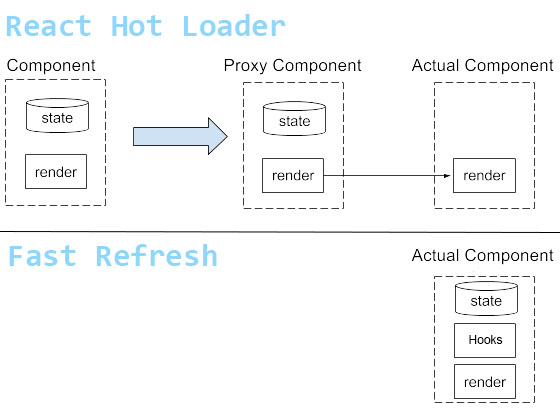 react hot loader vs fast refresh[/caption]
之前為了保留組件狀態,支持替換組件 render 部分的 Proxy Component 都不需要了,因為新版 React 對函數式組件、Hooks 的熱替換提供了原生支持
四。源碼簡析
相關源碼分為 Babel 插件和 Runtime 兩部分,都維護在 react-refresh 中,通過不同的入口文件(react-refresh/babel、react-refresh/runtime)暴露出來
可從以下 4 個方面來了解 Fast Refresh 的具體實現:
-
Plugin 在編譯時做了什麼?
-
Runtime 在運行時怎麼配合的?
-
React 為此提供了哪些支持?
-
包括 HMR 在內的完整機制
Plugin 在編譯時做了什麼?
簡單來講,Fast Refresh 通過 Babel 插件找出所有組件和自定義 Hooks,並註冊到大表(Map)中
先遍歷 AST 收集所有 Hooks 及其簽名:
// 語法樹遍歷一開始先單跑一趟遍歷找出所有 Hooks 調用,記錄到 hookCalls Map 中
Program: {
  enter(path) {
    // This is a separate early visitor because we need to collect Hook calls
    // and "const [foo, setFoo] = ..." signatures before the destructuring
    // transform mangles them. This extra traversal is not ideal for perf,
    // but it's the best we can do until we stop transpiling destructuring.
    path.traverse(HookCallsVisitor);
  }
}
(摘自 react/packages/react-refresh/src/ReactFreshBabelPlugin.js)
P.S. 以上代碼是 Babel 插件中 visitor 的一部分,具體見 [Babel 快速指南](/articles/babel 快速指南/#articleHeader9)
接著再遍歷一次找出所有 React 函數式組件,並插入代碼把組件、Hooks 等信息暴露給 Runtime,建立起源文件與運行時模塊之間的聯繫:
// 遇到函數聲明註冊 Hooks 信息
FunctionDeclaration: {
  exit(path) {
    const node = path.node;
    // 查表,函數中有 Hooks 調用則繼續
    const signature = getHookCallsSignature(node);
    if (signature === null) {
      return;
    }

    const sigCallID = path.scope.generateUidIdentifier('_s');
    path.scope.parent.push({
      id: sigCallID,
      init: t.callExpression(refreshSig, []),
    });

    // The signature call is split in two parts. One part is called inside the function.
    // This is used to signal when first render happens.
    path
      .get('body')
      .unshiftContainer(
        'body',
        t.expressionStatement(t.callExpression(sigCallID, [])),
      );

    // The second call is around the function itself.
    // This is used to associate a type with a signature.

    // Unlike with $RefreshReg$, this needs to work for nested
    // declarations too. So we need to search for a path where
    // we can insert a statement rather than hardcoding it.
    let insertAfterPath = null;
    path.find(p => {
      if (p.parentPath.isBlock()) {
        insertAfterPath = p;
        return true;
      }
    });

    insertAfterPath.insertAfter(
      t.expressionStatement(
        t.callExpression(
          sigCallID,
          createArgumentsForSignature(
            id,
            signature,
            insertAfterPath.scope,
          ),
        ),
      ),
    );
  },
},
Program: {
  exit(path) {
    // 查表,文件中有 React 函數式組件則繼續
    const registrations = registrationsByProgramPath.get(path);
    if (registrations === undefined) {
      return;
    }
    const declarators = [];
    path.pushContainer('body', t.variableDeclaration('var', declarators));
    registrations.forEach(({handle, persistentID}) => {
      path.pushContainer(
        'body',
        t.expressionStatement(
          t.callExpression(refreshReg, [
            handle,
            t.stringLiteral(persistentID),
          ]),
        ),
      );
      declarators.push(t.variableDeclarator(handle));
    });
  },
},
即通過 Babel 插件找到所有的 React 函數式組件定義(包括 HOC 等),並按組件名把組件引用註冊到運行時:
// 轉換前
export function Hello() {
  function handleClick() {}
  return <h1 onClick={handleClick}>Hi</h1>;
}
export default function Bar() {
  return <Hello />;
}
function Baz() {
  return <h1>OK</h1>;
}
const NotAComp = 'hi';
export { Baz, NotAComp };
export function sum() {}
export const Bad = 42;

// 轉換後
export function Hello() {
  function handleClick() {}

  return <h1 onClick={handleClick}>Hi</h1>;
}
_c = Hello;
export default function Bar() {
  return <Hello />;
}
_c2 = Bar;

function Baz() {
  return <h1>OK</h1>;
}

_c3 = Baz;
const NotAComp = 'hi';
export { Baz, NotAComp };
export function sum() {}
export const Bad = 42;

var _c, _c2, _c3;

$RefreshReg$(_c, "Hello");
$RefreshReg$(_c2, "Bar");
$RefreshReg$(_c3, "Baz");
特殊的,Hooks 處理起來稍麻煩一些:
// 轉換前
export default function App() {
  const [foo, setFoo] = useState(0);
  React.useEffect(() => {});
  return <h1>{foo}</h1>;
}

// 轉換後
var _s = $RefreshSig$();

export default function App() {
  _s();

  const [foo, setFoo] = useState(0);
  React.useEffect(() => {});
  return <h1>{foo}</h1>;
}

_s(App, "useState{[foo, setFoo](0)}\\nuseEffect{}");

_c = App;

var _c;

$RefreshReg$(_c, "App");
遇到一個 Hooks 會插入三行代碼,模塊作用域的 var _s = $RefreshSig$(); 和 _s(App, "useState{[foo, setFoo](0)}\\nuseEffect{}");,以及與 Hooks 調用處於相同作用域的 _s();
Runtime 在運行時怎麼配合的?
Babel 插件注入的代碼中出現了兩個未定義的函數:
-
$RefreshSig$:創建 Hooks 簽名 -
$RefreshReg$:註冊組件
這兩個函數來自 react-refresh/runtime,例如:
var RefreshRuntime = require('react-refresh/runtime');
window.$RefreshReg$ = (type, id) => {
  // Note module.id is webpack-specific, this may vary in other bundlers
  const fullId = module.id + ' ' + id;
  RefreshRuntime.register(type, fullId);
}
window.$RefreshSig$ = RefreshRuntime.createSignatureFunctionForTransform;
分別對應 RefreshRuntime 提供的 createSignatureFunctionForTransform 和 register
createSignatureFunctionForTransform 分兩個階段填充 Hooks 的標識信息,第一次填充關聯組件的信息,第二次收集 Hooks,第三次及之後的調用都無效(resolved 狀態,什麼也不做):
export function createSignatureFunctionForTransform() {
  // We'll fill in the signature in two steps.
  // First, we'll know the signature itself. This happens outside the component.
  // Then, we'll know the references to custom Hooks. This happens inside the component.
  // After that, the returned function will be a fast path no-op.
  let status: SignatureStatus = 'needsSignature';
  let savedType;
  let hasCustomHooks;
  return function<T>(
    type: T,
    key: string,
    forceReset?: boolean,
    getCustomHooks?: () => Array<Function>,
  ): T {
    switch (status) {
      case 'needsSignature':
        if (type !== undefined) {
          // If we received an argument, this is the initial registration call.
          savedType = type;
          hasCustomHooks = typeof getCustomHooks === 'function';
          setSignature(type, key, forceReset, getCustomHooks);
          // The next call we expect is from inside a function, to fill in the custom Hooks.
          status = 'needsCustomHooks';
        }
        break;
      case 'needsCustomHooks':
        if (hasCustomHooks) {
          collectCustomHooksForSignature(savedType);
        }
        status = 'resolved';
        break;
      case 'resolved':
        // Do nothing. Fast path for all future renders.
        break;
    }
    return type;
  };
}
而 register 把組件引用(type)和組件名標識(id)存儲到一張大表中,如果已經存在加入到更新隊列:
export function register(type: any, id: string): void {
  // Create family or remember to update it.
  // None of this bookkeeping affects reconciliation
  // until the first performReactRefresh() call above.
  let family = allFamiliesByID.get(id);
  if (family === undefined) {
    family = {current: type};
    allFamiliesByID.set(id, family);
  } else {
    pendingUpdates.push([family, type]);
  }
  allFamiliesByType.set(type, family);
}
pendingUpdates 隊列中的各項更新在 performReactRefresh 時才會生效,加入到 updatedFamiliesByType 表中,供 React 查詢:
function resolveFamily(type) {
  // Only check updated types to keep lookups fast.
  return updatedFamiliesByType.get(type);
}
React 為此提供了哪些支持?
注意到 Runtime 依賴 React 的一些函數:
import type {
  Family,
  RefreshUpdate,
  ScheduleRefresh,
  ScheduleRoot,
  FindHostInstancesForRefresh,
  SetRefreshHandler,
} from 'react-reconciler/src/ReactFiberHotReloading';
其中,setRefreshHandler 是 Runtime 與 React 建立聯繫的關鍵:
export const setRefreshHandler = (handler: RefreshHandler | null): void => {
  if (__DEV__) {
    resolveFamily = handler;
  }
};
在 performReactRefresh 時從 Runtime 傳遞給 React,並通過 ScheduleRoot 或 scheduleRefresh 觸發 React 更新:
export function performReactRefresh(): RefreshUpdate | null {
  const update: RefreshUpdate = {
    updatedFamilies, // Families that will re-render preserving state
    staleFamilies, // Families that will be remounted
  };

  helpersByRendererID.forEach(helpers => {
    // 將更新表暴露給 React
    helpers.setRefreshHandler(resolveFamily);
  });
  // 並觸發 React 更新
  failedRootsSnapshot.forEach(root => {
    const helpers = helpersByRootSnapshot.get(root);
    const element = rootElements.get(root);
    helpers.scheduleRoot(root, element);
  });
  mountedRootsSnapshot.forEach(root => {
    const helpers = helpersByRootSnapshot.get(root);
    helpers.scheduleRefresh(root, update);
  });
}
之後,React 通過 resolveFamily 取到最新的函數式組件和 Hooks:
export function resolveFunctionForHotReloading(type: any): any {
  const family = resolveFamily(type);
  if (family === undefined) {
    return type;
  }
  // Use the latest known implementation.
  return family.current;
}
(摘自 react/packages/react-reconciler/src/ReactFiberHotReloading.new.js)
並在調度過程中完成更新:
export function createWorkInProgress(current: Fiber, pendingProps: any): Fiber {
  switch (workInProgress.tag) {
    case IndeterminateComponent:
    case FunctionComponent:
    case SimpleMemoComponent:
      // 更新函數式組件
      workInProgress.type = resolveFunctionForHotReloading(current.type);
      break;
    case ClassComponent:
      workInProgress.type = resolveClassForHotReloading(current.type);
      break;
    case ForwardRef:
      workInProgress.type = resolveForwardRefForHotReloading(current.type);
      break;
    default:
      break;
  }
}
(摘自 react/packages/react-reconciler/src/ReactFiber.new.js)
至此,整個熱更新過程都清楚了
但要讓整套機制跑起來,還差一塊——HMR
包括 HMR 在內的完整機制
以上只是具備了運行時細粒度熱更新的能力,要著整運轉起來還要與 HMR 接上,這部分工作與具體構建工具(webpack 等)有關
具體如下:
// 1. 在應用入口(引 react-dom 之前)引入 runtime
const runtime = require('react-refresh/runtime');
// 並注入 GlobalHook,從 React 中鉤出一些東西,比如 scheduleRefresh
runtime.injectIntoGlobalHook(window);
window.$RefreshReg$ = () => {};
window.$RefreshSig$ = () => type => type;

// 2. 給每個模塊文件前後注入一段代碼
window.$RefreshReg$ = (type, id) => {
  // Note module.id is webpack-specific, this may vary in other bundlers
  const fullId = module.id + ' ' + id;
  RefreshRuntime.register(type, fullId);
}
window.$RefreshSig$ = RefreshRuntime.createSignatureFunctionForTransform;

try {

  // !!!
  // ...ACTUAL MODULE SOURCE CODE...
  // !!!

} finally {
  window.$RefreshReg$ = prevRefreshReg;
  window.$RefreshSig$ = prevRefreshSig;
}

// 3. 所有模塊都處理完之後,接入 HMR API
const myExports = module.exports;

if (isReactRefreshBoundary(myExports)) {
  module.hot.accept(); // Depends on your bundler
  const runtime = require('react-refresh/runtime');
  // debounce 降低更新頻率
  let enqueueUpdate = debounce(runtime.performReactRefresh, 30);
  enqueueUpdate();
}
其中,isReactRefreshBoundary 是具體的熱更新策略,控制走 Hot Reloading 還是降級到 Live Reloading,React Native 的策略具體見 metro/packages/metro/src/lib/polyfills/require.js /
五。Web 支持
Fast Refresh 需求雖然來自 React Native,但其核心實現是平台無關的,也適用於 Web 環境:
It's originally shipping for React Native but most of the implementation is platform-independent.
將 React Native 的 Metro 換成 webpack 等構建工具,按上述步驟接入即可,例如:
P.S. 甚至 React Hot Loader 已經貼出了退役公告,建議使用官方支持的 Fast Refresh:
React-Hot-Loader is expected to be replaced by React Fast Refresh. Please remove React-Hot-Loader if Fast Refresh is currently supported on your environment.
暫無評論,快來發表你的看法吧