
一。基本用法
TypeScript 也支持 JSX,除了能夠像 Babel 一樣把 JSX 編譯成 JavaScript 外,還提供了類型檢查
只需 2 步,即可使用 TypeScript 寫 JSX:
-
源碼文件用
.tsx擴展名 -
開啟
--jsx選項
此外,TypeScript 提供了 3 種 JSX 處理模式,分別對應不同的代碼生成規則:
| Mode | Input | Output | Output File Extension |
|---|---|---|---|
| preserve | <div /> | <div /> | .jsx |
| react | <div /> | React.createElement("div") | .js |
| react-native | <div /> | <div /> | .js |
也就是說:
-
preserve:生成
.jsx文件,但保留 JSX 語法不轉換,交給後續構建環節(如 Babel)處理 -
react:生成
.js文件,將 JSX 語法轉換成React.createElement -
react-native:生成
.js文件,但保留 JSX 語法不轉換
這些模式通過 --jsx 選項來指定,預設 "preserve",只影響代碼生成,並不影響類型檢查(例如 --jsx "preserve" 要求不轉換,但仍會對 JSX 進行類型檢查)
具體使用上,JSX 語法完全保持一致,唯一需要注意的是類型斷言
類型斷言
在 JSX 中只能用
as type(尖括號語法與 JSX 語法衝突)
let someValue: any = "this is a string";
// <type>
let strLength: number = (<string>someValue).length;
在 .tsx 文件中會引發報錯:
JSX element 'string' has no corresponding closing tag.
'</' expected.
由於語法衝突,<string>someValue 中的類型斷言部分(<string>)被當��� JSX 元素了。所以在 .tsx 中只能使用 as type 形式的類型斷言:
// as type
let strLength: number = (someValue as string).length;
P.S. 關於 TypeScript 類型斷言的更多信息,見 [三。類型斷言](/articles/基本類型-typescript 筆記 2/#articleHeader4)
二。元素類型
對於一個 JSX 表達式 <expr />,expr 可以是環境中的固有元素(intrinsic element,即內置組件,比如 DOM 環境中的 div 或 span),也可以是基於值的元素(value-based element),即自定義組件。兩種元素的區別在於:
-
生成的目標代碼不同
React 中,固有元素會生成字符串(比如
React.createElement("div")),而自定義組件不會(比如React.createElement(MyComponent)) -
元素屬性(即 Props)類型的查找方式不同
固有元素的屬性是已知的,而自定義組件可能想要指定自己的屬性集
形式上,要求 自定義組件必須首字母大寫,以此區分兩種 JSX 元素
P.S. 實際上,固有元素/基於值的元素與內置組件/自定義組件說的是一回事,對 TypeScript 編譯器而言,內置組件的類型已知,稱之為固有元素,自定義組件的類型與組件聲明(值)有關,稱之為基於值的元素
固有元素
固有元素的類型從 JSX.IntrinsicElements 接口上查找,如果沒有聲明該接口,那麼所有固有元素都不做類型檢查,如果聲明了,就在 JSX.IntrinsicElements 上查找對應的屬性,作為類型檢查的依據:
declare namespace JSX {
  interface IntrinsicElements {
    foo: any
  }
}

// 正確
<foo />;
// 錯誤 Property 'bar' does not exist on type 'JSX.IntrinsicElements'.
<bar />;
當然,也可以配合 索引簽名 允許使用未知的內置組件:
declare namespace JSX {
  interface IntrinsicElements {
    foo: any;
    [elemName: string]: any;
  }
}

// 正確
<bar />;
好處是將來擴展支持新內置組件後,不需要立即修改類型聲明,代價是失去了白名單的嚴格校驗
基於值的元素
基於值的元素直接從作用域裡找對應標識符,例如:
import MyComponent from "./myComponent";

// 正確
<MyComponent />
// 錯誤 Cannot find name 'SomeOtherComponent'.
<SomeOtherComponent />
共有 2 種基於值的元素:
-
無狀態的函數式組件(Stateless Functional Component,所謂 SFC)
-
類組件(Class Component)
二者單從 JSX 表達式的形式上區分不開,因此先當作 SFC 按照函數重載去嘗試解析,解析失敗才當類組件處理,還失敗就報錯
無狀態的函數式組件
形式上是個普通函數,要求第一個參數是 props 對象,返回類型是 JSX.Element(或其 [子類型](/articles/深入類型系統-typescript 筆記 8/#articleHeader4)),例如:
function Welcome(props: { name: string }) {
  return <h1>Hello, {props.name}</h1>;
}
同樣地,[函數重載](/articles/函數-typescript 筆記 5/#articleHeader9) 仍然適用:
function Welcome(props: { content: JSX.Element[] | JSX.Element });
function Welcome(props: { name: string });
function Welcome(props: any) {
  <h1>Hello, {props.name}</h1>;
}

<div>
  <Welcome name="Lily" />
  <Welcome content={<span>Hello</span>} />
</div>
P.S. JSX.Element 類型聲明來自 [ @types/react](https://www.npmjs.com/package/ @types/react)
類組件
類組件則繼承自 React.Component,與 JavaScript 版沒什麼區別:
class WelcomeClass extends React.Component {
  render() {
    return <h1>Hello, there.</h1>;
  }
}

<WelcomeClass />
類似於 Class 的 [雙重類型含義](/articles/類-typescript 筆記 4/#articleHeader8),對於 JSX 表達式 <Expr />,類組件的類型分為 2 部分:
-
元素類類型(element class type):
Expr的類型,即typeof WelcomeClass -
元素實例類型(element instance type):
Expr類實例的類型,即{ render: () => JSX.Element }
例如:
// 元素類類型
let elementClassType: typeof WelcomeClass;
new elementClassType();
// 元素實例類型
let elementInstanceType: WelcomeClass;
elementInstanceType.render();
要求元素實例類型必須是 JSX.ElementClass 的子類型,預設 JSX.ElementClass 類型為 {},在 React 裡則限定必須具有 render 方法:
namespace JSX {
  interface ElementClass extends React.Component<any> {
    render(): React.ReactNode;
  }
}
(摘自 DefinitelyTyped/types/react/index.d.ts)
否則報錯:
class NotAValidComponent {}
function NotAValidFactoryFunction() {
  return {};
}

<div>
  {/* 錯誤 JSX element type 'NotAValidComponent' is not a constructor function for JSX elements. */}
  <NotAValidComponent />
  {/* 錯誤 JSX element type '{}' is not a constructor function for JSX elements. */}
  <NotAValidFactoryFunction />
</div>
三。屬性類型
屬性檢查首先要確定元素屬性類型(element attributes type),固有元素和基於值的元素在屬性類型上存在些許差異:
-
固有元素的屬性類型:
JSX.IntrinsicElements上對應屬性的類型 -
基於值的元素屬性類型:元素實例類型上特定屬性類型上對應屬性的類型,這個特定屬性通過
JSX.ElementAttributesProperty指定
P.S. 如果未聲明 JSX.ElementAttributesProperty,就取組件類構造函數或 SFC 第一個參數的類型
具體的,固有元素屬性以 a 的 href 為例:
namespace JSX {
  interface IntrinsicElements {
    // 聲明各個固有元素,及其屬性類型
    a: {
      download?: any;
      href?: string;
      hrefLang?: string;
      media?: string;
      rel?: string;
      target?: string;
      type?: string;
      referrerPolicy?: string;
    }
  }
}

// 元素屬性類型為 { href?: string }
<a href="">鏈接</a>
基於值的元素屬性例如:
namespace JSX {
  // 指定特定屬性名為 props
  interface ElementAttributesProperty { props: {}; }
}

class MyComponent extends React.Component {
  // 聲明屬性類型
  props: {
    foo?: string;
  }
}
// 元素屬性類型為 { foo?: string }
<MyComponent foo="bar" />
可選屬性、展開運算符等也同樣適用,例如:
class MyComponent extends React.Component {
  // 聲明屬性類型
  props: {
    requiredProp: string;
    optionalProp?: string;
  }
}

const props = { optionalProp: 'optional' };
// 正確
<MyComponent { ...props } requiredProp="required" />
P.S. 另外,JSX 框架可以通過 JSX.IntrinsicAttributes 指定框架所需的額外屬性,比如 React 裡的 key,具體見 Attribute type checking
P.S. 特殊的,屬性校驗只針對屬性名為合法 JavaScript 標識符的屬性,data-* 之类的不做校驗
子組件類型檢查
子組件的類型來自元素屬性類型上的 children 屬性,類似於用 ElementAttributesProperty 指定 props,這裡用 JSX.ElementChildrenAttribute 來指定 children:
namespace JSX {
  // 指定特定屬性名為 children
  interface ElementChildrenAttribute { children: {}; }
}

const Wrapper = (props) => (
  <div>
    {props.children}
  </div>
);
<Wrapper>
  <div>Hello World</div>
  {"This is just a JS expression..." + 1000}
</Wrapper>
給 children 指定類型的方式與普通屬性類似:
interface PropsType {
  children: JSX.Element
  name: string
}
class Component extends React.Component<PropsType, {}> {
  render() {
    return (
      <h2>
        {this.props.children}
      </h2>
    )
  }
}

<Component name="hello">
  <h1>Hello World</h1>
</Component>
子組件類型不匹配會報錯:
// 錯誤 Type '{ children: Element[]; name: string; }' is not assignable to type 'Readonly<PropsType>'.
<Component name="hello">
  <h1>Hello World</h1>
  <h1>Hi</h1>
</Component>
四。結果類型
預設情況下,一個 JSX 表達式的結果類型是 any:
// a 的類型為 any
let a = <a href="" />;
a = {};
可以通過 JSX.Element 來指定,例如 React 中:
let a = <a href="" />;
// 錯誤 Type '{}' is missing the following properties from type 'Element': type, props, key.
a = {};
對應的類型聲明類似於:
namespace JSX {
  interface Element<T, P> {
    type: T;
    props: P;
    key: string | number | null;
  }
}
P.S. React 裡具體的 JSX 元素類型聲明見 DefinitelyTyped/types/react/index.d.ts
五。嵌入的表達式
JSX 允許在標籤內通過花括號語法({ })插入表達式:
const name = 'Josh Perez';
const element = <h1>Hello, {name}</h1>;
(摘自 Embedding Expressions in JSX)
TypeScript 同樣支持,並且能夠對嵌入的表達式做類型檢查:
const a = <div>
  {/* 錯誤 The left-hand side of an arithmetic operation must be of type 'any', 'number', 'bigint' or an enum type. */}
  {["foo", "bar"].map(i => <span>{i / 2}</span>)}
</div>
六。結合 React
引入 [React 類型定義](https://www.npmjs.com/package/ @types/react) 之後,很容易描述 Props 的類型:
interface WelcomeProps {
  name: string;
}
// 將 Props 的類型作為第一個類型參數傳入
class WelcomeClass extends React.Component<WelcomeProps, {}> {
  render() {
    return <h1>Hello, {this.props.name}</h1>;
  }
}
// 錯誤 Property 'name' is missing in type '{}' but required in type 'Readonly<WelcomeProps>'.
let errorCase = <WelcomeClass />;
let correctCase = <WelcomeClass name="Lily" />;
P.S. 關於類型參數及泛型的更多信息,見 [二。類型變量](/articles/泛型-typescript 筆記 6/#articleHeader3)
工廠函數
React 模式(--jsx react)下,可以配置具體使用的 JSX 元素工廠方法,有 2 種方式:
-
--jsxFactory選項:項目級配置 -
內聯
@jsx註釋指令:文件級配置
預設為 --jsxFactory "React.createElement",將 JSX 標籤轉換為工廠方法調用:
const div = <div />;
// 編譯結果
var div = React.createElement("div", null);
在 Preact 裡對應的 JSX 元素工廠方法為 h:
/* @jsx preact.h */
import * as preact from "preact";
<div />;
// 或者
/* @jsx h */
import { h } from "preact";
<div />;
P.S. 注意, @jsx 註釋指令必須出現在文件首行,其餘位置無效
編譯結果分別為:
/* @jsx preact.h */
var preact = require("preact");
preact.h("div", null);
// 或者
/* @jsx h */
var preact_1 = require("preact");
preact_1.h("div", null);
P.S. 另外,工廠方法配置還會影響 JSX 命名空間的查找,比如預設 --jsxFactory React.createElement 的話,優先查找 React.JSX,接下來才看全域 JSX 命名空間,如果指定 --jsxFactory h,就優先查找 h.JSX
七。總結
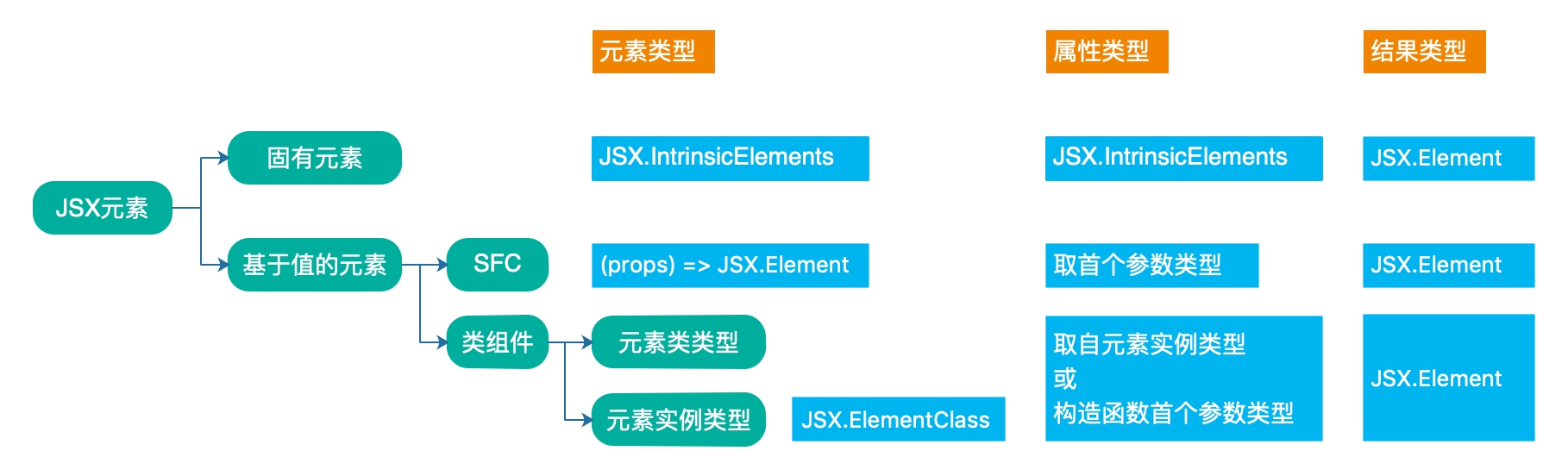
TypeScript 中 JSX 的類型支持分為元素類型、屬性類型和結果類型 3 部分,如下圖:
暫無評論,快來發表你的看法吧