
寫在前面
從 [源碼](/articles/vs-code 源碼簡析/#articleHeader4) 來看,VSCode 主體只是個 Editor(核心部分可在 Web 環境獨立運行,叫 Monaco),並不提供任何語言特性相關的功能,比如:
-
語法支持:語法校驗、高亮、格式化、Lint 檢查等等
-
編輯體驗:跳轉到定義、智能提示、自動補全、查找引用、變量重命名等等
這些統統沒有,都是由插件提供的,對 JS 的支持也是這樣
一.內置插件
VS Code 內置插件中,與 JavaScript 有關的只有一個 vscode/extensions/javascript/,而且是個純粹的語言支持型插件:
"contributes": {
  // 語言 id
  "languages": [],
  // 語法
  "grammars": [],
  // 代碼片段
  "snippets": [],
  // 語言相關配置文件校驗規則及提示
  "jsonValidation": []
}
P.S.關於 jsonValidation 的作用,見 Json Schema with VS Code
一堆配置文件顯然提供不了跳轉定義之類的強力功能,因此,還有兩個 TypeScript 相關的插件:
-
typescript-basics:類似於
javascript插件,提供 TS 語言語法支持 -
typescript-language-features:提供語言特性相關的高級支持,如跳轉、查找聲明/引用、補全提示、outline/breadcrumb 等涉及代碼語義的高級功能
其中 typescript-language-features 是 VS Code 能夠理解 JS/TS(以及 JSX/TSX)代碼語義,並支持跳轉到定義等功能的關鍵:
"activationEvents": [
  "onLanguage:javascript",
  "onLanguage:javascriptreact",
  "onLanguage:typescript",
  "onLanguage:typescriptreact",
  "onLanguage:jsx-tags",
  "onLanguage:jsonc"
]
二.typescript-language-features
結構
./src
├── commands.ts   # TS 相關自定義 command
├── extension.ts  # 插件入口
├── features  # 各種語言特性,如高亮、折疊、跳轉到定義等
├── languageProvider.ts # 對接 VSCode 功能入口
├── protocol.const.ts   # TS 語言元素常量
├── protocol.d.ts # tsserver 接口協議
├── server.ts     # 管理 tsserver 進進程
├── test
├── typeScriptServiceClientHost.ts  # 負責管理 Client
├── typescriptService.ts        # 定義 Client 接口形態
├── typescriptServiceClient.ts  # Client 具體實現
├── typings
└── utils
P.S.參考源碼版本 v1.28.2,最新的源碼 目錄結構已經變了,但思路一樣
其中最重要的 3 部分是 features、server 和 typescriptServiceClient:
-
Feature:對接 VSCode,為高亮、折疊、跳轉等 Editor 功能入口提供具體實現
-
Server:接入 TSServer,以獲得理解 JS 代碼語義的能力,為語義相關的功能提供數據源
-
Client:與 Server 交互(按照既定接口協議),發起請求,並接收響應數據
啟動流程
具體的,該插件激活時主要發生了這 3 件事情:
-
找出所有插件添加的
TypeScriptServerPlugin,並在 Client ready 之後註冊 -
創建 TypeScriptServiceClientHost
-
創建
TypeScriptServiceClient,立即創建 TSServer 進程 -
創建
LanguageProvider,負責對接 VSCode 功能入口 -
TSServer ready 之後,開始連接 VSCode 與 TSServer
-
LanguageProvider 註冊 VSCode 各項功能,例如
vscode.languages.registerCompletionItemProvider接補全提示 -
立即觸發診斷(語法校驗、類型檢查等)
其中比較有意思的是註冊 TypeScriptServerPlugin,創建 TSServer,以及 Client 與 Server 之間的通信
註冊 TypeScriptServerPlugin
只在 TS v2.3.0+ 才註冊外部 Plugin,通過命令行參數傳入:
if (apiVersion.gte(API.v230)) {
  const pluginPaths = this._pluginPathsProvider.getPluginPaths();

  if (plugins.length) {
    args.push('--globalPlugins', plugins.map(x => x.name).join(','));

    if (currentVersion.path === this._versionProvider.defaultVersion.path) {
      pluginPaths.push(...plugins.map(x => x.path));
    }
  }

  if (pluginPaths.length !== 0) {
    args.push('--pluginProbeLocations', pluginPaths.join(','));
  }
}
因為 TSServer plugin API 是在 TS v2.3.0 推出的:
TypeScript 2.3 officially makes a language server plugin API available. This API allows plugins to augment the regular editing experience that TypeScript already delivers. What all of this means is that you can get an enhanced editing experience for many different workloads.
也就是說,VSCode 的宇宙級 JS 編輯體驗,都得益於下層的 TypeScript:
One of TypeScript's goals is to deliver a state-of-the-art editing experience to the JavaScript world.
(摘自 Announcing TypeScript 2.3)
P.S.之所以存在低版本 TS 的情況,是因為 VSCode 允許使用外部 TS(內置的當然是高版本)
創建 TSServer
TSServer 運行在單獨的 Node 進程:
public spawn(
  version: TypeScriptVersion,
  configuration: TypeScriptServiceConfiguration,
  pluginManager: PluginManager
): TypeScriptServer {
  const apiVersion = version.version || API.defaultVersion;

  const { args, cancellationPipeName, tsServerLogFile } = this.getTsServerArgs(configuration, version, pluginManager);

  // fork 一個 tsserver 進程
  // 內置的 TSServer 位於 extensions/node_modules/typescript/lib/tsserver.js
  const childProcess = electron.fork(version.tsServerPath, args, this.getForkOptions());

  return new TypeScriptServer(childProcess, tsServerLogFile, cancellationPipeName, this._logger, this._telemetryReporter, this._tracer);
}
其中,electron.fork 是對原生 fork() 的��裝,限制了 Electron API 訪問:
import cp = require('child_process');

export function fork(modulePath, args, options): cp.ChildProcess {
  const newEnv = generatePatchedEnv(process.env, modulePath);
  return cp.fork(modulePath, args, {
    silent: true,
    cwd: options.cwd,
    env: newEnv,
    execArgv: options.execArgv
  });
}
與原生 cp.fork() 的區別在於對環境變量的 Patch:
function generatePatchedEnv(env: any, modulePath: string): any {
  const newEnv = Object.assign({}, env);

  newEnv['ELECTRON_RUN_AS_NODE'] = '1';
  newEnv['NODE_PATH'] = path.join(modulePath, '..', '..', '..');

  // Ensure we always have a PATH set
  newEnv['PATH'] = newEnv['PATH'] || process.env.PATH;

  return newEnv;
}
其中 ELECTRON_RUN_AS_NODE 用來限制訪問 Electron API:
ELECTRON_RUN_AS_NODE: Starts the process as a normal Node.js process.
主要出於UI 定製限制與安全性考慮,否則第三方 VSCode 插件可以通過 [typescriptServerPlugins 擴展點](/articles/typescriptserverplugin-vscode 插件開發筆記 3/#articleHeader8) 訪問 Electron API,篡改 UI
P.S.普通插件所處的 Node 進程也有此限制,具體見 [四。進程模型](/articles/api 注入機制及插件啟動流程-vscode 插件開發筆記 2/#articleHeader8)
Client 與 Server 通信
由於 TSServer 跑在子進程中,API 調用存在跨進程的問題,因此 TSServer 定義了一套 JSON 協議 protocol.d.ts,主要包括 API 名以及消息格式:
// 命令
const enum CommandTypes {
    Definition = "definition",
    Format = "format",
    References = "references",
    // ...
}

// 基本消息格式
interface Message {
    seq: number;
    type: "request" | "response" | "event";
}

// 請求消息格式
interface Request extends Message {
    type: "request";
    command: string;
    arguments?: any;
}

// 響應消息格式
interface Response extends Message {
    type: "response";
    request_seq: number;
    success: boolean;
    command: string;
    message?: string;
    body?: any;
    metadata?: unknown;
}
通過標準輸入/輸出收發消息,具體見 Message format:
tsserver listens on stdin and writes messages back to stdout.
P.S.關於進程間通信的更多信息,請查看 [1.通過 stdin/stdout 傳遞 json](/articles/nodejs 進程間通信/#articleHeader8)
三.TSServer
TSServer 與 TS 密不可分,如圖:
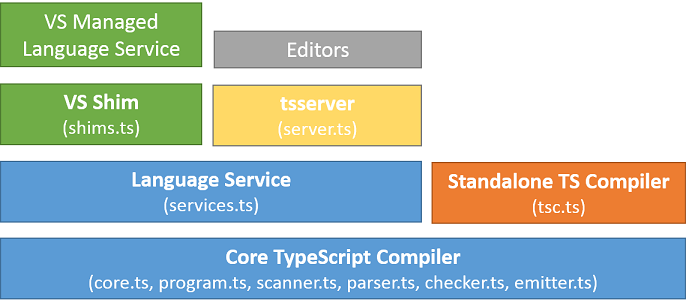
其中,最重要的 3 塊是:
-
編譯器核心(Core TypeScript Compiler)
實現了一個完整的編譯器,包括詞法分析、類型校驗、語法分析、代碼生成等
-
面向編輯器的語言服務(Language Service)
提供語句補全、API 提示、代碼格式化、文件內跳轉、配色、斷點位置校驗等,還有一些更場景化的 API,如增量編譯,具體見 Standalone Server (tsserver)
-
獨立的編譯器(Standalone Compiler (
tsc))CLI 工具,對輸入文件進行編譯轉換,再輸出到文件
而 TSServer 作為獨立的進程服務(Standalone Server (tsserver)),在 Compiler 和 Service 之上建立了一層封裝,以 JSON 協議的形式暴露接口,具體見 Using the Language Service API
所以,TSServer 具有 tsc 的完整能力,還有面向編輯器的語言服務支持,非常適合編輯器後台進程之類的應用場景
四.總結
至此,一切都明了了。最關鍵的語義分析能力及數據支持來自下層 TSServer,因此,跳轉到定義的大致流程是這樣的:
-
用戶在 VSCode 界面點擊 Go to Definition
-
觸發內置插件
typescript-language-features註冊的對應 Feature 實現 -
Feature 通過 Client 發起對 TSServer 的請求
-
TSServer 查相關 AST 找出 Definitions,並按照既定協議格式輸出
-
Client 接到響應,取出數據,傳遞給 Feature
-
Feature 把原始數據轉換成 VSCode 展現需要的格式
-
VSCode 拿到數據,讓光標移動到 Editor 指定位置。砰,就跳過去了
P.S.VSCode 中其它 JS 語義相關的功能與之類似,都依靠 TSServer 提供支持
暫無評論,快來發表你的看法吧