
一. JSON 智慧提示
VS Code 能夠對 JSON 進行提示和校驗:
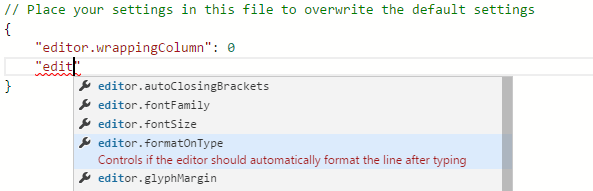
在編輯冗長的設定檔時尤為好用,預設支援 package.json、tsconfig.json 等常見的 JSON 配置
而對於自定義的特殊 JSON 協定,則需要透過 JSON Schema 來擴充支援
二. JSON Schema
要想對 JSON 進行智慧提示(或校驗),先要有一份元資料,將 JSON 的結構、欄位取值和含義等元資訊定義清楚
在 VS Code 裡,這份元資料用 JSON Schema 來描述:
To understand the structure of JSON files, we use JSON schemas. JSON schemas describe the shape of the JSON file, as well as value sets, default values, and descriptions.
P.S. VS Code 支援目前(2020/5/16)最新的 JSON Schema Draft 7 規範
至於 JSON Schema,也是一種基於 JSON 的資料格式,用來定義 JSON 資料的結構:
JSON Schema specifies a JSON-based format to define the structure of JSON data for validation, documentation, and interaction control.
(摘自 JSON Schema)
例如 person.json:
{
  "first_name": "George",
  "last_name": "Washington",
  "birthday": "1732-02-22",
  "address": {
    "street_address": "3200 Mount Vernon Memorial Highway",
    "city": "Mount Vernon",
    "state": "Virginia",
    "country": "United States"
  }
}
對應的 JSON Schema 為(person.schema.json):
{
  "type": "object",
  "properties": {
    "first_name": { "type": "string" },
    "last_name": { "type": "string" },
    "birthday": { "type": "string", "format": "date" },
    "address": {
      "type": "object",
      "properties": {
        "street_address": { "type": "string" },
        "city": { "type": "string" },
        "state": { "type": "string" },
        "country": { "type" : "string" }
      }
    }
  }
}
上例看起來像是 JSON 的型別宣告,實際上,除型別外還能攜帶欄位取值、含義描述等資訊:
{
  "type": "string",
  "pattern": "^(\\([0-9]{3}\\))?[0-9]{3}-[0-9]{4}$",
  "title": "telephone number",
  "description": "a simple North American telephone number with an optional area code"
}
P.S. 關於 JSON Schema 的詳細資訊,見 Understanding JSON Schema
三. 擴充自定義 JSON 提示
既然 VS Code 提供的 JSON 提示能力是基於 JSON Schema 的,那麼要支援自定義的 JSON 格式就相當容易了:
-
先建立(手動編寫或轉換生成)一份 JSON Schema,準備好提示/校驗所需的元資料
-
再與目標 JSON 檔案建立關聯,讓 VS Code 在打開特定的 JSON 檔案時能夠找到對應的提示資訊(JSON Schema)
生成 JSON Schema
對於簡單的、不頻繁更新的 JSON 資料,手動編寫 JSON Schema 即可,而另一些複雜冗長、時不時擴充幾個欄位的 JSON 資料,透過工具轉換生成通常是更好的選擇:
-
JSON 轉 JSON Schema:推薦 JSON Schema Tool(不開源,但集轉換、編輯於一體,功能相對完整,並且支援 draft-07 規範),或者 to-json-schema(開源,僅支援轉換,配合其它 JSON Schema 編輯器使用)
-
編輯 JSON Schema:推薦 JSON-Schema-Editor 視覺化編輯器
-
JSON Schema 語法校驗:JSON Schema Validator
正確生成 JSON Schema 之後,在 VS Code 中與 JSON 檔案建立關聯即可
與 JSON 檔案建立關聯
有 3 種方式建立 JSON Schema 與 JSON 檔案的關聯:
-
用戶側:透過用戶設定(Settings)中的
json.schemas選項來配置映射關係 -
資料側:在 JSON 資料中增加一個
$schema欄位,指向 JSON Schema -
第三方:透過
jsonValidation擴充點配置映射關係
json.schemas
"json.schemas": [
  {
    "fileMatch": [
      "/.babelrc"
    ],
    "url": "http://json.schemastore.org/babelrc"
  }
]
P.S. JSON Schema Store 提供了 200 多個常見設定檔對應的 JSON Schema
表示對所有名為 .babelrc 的 JSON 檔案應用 url 指向的 JSON Schema,其中 url 也可以是本地檔案的相對路徑,例如 "url": "./myschema.json" 表示當前工作空間根目錄下的 myschema.json
或者直接將 JSON Schema 寫進來:
"json.schemas": [
  {
    "fileMatch": [
      "/.myconfig"
    ],
    "schema": {
      "type": "object",
      "properties": {
        "name": {
          "type": "string",
          "description": "The name of the entry"
        }
      }
    }
  }
]
用戶設定操作簡單,且不影響 JSON 資料,但缺點在於本地設定不共享,每個人都要配一遍,不適用於多人協作的場景,並且有些特殊場景無法透過 fileMatch 規則來描述映射關係,此時可以考慮 $schema
P.S. 注意,如果 JSON 資料檔案副檔名不為 .json,還需要配置 files.association 表明此類檔案內容按 JSON 處理(因為 JSON Schema 配置僅對 JSON 生效):
"files.associations": {
  ".babelrc": "json"
}
具體見 Adding a file extension to a language
$schema
{
  "$schema": "http://json.schemastore.org/coffeelint",
  "line_endings": "unix"
}
由 JSON 資料(透過特殊的 $schema 欄位)附帶上對應的 JSON Schema,缺點是會弄髒 JSON 資料,所有消費者都要對 $schema 做特殊處理,而且不適用於資料側不受控的情況,比如 JSON 資料是由第三方提供的,要加欄位幾乎不可能
優勢在於能夠建立一對一的精確映射,從而滿足一些透過映射規則難以描述的場景,比如自定義的 JSON 資料也叫 package.json,甚至 JSON 檔案名稱都不固定的情況(具體見 support setting schema associations at runtime,將來可能會提供更靈活、不侵入原始資料的 JSON Schema 關聯方式)
jsonValidation
{
  "contributes": {
    "jsonValidation": [
      {
        "fileMatch": ".jshintrc",
        "url": "http://json.schemastore.org/jshintrc"
      }
    ]
  }
}
與 json.schemas 用戶設定類似,只是將映射關係放到了擴充功能的 package.json 裡集中提供,以解決配置共享的問題,映射關係描述能力的缺陷仍然存在
P.S. jsonValidation 僅支援 url 形式引入 JSON Schema,不支援透過 schema 直接寫進來
四. 自動補全
JSON Schema 規範中的 default 欄位可用於 JSON 自動補全(VS Code 預設支援),能夠滿足一般情況。對於更複雜的補全提示,可透過擴充欄位 defaultSnippets 來完成:
{
  "type": "array",
  "title": "Keybindings configuration",
  "items": {
    "type": "object",
    "required": ["key"],
    "defaultSnippets": [
      {
        "label": "New keybinding",
        "description": "Binds a key to a command for a given state",
        "body": { "key": "$1", "command": "$2", "when": "$3" }
      }
    ],
    "properties": {
      "key": {
        "type": "string"
      }
    }
  }
}
defaultSnippets 中的 body 語法與 Snippets 相同,支援控制游標位置,使用佔位符、預定義的常量(當前檔案名稱、年月等)等
P.S. defaultSnippets 不屬於 JSON Schema 規範的一部分,而是 VS Code 為了增強 JSON 的補全能力擴充出的自定義欄位(JSON Schema 規範允許擴充,忽略所有未知欄位)
暫無評論,快來發表你的看法吧