
一.Fast Refresh とは何か?
React Native(v0.6.1)で新たに導入された機能で、_React コンポーネントの変更が即座に反映される_ものです:
Fast Refresh is a React Native feature that allows you to get near-instant feedback for changes in your React components.
聞こえ方は...そうです、その核心能力は Hot Reloading です:
Fast Refresh is a feature that lets you edit React components in a running application without losing their state.
しかし、これまでのコミュニティ方案(React Hot Loader など)とは異なり、_Fast Refresh は React による公式サポートがあり、より安定して信頼性が高い_です:
It is similar to an old feature known as "hot reloading", but Fast Refresh is more reliable and officially supported by React.
旧方案 の安定性、信頼性、フォールトトレランスなどの問題を完全に解決するために:
It didn't work reliably for function components, often failed to update the screen, and wasn't resilient to typos and mistakes. We heard that most people turned it off because it was too unreliable.
概念的には、_Fast Refresh は Live Reloading と Hot Reloading を 1 つに統合したようなもの_です:
In React Native 0.61, We're unifying the existing "live reloading" (reload on save) and "hot reloading" features into a single new feature called "Fast Refresh".
二.動作メカニズム
Reload 戦略
基本的な処理戦略は 3 つの状況に分かれます:
-
編集したモジュールが React コンポーネントのみをエクスポートしている場合、Fast Refresh はそのモジュールのコードのみを更新し、対応するコンポーネントを再レンダリングします。この場合、そのファイルのすべての変更が有効になり、スタイル、レンダリングロジック、イベント処理、さらには一部の副作用も含まれます
-
編集したモジュールが React コンポーネント以外のものもエクスポートしている場合、Fast Refresh はそのモジュールとそれに依存するすべてのモジュールを再実行します
-
編集したファイルが React(コンポーネント)ツリー外のモジュールから参照されている場合、Fast Refresh は全体リフレッシュ(Live Reloading)にダウングレードします
モジュールのエクスポート内容に基づいて、純粋コンポーネントモジュール、非コンポーネントモジュール、不純粋コンポーネントモジュールを区別し、純粋コンポーネントモジュール(React コンポーネントのみをエクスポートするモジュール)のサポート度が最も高く、新しい React(v16.x)の関数型コンポーネントと Hooks を完全にサポートします
フォールトトレランス処理
Hot Reloading と比較して、Fast Refresh のフォールトトレランスはより強いです:
-
構文エラー:Fast Refresh 中の構文エラーは catch され、修正してファイルを保存すれば正常に回復するため、構文エラーのあるファイルは実行されず、手動で再リフレッシュする必要はありません
-
ランタイムエラー:モジュール初期化プロセス中のランタイムエラーも catch され、実質的な影響を与えません。コンポーネント中のランタイムエラーについては、Fast Refresh はアプリケーション全体を再マウント(remount)します(Error Boundary がある場合を除く)
つまり、構文エラーと一部のスペルミス(モジュールロード時のランタイムエラー)については、修正後 Fast Refresh で正常に回復し、コンポーネントランタイムエラーについては、全体再リフレッシュ(Live Reloading)または局部再リフレッシュ(Error Boundary の場合、Error Boundary を再リフレッシュ)にダウングレードします
制限
しかし、状況によっては状態を維持することが非常に安全ではないため、信頼性を確保するため、Fast Refresh はこれらの状況に遭遇すると一律に状態を保持しません:
-
Class コンポーネントは一律に再マウント(remount)され、state はリセットされます。高階コンポーネントが返す Class コンポーネントも含みます
-
不純粋コンポーネントモジュール。編集したモジュールが React コンポーネントをエクスポートする他に、他のものもエクスポートしている場合
特殊的には、// @refresh reset 指令(ソースコードファイル中の任意の位置にこの行のコメントを追加)を通じて強制的に再マウント(remount)することもでき、可用性を最大限に保証します
P.S.長期的には、関数型コンポーネントが台頭する ため、Class コンポーネントは越来越少になり、編集体験はますます良くなります:
In the longer term, as more of your codebase moves to function components and Hooks, you can expect state to be preserved in more cases.
三.実装原理
HMR(module レベル)、React Hot Loader(制限されたコンポーネントレベル)よりも_より細かい粒度のホットアップデート能力_を実現し、コンポーネントレベル、さらには Hooks レベルの信頼できる更新をサポートするには、外部メカニズム(補完のランタイム、コンパイル変換)だけでは難しく、React の深い協力が必要です:
Fast Refresh is a reimplementation of "hot reloading" with full support from React.
つまり、これまで回避できなかった難題(Hooks など)は、現在 React の協力を通じて解決できます
実装上、Fast Refresh も HMR に基づいており、下から上へ順に:
-
HMR メカニズム:webpack HMR など
-
コンパイル変換:
react-refresh/babel -
補完ランタイム:
react-refresh/runtime -
React サポート:React DOM 16.9+、または react-reconciler 0.21.0+
React Hot Loader と比較して、コンポーネント上のプロキシを削除し、React によって直接サポートを提供するように変更しました:
[caption id="attachment_2202" align="alignnone" width="560"]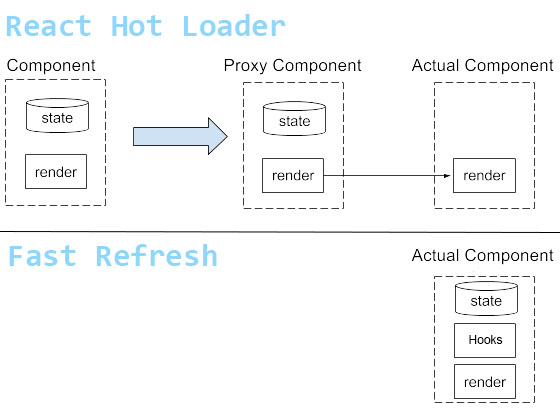 react hot loader vs fast refresh[/caption]
以前はコンポーネント状態を保持するために、コンポーネントの render 部分を置き換える Proxy Component が必要でしたが、_新版 React は関数型コンポーネント、Hooks のホットリプレースにネイティブサポートを提供している_ため、不要になりました
四.ソースコード簡易分析
関連ソースコードは Babel プラグインと Runtime の 2 部分に分かれ、すべて react-refresh でメンテナンスされており、異なるエントリーファイル(react-refresh/babel、react-refresh/runtime)を通じて公開されています
以下の 4 つの側面から Fast Refresh の具体的な実装を理解できます:
-
Plugin はコンパイル時に何を行ったか?
-
Runtime はランタイム時にどのように協力したか?
-
React はこれのためにどのようなサポートを提供したか?
-
HMR を含む完全なメカニズム
Plugin はコンパイル時に何を行ったか?
簡単に言えば、Fast Refresh は Babel プラグインを通じてすべてのコンポーネントとカスタム Hooks を見つけ出し、大きな表(Map)に登録します
まず AST を走査してすべての Hooks とそのシグネチャを収集します:
// 语法树遍历一开始先单跑一趟遍历找出所有 Hooks 调用,记录到 hookCalls Map 中
Program: {
  enter(path) {
    // This is a separate early visitor because we need to collect Hook calls
    // and "const [foo, setFoo] = ..." signatures before the destructuring
    // transform mangles them. This extra traversal is not ideal for perf,
    // but it's the best we can do until we stop transpiling destructuring.
    path.traverse(HookCallsVisitor);
  }
}
(react/packages/react-refresh/src/ReactFreshBabelPlugin.js から引用)
P.S.上記コードは Babel プラグイン中 visitor の一部で、詳細は [Babel 快速指南](/articles/babel 快速指南/#articleHeader9) を参照
次に再度走査してすべての React 関数型コンポーネントを見つけ出し、コードを挿入してコンポーネント、Hooks などの情報を Runtime に公開し、_ソースファイルとランタイムモジュール間の連絡を確立_します:
// 遇到函数声明注册 Hooks 信息
FunctionDeclaration: {
  exit(path) {
    const node = path.node;
    // 查表,函数中有 Hooks 调用则继续
    const signature = getHookCallsSignature(node);
    if (signature === null) {
      return;
    }

    const sigCallID = path.scope.generateUidIdentifier('_s');
    path.scope.parent.push({
      id: sigCallID,
      init: t.callExpression(refreshSig, []),
    });

    // The signature call is split in two parts. One part is called inside the function.
    // This is used to signal when first render happens.
    path
      .get('body')
      .unshiftContainer(
        'body',
        t.expressionStatement(t.callExpression(sigCallID, [])),
      );

    // The second call is around the function itself.
    // This is used to associate a type with a signature.

    // Unlike with $RefreshReg$, this needs to work for nested
    // declarations too. So we need to search for a path where
    // we can insert a statement rather than hardcoding it.
    let insertAfterPath = null;
    path.find(p => {
      if (p.parentPath.isBlock()) {
        insertAfterPath = p;
        return true;
      }
    });

    insertAfterPath.insertAfter(
      t.expressionStatement(
        t.callExpression(
          sigCallID,
          createArgumentsForSignature(
            id,
            signature,
            insertAfterPath.scope,
          ),
        ),
      ),
    );
  },
},
Program: {
  exit(path) {
    // 查表,文件中有 React 函数式组件则继续
    const registrations = registrationsByProgramPath.get(path);
    if (registrations === undefined) {
      return;
    }
    const declarators = [];
    path.pushContainer('body', t.variableDeclaration('var', declarators));
    registrations.forEach(({handle, persistentID}) => {
      path.pushContainer(
        'body',
        t.expressionStatement(
          t.callExpression(refreshReg, [
            handle,
            t.stringLiteral(persistentID),
          ]),
        ),
      );
      declarators.push(t.variableDeclarator(handle));
    });
  },
},
つまり Babel プラグインを通じてすべての React 関数型コンポーネント定義(HOC などを含む)を見つけ出し、コンポーネント名に基づいてコンポーネント参照をランタイムに登録します:
// 转换前
export function Hello() {
  function handleClick() {}
  return <h1 onClick={handleClick}>Hi</h1>;
}
export default function Bar() {
  return <Hello />;
}
function Baz() {
  return <h1>OK</h1>;
}
const NotAComp = 'hi';
export { Baz, NotAComp };
export function sum() {}
export const Bad = 42;

// 转换后
export function Hello() {
  function handleClick() {}

  return <h1 onClick={handleClick}>Hi</h1>;
}
_c = Hello;
export default function Bar() {
  return <Hello />;
}
_c2 = Bar;

function Baz() {
  return <h1>OK</h1>;
}

_c3 = Baz;
const NotAComp = 'hi';
export { Baz, NotAComp };
export function sum() {}
export const Bad = 42;

var _c, _c2, _c3;

$RefreshReg$(_c, "Hello");
$RefreshReg$(_c2, "Bar");
$RefreshReg$(_c3, "Baz");
特殊的には、Hooks の処理は少し面倒です:
// 转换前
export default function App() {
  const [foo, setFoo] = useState(0);
  React.useEffect(() => {});
  return <h1>{foo}</h1>;
}

// 转换后
var _s = $RefreshSig$();

export default function App() {
  _s();

  const [foo, setFoo] = useState(0);
  React.useEffect(() => {});
  return <h1>{foo}</h1>;
}

_s(App, "useState{[foo, setFoo](0)}\\nuseEffect{}");

_c = App;

var _c;

$RefreshReg$(_c, "App");
Hooks に遭遇すると 3 行のコードが挿入され、モジュールスコープの var _s = $RefreshSig$(); と _s(App, "useState{[foo, setFoo](0)}\\nuseEffect{}");、および Hooks 呼び出しと同じスコープの _s(); です
Runtime はランタイム時にどのように協力したか?
Babel プラグインが注入したコード中に 2 つの未定義関数が現れました:
-
$RefreshSig$:Hooks シグネチャを作成 -
$RefreshReg$:コンポーネントを登録
これら 2 つの関数は react-refresh/runtime から来ており、例えば:
var RefreshRuntime = require('react-refresh/runtime');
window.$RefreshReg$ = (type, id) => {
  // Note module.id is webpack-specific, this may vary in other bundlers
  const fullId = module.id + ' ' + id;
  RefreshRuntime.register(type, fullId);
}
window.$RefreshSig$ = RefreshRuntime.createSignatureFunctionForTransform;
それぞれ RefreshRuntime が提供する createSignatureFunctionForTransform と register に対応します
createSignatureFunctionForTransform は 2 つの段階で Hooks の識別情報を埋め、1 回目は関連コンポーネントの情報を埋め、2 回目は Hooks を収集し、3 回目以降の呼び出しは無効です(resolved 状態、何もしない):
export function createSignatureFunctionForTransform() {
  // We'll fill in the signature in two steps.
  // First, we'll know the signature itself. This happens outside the component.
  // Then, we'll know the references to custom Hooks. This happens inside the component.
  // After that, the returned function will be a fast path no-op.
  let status: SignatureStatus = 'needsSignature';
  let savedType;
  let hasCustomHooks;
  return function<T>(
    type: T,
    key: string,
    forceReset?: boolean,
    getCustomHooks?: () => Array<Function>,
  ): T {
    switch (status) {
      case 'needsSignature':
        if (type !== undefined) {
          // If we received an argument, this is the initial registration call.
          savedType = type;
          hasCustomHooks = typeof getCustomHooks === 'function';
          setSignature(type, key, forceReset, getCustomHooks);
          // The next call we expect is from inside a function, to fill in the custom Hooks.
          status = 'needsCustomHooks';
        }
        break;
      case 'needsCustomHooks':
        if (hasCustomHooks) {
          collectCustomHooksForSignature(savedType);
        }
        status = 'resolved';
        break;
      case 'resolved':
        // Do nothing. Fast path for all future renders.
        break;
    }
    return type;
  };
}
register はコンポーネント参照(type)とコンポーネント名識別(id)を大きな表に保存し、すでに存在する場合は更新キューに追加します:
export function register(type: any, id: string): void {
  // Create family or remember to update it.
  // None of this bookkeeping affects reconciliation
  // until the first performReactRefresh() call above.
  let family = allFamiliesByID.get(id);
  if (family === undefined) {
    family = {current: type};
    allFamiliesByID.set(id, family);
  } else {
    pendingUpdates.push([family, type]);
  }
  allFamiliesByType.set(type, family);
}
pendingUpdates キュー中の各項更新は performReactRefresh 時にのみ有効になり、updatedFamiliesByType 表に追加され、React が照会するために提供されます:
function resolveFamily(type) {
  // Only check updated types to keep lookups fast.
  return updatedFamiliesByType.get(type);
}
React はこれのためにどのようなサポートを提供したか?
Runtime が React のいくつかの関数に依存していることに注意してください:
import type {
  Family,
  RefreshUpdate,
  ScheduleRefresh,
  ScheduleRoot,
  FindHostInstancesForRefresh,
  SetRefreshHandler,
} from 'react-reconciler/src/ReactFiberHotReloading';
その中で、setRefreshHandler は Runtime と React が連絡を確立する鍵です:
export const setRefreshHandler = (handler: RefreshHandler | null): void => {
  if (__DEV__) {
    resolveFamily = handler;
  }
};
performReactRefresh 時に Runtime から React に渡され、ScheduleRoot または scheduleRefresh を通じて React 更新をトリガーします:
export function performReactRefresh(): RefreshUpdate | null {
  const update: RefreshUpdate = {
    updatedFamilies, // Families that will re-render preserving state
    staleFamilies, // Families that will be remounted
  };

  helpersByRendererID.forEach(helpers => {
    // 将更新表暴露给 React
    helpers.setRefreshHandler(resolveFamily);
  });
  // 并触发 React 更新
  failedRootsSnapshot.forEach(root => {
    const helpers = helpersByRootSnapshot.get(root);
    const element = rootElements.get(root);
    helpers.scheduleRoot(root, element);
  });
  mountedRootsSnapshot.forEach(root => {
    const helpers = helpersByRootSnapshot.get(root);
    helpers.scheduleRefresh(root, update);
  });
}
その後、React は resolveFamily を通じて最新の関数型コンポーネントと Hooks を取得します:
export function resolveFunctionForHotReloading(type: any): any {
  const family = resolveFamily(type);
  if (family === undefined) {
    return type;
  }
  // Use the latest known implementation.
  return family.current;
}
(react/packages/react-reconciler/src/ReactFiberHotReloading.new.js から引用)
スケジューリングプロセス中で更新を完了します:
export function createWorkInProgress(current: Fiber, pendingProps: any): Fiber {
  switch (workInProgress.tag) {
    case IndeterminateComponent:
    case FunctionComponent:
    case SimpleMemoComponent:
      // 更新函数式组件
      workInProgress.type = resolveFunctionForHotReloading(current.type);
      break;
    case ClassComponent:
      workInProgress.type = resolveClassForHotReloading(current.type);
      break;
    case ForwardRef:
      workInProgress.type = resolveForwardRefForHotReloading(current.type);
      break;
    default:
      break;
  }
}
(react/packages/react-reconciler/src/ReactFiber.new.js から引用)
至此、ホットアップデートプロセス全体が明確になりました
しかし、整套メカニズムを動作させるには、もう 1 つ不足しています——HMR
HMR を含む完全なメカニズム
上記はランタイム細粒度ホットアップデート能力を備えただけで、実際に動作させるには HMR と接続する必要があり、この部分の作業は具体的な構築ツール(webpack など)に関係します
具体的には以下の通り:
// 1.在应用入口(引 react-dom 之前)引入 runtime
const runtime = require('react-refresh/runtime');
// 并注入 GlobalHook,从 React 中钩出一些东西,比如 scheduleRefresh
runtime.injectIntoGlobalHook(window);
window.$RefreshReg$ = () => {};
window.$RefreshSig$ = () => type => type;

// 2.给每个模块文件前后注入一段代码
window.$RefreshReg$ = (type, id) => {
  // Note module.id is webpack-specific, this may vary in other bundlers
  const fullId = module.id + ' ' + id;
  RefreshRuntime.register(type, fullId);
}
window.$RefreshSig$ = RefreshRuntime.createSignatureFunctionForTransform;

try {

  // !!!
  // ...ACTUAL MODULE SOURCE CODE...
  // !!!

} finally {
  window.$RefreshReg$ = prevRefreshReg;
  window.$RefreshSig$ = prevRefreshSig;
}

// 3.所有模块都处理完之后,接入 HMR API
const myExports = module.exports;

if (isReactRefreshBoundary(myExports)) {
  module.hot.accept(); // Depends on your bundler
  const runtime = require('react-refresh/runtime');
  // debounce 降低更新频率
  let enqueueUpdate = debounce(runtime.performReactRefresh, 30);
  enqueueUpdate();
}
その中で、isReactRefreshBoundary は具体的なホットアップデート戦略で、Hot Reloading を行うか Live Reloading にダウングレードするかを制御し、React Native の戦略は metro/packages/metro/src/lib/polyfills/require.js / を参照
五.Web サポート
Fast Refresh 需要は React Native から来ていますが、その_核心実装はプラットフォームに依存せず、Web 環境にも適用できます_:
It's originally shipping for React Native but most of the implementation is platform-independent.
React Native の Metro を webpack などの構築ツールに置き換え、上記手順に従って接続すればよく、例えば:
P.S.さらに React Hot Loader はすでに退役公告を出しており、公式サポートの Fast Refresh を使用することを推奨しています:
React-Hot-Loader is expected to be replaced by React Fast Refresh. Please remove React-Hot-Loader if Fast Refresh is currently supported on your environment.
コメントはまだありません