
一.iframe 부터 말하다
iframe 을 이용하여 제 3 자 페이지를 임베드할 수 있습니다. 예를 들어:
<iframe style="width: 800px; height: 600px;" src="https://www.baidu.com"/>
하지만, 모든 제 3 자 페이지가 iframe 으로 임베드할 수 있는 것은 아닙니다:
<iframe style="width: 800px; height: 600px;" src="https://github.com/join"/>
Github 로그인 페이지는 百度 홈페이지처럼 얌전히 iframe 안에 표시되지 않고, Console 패널에 오류 행을 출력했습니다:
Refused to display 'https://github.com/join' in a frame because an ancestor violates the following Content Security Policy directive: "frame-ancestors 'none'".
이것은 왜일까요?
二.클릭재킹과 보안 정책
맞습니다. 페이지가 iframe 안에 로드되는 것을 금지하는 것은 주로 클릭재킹 (Clickjacking) 을 방지하기 위함입니다:

구체적으로, 클릭재킹에 대해, 주로 3 가지 대응 조치가 있습니다:
-
CSP(Content Security Policy, 즉 콘텐츠 보안 정책)
-
X-Frame-Options
서버 측은 HTTP 응답 헤더를 설정하여 CSP 와 X-Frame-Options 를 선언합니다. 예를 들어:
# 임베드를 허용하지 않음.<frame>, <iframe>, <object>, <embed> 와 <applet> 포함
Content-Security-Policy: frame-ancestors 'none'
# 동원의 페이지에만 임베드를 허용
Content-Security-Policy: frame-ancestors 'self'
# 화이트리스트 내의 페이지에만 임베드를 허용
Content-Security-Policy: frame-ancestors www.example.com

# 임베드를 허용하지 않음.<frame>, <iframe>, <embed> 와 <object> 포함
X-Frame-Options: deny
# 동원의 페이지에만 임베드를 허용
X-Frame-Options: sameorigin
# (폐지됨) 화이트리스트 내의 페이지에만 임베드를 허용
X-Frame-Options: allow-from www.example.com
P.S.동원이란 프로토콜, 도메인명, 포트번호가 모두 완전히 같은 것을 가리킵니다. Same-origin policy 참조
P.S. 또한, frame-ancestors 와 매우 잘 생긴 frame-src 가 있지만, 둘의 작용은 반대입니다. 후자는 현재 페이지 중의 <iframe> 과 <frame> 가 로드할 수 있는 콘텐츠 소스를 제한하는 데 사용됩니다
framekiller 에 대해서는, 클라이언트 측에서 JavaScript 를 실행하여, 反客为主합니다:
// 原版
<script>
if(top != self) top.location.replace(location);
</script>

// 增强版
<style> html{display:none;} </style>
<script>
if(self == top) {
  document.documentElement.style.display = 'block';
} else {
  top.location = self.location;
}
</script>
Github 로그인 페이지는, CSP 와 X-Frame-Options 응답 헤더를 동시에 설정했습니다:
Content-Security-Policy: frame-ancestors 'none';
X-Frame-Options: deny
따라서 iframe 으로 임베드할 수 없습니다. 그렇다면, 이러한 제한을 깨는 방법이 있을까요?
三.思路
주요 제한이 HTTP 응답 헤더에서 온다면, 적어도 두 가지思路가 있습니다:
-
응답 헤더를 개조하여,
iframe보안 제한을 만족하도록 함 -
소스 콘텐츠를 직접 로드하지 않고,
iframe보안 제한을 우회함
리소스 응답이 종점에 도달하기 전의 임의의環節에서,拦截하여 CSP 와 X-Frame-Options 를改掉합니다. 예를 들어 클라이언트 측에서 응답을 받았을 때拦截개조하거나, 또는 대리 서비스로 전송개조합니다
또 다른思路는 매우 재미있습니다. Chrome Headless 를借助하여 소스 콘텐츠를 로드하고, 스크린샷으로 변환하여 iframe 안에 표시합니다. 예를 들어 Browser Preview for VS Code:
Browser Preview is powered by Chrome Headless, and works by starting a headless Chrome instance in a new process. This enables a secure way to render web content inside VS Code, and enables interesting features such as in-editor debugging and more!
즉, Chrome 으로 정상적으로 페이지를 로드한 후, 콘텐츠를 스크린샷하여 iframe 안에 넣으므로, 상기 (framekiller 를 포함한) 보안 정책의 제한을 받지 않습니다. 하지만, 이 방안도 완벽하지는 않아, 다른 문제가 존재합니다:
-
일부 기능이 제한됩니다. 예를 들어 텍스트를 복사할 수 없음, 오디오 재생을 지원하지 않음 등
四.해결 방안
클라이언트 측拦截
Service Worker
HTTP 응답을拦截개조하려면, 먼저 떠오르는 것은 당연히 Service Worker(一種의 [Web Worker](/articles/理解 web-workers/)) 입니다:
A service worker is an event-driven worker registered against an origin and a path. It takes the form of a JavaScript file that can control the web-page/site that it is associated with, intercepting and modifying navigation and resource requests.
(Service Worker API 에서 발췌)
Service Worker 를 등록한 후 리소스 요청을拦截하여修改할 수 있습니다. 예를 들어:
// 1.Service Worker 등록
navigator.serviceWorker.register('./sw-proxy.js');

// 2. 요청拦截 (sw-proxy.js)
self.addEventListener('fetch', async (event) => {
  const {request} = event;
  let response = await fetch(request);
  // 3.Response 재구성
  response = new Response(response.body, response)
  // 4. 응답 헤더 개조
  response.headers.delete('Content-Security-Policy');
  response.headers.delete('X-Frame-Options');

  event.respondWith(Promise.resolve(originalResponse));
});
주의, Fetch Response 는 직접 요청 헤더를修改하는 것을 허용하지 않습니다. 재구성해야 합니다. Alter Headers 참조
P.S. 완전한 구현 사례는, DannyMoerkerke/sw-proxy 참조 가능
WebRequest
Electron 환경이라면, WebRequest API 를借助하여 응답을拦截하여 개조할 수도 있습니다:
const { session } = require('electron')

session.defaultSession.webRequest.onHeadersReceived((details, callback) => {
  callback({
    responseHeaders: {
      ...details.responseHeaders,
      'Content-Security-Policy': ['default-src \'none\'']
    }
  })
})
(CSP HTTP Header 에서 발췌)
하지만 Service Worker 와 마찬가지로, WebRequest 도클라이언트 측 환경에 의존합니다. 안전성의 고려로, 이러한 능력은 일부 환경에서 무효화될 수 있으며, 이 때는 서버 측에서出路를 찾아야 합니다. 예를 들어 대리 서비스를 통해 전송합니다
대리 서비스 전송
기본적인思路는 대리 서비스를 통해 소스 요청과 응답을 전송하고, 전송過程中에 응답 헤더さら에는 응답체를修改합니다
구체적 구현에서는, 2 단계로 나뉩니다:
-
대리 서비스를 생성하고, 응답 헤더 필드를 개조
-
클라이언트 측이 대리 서비스에 요청
HTTPS 를 예로 들면, 대리 서비스의 간단한 구현은 다음과 같습니다:
const https = require("https");
const querystring = require("querystring");
const url = require("url");

const port = 10101;
// 1. 대리 서비스 생성
https.createServer(onRequest).listen(port);

function onRequest(req, res) {
  const originUrl = url.parse(req.url);
  const qs = querystring.parse(originUrl.query);
  const targetUrl = qs["target"];
  const target = url.parse(targetUrl);

  const options = {
    hostname: target.hostname,
    port: 80,
    path: url.format(target),
    method: "GET"
  };

  // 2. 代发 요청
  const proxy = https.request(options, _res => {
    // 3. 응답 헤더修改
    const fieldsToRemove = ["x-frame-options", "content-security-policy"];
    Object.keys(_res.headers).forEach(field => {
      if (!fieldsToRemove.includes(field.toLocaleLowerCase())) {
        res.setHeader(field, _res.headers[field]);
      }
    });
    _res.pipe(res, {
      end: true
    });
  });
  req.pipe(proxy, {
    end: true
  });
}
클라이언트 측 iframe 은 직접 소스 리소스에 요청하지 않고, 대리 서비스를 통해 가져갑니다:
<iframe style="width: 400px; height: 300px;" src="http://localhost:10101/?target=https%3A%2F%2Fgithub.com%2Fjoin"/>
이렇게 하면, Github 로그인 페이지는 iframe 안에서 얌전히 표시될 수 있습니다:
[caption id="attachment_2078" align="alignnone" width="924"]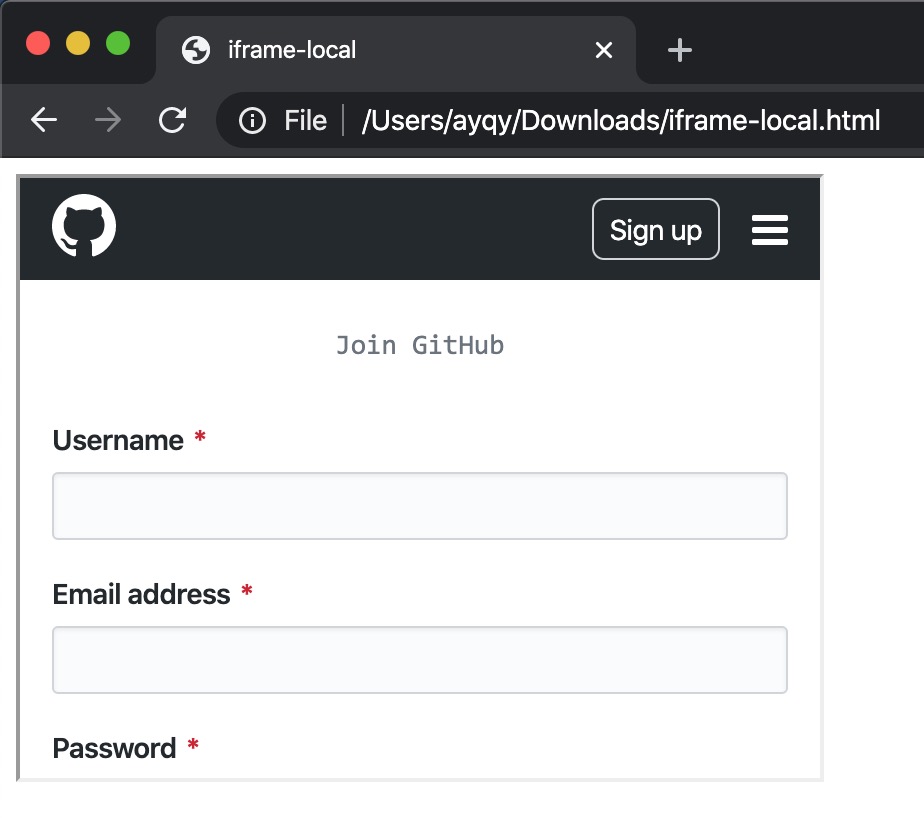 iframe github login[/caption]
아직 댓글이 없습니다