
서문에
React 가 제공하는 SSR API 는 두 부분으로 나뉩니다. 일부는 서버 측용 (react-dom/server), 다른 일부는 클라이언트 측에서 실행됩니다 (react-dom)
[caption id="attachment_2317" align="alignnone" width="625"]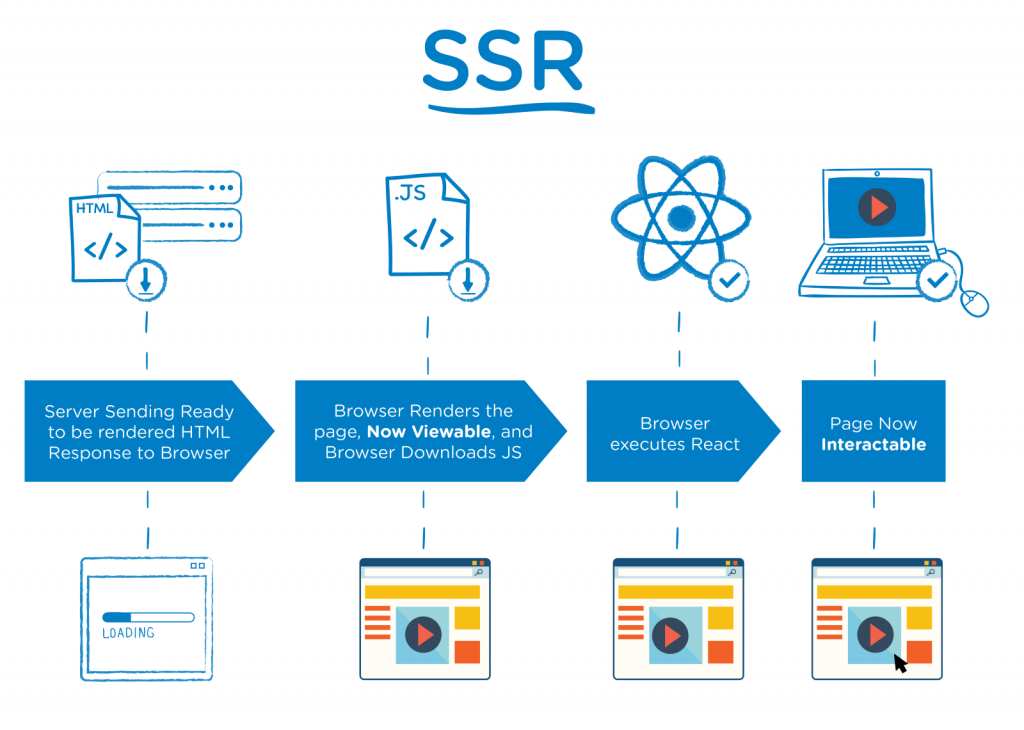 react ssr[/caption]
一.ReactDOMServer
ReactDOMServer 관련 API 는서버 측에서 React 컴포넌트를 정적인 (HTML) 태그로 렌더링할 수 있습니다:
The ReactDOMServer object enables you to render components to static markup.
컴포넌트 트리를 대응하는 HTML 태그로 렌더링하는 작업은 브라우저 환경에서도 완료할 수 있으므로, 서버 측용 React DOM API 도 두 가지 유형으로 나뉩니다:
-
Node.js, 브라우저 환경을跨어 실행 가능한 String API: renderToString(), renderToStaticMarkup()
-
Node.js 환경에서만 실행 가능한 Stream API: renderToNodeStream(), renderToStaticNodeStream()
renderToString
ReactDOMServer.renderToString(element)
가장 기본적인 SSR API 로, React 컴포넌트 (정확히는 ReactElement) 를 입력하고 HTML 문자열을 출력합니다. 이후 클라이언트 측 hydrate API 가 서버 측에서 반환된 뷰 구조에 인터랙션 동작을 부가하여 페이지 렌더링을 완료합니다:
If you call ReactDOM.hydrate() on a node that already has this server-rendered markup, React will preserve it and only attach event handlers.
renderToStaticMarkup
ReactDOMServer.renderToStaticMarkup(element)
renderToString 과 유사하지만, API 설계상의 차이로, renderToStaticMarkup 는순수한 표시 (이벤트 인터랙션 없음, hydrate 불필요) 의 장면에만 사용됩니다:
This is useful if you want to use React as a simple static page generator, as stripping away the extra attributes can save some bytes. If you plan to use React on the client to make the markup interactive, do not use this method. Instead, use renderToString on the server and ReactDOM.hydrate() on the client.
따라서 renderToStaticMarkup 는 클린한 HTML 만을 생성하고, 추가의 DOM 속성 (data-reactroot 등) 을 띠지 않으며, 응답 체적 상에서약간의우위가 있습니다
체적 우위가 약간의 이유는, React 16 이전, SSR 은 문자열 체크섬 (string checksum) 기반의 HTML 노드 재사용 방식 을 채택하여, 문자 대 문자로 엄격히 일관성을 검증하고, 일단 불일치를 발견하면 서버 측 렌더링 결과를 완전히 폐기하고, 클라이언트 측에서 재렌더링했습니다:
If for any reason there's a mismatch, React raises a warning in development mode and replaces the entire tree of server-generated markup with HTML that has been generated on the client.
대량의 추가 속성을 생성했습니다:
// renderToString
<div data-reactroot="" data-reactid="1"
    data-react-checksum="122239856">
  <!-- react-text: 2 -->This is some <!-- /react-text -->
  <span data-reactid="3">server-generated</span>
  <!-- react-text: 4--> <!-- /react-text -->
  <span data-reactid="5">HTML.</span>
</div>
이 때 renderToStaticMarkup 가 생성하는 클린하고 상쾌한 HTML 은 아직不小的체적 우위가 있었습니다:
// renderToStaticMarkup
<div data-reactroot="">
  This is some <span>server-generated</span> <span>HTML.</span>
</div>
React 16 은 단일 노드 검증으로 전환하여 (서버 측에서 반환된) HTML 노드를 재사용 하고, data-reactid, data-react-checksum 등의 체적 점유大户를 생성하지 않게 되어, 두 API 의 렌더링 결과 체적 차이는 미미해졌습니다. 예를 들어, React 컴포넌트에 대해:
class MyComponent extends React.Component {
  state = {
    title: 'Welcome to React SSR!',
  }

  render() {
    return (
      <div>
        <h1 className="here">
          {this.state.title} Hello There!
        </h1>
      </div>
    );
  }
}
둘의 렌더링 결과는 각각:
// renderToString
<div data-reactroot=""><h1 class="here">Welcome to React SSR!<!-- --> Hello There!</h1></div>

// renderToStaticMarkup
<div><h1 class="here">Welcome to React SSR! Hello There!</h1></div>
즉, 현재 (2020/11/8, React 17.0.1) renderToStaticMarkup 와 renderToString 의 실제 차이는 주로:
-
renderToStaticMarkup는data-reactroot를 생성하지 않음 -
renderToStaticMarkup는 인접 텍스트 노드 간에<!-- -->를 생성하지 않음 (텍스트 노드를 합병한 것에 상당하며, 노드 재사용을 고려하지 않고, 정적 렌더링용 추가 최적화 조치로算是)
renderToNodeStream
ReactDOMServer.renderToNodeStream(element)
renderToString 에 대응하는 Stream API 로, renderToString 이 생성하는 HTML 문자열을 Node.js Readable stream 형식으로 반환합니다
P.S. 기본적으로utf-8 인코딩의 바이트스트림을 반환하며, 다른 인코딩 형식은自行변환이 필요합니다
P.S. 이 API 의 구현은 Node.js 의 Stream 특성 에 의존하므로, 브라우저 환경에서는 사용할 수 없습니다
renderToStaticNodeStream
ReactDOMServer.renderToStaticNodeStream(element)
renderToStaticMarkup 에 대응하는 Stream API 로, renderToStaticMarkup 가 생성하는 클린한 HTML 문자열을 Node.js Readable stream 형식으로 반환합니다
P.S.同样 utf-8 인코딩이며, 브라우저 환경에서는 사용할 수 없습니다
二.ReactDOM
hydrate()
ReactDOM.hydrate(element, container[, callback])
자주 사용되는 render() 함수 시그니처와 완전히 일치합니다:
ReactDOM.render(element, container[, callback])
hydrate() 는 SSR 과配合하여 사용하며, render() 와의 차이는렌더링過程中에 서버 측에서 반환된 기존 HTML 노드를 재사용할 수 있고, 인터랙션 동작 (이벤트 리스너 등) 만을 부가하며, DOM 노드를 재생성하지 않는 것입니다:
React will attempt to attach event listeners to the existing markup.
주의할 점은, 서버 측에서 반환된 HTML 과 클라이언트 측 렌더링 결과가 일치하지 않을 때, 성능 고려로, hydrate() 는 텍스트 노드 외의 SSR 렌더링 결과를訂正하지 않고, 그대로 잘못됩니다:
There are no guarantees that attribute differences will be patched up in case of mismatches. This is important for performance reasons because in most apps, mismatches are rare, and so validating all markup would be prohibitively expensive.
development 모드에서만 이러한 불일치 문제에 Warning 을 보고하므로, SSR HydrationWarning 을 중시하고, Error 로逐个解決해야 합니다:
This performance optimization means that you will need to make extra sure that you fix any markup mismatch warnings you see in your app in development mode.
특별한 것으로, 예상 내의 불일치 문제, 예를 들어 타임스탬프에 대해서는, suppressHydrationWarning={true} 속성을 통해 해당 요소의 HydrationWarning 을 명시적으로 무시할 수 있습니다 (경고만 무시하고, 訂正은 하지 않으므로,仍서버 측 렌더링 결과를 보유합니다). 만약 어떻게든 서버 측과 클라이언트 측에서 각각 다른 내용을 렌더링하고 싶다면, 먼저 첫 렌더링 내용을 일치시킨 후, 이후 업데이트를 통해 완료할 것을 권장합니다 (물론, 성능은 조금 나빠집니다). 예를 들어:
class MyComponent extends React.Component {
  state = {
    isClient: false
  }

  render() {
    return this.state.isClient ? '렌더링...클라이언트 내용' : '렌더링...서버 측 내용';
  }

  componentDidMount() {
    this.setState({
      isClient: true
    });
  }
}
三.SSR 관련의 API 제한
대부분의 라이프사이클 함수는 서버 측에서 실행되지 않음
SSR 모드에서는, 서버 측은 3 개의 라이프사이클 함수만 실행합니다:
constructorgetDerivedStateFromPropsrender
기타 모든 라이프사이클은 서버 측에서 실행되지 않으며, getDerivedStateFromError, componentDidCatch 등의 에러 처리 API 를 포함합니다
[caption id="attachment_2319" align="alignnone" width="625"]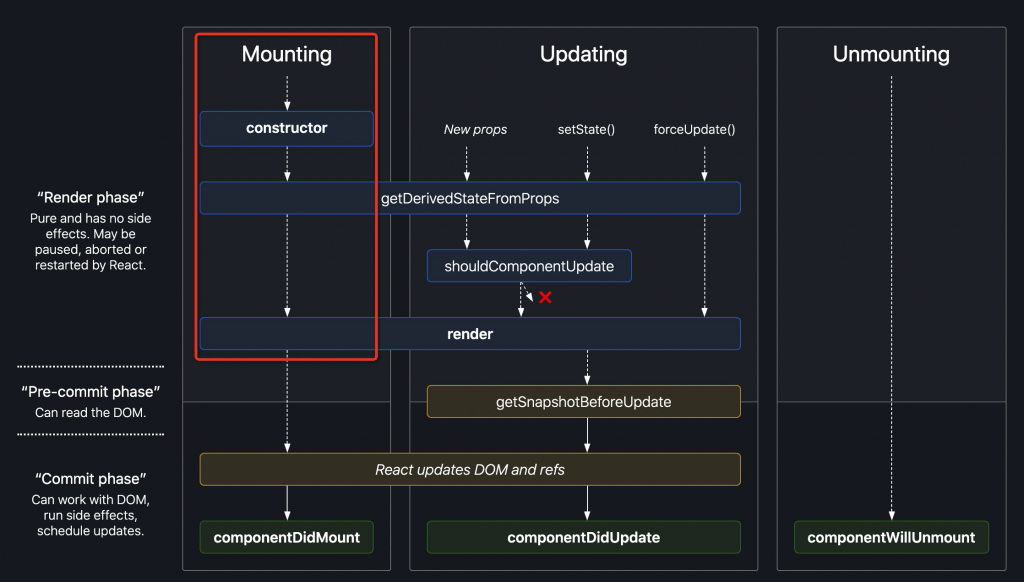 react ssr lifecycle[/caption]
P.S. 이미 폐기된 componentWillMount, UNSAFE_componentWillMount 는 getDerivedStateFromProps, getSnapshotBeforeUpdate 와互斥하며, 후자 그룹의 신 API 중 임의 1 개가 존재하면, 전자 2 개의 구 API 는 호출되지 않습니다
Error Boundary 와 Portal 을 지원하지 않음
With streaming rendering it's impossible to "call back" markup that has already been sent, and we opted to keep renderToString and renderToNodeStream's output identical.
스트리밍 렌더링을 지원하고, 동시에 String API 와 Stream API 의 출력 내용 일관성을 유지하기 위해, 렌더링 백트랙을 일으키는 두 가지 특성을 희생했습니다:
-
Error Boundary: 자손 컴포넌트의 런타임 에러를 캡처하고, 다운그레이드 UI 를 렌더링 가능
-
Portal: 컴포넌트를 지정된 임의의 DOM 노드에 렌더링 가능하고, 동시에 이벤트가 컴포넌트 계층에 따라 버블하는 것을 유지
이해하기 쉬운 것으로, 스트리밍은 렌더링하면서 응답하고, (백트랙하여) 이미 전송한 내용을 변경할 수 없으므로, 기타 유사한 장면도 지원되지 않습니다. 예를 들어 렌더링過程中에 동적으로 head 내에 style 이나 script 태그를 삽입하는 등
P.S. SSR Error Boundary 에 대한 더 많은 논의에 대해서는, componentDidCatch doesn't work in React 16's renderToString 참조
아직 댓글이 없습니다